
Datastory
Datastory turns data into interactive charts, data-driven web applications, and presentations that can be published as stories.
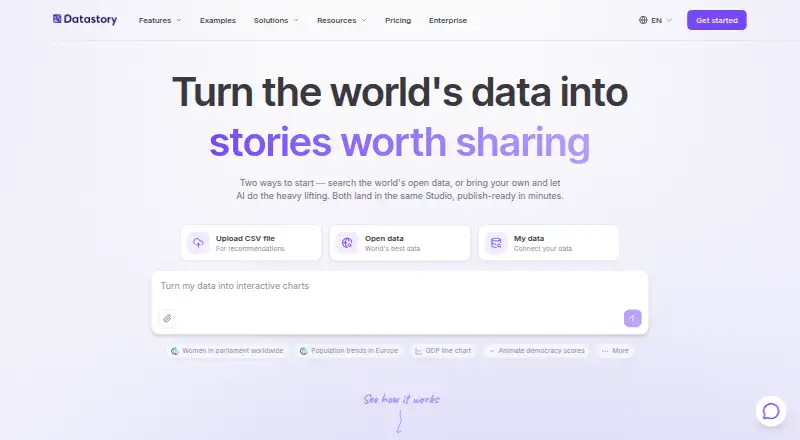
What Datastory is
Datastory turns data into interactive charts, data-driven web applications, and presentations that can be published as stories. Its AI interprets uploaded data, suggests visualizations, identifies insights, and drafts captions based on workspace data. A chart picker reads columns and recommends ways to represent categorical, temporal, geographic, or hierarchical information. Visualizations can be published as standalone links, embedded in websites, or exported as high-quality images. An Open Data catalog provides statistics from sources including OECD, WHO, Eurostat, the World Bank, and the UN. The Starter plan is free and includes 10 visualizations, up to three team members, 100 AI credits per month, and unlimited open data downloads. Professional costs $15 a month per user and includes unlimited visualizations and collaborators, 1,000 AI credits per month, priority support, and custom branding. Datastory describes its audience as data storytellers, analysts, journalists, NGOs, and research teams. The company is based in Stockholm and was founded in 2005.
Good
- AI suggests visualizations and identifies insights
- Publish as links, embeds, or images
- Open Data catalog includes international sources
- Free plan includes unlimited open data downloads
Watch out
- Starter is limited to 10 visualizations
- Starter includes 100 AI credits per month
Who it suits
Datastory suits analysts, journalists, NGOs, researchers, and other data storytellers who want to publish interactive visualizations or presentations. The free Starter plan supports small teams with up to three members.
Verdict
Datastory pairs data visualization and publishing tools with AI-assisted interpretation and captioning. Its free tier has defined visualization and AI-credit limits, while Professional is priced per user.
Plans and prices
From Datastory's own pricing page, checked 3 Oct 2026.
| Plan | Price | What it gives you |
|---|---|---|
| Starter | Free | 10 data visualizations · Up to 3 team members · 100 AI credits per month · Unlimited open data downloads |
| Professional | $15 a month | Unlimited data visualizations · Unlimited collaborators · 1000 AI credits per month · Priority support · Custom logo and theming · per user |
| Enterprise | Priced on request | Unlimited visualizations and collaborators · Custom data integration and modeling · Custom visualizations · Dedicated account manager · AI credits on demand · Custom |
The facts
Each one read from Datastory's own pages, with the date it was checked.
What it does
- Accessibility
- The visualization page says contrast checked and color blind safe palettes are in progress, with keyboard and screen reader support on the roadmap.checked 3 Oct 2026
- AI workflow
- Its AI can interpret uploaded data, suggest visualizations, identify insights, and draft captions grounded in workspace data.checked 3 Oct 2026
- Audience
- Datastory describes its intended users as data storytellers, analysts, journalists, NGOs, and research teams.checked 3 Oct 2026
- Charts
- The chart picker reads data columns and recommends encodings for categorical, temporal, geographic, or hierarchical data.checked 3 Oct 2026
- Compliance
- Datastory states it complies with GDPR as a data processor and platform provider, and that a data processing agreement is standard in project contracts.checked 3 Oct 2026
- Data location
- The security page says primary data centers are in EU/EEA regions and enterprise customers may request data residency options.checked 3 Oct 2026
- Integrations
- Datastory says visualizations can be embedded in Notion, Webflow, newsletters, and content management systems.checked 3 Oct 2026
- Linked data
- Linked data is described as an Enterprise feature for connecting datasets in a knowledge graph and reusing consistent metric definitions.checked 3 Oct 2026
- Open data
- The Open Data catalog offers statistics from sources including OECD, WHO, Eurostat, World Bank, and the UN.checked 3 Oct 2026
- Product
- Datastory turns data into interactive charts, data driven web applications, and presentations that can be published as stories.checked 3 Oct 2026
- Publishing
- Visualizations can be published as standalone links, embedded in websites, or exported as high quality images.checked 3 Oct 2026
- Security
- The security page states that data is encrypted in transit with TLS 1.3 and at rest with AES-256, and that accounts use role based access control and multi factor authentication.checked 3 Oct 2026
- Support
- The Starter plan includes email support, Professional includes priority support, and Enterprise includes dedicated support.checked 3 Oct 2026
The company
- Founded
- 2005checked 28 Sep 2026
- Headquarters
- Stockholm, Swedenchecked 28 Sep 2026
The full review of Datastory
Datastory is a web workspace for turning datasets into interactive charts, applications and presentations. It is a strong fit for analysts, journalists, NGOs and research teams that need to explain evidence and publish it in several formats. The free tier is useful for small projects, while continuing team work generally calls for Professional.
Overview
Datastory combines data import, visual analysis and story-style publishing in one workflow. You can publish a visualization as a standalone link, embed it in a website or export a high-quality image. That range suits organizations that need both interactive material for the web and fixed artwork for reports, newsletters or presentations.
Its Open Data catalog includes statistics from the OECD, WHO, Eurostat, World Bank and the UN. Those sources give a public-data project a useful starting point, and unlimited open-data downloads are included in Starter. Datastory was founded in 2005 and is headquartered in Stockholm, Sweden.
Key features
AI can interpret uploaded data, suggest visualizations, identify insights and draft captions based on workspace data. This can shorten the path from a spreadsheet to an explainable story, but suggestions still need editorial checking: an automatically selected chart or caption may not express the intended comparison.
The chart picker reads column types and recommends encodings for categorical, temporal, geographic and hierarchical data. That guidance is particularly valuable when a team works across different kinds of datasets. Datastory also supports brand kits, interactive publishing and both link-based and embedded publishing.
Embeds are supported in Notion, Webflow, newsletters and content management systems, making the output practical for editorial and communications teams. Linked data is an Enterprise feature: it connects datasets in a knowledge graph and lets teams reuse consistent metric definitions, which is more relevant to larger, governed data programs than to occasional chart makers.
Security controls are substantial for a web service. Data is encrypted in transit with TLS 1.3 and at rest with AES-256; accounts have role-based access control and multi-factor authentication. Datastory says it complies with GDPR as a processor and platform provider, uses EU/EEA primary data centers, and can offer residency options to enterprise customers. Contrast is checked, but color-blind-safe palettes are still in progress, while keyboard and screen-reader support remain on the roadmap. That makes accessibility a current limitation for teams with strict inclusive-publishing requirements.
Pricing
Starter — free. This plan allows 10 data visualizations, up to three team members, 100 AI credits per month and unlimited Open Data downloads. It includes email support. The visualization cap and small team allowance make it appropriate for a personal portfolio, pilot or occasional project, not a busy newsroom or expanding research group.
Professional — $15 a month, billed per user. You get unlimited data visualizations, unlimited collaborators, 1,000 AI credits per month, priority support, custom logo and theming. Paying per user is sensible when several contributors need access, and the removal of the visualization cap is the main operational upgrade. AI-heavy workflows should still monitor the monthly credit allowance.
Enterprise — custom pricing, billed Custom. It adds unlimited visualizations and collaborators, custom data integration and modeling, custom visualizations, a dedicated account manager and AI credits on demand. This is the plan for organizations that need governed data connections, bespoke work and managed support rather than a published per-user price.
The project limit is 15. Datastory offers a free plan, while Professional and Enterprise provide the capacity and support expected for sustained collaboration.
Platforms
Datastory runs on the web. That keeps publishing and collaboration centered in a browser, but the listed platform does not include native desktop or mobile applications.
Who it's for
Choose Datastory if you are an analyst, journalist, NGO, researcher or data storyteller who needs to move from source data to an interactive, publishable explanation. It is especially suitable when the same work must appear as an embed, link and image, or when public statistics from established international sources are central to the project.
It is less suitable for teams that require finished accessibility coverage today, or for users seeking a dedicated static-infographic tool without a data-publishing workflow.
Pros and cons
- Pros: AI interpretation, chart recommendations and caption drafting can accelerate data storytelling.
- Pros: Links, embeds and high-quality image export cover multiple publishing destinations.
- Pros: Open Data sources and unlimited downloads on Starter help public-statistics projects get moving.
- Pros: TLS 1.3, AES-256, role controls, MFA and GDPR positioning support organizational use.
- Cons: Starter stops at 10 visualizations and three members, limiting ongoing team production.
- Cons: Accessibility is incomplete, with color-blind-safe palettes and assistive-technology support still unfinished.
- Cons: Professional's 1,000 monthly AI credits may constrain particularly intensive automated analysis.
Alternatives
Visme is the better choice when you need a broader cross-platform design tool, including Windows, macOS and iOS, plus slide and page limits rather than Datastory's data-story workflow.
Infogram suits users who prioritize a large library of interactive chart types, map types and online publishing, with API access also listed.
MilleMots is aimed at mobile infographic creation on Android and iOS, with a free allowance of three infographics per month.
Piktochart is a strong alternative for teams wanting a web infographic editor with storage, downloads and AI credits in its free plan.
GetInfographic is an option for users seeking API, browser-extension and web access with credit-based generation.
InfographicMaker.org focuses on infographic drafts, templates, brand kits and vector export across its paid tiers.
Jeda.ai offers a web-based AI workspace with a free trial and daily processing actions.
MakeInfographic.ai is a credit-based web option with a free tier for limited monthly infographic generation.
For broader discovery, see the Data Storytelling Tools, AI Infographic Makers and Infographic Software lists.
Verdict
Datastory is a good recommendation for professionals who need data interpretation, chart guidance and flexible publication in one browser workspace. Its strongest reason to choose it is the combination of AI-assisted analysis, credible open-data access and link, embed and image output. Look elsewhere if accessibility completeness, native apps or a purely design-first infographic workflow matters more than data-driven publishing.
Alternatives to Datastory
- 1

Datawrapper
Free planOpen sourceAndroidiOSWebAPI8.6From $21 a month - 2

Infogram
Free planAndroidiOSWebAPI8.1From $19 a month - 3

Understand
Free planAndroidiOSWebAPI7.9From $15 a month - 4
Juicebox
Free planWebExtension7.2From $119 a month - 5

Observable
Free planWebSelf-hosted6.9From $22 a month - 6
DataStories
AndroidiOSWebAPI6.8