GPXSee
GPXSee is free GPS log viewer and analyzer software for tracks and related location data.
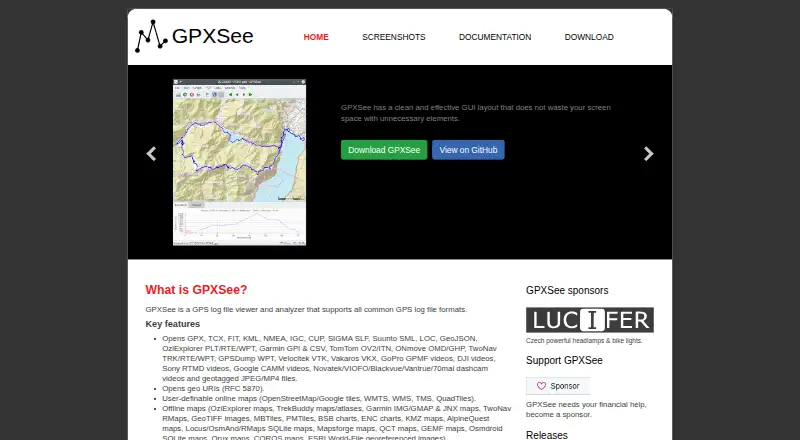
What GPXSee is
GPXSee is free GPS log viewer and analyzer software for tracks and related location data. It opens formats including GPX, TCX, FIT, KML, NMEA, IGC, GeoJSON, Garmin, TomTom, and geotagged media. Users can view data on user-definable online maps or in many offline map formats, and inspect graphs for elevation, speed, heart rate, cadence, power, temperature, and gear ratio or shifts. Views can be printed or exported to PNG and PDF. The software can show real-time GPS position through the Qt positioning API when a positioning plugin is configured. GPXSee provides Android, Linux, macOS, and Windows builds, along with source code, under the GPLv3 open-source license. The project positions it as a GPS data and map viewer rather than full-featured GIS software. Some online map definitions require API keys or credentials and need their template files completed and renamed. On Android, multi-file maps and SQLite-based formats may need to be placed in GPXSee's map directory to load properly. Official Windows and Mac installers use self-signed certificates, which may require operating-system configuration.
Good
- Supports a broad range of GPS data formats.
- Includes offline map format support.
- Graphs several activity and sensor measures.
- Prints and exports to PNG and PDF.
- Builds are available for desktop and Android.
Watch out
- It is not full-featured GIS software.
- Some online map definitions require credentials and setup.
- Certain Android map formats need manual placement.
- Self-signed installer certificates may need OS configuration.
Who it suits
It suits people who need to inspect GPS tracks and related data on maps, review activity graphs, or export a view. It is not intended as full-featured GIS software.
Verdict
GPXSee covers common GPS log viewing, mapping, graphs, and export needs across desktop and Android. Users needing GIS functions or effortless setup for credentialed maps may need to account for its stated limits.
Plans and prices
From GPXSee's own pricing page, checked 4 Oct 2026.
| Plan | Price | What it gives you |
|---|---|---|
| GPXSee | Free | Free software; GPLv3 open-source license |
The facts
Each one read from GPXSee's own pages, with the date it was checked.
Where it runs
- Android limitation
- On Android, multi-file maps and SQLite-based map formats may not load properly from the application menu and should be placed in GPXSee's map directory.checked 4 Oct 2026
What it does
- Downloads
- The project provides Windows, macOS, Linux, and Android builds, and also publishes source code.checked 4 Oct 2026
- Export
- It supports printing and exporting to PNG and PDF.checked 4 Oct 2026
- File formats
- It opens GPS tracks and related data in formats including GPX, TCX, FIT, KML, NMEA, IGC, GeoJSON, Garmin, TomTom, and geotagged media formats.checked 4 Oct 2026
- Graphs
- It can display elevation, speed, heart rate, cadence, power, temperature, and gear ratio or shifts graphs.checked 4 Oct 2026
- Integrations
- Some online map definitions require API keys or user credentials; those template files must be completed and renamed before use.checked 4 Oct 2026
- Intended scope
- The project describes GPXSee as a small, fast GPS data and map viewer, and says it is not full-featured GIS software.checked 4 Oct 2026
- Maps
- It supports user-definable online maps and many offline map formats.checked 4 Oct 2026
- Positioning
- It can show real-time GPS position using the Qt positioning API, subject to configuring a positioning plugin.checked 4 Oct 2026
- Purpose
- GPXSee is a GPS log file viewer and analyzer that supports common GPS log file formats.checked 4 Oct 2026
- Security
- The official Windows and Mac installers are signed during the GitHub build using self-signed certificates stored in the Git repository; users may need to configure their OS to accept them.checked 4 Oct 2026
- Support
- The project asks users to report bugs and request features through its GitHub issue tracker.checked 4 Oct 2026
The full review of GPXSee
GPXSee is a free GPS log viewer and analyzer for examining routes, sensor readings, and location-linked media. It suits hikers, cyclists, pilots, travelers, and field teams handling files from several devices. Its focused viewer-and-export approach is strong for routine track work, while users needing GIS analysis or browser mapping should look elsewhere.
Overview
GPXSee reads an unusually broad mix of GPS and geospatial files: GPX, TCX, FIT, KML, NMEA, IGC, GeoJSON, Garmin, TomTom, and geotagged media formats. That makes it useful when one workflow combines fitness-watch recordings, navigation-unit tracks, aviation logs, and photos. You can inspect these records in one application instead of maintaining separate viewers for each source.
The project intentionally stays a small, fast GPS data and map viewer rather than full-featured GIS software. It has no spatial-analysis capability, web-mapping workspace, or dashboard builder. Pick it for understanding and presenting recorded data; select a GIS product when editing layers or performing deeper geographic analysis is central to the job.
Key features
Maps and positioning
User-definable online maps and support for many offline map formats let you choose suitable backgrounds for routes, trips, and field conditions. Some online map definitions need API keys or user credentials. Those templates must be completed and renamed before use, which adds technical setup and makes credentialed providers less convenient than ready-configured sources.
GPXSee can show a real-time GPS position through the Qt positioning API, but this depends on configuring a positioning plugin. It is therefore practical for users prepared to handle that configuration, not an instant live-location tool for every installation.
Graphs and export
Charts for elevation, speed, heart rate, cadence, power, temperature, and gear ratio or shifts turn raw logs into useful activity and equipment context. Athletes can compare effort and performance signals, while field users can inspect terrain and movement patterns. Printing and PNG or PDF export are useful for sharing a route briefing, trip record, or report without sending the original project files.
Platform caveats
On Android, multi-file maps and SQLite-based map formats may fail to load from the application menu. Placing those files in GPXSee's map directory is the required workaround, so Android map workflows demand more file management than desktop use. Windows and Mac installers are signed during the GitHub build with self-signed certificates stored in the repository; some operating systems may require users to configure acceptance of those certificates.
Pricing
GPXSee costs free under its GPXSee plan. It is free software released under the GPLv3 open-source license, with no free trial because the entire product is free. There are no paid tiers, seat charges, usage quotas, or renewal terms to weigh. This is the right fit for individuals, clubs, and organizations that want a capable local viewer without subscription commitments; the trade-off is the deliberately narrow GIS scope rather than a premium tier with advanced analysis.
Platforms
Builds are provided for Android, Linux, macOS, and Windows, and the project also publishes source code. Desktop users get the broadest file-handling comfort, while Android users should account for the map-directory workaround described above. GPXSee is a local application rather than a web-mapping service.
Who it's for
Choose GPXSee if you regularly receive GPS logs in different formats and need quick map inspection, sensor graphs, or printable and image-based exports. It is particularly well matched to outdoor athletes, pilots, travelers, photographers with geotagged media, and field personnel who prefer offline-capable map files. It is not the right primary tool for analysts requiring spatial processing, web publication, dashboards, or a turnkey credentialed-map setup.
Pros and cons
- Pro: Broad format coverage handles fitness, navigation, aviation, and geotagged-media files in one viewer.
- Pro: Offline-map support and configurable online maps accommodate both connected and field workflows.
- Pro: Specialized graphs expose key activity and sensor metrics, with PNG, PDF, and print output for sharing.
- Con: API-key and credential requirements can make online-map configuration technical.
- Con: Android users may need to move certain map files into a dedicated directory.
- Con: Its lack of spatial analysis, web mapping, and dashboard tools limits it to viewing and presentation.
- Con: Self-signed installer certificates may require operating-system acceptance changes on Windows and macOS.
Alternatives
For a wider catalog, browse GIS Software. QGIS is the closest free, open-source alternative when you need a full GIS rather than a focused log viewer. Choose GRASS GIS for an open-source GIS environment, or MapServer when the priority is geographic data rendering. Felt suits teams wanting freemium, browser-oriented map creation and sharing, though its free Personal plan excludes own data-file uploads. QGIS Cloud is a better direction for publishing QGIS work as a service. GIS Cloud fits hosted field and publishing workflows, including its per-asset Track plan. StatSilk is aimed at cloud-based visualization with commercial and non-commercial options. NASA WorldWind is an open-source SDK and API choice when software development, rather than end-user track review, is the goal.
Verdict
GPXSee is an excellent no-cost choice for viewing mixed GPS logs, studying activity graphs, selecting offline or custom map backgrounds, and producing simple exports across desktop and Android. Choose it when focused local inspection matters more than GIS depth. Look elsewhere if you need spatial analysis, web publication, dashboards, or effortless setup with credentialed online maps.
Alternatives to GPXSee
- 1

Felt
Free planAndroidiOSWebAPI8.2From $199 a month - 2
NASA WorldWind
Free planOpen sourceAndroidWebAPILinux7.9Free plan - 3

Maptitude
AndroidiOSWebAPI7.8From $795 a year - 4
Mapbox Studio
Free planAndroidiOSWebAPI7.7Free plan - 5
StatSilk
Free planAndroidiOSWebAPI7.7From $495 a year - 6

GIS Cloud
Free planAndroidiOSWebAPI7.5From $5 a month