QGIS Cloud
QGIS Cloud is a hosted Web-GIS platform for putting QGIS maps, spatial data, and services online.
What QGIS Cloud is
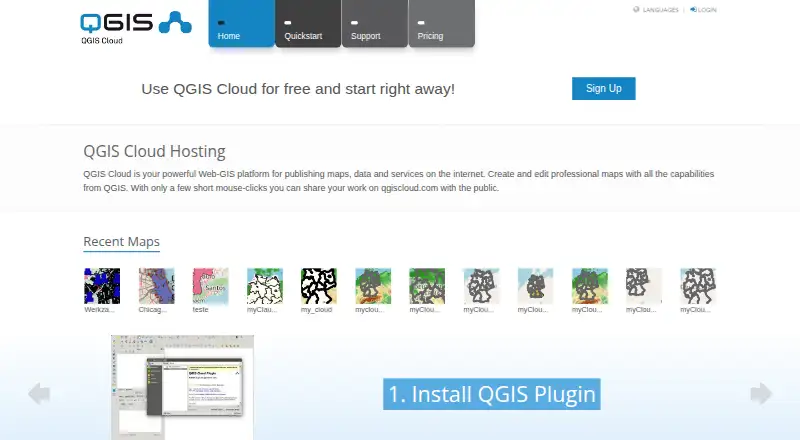
QGIS Cloud is a hosted Web-GIS platform for putting QGIS maps, spatial data, and services online. Publishing starts in QGIS Desktop: install the QGIS Cloud plugin, then upload data and publish a map. Maps are served with QGIS Server and retain the appearance of their desktop projects. The service includes PostgreSQL databases extended with PostGIS, which can be managed through tools such as pgAdmin or QGIS Database Manager. Maps and data can be shared using WMS, WFS, and WFS-T; the latter supports edits. QGIS Cloud also provides web and mobile clients and map printing up to 1200 dpi. Its Free plan costs nothing and allows unlimited public maps for non-commercial, non-government use, with one PostGIS database, 50 MB total, and 10 concurrent database connections. Free maps and services are public. QGIS Cloud Pro is billed at 65 Euro/month and offers restricted access for maps and WMS, SSL support, and more database capacity. The service is provided by Sourcepole AG, founded in 2000.
Good
- Publishes QGIS Desktop maps online through a plugin.
- Maps retain their QGIS Desktop project styling.
- Shares data through WMS, WFS, and editable WFS-T.
- Includes web and mobile clients.
- Supports printing up to 1200 dpi.
Watch out
- Free maps and services are public.
- Free use is limited to non-commercial, non-government activity.
- Free plan includes 50 MB total database storage.
- Pro is billed at 65 Euro/month.
Who it suits
QGIS Cloud Free suits people testing map publishing or working on non-commercial, non-government projects. Commercial or government users are directed to QGIS Cloud Pro.
Verdict
QGIS Cloud connects QGIS Desktop projects with hosted maps, spatial data, and OGC services. Its Free plan is public and restricted to non-commercial, non-government use; QGIS Cloud Pro adds restricted access and a larger database allowance.
Plans and prices
From QGIS Cloud's own pricing page, checked 3 Oct 2026.
| Plan | Price | What it gives you |
|---|---|---|
| QGIS Cloud Free | Free | Unlimited public maps (only non commercial / non government use) · 1 PostGIS 3.1 database · 50 MB total · 10 concurrent database connections · Free! |
| QGIS Cloud Pro | — | Restricted access for maps and WMS · SSL support · 10 PostGIS 3.1 databases · 500 MB total · 20 concurrent database connections · Daily database backups · WebGIS client editing · Viewer logo and CSS customization · 65 Euro/month |
The facts
Each one read from QGIS Cloud's own pages, with the date it was checked.
What it does
- Client access
- The service includes a WebGIS client and a mobile client.checked 3 Oct 2026
- Database
- The service provides PostgreSQL databases extended with PostGIS, manageable with compatible tools such as pgAdmin and QGIS Database Manager.checked 3 Oct 2026
- Integrations
- The documentation describes database access using pgAdmin or QGIS Database Manager and background map layers from WMS, WMTS, XYZ, OpenStreetMap, Bing, and Google Maps.checked 3 Oct 2026
- Intended users
- The documentation directs commercial or government applications to QGIS Cloud Pro and describes Free for testing and non-commercial activities.checked 3 Oct 2026
- Map styling
- Published maps use QGIS Server and are described as looking the same as their QGIS Desktop projects.checked 3 Oct 2026
- OGC services
- Maps and data can be shared through WMS, WFS, and WFS-T services, with WFS-T supporting edits.checked 3 Oct 2026
- Printing
- QGIS Cloud supports high-quality map printing at resolutions up to 1200 dpi.checked 3 Oct 2026
- Publishing workflow
- Users install the QGIS Cloud plugin in QGIS Desktop to upload data and publish maps.checked 3 Oct 2026
- Purpose
- QGIS Cloud is a hosted Web-GIS platform for publishing QGIS maps, spatial data, and services online.checked 3 Oct 2026
- Security
- The documentation says database access is password protected and encrypted, while QGIS Cloud Pro can restrict access to maps and services.checked 3 Oct 2026
- Support
- QGIS Cloud links users to its documentation and Support and FAQ pages.checked 3 Oct 2026
Money
- Free-tier visibility
- Maps and services published under a Free account are public; the plans page limits Free use to non-commercial and non-government activity.checked 3 Oct 2026
The company
- Headquarters
- Zürich, Switzerlandchecked 28 Sep 2026
- Maker
- QGIS Cloud is a service provided by Sourcepole AG, whose about page says Sourcepole was founded in 2000.checked 3 Oct 2026
The full review of QGIS Cloud
QGIS Cloud is a hosted mapping service built around projects made in QGIS Desktop. It is a strong fit for QGIS users who need to publish maps and spatial data online, but less suited to teams seeking a standalone mapping workspace.
Its appeal is the path from desktop project to hosted map, with database and OGC service capabilities alongside it. Free is narrowly useful for public, non-commercial work; commercial use or restricted maps require Pro.
Overview
Publishing begins in QGIS Desktop with the QGIS Cloud plugin, which uploads data and publishes maps. QGIS Server renders maps to match their desktop project styling, a practical advantage for users who want the online version to retain the cartography they have already built. The trade-off is a workflow anchored in QGIS Desktop, rather than a general-purpose hosted map editor.
QGIS Cloud provides PostgreSQL databases extended with PostGIS, which users can manage with pgAdmin or QGIS Database Manager. WMS and WFS provide ways to share maps and data, while WFS-T adds support for edits. A WebGIS client and mobile client broaden access; background layers can come from WMS, WMTS, XYZ, OpenStreetMap, Bing, and Google Maps. Printing supports resolutions up to 1200 dpi, useful when maps need to work on paper as well as on screen.
Database access is password protected and encrypted. That does not make Free appropriate for private maps: maps and services published under Free are public. Pro adds restricted access for maps and WMS, an important distinction for projects that cannot be openly published.
Key features
Desktop-to-web publishing
The plugin-based upload and QGIS Server rendering make QGIS Cloud especially coherent for existing QGIS Desktop projects. Users keep the project styling in the published map instead of rebuilding it for a separate web mapping workflow.
Hosted spatial data and services
PostGIS databases and familiar management tools make the hosted data layer accessible to GIS users already working with PostgreSQL tools. WMS, WFS, and editable WFS-T make the service useful for sharing data and supporting edits, not just displaying a static map.
Clients and print output
The included WebGIS and mobile clients give published work more than one route to viewers. Support for common background map sources and printing up to 1200 dpi adds flexibility, though the Free plan’s public-only rule remains a decisive constraint for sensitive work.
Pricing
QGIS Cloud is freemium. QGIS Cloud Free costs nothing and includes unlimited public maps, one PostGIS 3.1 database, 50 MB total storage, and 10 concurrent database connections. Its terms restrict use to non-commercial and non-government activity, so it suits experiments and openly shared personal or community projects, not professional or government deployment. “Unlimited” maps does not mean unlimited data: the single database and 50 MB cap are modest.
QGIS Cloud Pro has custom pricing; the plan is billed at 65 Euro/month. It provides restricted access for maps and WMS, SSL support, 10 PostGIS 3.1 databases, 500 MB total storage, and 20 concurrent database connections. Daily database backups, WebGIS client editing, and viewer logo and CSS customization round it out. The larger allowance and privacy controls make Pro the relevant option for commercial or government applications, but the 500 MB total remains a bounded storage allowance.
Free gives up private map access, SSL support, backups, WebGIS client editing, and viewer customization. Pro’s published billing term is monthly; no separate trial term is stated for QGIS Cloud.
Platforms
QGIS Cloud is listed for Android, iOS, Linux, macOS, web, and Windows, as well as an extension. Its hybrid deployment and mobile apps suit publishing from desktop GIS while making maps accessible on mobile devices and in a browser.
Who it's for
Choose QGIS Cloud if QGIS Desktop is already central to your mapping work and you want hosted publication that retains project styling, with PostGIS and OGC services in the same service. Free is best kept to testing and non-commercial, non-government maps that can be public. Commercial or government users, or anyone needing restricted maps, should consider Pro.
Look elsewhere if the need is a private hosted map on a no-cost plan, if a desktop-independent authoring workflow is essential, or if the storage allowances do not fit the project.
Pros and cons
- Pro: QGIS Server preserves QGIS Desktop project styling, avoiding a separate styling pass for published maps.
- Pro: PostGIS, WMS, WFS, and editable WFS-T support data management and sharing as well as map display.
- Pro: Pro adds restricted map access, backups, client editing, and viewer customization for more controlled deployments.
- Con: Free maps and services are public, and Free is limited to non-commercial and non-government use.
- Con: Free’s 50 MB and one-database allowance, and Pro’s 500 MB and 10-database allowance, may constrain data-heavy projects.
- Con: Publishing depends on QGIS Desktop and its plugin, which is a poor match for users seeking an independent web mapping workspace.
Alternatives
Browse GIS Software for more options in the category.
- Felt is worth considering for users who want unlimited maps and sharing on its free Personal plan, but that plan excludes own data file uploads and is for personal use only.
- QGIS is the direct choice for free, open-source desktop GIS under GNU GPLv2+ when hosted publishing is not required.
- GIS Cloud is an alternative for teams considering QGIS or ArcMap publisher plugins; its Track plan is $5 a month per asset.
- GPXSee is another free software option.
- GRASS GIS is another free and open-source GIS option.
- NextGIS Web may suit users considering an annual hosted plan: Mini is €180 a year, billed annually, with one user, 10 GiB storage, unlimited layers, one tracker, and one collector.
- Google Earth Engine is another option for readers comparing GIS and geospatial services.
- SuperMap GIS is another option for readers comparing GIS software.
Verdict
QGIS Cloud is the right choice for QGIS Desktop users who want a direct route to hosted maps, PostGIS data, and OGC sharing. Its strongest reason to choose it is the close carry-over of QGIS project styling; its strongest reason to look elsewhere is the public-only, non-commercial Free tier, while Pro’s storage remains limited to 500 MB total.
Getting started
- Visit https://qgiscloud.com/.
- Install the QGIS Cloud plugin in QGIS Desktop.
- Upload data and publish maps through the plugin.
- Choose QGIS Cloud Free for non-commercial, non-government activity, or Pro billed at 65 Euro/month for commercial or government applications.
Limits worth knowing
QGIS Cloud Free includes one PostGIS 3.1 database, 50 MB total, and 10 concurrent database connections. Its maps and services are public, and the plan is limited to non-commercial, non-government use.
Questions
Is there a free plan?
Yes. QGIS Cloud Free costs nothing.
What does the Free plan include?
It allows unlimited public maps for non-commercial, non-government use, with one PostGIS 3.1 database, 50 MB total, and 10 concurrent database connections.
How much does Pro cost?
QGIS Cloud Pro is billed at 65 Euro/month.
What does Pro add?
Pro includes restricted access for maps and WMS, SSL support, 10 PostGIS 3.1 databases, 500 MB total, 20 concurrent database connections, daily backups, WebGIS client editing, and viewer logo and CSS customization.
Which platforms are supported?
QGIS Cloud lists Android, iOS, Linux, macOS, web, Windows, and an extension.
Who provides QGIS Cloud?
QGIS Cloud is provided by Sourcepole AG, whose about page says it was founded in 2000.
Alternatives to QGIS Cloud
- 1

Felt
Free planAndroidiOSWebAPI8.2From $199 a month - 2
NASA WorldWind
Free planOpen sourceAndroidWebAPILinux7.9Free plan - 3

Maptitude
AndroidiOSWebAPI7.8From $795 a year - 4
Mapbox Studio
Free planAndroidiOSWebAPI7.7Free plan - 5
StatSilk
Free planAndroidiOSWebAPI7.7From $495 a year - 6
GIS Cloud
Free planAndroidiOSWebAPI7.5From $5 a month