MapChart
MapChart is a map-making service for coloring countries or states, adding a legend, and downloading the finished map as an image.
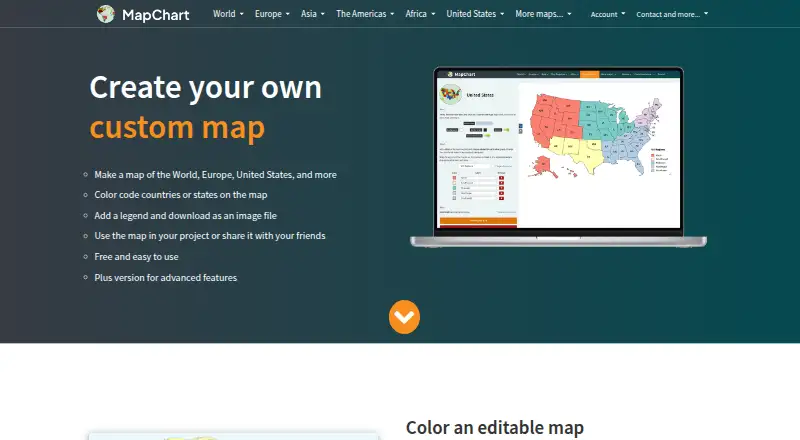
What MapChart is
MapChart is a map-making service for coloring countries or states, adding a legend, and downloading the finished map as an image. Its library contains more than 100 world, continent, country, subdivision, and fantasy maps. You can adjust colors, patterns, backgrounds, borders, and legends, hide areas, zoom, and save work to continue later. Selected maps accept Excel data imports. The website offers free high-resolution image downloads, and maps made with MapChart are licensed under CC BY-SA 4.0. Official Google Sheets and Airtable add-ons create maps from spreadsheet or base data and insert or display them in those services. MapChart also has iOS and Android apps for making, previewing, sharing, and downloading PNG maps. Configurations can move between the website and mobile app as text files. The free plan includes the main map-making tools and maps. Mobile Premium costs €4.99, paid once, Mobile Premium Max costs €8.99, paid once, and MapChart Plus costs $39.99 a year.
Good
- More than 100 maps, including fantasy maps.
- Free high-resolution image downloads.
- Excel import available for selected maps.
- Official Google Sheets and Airtable add-ons.
- Configurations can transfer between web and mobile.
Watch out
- Plus has no free trial.
- Mobile Premium costs €4.99, paid once.
- Mobile Premium Max costs €8.99, paid once.
- Plus costs $39.99 a year.
Who it suits
MapChart suits people who need custom maps for classrooms, journals, scientific papers, market research, sales presentations, infographics, games, or travel. Its web and mobile apps and spreadsheet add-ons offer several ways to create or use maps.
Verdict
MapChart offers map editing and image downloads across web and mobile, with spreadsheet add-ons and selected Excel imports. Compare the free plan with its paid options if you need unlimited saved configurations, palette colors, or Plus features.
Plans and prices
From MapChart's own pricing page, checked 14 Oct 2026.
| Plan | Price | What it gives you |
|---|---|---|
| Free | Free | All maps · all tools and extras · 25 saved configurations · 25 My Palette colors |
| Mobile Premium | €4.99, paid once | Unlimited saved configurations · unlimited My Palette colors · all maps, tools and extras · 4.99 € · one-time purchase |
| Premium | €4.99, paid once | All maps · all tools and extras · unlimited saved configurations · unlimited My Palette colors · one-time purchase |
| Mobile Premium Max | €8.99, paid once | Unlimited saved configurations · unlimited My Palette colors · no ads · all maps, tools and extras · 8.99 € · one-time purchase |
| Premium Max | €8.99, paid once | All maps · all tools and extras · unlimited saved configurations · unlimited My Palette colors · no ads · one-time purchase |
| MapChart Plus | $39.99 a year | No ads · account-saved maps · saved palettes · cross-device access · iOS app access · billed annually |
The facts
Each one read from MapChart's own pages, with the date it was checked.
What it does
- Airtable integration
- The official Airtable extension creates maps from base records, displays them beside the table, and downloads PNG images.checked 14 Oct 2026
- Color and pattern tools
- Users can choose custom colors, colorblind-friendly palettes, dots and stripe patterns, backgrounds, borders, fonts, and legend styling.checked 14 Oct 2026
- Configuration files
- Map settings can be saved and restored through MapChart configuration text files, with drag-and-drop loading supported.checked 14 Oct 2026
- Data import
- Selected maps support importing data from Excel.checked 5 Oct 2026
- Documentation and support
- Documentation consists of a feature tutorial, FAQ, changelog, bug-report button, and email support requesting browser, operating-system, and reproduction details.checked 14 Oct 2026
- Editing controls
- Maps support hiding regions, isolating countries or states, zooming, rearranging legend rows, and coloring subdivisions in bulk.checked 14 Oct 2026
- Editing features
- Users can customize colors, patterns, backgrounds, borders, and legends, hide map areas, zoom, and save work to continue later.checked 5 Oct 2026
- Export
- The website offers free high-resolution image downloads, and maps made with the service are licensed under CC BY-SA 4.0.checked 5 Oct 2026
- Export formats
- The editor can export high-resolution PNG, JPEG, SVG, and rasterized PDF files.checked 14 Oct 2026
- Google Sheets integration
- The official Google Sheets add-on creates maps from spreadsheet columns, inserts them into sheets, or downloads PNG files.checked 14 Oct 2026
- Independent comparison
- Oh My Maps describes MapChart as a capable free map-coloring tool and says it offers broader regional map coverage than its own four-editor product.checked 14 Oct 2026
- Independent comparison limit
- Oh My Maps says MapChart's paid tier gates account saving, while its own editor keeps all features free without an account.checked 14 Oct 2026
- Independent comparison strength
- Oh My Maps says MapChart supports ten world projections and exports PDF or files up to 10,000 pixels on the long edge.checked 14 Oct 2026
- Integrations
- MapChart provides official add-ons for Google Sheets and Airtable to create maps from spreadsheet or base data and insert or display the maps there.checked 5 Oct 2026
- Intended users
- The maker describes use in classrooms, journals, scientific papers, market research, sales presentations, infographics, map games, and travel maps.checked 5 Oct 2026
- Limit: export layout
- Justuseapp reviewers criticized mobile export because fitting a readable map and non-overlapping legend onto a phone view can be difficult.checked 14 Oct 2026
- Limit: map granularity
- Justuseapp reviewers requested custom borders, partial-country painting, selective label removal, and more complete subdivision coverage.checked 14 Oct 2026
- Limit: missing custom borders
- Apple reviewers requested user-drawn borders, flags, images, and the ability to represent partial territorial changes.checked 14 Oct 2026
- Limit: regional coverage
- A Google Play reviewer wanted more detailed subdivision maps outside North America and Europe, especially in western and central Asia.checked 14 Oct 2026
- Limit: saved-map reliability
- An Apple reviewer reported maps disappearing after closing the app and difficulty reopening saved configurations.checked 14 Oct 2026
The company
- Company origin
- The About page says MapChart has existed since 2014.checked 14 Oct 2026
- Founded
- 2014checked 28 Sep 2026
Where it runs
- Cross-device work
- Map configurations can be exported as text files from the website and imported into the mobile app, or transferred back to the website.checked 5 Oct 2026
- iOS requirement
- The Apple listing requires iOS 15.0 or later and identifies the app as designed for iPhone and iPad.checked 14 Oct 2026
The full review of MapChart
Overview
MapChart is a browser map editor with companion iOS and Android apps for coloring countries or states and exporting finished maps as images. It best suits educators, researchers, analysts, and communicators who need a polished thematic map without constructing geographic data from scratch. The core editor is unusually capable at no cost, while paid plans matter mainly when you save many configurations, need larger palettes, or want expanded mobile and sync features.
Key features
A library of more than 100 world, continent, country, subdivision, and fantasy maps gives projects a ready-made geographic base. You can apply colors and patterns, change backgrounds, borders, and legends, hide areas, zoom, and save work for later. That combination works well for classroom handouts, scientific figures, market research, sales presentations, infographics, map games, and travel maps. It is a visual map-making workflow rather than a full geographic information system, so its appeal is strongest when presentation matters more than advanced spatial analysis.
MapChart provides free high-resolution image downloads, making the output suitable for print and slides. Selected maps accept Excel imports, which can speed up data-driven coloring, but the restriction to selected maps means Excel is not a universal route into the editor. Official Google Sheets and Airtable add-ons create maps from spreadsheet or base data and insert or display them in those services, a practical fit for teams already working in tabular tools. Finished maps are licensed under CC BY-SA 4.0, so anyone publishing or reusing them should account for that attribution and share-alike requirement.
The mobile apps support creating, previewing, sharing, and downloading PNG maps. Website configurations can be exported as text files and imported into the mobile app, or moved back to the website. That cross-device transfer is useful, although it is a file-based handoff rather than seamless live editing. MapChart says Gumroad handles Plus payments and subscriptions; account settings allow email or password changes and account deletion.
Pricing
The Free plan costs nothing and includes the main map-making tools and maps. It is the sensible starting point for occasional maps, especially because high-resolution downloads are included. There is no free trial, so paid capabilities require a purchase.
Mobile Premium costs 4.99 EUR once (one-time purchase). It adds unlimited saved configurations, unlimited My Palette colors, and all maps, tools, and extras. Mobile Premium Max costs 8.99 EUR once and adds no ads to the same package. These one-time tiers suit mobile-first users who want permanent capacity without an annual bill; Max is justified mainly if advertising is unacceptable.
MapChart Plus costs $39.99 a year, billed annually. It allows up to 1,000 map configurations and up to 1,000 palette colors or patterns, removes ads, synchronizes saved maps and palettes, and includes iOS app access. There is no team plan, so organizations needing shared seats should look elsewhere. Plus has no trial, but a 14-day, no-questions-asked refund policy reduces the commitment risk. Plus users can email support for account issues or bugs and are told to expect a reply within 1–3 days.
Platforms
MapChart runs on the web and has official Android and iOS apps. Manual data refresh is used, access is public, and there are no embed options. The web editor is the broadest starting point; mobile is useful for creating, reviewing, sharing, and PNG downloading on the move.
Who it's for
Choose MapChart for clear, customized maps in education, publishing, research, business presentations, infographics, games, or travel planning. It is less suitable when you need embedded interactive maps, private team administration, or unrestricted Excel support across every map type.
Pros and cons
- Pros: More than 100 map templates reduce setup work; colors, patterns, legends, borders, backgrounds, hiding, and zoom provide strong visual control; free high-resolution downloads make the free tier genuinely usable; Google Sheets and Airtable add-ons connect maps to existing data; text-file transfers support web/mobile continuity.
- Cons: Excel import works only on selected maps; the CC BY-SA 4.0 license may constrain publishing workflows; Plus caps configurations and palette items at 1,000 and has no team plan; no embeds are provided; paid plans have no trial.
Alternatives
For broader charting with web publishing, embedding, and PNG downloads, consider Datawrapper, whose free plan includes those outputs but shows attribution. Felt is a better fit for unlimited shared personal maps when you can accept no own-data-file uploads on its free plan. Pick Mapotic when a place-based map with 100 places, data layers, filters, ratings, and comments is more important than MapChart-style coloring. EasyMapMaker suits pin-based projects, offering 250 pins per map and 20 maps a day free. MapTiler Cloud is aimed at hosted map infrastructure, with free storage, sessions, API requests, and uploads for testing or personal non-commercial use. Maputnik is the choice for a free, open-source visual editor usable online, by CLI, or in Docker. Scribble Maps favors pin annotation, though its free tier allows only five lifetime saves and 450×450px images. Visme is preferable when maps belong inside broader presentation and design projects.
Verdict
MapChart is a strong recommendation for anyone who needs attractive, exportable country or state maps quickly, especially teachers and researchers who can stay within the free plan. Its main reason to choose is the combination of extensive templates, visual controls, high-resolution downloads, and spreadsheet integrations. Look elsewhere if you need interactive embeds, collaborative team administration, broad GIS capabilities, or Excel import on every map.
Alternatives to MapChart
- 1

Datawrapper
Free planOpen sourceAndroidiOSWebAPI8.6From $21 a month - 2

Felt
Free planAndroidiOSWebAPI8.2From $199 a month - 3

Scribble Maps
Free planAndroidiOSWebAPI8.1From $168 a year - 4

BatchGeo
Free planAndroidiOSWebAPI7.9From $99 a month - 5

Maptitude
AndroidiOSWebAPI7.8From $795 a year - 6
Mapbox Studio
Free planAndroidiOSWebAPI7.7Free plan