
BatchGeo
BatchGeo turns spreadsheet data into interactive maps by geocoding locations and displaying them on Google Maps.
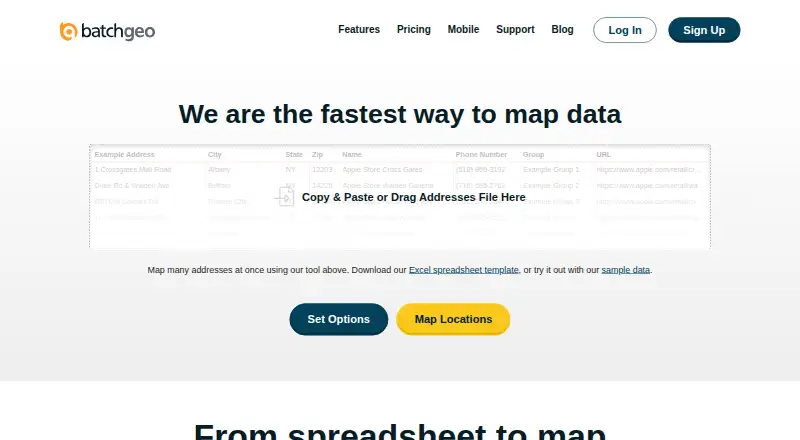
What BatchGeo is
BatchGeo turns spreadsheet data into interactive maps by geocoding locations and displaying them on Google Maps. Users can paste addresses, intersections, cities, states, postal codes, or coordinates, then group and filter results to explore geographic trends. Maps can use markers or boundaries and be saved for embedding on websites with HTML. The free tier supports maps with up to 250 rows of data. Pro adds route optimization for up to 23 locations, Street View integration, and PDF, PNG, and KML exports; it costs $99 a month. The free plan lists map saving for up to 30 days, up to 1000 geocoding per month, and up to 100 map views. BatchGeo has a native iOS app for accessing maps, searching locations, filtering data, and getting directions; Android users are directed to mobile-optimized maps. Maps can be public, unlisted, subscription-accessible, or password-protected with Pro. BatchGeo notes that technical users may still uncover hidden locations when address hiding is enabled.
Good
- Accepts several location formats from spreadsheets.
- Supports grouping and filtering map data.
- Saved maps can be embedded with HTML.
- Pro includes PDF, PNG, and KML exports.
- Native iOS app supports map search and filtering.
Watch out
- Free maps are limited to 250 data rows.
- Pro costs $99 a month.
- Android access uses mobile-optimized maps, not a native app.
- Hidden locations may still be uncovered by technical users.
Who it suits
BatchGeo suits people who want to map spreadsheet locations without cartography, programming, or GIS training. Its listed use cases include sales, real estate, store locators, and data analysis.
Verdict
BatchGeo provides a direct route from spreadsheet locations to interactive maps, with grouping, filtering, and embedding. Check the free-tier row limit and Pro price, and consider its stated caveat about hidden locations.
Plans and prices
From BatchGeo's own pricing page, checked 15 Oct 2026.
| Plan | Price | What it gives you |
|---|---|---|
| Free Plan | Free | 250 geocodes/month · 50 map views/month · 90-day map storage · basic data selection · monthly |
| BatchGeo Pro | $99 a month | 100,000 markers per map · Password protected · 10 users included · Street View integration · PDF, PNG, KML export |
| Pro Plan | $99 a month | 10 users · 100,000 markers/map · 25,000 views/month · 250,000 geocodes/month · PDF/PNG/KML export · Street View · heat maps · 25-point route optimization · password protection · monthly |
The facts
Each one read from BatchGeo's own pages, with the date it was checked.
What it does
- Analysis
- Users can group and filter map data, explore geographic trends, and create marker or boundary maps.checked 2 Oct 2026
- API status
- An official blog post describes a BatchGeo developer API as an idea being considered, rather than documenting a released API.checked 15 Oct 2026
- Audience
- The company describes BatchGeo as usable without cartography, programming, or GIS training and highlights sales, real estate, store locator, and data analysis use cases.checked 2 Oct 2026
- Boundary maps
- Boundary mode aggregates records by government or postal boundaries and shades regions according to values.checked 15 Oct 2026
- Data privacy modes
- Saved maps can be public, unlisted, restricted to subscription users or password protected on Pro.checked 15 Oct 2026
- Embedding
- Saved maps provide iframe embed code for placement on websites.checked 15 Oct 2026
- Encryption claim
- The product states that data is encrypted in transit and at rest.checked 15 Oct 2026
- Exports
- Pro maps can be exported as PDF, PNG or KML files.checked 15 Oct 2026
- Heat maps
- The product offers a heat-map layer for visualizing location density.checked 15 Oct 2026
- Input formats
- The service accepts Excel XLS/XLSX, CSV, Google Sheets and tab-delimited text, plus direct pasted or manually entered locations.checked 15 Oct 2026
- Inputs
- It accepts data copied from spreadsheets and supports addresses, intersections, cities, states, postal codes, and coordinates.checked 2 Oct 2026
- Integrations
- Independent software listings identify Microsoft Excel, Google Maps and Google Docs as integrations or connected products.checked 15 Oct 2026
- Legal entity
- The website footer and terms identify the maker as BatchGeo LLC.checked 15 Oct 2026
- Licence
- BatchGeo is proprietary web software; its terms grant only a limited, revocable access licence and prohibit copying, reverse engineering, hosting or commercial exploitation of the site.checked 15 Oct 2026
- Limit: advanced functionality
- G2 reviewers say the product has fewer customization and analytics capabilities than more advanced GIS tools.checked 15 Oct 2026
- Limit: interface and editing
- GetApp reviews mention slow behavior, a less flexible interface and the need to re-upload data when source files change.checked 15 Oct 2026
Where it runs
- App changelog
- Recent iOS releases list fixes for session-invalid errors, password-character login failures, hidden-map handling, logout issues and deep-link loading.checked 15 Oct 2026
- App complaints
- App Store reviewers report that the app stopped working, support email was ineffective and saved maps sometimes appeared on the website but not in the app.checked 15 Oct 2026
- App purpose and requirement
- The iOS app is a companion for viewing saved maps and requires iOS/iPadOS 15 or later.checked 15 Oct 2026
The company
- Company founding
- BatchGeo says it was founded in 2006 by a team of GIS experts.checked 15 Oct 2026
- Company headquarters
- The company says it is located in Vancouver, Washington, north of Portland, Oregon.checked 15 Oct 2026
- Founded
- 2006checked 28 Sep 2026
- Headquarters
- Vancouver, Washington, United Stateschecked 28 Sep 2026
Money
- Free-tier limit
- The features FAQ says the free tier supports maps with up to 250 rows of data.checked 2 Oct 2026
The full review of BatchGeo
BatchGeo is a spreadsheet-to-map tool for people who need to plot and explore location records without GIS or programming training. It is strongest for straightforward maps that can be refreshed manually; small projects can start free, while larger maps and stronger sharing controls require Pro.
Overview
Paste spreadsheet data into BatchGeo and it geocodes supported locations onto Google Maps. Grouping and filtering help make geographic patterns easier to inspect, and saved maps can be embedded on a website. The trade-off is that updates are manual: changes in the source spreadsheet will not flow through automatically.
Founded in 2006 and based in Vancouver, Washington, BatchGeo is aimed at practical mapping work rather than specialist GIS workflows. Its stated use cases include sales, real estate, store locators, and data analysis.
Key features
BatchGeo accepts addresses, intersections, cities, states, postal codes, and coordinates. Users can create marker or boundary maps, then group and filter records to explore geographic trends. That combination is useful when a spreadsheet needs to become a navigable map quickly, but manual refresh makes it a poor fit for data that must stay continuously synchronized.
Saved maps can be embedded using an iframe. Visibility choices include public, unlisted, subscription-user access, and password protection with Pro. Address hiding is not a reliable security boundary: technically capable viewers may still uncover hidden locations. BatchGeo stores saved map data on its servers; it says Pro traffic is encrypted and its servers are patched, firewalled, and periodically scanned and audited.
Pro adds Google Maps Street View, exports to PDF, PNG, and KML, and route optimization for up to 23 locations. Those are useful additions for sharing map outputs or planning a short route, though the route limit makes it unsuitable for larger itineraries. The native iOS app supports map access, location search, filtering, and driving directions. Android users get mobile-optimized maps rather than a native app. Support is provided through an article-based help center covering map creation and use, accounts, mobile features, and Pro.
Pricing
BatchGeo has a free plan and a free trial. The free plan has no price stated, saves maps for up to 30 days, allows up to 1,000 geocoding operations per month and up to 100 map views, and the features FAQ caps free maps at 250 rows. That is enough to assess small, short-lived projects, but the row and view limits can constrain ongoing public use.
BatchGeo Pro costs $99 a month. It raises the limit to 100,000 markers per map and includes password protection, 10 users, Street View, and PDF, PNG, and KML export. It suits teams that need larger maps, controlled access, or portable exports; its monthly cost is harder to justify for occasional mapping, and route optimization remains limited to 23 locations.
Platforms
BatchGeo supports web, iOS, and Android. The native iOS app adds searching, filtering, map access, and driving directions; Android access uses mobile-optimized maps. The service uses Google Maps for display and geocoding.
Who it's for
Choose BatchGeo for address-based spreadsheet data that needs to become an interactive, filterable map without specialist mapping skills. It fits small businesses mapping sales or property records, teams building store locators, and analysts exploring geographic patterns. Look elsewhere if maps must update automatically, if Android-native app access matters, or if hidden addresses need to be treated as confidential.
Pros and cons
- Pros: Broad location input support and marker or boundary maps make varied spreadsheet records mappable without GIS training.
- Pros: Grouping, filtering, and iframe embedding support exploration and website sharing.
- Pros: Pro combines 10 included users with a 100,000-marker map limit, password protection, and common export formats.
- Cons: Manual refresh leaves maps out of date until users update them.
- Cons: The free plan's 250-row, 100-view, and 30-day save limits restrict larger or sustained projects.
- Cons: Address hiding does not prevent technically capable viewers from uncovering locations, and route optimization tops out at 23 locations.
Alternatives
Consider Datawrapper if charts, maps, and tables with web publishing, embedding, and PNG downloads are a closer fit; its free plan shows attribution. Choose Felt for personal use when unlimited maps and sharing matter more than uploading your own data file. Mapotic is an option for a free map with up to 100 places, custom fields, layers, filters, ratings, and comments, though ads may appear.
EasyMapMaker offers a free tier with 250 pins per map, 20 maps a day, and seven unique groups; its Pro plan is $29 a month for readers who need more capacity. MapChart is another mapping alternative. For teams building on map infrastructure, MapTiler Cloud has a free plan for testing, personal, or non-commercial use with stated storage, session, API-request, and upload quotas. Scribble Maps may suit basic map drawing, with five lifetime saves on its free plan and a Pro Basic monthly plan at $19 a month. Choose Yandex Maps for a free maps, place-search, and route service.
Browse Interactive Map Software or Map Creation Software for more options.
Verdict
BatchGeo is a good choice for individuals and small teams turning spreadsheet locations into shareable maps, especially when filtering and grouping matter more than automation. Its clearest advantages are a low-friction spreadsheet workflow and practical map exports on Pro. Choose another tool if you need automatic data refresh, dependable secrecy for hidden addresses, or a more generous free tier.
Getting started
- Open the BatchGeo website
- Choose the Free Plan or BatchGeo Pro
- Paste spreadsheet data with supported location fields
- Create a marker or boundary map on Google Maps
- Save and embed the map with HTML, or access it through iOS or mobile-optimized Android maps
Limits worth knowing
The free tier supports maps with up to 250 rows. The Free Plan lists saving for up to 30 days, up to 1,000 geocoding operations per month, and up to 100 map views; Pro route optimization supports up to 23 locations.
Questions
Is there a free plan?
Yes. BatchGeo offers a Free Plan, and the service also lists a free trial.
What does BatchGeo Pro cost?
BatchGeo Pro costs $99 a month.
Which devices can access BatchGeo maps?
Platforms listed are Android, iOS, and web. A native iOS app provides map access, search, filtering, and driving directions; Android users use mobile-optimized maps.
What does Pro include?
Pro includes 100,000 markers per map, password protection, 10 users, Street View integration, and PDF, PNG, and KML export.
What data can be mapped?
BatchGeo accepts addresses, intersections, cities, states, postal codes, and coordinates copied from spreadsheets.
Alternatives to BatchGeo
- 1

Datawrapper
Free planOpen sourceAndroidiOSWebAPI8.6From $21 a month - 2

Felt
Free planAndroidiOSWebAPI8.2From $199 a month - 3

Scribble Maps
Free planAndroidiOSWebAPI8.1From $168 a year - 4
MapChart
Free planAndroidiOSWebExtension8.0From $39.99 a year - 5

Maptitude
AndroidiOSWebAPI7.8From $795 a year - 6
Mapbox Studio
Free planAndroidiOSWebAPI7.7Free plan