EasyMapMaker
EasyMapMaker turns spreadsheet data containing addresses or latitude and longitude into a map.
What EasyMapMaker is
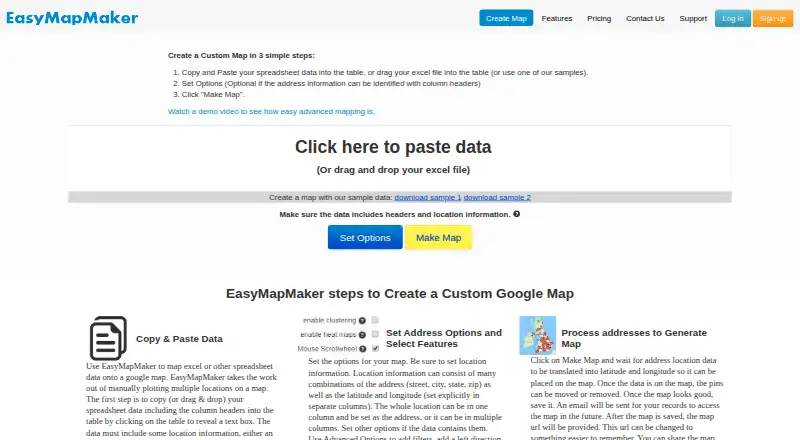
EasyMapMaker turns spreadsheet data containing addresses or latitude and longitude into a map. Users can paste data or drag in an Excel file, choose options, and generate a map. Tools include clustering, colored and custom markers, filtering, radius searches, heat maps, map styles, pin labels, and numbered pins. Saved maps can be shared, embedded on a webpage, or printed; maps can also be exported as images or PDFs, and visible map data can be exported to Excel. The free plan uses OSM for geocoding, while paid plans use Google Maps and Google geocoding. The service can generate KML for Google Earth. Maps work on most Apple and Android phones and tablets, though some features may not be available on every device. Creating and editing maps on mobile is possible, but the maker does not recommend or support it. The Basic plan is free and allows 250 pins per map and 20 maps a day. Pro costs $29.00 per month and includes up to 1,500 pins per map; a seven-day trial is listed. EasyMapMaker identifies itself as a service of TC Cloud Solutions LLC.
Good
- Accepts pasted spreadsheet data and Excel files.
- Offers clustering, filters, heat maps, and custom markers.
- Saved maps can be shared, embedded, or printed.
- Exports map images, PDFs, visible data, and KML.
Watch out
- Basic plan allows 250 pins per map.
- Mobile map creation and editing are not supported.
- Some features may not work on every mobile device.
Who it suits
EasyMapMaker suits people who want to turn address or coordinate spreadsheets into shareable, exportable maps. Mobile users can view maps, but the maker does not recommend or support map creation and editing on mobile devices.
Verdict
EasyMapMaker combines spreadsheet-to-map conversion with a range of map display and sharing options. Check the Basic plan’s pin limit and the mobile editing restriction against your workflow.
Plans and prices
From EasyMapMaker's own pricing page, checked 7 Oct 2026.
| Plan | Price | What it gives you |
|---|---|---|
| Basic | Free | 250 pins per map · 20 maps a day · 7 unique groups · Free |
| Pro | $29 a month | 1,500 pins per map · 15,000 geocodes per month · 1 user · no limit on maps · $29 per month |
| Premium | $59 a month | 15,000 pins per map · 50,000 geocodes per month · 1 user · no limit on maps · $59 per month |
| Enterprise | $99 a month | 30,000 pins per map · 50,000 geocodes per month · first 10 users included · no limit on maps · $99 per month |
The facts
Each one read from EasyMapMaker's own pages, with the date it was checked.
The company
- Company
- The site identifies EasyMapMaker as a service of TC Cloud Solutions LLC.checked 7 Oct 2026
What it does
- Exports
- Maps can be exported as images or PDFs, and visible map data can be exported to Excel.checked 7 Oct 2026
- Features
- Features include clustering, colored and custom markers, filtering, radius searches, heat maps, map styles, pin labels, and numbered pins.checked 7 Oct 2026
- Input
- Users can paste spreadsheet data or drag and drop an Excel file, then set options and generate a map.checked 7 Oct 2026
- Integrations
- The service uses Google Maps and Google geocoding on paid plans; its free plan uses OSM for geocoding, and it can generate KML for Google Earth.checked 7 Oct 2026
- Limits
- The maker says the former Premium Big Data plan for up to 100,000 locations is no longer available to new sign-ups.checked 7 Oct 2026
- Map access
- Password protected maps are available on subscription plans, and access to a map's edit page requires login.checked 7 Oct 2026
- Mobile editing
- Building and editing maps on mobile and tablet devices is possible but the maker says it is not recommended and is not supported.checked 7 Oct 2026
- Privacy
- The privacy policy says the service does not sell data, does not store map data until a map is saved, and allows users to remove saved map data by deleting the map.checked 7 Oct 2026
- Purpose
- EasyMapMaker turns spreadsheet data with address or latitude and longitude information into a map.checked 7 Oct 2026
- Sharing
- Saved maps can be shared, embedded on a webpage, or printed.checked 7 Oct 2026
- Support
- The contact page provides a support email address, [email protected].checked 7 Oct 2026
Where it runs
- Supported devices
- Maps work on most Apple and Android mobile and tablet devices, though some features may not be supported on all devices.checked 7 Oct 2026
The full review of EasyMapMaker
EasyMapMaker is a spreadsheet-to-map tool for turning address or coordinate data into shareable maps. It is strongest for people who need to visualize an existing location list rather than build a broader mapping workflow. The free tier covers small projects, while higher pin and geocoding needs call for a paid plan.
Overview
Paste spreadsheet data or drag in an Excel file, set options, and generate a map. That focused workflow is convenient when locations already live in a spreadsheet; it is less suited to teams that need maps to stay synchronized with changing source data, since refreshes are manual.
Saved maps can be shared, embedded on a webpage with an iframe, or printed. Users can export maps as images or PDFs, and export the data currently visible on a map to Excel. KML generation provides a route to Google Earth. Paid plans use Google Maps and Google geocoding, while the free plan uses OSM for geocoding.
The privacy policy says EasyMapMaker does not sell data and does not store map data until a map is saved. Saved map data can be removed by deleting the map. Subscription plans support password-protected maps, and access to a map’s edit page requires login.
Key features
Clustering, filtering, radius searches, and heat maps help make location sets easier to interpret, particularly when many pins would otherwise crowd the display. Colored and custom markers, map styles, pin labels, and numbered pins give users practical ways to distinguish locations and make a map more readable.
These features support presentable maps without requiring a separate mapping workflow, but the service is not a live spreadsheet connection: changes to the source data need a manual refresh. The former Premium Big Data plan for up to 100,000 locations is no longer open to new sign-ups, so users planning maps at that scale should not assume EasyMapMaker can meet that requirement through a standard new subscription.
Pricing
EasyMapMaker is freemium, with a 7-day trial and paid plans starting at $29/user/mo. The free Basic plan costs nothing and allows 250 pins per map, 20 maps a day, and 7 unique groups. It is a sensible way to make small maps, but the per-map pin ceiling makes it a poor fit for larger location sets.
Pro costs $29 a month, billed $29 per month. It raises capacity to 1,500 pins per map and 15,000 geocodes per month, with one user and no limit on maps. This is the entry paid option for an individual who needs more room than Basic provides.
Premium costs $59 a month, billed $59 per month. It allows 15,000 pins per map and 50,000 geocodes per month, still for one user and unlimited maps. Choose it when the larger per-map ceiling or geocoding quota matters; it does not add seats over Pro.
Enterprise costs $99 a month, billed $99 per month. It includes 30,000 pins per map, 50,000 geocodes per month, the first 10 users, and unlimited maps. Its seat allowance makes it the clearest fit for a small team, while the geocoding quota is the same as Premium’s. The free plan and Pro and Premium plans have lower pin or geocoding allowances than Enterprise; the paid individual plans also include only one user.
Platforms
EasyMapMaker is available on Android, iOS, and the web. Maps work on most Apple and Android phones and tablets, although some features may not be supported on every device. Building or editing maps on mobile and tablet is possible, but the maker does not recommend or support it, so users who need mobile map creation should look elsewhere.
Who it's for
EasyMapMaker is a good match for individuals or small teams who maintain location data in spreadsheets and want options for styling, filtering, sharing, and exporting maps. Basic suits modest maps; Pro and Premium fit users who need higher limits but not multiple seats; Enterprise is the appropriate tier for up to 10 included users. It is a weaker choice for mobile-first editing, automatic data refresh, or new projects requiring up to 100,000 locations.
Pros and cons
- Pro: Spreadsheet input turns existing address or coordinate lists into maps without requiring users to rebuild the data in a mapping tool.
- Pro: Sharing, iframe embedding, printing, image and PDF exports, and Excel export give maps several practical ways to circulate or reuse the information.
- Pro: Multiple pin, filtering, and display options help users make maps clearer for different audiences and location sets.
- Con: The free plan tops out at 250 pins per map, so larger projects require a paid plan.
- Con: Data refresh is manual, which adds upkeep when the spreadsheet changes.
- Con: Mobile map building and editing are unsupported, despite mobile access to maps.
- Con: Pro and Premium include one user each; teams needing shared seats must consider Enterprise.
Alternatives
Datawrapper is worth considering for users who want a broader charts, maps, and tables package with web publishing, embedding, and PNG downloads on its free plan; that plan shows attribution.
Felt offers unlimited maps and sharing on its free Personal plan, but that plan does not allow own data file uploads and is for personal use only. It may suit users prioritizing free map sharing over spreadsheet-file uploads.
Mapotic is an alternative for users who want a free map builder with 100 places, custom fields, data layers, filters, ratings, and comments; ads may appear.
MapChart is another freemium mapping option to compare when selecting a map-making tool.
MapTiler Cloud may suit testing, personal, or non-commercial use that needs a free allowance of 5 GB storage, 5,000 sessions per month, 100,000 API requests per month, and 100 uploads per month.
Maputnik is a free, open-source visual editor with online, CLI, or Docker use, for readers who prefer that kind of editing tool.
Scribble Maps is worth comparing for users whose needs fit its free allowance of five lifetime map saves, one user, and 450×450px images.
Visme is a freemium option for readers looking for a broader visual-content tool rather than a spreadsheet-to-map workflow.
Browse Map Creation Software or Interactive Map Software for more options.
Verdict
Choose EasyMapMaker if you have spreadsheet-based location data and want a direct way to turn it into a styled, shareable map with useful export options. Its main advantage is that focused spreadsheet-to-map workflow; its main drawbacks are manual refreshing and unsupported mobile editing. Check the Basic pin ceiling, paid geocoding quotas, and seat limits against your project before committing.
Getting started
- Open the EasyMapMaker website
- Start with the Basic free plan or begin the 7-day trial
- Paste spreadsheet data or drag and drop an Excel file
- Set map options and generate the map
- Save the map to share, embed, print or export it
Limits worth knowing
Basic is free with 250 pins per map, 20 maps per day and seven unique groups. Pro raises capacity to 1,500 pins per map and 15,000 geocodes per month; Premium and Enterprise provide larger pin and geocode quotas. The former Premium Big Data plan for up to 100,000 locations is unavailable to new sign-ups.
Questions
What are the EasyMapMaker plans?
Basic is free. Pro costs $29 a month, Premium $59 a month and Enterprise $99 a month; a 7-day trial is listed.
Which devices can display maps?
Maps work on most Apple and Android phones and tablets, as well as the web, although some features may not work on every device.
What mapping services are used?
Paid plans use Google Maps and Google geocoding. The free plan uses OSM for geocoding, and EasyMapMaker can generate KML for Google Earth.
Can maps be shared or embedded?
Saved maps can be shared, embedded on a webpage or printed. Password-protected maps are available on subscription plans.
Can data be exported?
Maps can be exported as images or PDFs, and visible map data can be exported to Excel.
Who provides EasyMapMaker?
The site identifies EasyMapMaker as a service of TC Cloud Solutions LLC.
Alternatives to EasyMapMaker
- 1

Datawrapper
Free planOpen sourceAndroidiOSWebAPI8.6From $21 a month - 2

Felt
Free planAndroidiOSWebAPI8.2From $199 a month - 3

Scribble Maps
Free planAndroidiOSWebAPI8.1From $168 a year - 4
MapChart
Free planAndroidiOSWebExtension8.0From $39.99 a year - 5

BatchGeo
Free planAndroidiOSWebAPI7.9From $99 a month - 6

Maptitude
AndroidiOSWebAPI7.8From $795 a year