
LOGINventory
LOGINventory discovers and documents hardware, software, configurations, and permissions across an IT network.
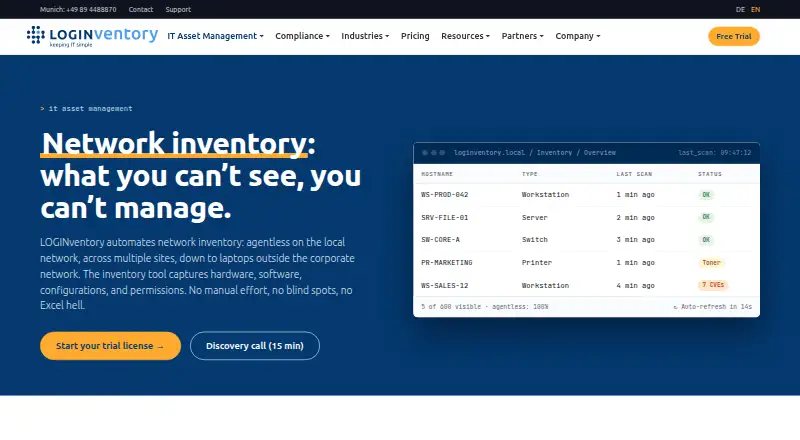
What LOGINventory is
LOGINventory discovers and documents hardware, software, configurations, and permissions across an IT network. Its core discovery is agentless, using WMI/RPC, SNMP, or SSH; an Offline Agent can cover Windows, Linux, and macOS devices outside the local network. Supported environments include Windows, Linux/Unix, macOS, SNMP network devices, multiple hypervisors, Microsoft cloud services, AWS virtual machines, and Exchange. The Inventory Edition focuses on network inventory, while the SAM Edition adds license management, software usage measurement, target-versus-actual comparisons, and compliance reports. It runs on the customer's infrastructure and stores inventory data in a local SQL database; the maker says that data is not transmitted to it. LOGINventory is on-premises software, and the server requires Windows 10/11 or Windows Server 2016–2025 (x64) and SQL Server 2012 SP4 or later. The 30-day trial includes the full feature set at full network size, needs no credit card, and includes personal support.
Good
- Agentless discovery uses WMI/RPC, SNMP, or SSH.
- Offline Agent covers Windows, Linux, and macOS devices.
- Inventory data stays in a local SQL database.
- 30-day trial includes full features at full network size.
- SAM Edition adds license management and compliance reports.
Watch out
- Server requires Windows 10/11 or supported Windows Server.
- Server requires SQL Server 2012 SP4 or later.
- Listed annual prices exclude VAT.
- Maker states it is not ISO 27001 certified.
Who it suits
LOGINventory suits IT managers who need to document assets across a network and want inventory data held on their own infrastructure. The SAM Edition is aimed at teams that also need software license management and compliance reporting.
Verdict
LOGINventory combines broad network discovery with on-premises data storage and a dedicated SAM Edition. Check the server requirements and the distinction between inventory and software asset management before choosing an edition.
Plans and prices
From LOGINventory's own pricing page, checked 30 Sep 2026.
| Plan | Price | What it gives you |
|---|---|---|
| Forever-Free | Free | Up to 20 devices · No time limit. |
| Inventory Edition | €6.50 a year | Network, hardware, software and cloud inventory · licensed in steps of 25 assets · 30-day trial at full network size · Per asset per year, excl. VAT: €6.50 (0–249 assets), €5.90 (250–499), €5.20 (500–999), €4.50 (1,000–2,499), €3.70 (2,500–4,999); 5,000+ individually priced |
| SAM Edition | €8.60 a year | Everything in Inventory plus software asset management (licences owned vs in use) · Per asset per year, excl. VAT: €8.60 (0–249 assets), €7.40 (250–499), €6.80 (500–999), €6.00 (1,000–2,499), €4.70 (2,500–4,999); 5,000+ individually priced |
The facts
Each one read from LOGINventory's own pages, with the date it was checked.
What it does
- AI data handling
- The optional LIA AI assistant processes requests through Azure OpenAI, with automatic anonymization, and can be disabled.checked 30 Sep 2026
- Asset limit
- No limit (licensed per asset; volume tiers up to 4,999 assets, individual terms from 5,000)checked 7 Oct 2026
- Audience
- The maker describes LOGINventory as serving IT managers in the German-speaking mid-market and lists use across organizations from small businesses to enterprises.checked 30 Sep 2026
- Certification limit
- The maker states that neither LOGINventory nor Schmidt’s LOGIN GmbH is ISO 27001 certified; the product includes a manually completed control template.checked 30 Sep 2026
- Coverage
- The product supports Windows, Linux/Unix, macOS, SNMP network devices, multiple hypervisors, Microsoft cloud services, AWS virtual machines, and Exchange.checked 30 Sep 2026
- Discovery
- Core network discovery is agentless and uses WMI/RPC, SNMP, or SSH; an Offline Agent is available for Windows, Linux, and macOS devices outside the LAN.checked 30 Sep 2026
- Editions
- The SAM Edition adds license management, target-versus-actual comparisons, software usage measurement, and compliance reports to the Inventory Edition.checked 30 Sep 2026
- Hosting and data
- LOGINventory runs on the customer's own infrastructure and stores inventory data in the customer's local SQL database; the maker says inventory data is not transmitted to it.checked 30 Sep 2026
- Integrations
- Integration methods include REST API with JSON, PowerShell, CSV, custom scan scripts, and direct connections for MDM and ITSM/CMDB products.checked 30 Sep 2026
- Inventory data
- The maker says the product can capture up to 1,117 individual values per Windows device by default.checked 30 Sep 2026
- Named integrations
- Listed integrations include Microsoft Intune, baramundi, APPTEC360, Sophos Mobile, Kyberna ky2help, iET ITSM, helpLine, and i-net HelpDesk.checked 30 Sep 2026
- Purpose
- LOGINventory discovers and documents hardware, software, configurations, and permissions across an IT network.checked 30 Sep 2026
- Support
- Maintenance includes updates and major releases, business-day technical support by email and phone, one hour of remote consulting per year, and helpdesk access.checked 30 Sep 2026
Money
- Free plan
- Yeschecked 20 Sep 2026
- Trial
- The 30-day trial provides the full feature set at the customer's full network size, requires no credit card, and includes personal support.checked 30 Sep 2026
The company
- Headquarters
- Munich, Germanychecked 23 Sep 2026
Where it runs
- Platform requirement
- The LOGINventory server requires Windows 10/11 or Windows Server 2016–2025 (x64) and SQL Server 2012 SP4 or later; the installer can include SQL Server Express.checked 30 Sep 2026
The full review of LOGINventory
Overview
LOGINventory is on-premises software for discovering and documenting devices, software, configurations, and permissions across an IT network. It suits IT teams that need broad inventory coverage while keeping inventory data in a local SQL database. Its key choice is between an Inventory Edition for discovery and a SAM Edition that adds software asset management.
Key features
Discovery is agentless on the network, using WMI/RPC, SNMP, or SSH. An Offline Agent extends collection to Windows, Linux, and macOS devices outside the LAN. That combination suits mixed environments, though agentless collection depends on having the relevant protocols and access in place.
Coverage spans Windows, Linux/Unix, macOS, SNMP network devices, multiple hypervisors, Microsoft cloud services, AWS virtual machines, and Exchange. LOGINventory can capture up to 1,117 individual values per Windows device by default, giving administrators a detailed inventory baseline. The Inventory Edition handles discovery and documentation; the SAM Edition adds license management, target-versus-actual comparisons, software usage measurement, and compliance reports. That makes the higher tier more appropriate when the goal includes tracking licensing and compliance, not simply knowing what is installed.
Integration options include REST API with JSON, PowerShell, CSV, custom scan scripts, and direct connections to MDM and ITSM/CMDB products. Named integrations include Microsoft Intune, baramundi, APPTEC360, Sophos Mobile, Kyberna ky2help, iET ITSM, helpLine, and i-net HelpDesk.
LOGINventory runs on customer infrastructure and stores inventory in a local SQL database; the maker says inventory data is not transmitted to it. Its optional LIA assistant processes requests through Azure OpenAI with automatic anonymization, and can be disabled. The maker states that neither the product nor Schmidt’s LOGIN GmbH is ISO 27001 certified, although a manually completed control template is included. This is a meaningful distinction for organizations that require that certification.
Pricing
The Forever-Free plan costs nothing and covers 20 devices. It is a small-estate starting point, not a substitute for the paid plans once the device count exceeds that cap.
Inventory360 costs €6.50 a year and SAM360 costs €8.60 a year; both prices exclude VAT and cover 0–249 assets. Inventory360 is the lower-cost route for network inventory, while SAM360 adds the software asset management capabilities. For the annual per-asset Inventory Edition, listed tiers are €6.50 for 0–249 assets, €5.90 for 250–499, €5.20 for 500–999, €4.50 for 1,000–2,499, and €3.70 for 2,500–4,999. The SAM Edition tiers are €8.60, €7.40, €6.80, €6.00, and €4.70 for those same asset bands. All prices exclude VAT; 5,000 or more assets are individually priced on request. The tier schedule makes larger estates cheaper per asset, but the final cost depends on asset count and edition.
A 30-day trial provides the full feature set at the customer's full network size, with no credit card required and personal support included. Maintenance includes updates and major releases, business-day technical support by email and phone, one hour of remote consulting per year, and helpdesk access.
Platforms
The product supports API, Linux, macOS, self-hosted, web, and Windows environments, but the server has a specific requirement: Windows 10/11 or Windows Server 2016–2025 (x64), plus SQL Server 2012 SP4 or later. The installer can include SQL Server Express. Teams unable to provide a Windows server and SQL database should look elsewhere.
Who it's for
LOGINventory is a fit for IT managers in organizations from small businesses to enterprises that need inventory across endpoints, network devices, cloud services, and virtualization. It is especially relevant where local data storage matters or where software licensing and compliance need to be managed alongside discovery. A 20-device free plan offers a limited entry point; the server requirements and paid per-asset tiers make it less suited to teams seeking a server-free service or an uncapped free deployment.
Pros and cons
- Pros: Agentless discovery across several protocols reduces the need to deploy agents throughout a LAN.
- Pros: The Offline Agent and broad device and cloud coverage extend inventory beyond on-network endpoints.
- Pros: Local SQL storage keeps inventory on customer infrastructure, with the optional AI assistant able to be disabled.
- Cons: The server requires Windows and SQL Server, constraining teams without that infrastructure.
- Cons: The free plan stops at 20 devices, while paid costs scale by asset count.
- Cons: Neither the product nor its maker is ISO 27001 certified, which may rule it out for organizations with that requirement.
Alternatives
OCS Inventory NG is a free alternative with Windows, Linux, macOS, web, mobile, and API platforms; its editor provides integration and support. Choose it when free software and that broader platform mix matter more than LOGINventory's stated SAM Edition capabilities.
Open-AudIT offers a free plan for unlimited devices with community support, plus a Professional plan at $399 a year. It is worth considering when an unlimited-device free tier is more important than LOGINventory's small-estate cap.
runZero has a Community Edition capped at 100 assets, one organization, 10 recurring tasks, and 30 days of data retention. Pick it when those limits suit the intended scope; LOGINventory's free plan instead allows 20 devices and its paid editions include an inventory-to-SAM choice.
CloudQuery offers a free plan with a 1M-row limit, cloud asset inventory in your database, an MCP server, and more than 50 sources. It is a better candidate when that cloud-inventory approach matches the task.
rxInventory is another freemium option for Linux, macOS, and Windows.
IT Asset Tool has a free Basic plan capped at 35 assets and paid enterprise plans. Consider it when that free allowance or its available Linux and self-hosted platforms better match your needs.
GLPI supports a wide platform range and offers Public Cloud pricing at €19 a month per IT agent, from one billed agent. Choose it when that per-agent cloud option fits better than LOGINventory's on-premises, asset-based model.
BelManage is a paid alternative with an annual per-computer on-premises plan.
Compare the wider category options in IT Asset Discovery Software, Network Documentation Software, Network Discovery Software, and IT Asset Management Software.
Verdict
Choose LOGINventory if your team needs detailed, broad network inventory kept on its own infrastructure, with a path to license tracking and compliance reporting in the SAM Edition. Look elsewhere if the Windows-and-SQL Server requirement, 20-device free cap, or lack of ISO 27001 certification conflicts with your operating or compliance needs.
Getting started
- Visit the LOGINventory network inventory website.
- Choose the free edition, Inventory Edition, or SAM Edition.
- Install the server on Windows 10/11 or Windows Server 2016–2025 (x64), with SQL Server 2012 SP4 or later; the installer can include SQL Server Express.
- Run agentless discovery through WMI/RPC, SNMP, or SSH.
- Use the Offline Agent for Windows, Linux, or macOS devices outside the LAN.
- For a trial, request 30 days of full features at full network size; no credit card is required.
Limits worth knowing
The free edition supports up to 20 devices. Paid Inventory Edition pricing is per asset per year, with listed volume tiers through 4,999 assets and individual terms from 5,000 assets.
Questions
Is LOGINventory free?
Yes. Its Forever-Free edition has no time limit and supports up to 20 devices.
How much does a paid edition cost?
The listed rate is €3.70 per asset per year at 2,500–4,999 assets; 5,000 or more are individually priced.
What does the SAM Edition add?
It adds license management, target-versus-actual comparisons, software usage measurement, and compliance reports to the Inventory Edition.
Is there a trial?
Yes. The 30-day trial provides the full feature set at the customer's full network size, with no credit card required and personal support.
Where is inventory data stored?
LOGINventory runs on the customer's infrastructure and stores inventory in the customer's local SQL database. Its maker says the inventory data is not transmitted to it.
What does the server require?
The server requires Windows 10/11 or Windows Server 2016–2025 (x64), plus SQL Server 2012 SP4 or later. The installer can include SQL Server Express.
Alternatives to LOGINventory
- 1

GLPI
Open sourceAndroidiOSWebAPI9.1From €19 a month - 2
Lansweeper
Free planWebAPILinuxmacOS8.8Free plan - 3

Freshservice
AndroidiOSWebAPI8.6From $19 a month - 4

Reftab
Free planAndroidiOSWeb8.6From $9 a year - 5

LICENSEWARE
Free planWebAPILinuxmacOS8.6From $3.36 a year - 6
i-doit
Open sourceAndroidiOSWebAPI8.5From €48.65 a month