LocalRedact
LocalRedact is a free, open-source tool for redacting PDF files using plain-English instructions and deterministic rules.
What LocalRedact is
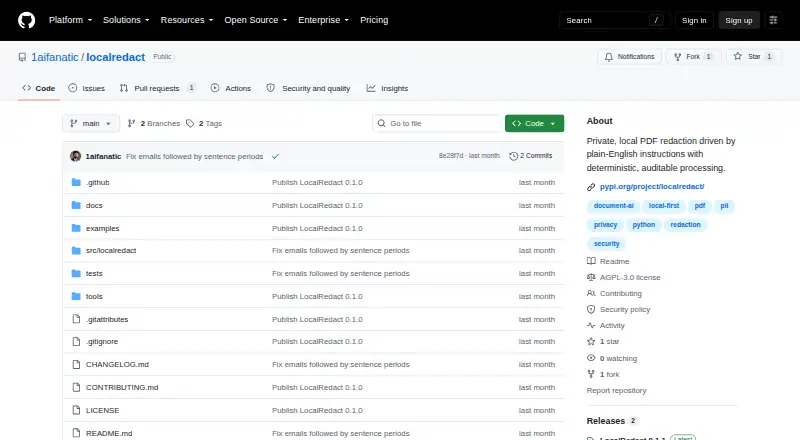
LocalRedact is a free, open-source tool for redacting PDF files using plain-English instructions and deterministic rules. It removes text beneath redacted areas and blanks image pixels where they intersect those areas. It can target personal, financial, government, health, and credential data, along with quoted values and selected page or layout instructions. Processing happens locally with PyMuPDF; the project says it uses no LLM, cloud API, telemetry, or model download. By default, it removes common PDF extras such as metadata, embedded files, JavaScript, links, and saved form state, then reopens the output to check that detected values are no longer extractable. It offers a Python API, two command-line tools, and an optional local HTTP service. Scanned PDFs can use locally installed Tesseract, while image-only pages fail closed without OCR by default. LocalRedact is alpha software, and its detection is best effort, not compliance certification. The project recommends visually reviewing high-stakes outputs before sharing them.
Good
- Processes PDFs locally without cloud APIs or telemetry.
- Removes underlying text and intersecting image pixels.
- Checks output for extractable detected values.
- Offers Python, command-line, and optional HTTP interfaces.
Watch out
- Detection is best effort, not compliance certification.
- Alpha software may miss sensitive content.
- Scanned-document OCR requires locally installed Tesseract.
- Requires Python 3.10 or later.
Who it suits
It suits people who need local PDF redaction through an API, command line, or optional HTTP service. Users handling high-stakes documents should be prepared to review results visually.
Verdict
LocalRedact combines local processing, multiple interfaces, and checks of saved PDFs. Its alpha status and detection limits make visual review important, especially for high-stakes documents.
Plans and prices
From LocalRedact's own pricing page, checked 8 Oct 2026.
| Plan | Price | What it gives you |
|---|---|---|
| LocalRedact | Free | AGPL-3.0-only · Python package · optional local HTTP service |
The facts
Each one read from LocalRedact's own pages, with the date it was checked.
What it does
- Availability
- The package is distributed through PyPI and requires Python 3.10 or later.checked 8 Oct 2026
- Compliance
- The project describes its detection as best effort and says it is not a compliance certification.checked 8 Oct 2026
- Detection
- Supported targets include personal, financial, government, health, and credential data, plus quoted exact values and selected page or layout instructions.checked 8 Oct 2026
- Detection limits
- It says detection may miss unusual formatting, handwriting, weak OCR, vector-outline text, novel identifiers, or sensitive prose.checked 8 Oct 2026
- Integrations
- The base package depends on PyMuPDF, and the optional HTTP service can be installed with the server extra.checked 8 Oct 2026
- Interfaces
- LocalRedact provides a Python API, two command-line tools, and an optional loopback HTTP service.checked 8 Oct 2026
- Known limit
- The project describes detection as best effort and says it is not a compliance certification; it warns that unusual formatting, handwriting, weak OCR, and other content may be missed.checked 8 Oct 2026
- License
- LocalRedact is licensed under GNU AGPL version 3 only, and the README notes that PyMuPDF has separate AGPL and commercial licensing.checked 8 Oct 2026
- Limit
- The project describes itself as alpha software and warns automated redaction may miss sensitive content, recommending visual review of high-stakes output.checked 8 Oct 2026
- OCR
- Scanned PDFs can use locally installed Tesseract through an OCR option, while image-only pages fail closed without OCR by default.checked 8 Oct 2026
- Output checks
- It sanitizes common PDF extras by default, reopens the output, and checks that detected values are no longer extractable.checked 8 Oct 2026
- Privacy
- The project says it uses no LLM, cloud API, telemetry, or model download, and reads PDF text and coordinates locally with PyMuPDF.checked 8 Oct 2026
- Processing
- The project says processing is local and does not use an LLM, cloud API, telemetry, or model download.checked 8 Oct 2026
- Purpose
- LocalRedact is a private PDF redaction tool that processes plain-English instructions with deterministic rules.checked 8 Oct 2026
- Redaction
- It applies PDF redactions that remove underlying text and blank intersecting image pixels.checked 8 Oct 2026
- Review guidance
- The README calls the software alpha and recommends visually reviewing every high-stakes output before sharing it.checked 8 Oct 2026
- Sanitization
- By default, it removes common PDF extras including metadata, embedded files, JavaScript, links, and saved form state.checked 8 Oct 2026
- Service security
- The local HTTP service binds to 127.0.0.1 by default, makes no outbound requests, and requires an explicit option for non-loopback binding.checked 8 Oct 2026
- Verification
- After writing output, it reopens the PDF and checks that detected values are no longer extractable.checked 8 Oct 2026
The full review of LocalRedact
LocalRedact is a free, open-source PDF redaction tool for people who want to process documents locally and can use a Python package, command line, or API. Its strongest case is privacy-conscious, rule-based redaction; its alpha status and best-effort detection make it a poor fit for unattended, high-stakes work.
Overview
LocalRedact processes PDF text and coordinates on the device using PyMuPDF, without an LLM, cloud API, telemetry, or model download. Redactions remove underlying text and blank intersecting image pixels, while default sanitization removes common PDF extras such as metadata, embedded files, JavaScript, links, and saved form state. This gives privacy-focused users a substantial local workflow, but it accepts PDF files only.
After writing a file, LocalRedact reopens it and checks whether detected values remain extractable. That is a useful safeguard against redactions that merely cover visible text, not proof that every sensitive item has been found. Detection is best effort, not a compliance certification, and may miss unusual formatting, handwriting, weak OCR, vector-outline text, novel identifiers, or sensitive prose.
Key features
Rule-based targeting
Plain-English instructions can target personal, financial, government, health, and credential data, as well as quoted exact values and selected page or layout conditions. Deterministic rules let users avoid sending documents to an AI service, but the range of target types should not be mistaken for comprehensive detection.
Local OCR and interfaces
Scanned PDFs can use locally installed Tesseract through an OCR option. Without OCR, image-only pages fail closed by default, which is safer than silently treating them as readable text but means scanned-document workflows require extra setup. Users can work through a Python API, two command-line tools, or an optional loopback HTTP service; the base package uses PyMuPDF, and the service requires the server extra.
The HTTP service binds to 127.0.0.1 by default and makes no outbound requests. Binding beyond loopback requires an explicit option, a sensible default for a local utility. The project is alpha software and recommends visually reviewing every high-stakes output before sharing it, so it is best treated as an aid to review rather than a replacement for it.
Pricing
LocalRedact is free: its LocalRedact plan costs nothing and is licensed under GNU AGPL version 3 only. There is no free-trial distinction to weigh against a paid tier. The package is distributed through PyPI and requires Python 3.10 or later. PyMuPDF has separate AGPL and commercial licensing, so organizations should consider those terms alongside LocalRedact's license.
Platforms
LocalRedact supports API use, Linux, macOS, Windows, and self-hosted deployment. It is marked for desktop deployment and supports OCR redaction and automated detection, but not batch processing. That makes it more suitable for individual or controlled document workflows than jobs that depend on built-in bulk processing.
Who it's for
Choose LocalRedact if keeping PDFs on your own machine, using explicit rules, and checking saved output are more important than a polished hosted workflow. It suits technically comfortable users who can install Python software and, for scanned files, configure Tesseract. Look elsewhere if you need batch processing, a compliance guarantee, or dependable unattended detection of varied sensitive content.
Pros and cons
- Pro: Local processing without an LLM, cloud API, telemetry, or model download keeps document handling on-device.
- Pro: It removes underlying text, blanks intersecting image pixels, sanitizes common PDF extras, and checks whether detected values remain extractable.
- Pro: Python, command-line, and optional local HTTP interfaces offer several ways to fit it into a local workflow.
- Con: Alpha, best-effort detection can miss sensitive content, so high-stakes outputs need visual review.
- Con: OCR depends on locally installed Tesseract, while batch processing is not supported.
- Con: AGPL-3.0-only licensing and PyMuPDF's separate licensing terms may require attention before organizational use.
Alternatives
For other options, browse Document Redaction Software. Consider Excise as another free option for API, Linux, macOS, or Windows. GroupDocs.Redaction is a paid alternative with a free plan and trial and support across mobile, desktop, web, API, and self-hosted platforms. Philter offers a free personal and evaluation desktop plan with on-device redaction and community support; its free use is limited to individual, non-commercial, or evaluation purposes.
BleachPDF is another free option for Linux and macOS that runs on your own computer. Docuflair Redact is a paid alternative with a free trial and support for mobile, desktop, and web platforms. PineThink Redact offers a free single-document plan for personal use, plus a paid Premium plan at $6.99 a month after a 14-day free trial. PDFRedaction is a free web option with a daily document cap for registered users and local processing. Redact PDF AI offers a freemium option across mobile, desktop, web, and API platforms.
Verdict
LocalRedact is a good choice for technically comfortable users who need free, local PDF redaction and value output checks over a fully managed workflow. Its local-first design and removal of underlying content are compelling; its alpha status and detection gaps mean it should not be trusted without visual review, especially for high-stakes documents.
Getting started
- Visit the LocalRedact project website.
- Install the package from PyPI; Python 3.10 or later is required.
- Choose the Python API or one of the two command-line tools.
- Install the server extra if you want the optional HTTP service.
- Install Tesseract locally to use the OCR option for scanned PDFs.
Questions
What does LocalRedact cost?
The listed LocalRedact plan is free. The project is open source under GNU AGPL version 3 only.
Which platforms does it support?
Listed platforms are API, Linux, macOS, self-hosted, and Windows. Desktop is the listed deployment type.
What can it redact?
Supported targets include personal, financial, government, health, and credential data, plus quoted exact values and selected page or layout instructions.
Does it support OCR?
Yes. Scanned PDFs can use locally installed Tesseract through an OCR option; image-only pages fail closed without OCR by default.
Does it send documents to the cloud?
The project says processing is local and uses no LLM, cloud API, telemetry, or model download.
Is it suitable for certified compliance redaction?
The project describes detection as best effort and says it is not a compliance certification. It recommends visually reviewing every high-stakes output before sharing.
Alternatives to LocalRedact
- 1
GroupDocs.Redaction
AndroidiOSWebAPI7.6$1,999 usage-based - 2

Redactable
Free planWebAPI7.4From $19 a month - 3
RedactLaw
Free planWebAPISelf-hosted7.4From $39 a month - 4
Docuflair Redact
AndroidiOSWebLinux7.2From €3,588 a year - 5
BleachPDF
Free planOpen sourceLinuxmacOSSelf-hosted7.0Free plan - 6
Excise
Free planAPILinuxmacOSWindows6.8Free plan