BleachPDF
BleachPDF is a free desktop tool for redacting PDF files on Linux and macOS, including scanned documents.
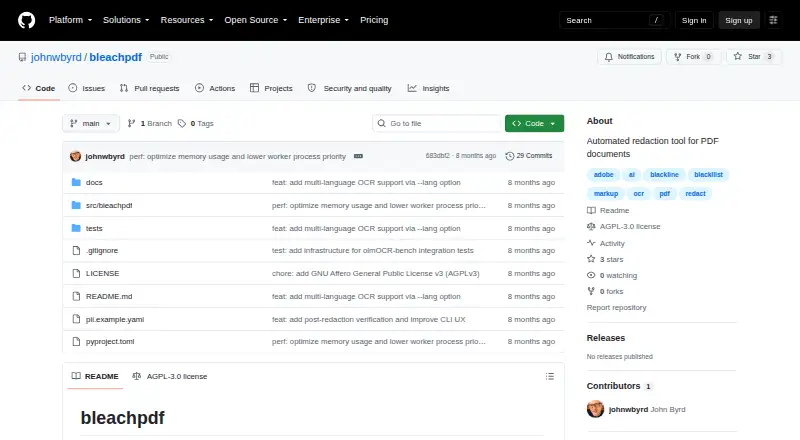
What BleachPDF is
BleachPDF is a free desktop tool for redacting PDF files on Linux and macOS, including scanned documents. It converts pages into images, applies OCR to locate specified text, covers matches with black boxes and saves a new PDF. Because the result contains images only, it has no text layer through which redacted wording could be exposed by copying and pasting. Users can match exact text or configure patterns such as case-insensitive text and digit patterns. The command line can process a file pattern or folder for batch work. BleachPDF rescans the output to verify that matches are hidden, and treats failed verification as a stop condition. It runs locally and does not upload documents. Setup uses pip and requires Tesseract; OCR language can be selected, with examples for English and English plus Korean. OCR can miss handwriting, unusual fonts, poor scans or very small, dense text, so manual review is advised. The repository displays an AGPL-3.0 license and states it grants no permission to use the software for censorship as defined in that license.
Good
- Runs on the user's computer without document uploads.
- Can redact batches from a folder or file pattern.
- Output omits a hidden text layer.
- Verification failures stop processing.
Watch out
- Requires pip and Tesseract.
- OCR can err on handwriting and poor scans.
- Manual review of output is advised.
- Only Linux and macOS are listed.
Who it suits
BleachPDF suits Linux or macOS users who need to redact PDFs locally, including batches of scanned files. It is aimed at users comfortable installing pip packages and Tesseract and checking OCR output manually.
Verdict
BleachPDF offers local OCR-based PDF redaction with output verification and batch processing. OCR limitations make manual checking important, especially for difficult scans or text.
Plans and prices
From BleachPDF's own pricing page, checked 15 Oct 2026.
| Plan | Price | What it gives you |
|---|---|---|
| BleachPDF | Free | No subscriptions · no accounts · local processing |
The facts
Each one read from BleachPDF's own pages, with the date it was checked.
What it does
- Batch processing
- The CLI accepts folders and glob patterns to process multiple PDF files.checked 15 Oct 2026
- Benchmark testing
- The project says its tests use Allen Institute for AI's olmOCR-bench and rescan outputs to check that redacted text is hidden.checked 15 Oct 2026
- Case-insensitive matching
- Pattern syntax supports case-insensitive literals using the i modifier.checked 15 Oct 2026
- Configuration files
- Configuration can be selected explicitly, through BLEACHPDF_CONFIG, or from user and system configuration locations.checked 15 Oct 2026
- Dependencies
- Declared dependencies include pytesseract, Pillow, ReportLab, PyMuPDF, PyYAML, parsimonious, platformdirs, and psutil.checked 15 Oct 2026
- Developer interface
- The package exposes a bleachpdf console-script entry point calling bleachpdf:main.checked 15 Oct 2026
- Digit and letter patterns
- The pattern language can match arbitrary digits or letters, such as nine-digit or ten-digit sequences.checked 15 Oct 2026
- Exact matching
- Users can supply literal strings with the -m or --match command-line option.checked 15 Oct 2026
- Exit statuses
- The CLI documents distinct codes for configuration errors, file errors, no matches, and verification failures.checked 15 Oct 2026
- External benchmark details
- The olmOCR-bench dataset page identifies it as an Allen Institute for AI benchmark with 1K to 10K document examples and English-language data.checked 15 Oct 2026
- Image-only output
- The resulting PDF contains page images without a hidden text layer that could expose redacted text through copying.checked 15 Oct 2026
- Installation dependency
- Installation requires the Tesseract OCR engine, with Ubuntu/Debian and macOS setup commands documented.checked 15 Oct 2026
- Language support
- The OCR language can be selected with --lang, with examples including eng and eng+kor.checked 3 Oct 2026
- License
- The package is licensed as GNU AGPL-3.0-or-later and is classified as OSI-approved AGPLv3+.checked 15 Oct 2026
- Limitations
- Handwriting, unusual fonts, low-quality scans, and very small or dense text can cause recognition errors, so the README advises checking output manually.checked 3 Oct 2026
- Limit: censorship restriction
- The accompanying license states that permission is not granted to use the software for censorship as defined in the license text.checked 15 Oct 2026
- Limit: manual checking
- The author says users must inspect results themselves because automated redaction is not perfectly reliable and may over-redact.checked 15 Oct 2026
- Limit: OCR accuracy
- The README warns that handwriting, unusual fonts, poor scans, and very small or dense text can be misrecognized.checked 15 Oct 2026
- Local privacy
- The README says processing occurs on the user's computer without uploads, accounts, or subscriptions.checked 15 Oct 2026
- Notable update: language support
- A February 3, 2026 commit added multilingual OCR support through the --lang option.checked 15 Oct 2026
The company
- Maker
- The README identifies the author as John Byrd.checked 3 Oct 2026
- Maker statement
- John Byrd described BleachPDF on LinkedIn as a Python command-line tool for removing PII such as Social Security and bank-account numbers from PDFs.checked 15 Oct 2026
- Maker testing claim
- John Byrd said he ran the tool on tax returns and bank statements and found it cleaned them successfully.checked 15 Oct 2026
Where it runs
- Maker platform claim
- John Byrd stated that the tool works on both vector PDFs and scanned PDFs.checked 15 Oct 2026
The full review of BleachPDF
Overview
BleachPDF is a command-line utility for redacting sensitive text in PDFs, including scanned pages. It is best for Linux and macOS users comfortable installing OCR tools and running repeatable jobs locally. Its image-only output and fatal verification checks are useful safeguards, but OCR can miss text, so the result still needs manual review.
Key features
BleachPDF converts PDF pages to images, uses OCR to locate specified text, draws black boxes over matches, and saves a new PDF. Users can target exact strings or configure patterns such as case-insensitive matches and digit sequences. Folder and file-pattern input supports batch processing, making the tool more practical for recurring workloads than for occasional edits in a graphical interface.
The finished PDF contains images rather than a hidden text layer, so redacted words cannot be recovered by copying and pasting from that layer. BleachPDF also rescans its output and treats verification failures as fatal. Those safeguards reduce the risk of quietly accepting an unsuccessful redaction, but they do not remove the need to inspect the pages: handwriting, unusual fonts, poor scans, and tiny or dense text can defeat OCR.
Processing happens on the user's computer, with no document upload. OCR language can be selected with --lang; examples include eng and eng+kor. Installation uses pip and requires Tesseract, with setup instructions for Ubuntu/Debian and macOS.
Pricing
BleachPDF costs nothing, with no subscription, and runs on the user's own computer. There is no free trial because the software is free. This is a good fit for individuals or teams able to manage a local command-line installation; there are no stated paid tiers or seat-based plans.
Platforms
BleachPDF is desktop software for Linux and macOS. Its PDF-only input and command-line workflow make it a focused choice for those systems, not a fit for users who need a Windows, mobile, or browser-based tool.
Who it's for
Choose BleachPDF when local processing, pattern-based matching, and batch handling matter more than a graphical interface. It suits technically comfortable users who can install pip and Tesseract and manually check OCR output. It is a weaker choice for difficult scans or anyone who needs a workflow that does not depend on OCR accuracy.
Pros and cons
- Pros: Local processing keeps documents on the user's computer; image-only output avoids a hidden text layer; fatal output verification and batch input support safer, repeatable jobs.
- Cons: OCR can misread handwriting, unusual fonts, low-quality scans, and small or dense text, so manual inspection remains necessary. Installation requires pip and Tesseract, and the command-line workflow is not aimed at users seeking a graphical editor.
- License note: The repository displays an AGPL-3.0 license and states that it grants no permission to use the software for censorship as defined in the license.
Alternatives
For a wider document-redaction category, browse Document Redaction Software.
- GroupDocs.Redaction is worth considering if you need broader platform coverage, including web, mobile, Windows, or self-hosting, and a paid product with a free plan and trial.
- Philter is an alternative for users seeking a freemium option with API, self-hosted, or Windows availability; its free desktop plan is for individual, non-commercial, and evaluation use.
- Docuflair Redact is a paid alternative with a free trial and coverage across desktop, mobile, and web platforms.
- PineThink Redact offers a free single-document option for personal use, plus a premium plan after a 14-day trial.
- PDFRedaction is a free web-based alternative with a daily document cap for registered users, OCR, AI detection, and local processing.
- Redact PDF AI is a freemium option spanning web, mobile, desktop, and API platforms, with prepaid credits and a starter plan.
- Redactable offers three free documents before its pay-as-you-go per-document option.
- RedactFile is a freemium web and API alternative with a free plan capped at 2MB per upload and 10 daily uploads.
Verdict
BleachPDF is a sensible free choice for Linux and macOS users who want local, batch-capable PDF redaction with image-only output and verification checks. Its strongest reason to choose it is keeping documents on-device without a subscription; its main reason to look elsewhere is the OCR burden, especially when scans are hard to read or a graphical workflow is essential.
Alternatives to BleachPDF
- 1
GroupDocs.Redaction
AndroidiOSWebAPI7.6$1,999 usage-based - 2

Redactable
Free planWebAPI7.4From $19 a month - 3

RedactLaw
Free planWebAPISelf-hosted7.4From $39 a month - 4
Docuflair Redact
AndroidiOSWebLinux7.2From €3,588 a year - 5
Excise
Free planAPILinuxmacOSWindows6.8Free plan - 6
Redact PDF AI
AndroidiOSWebAPI6.7From $50 a month