
RedactLaw
RedactLaw is an AI document-redaction platform designed exclusively for law firms.
What RedactLaw is
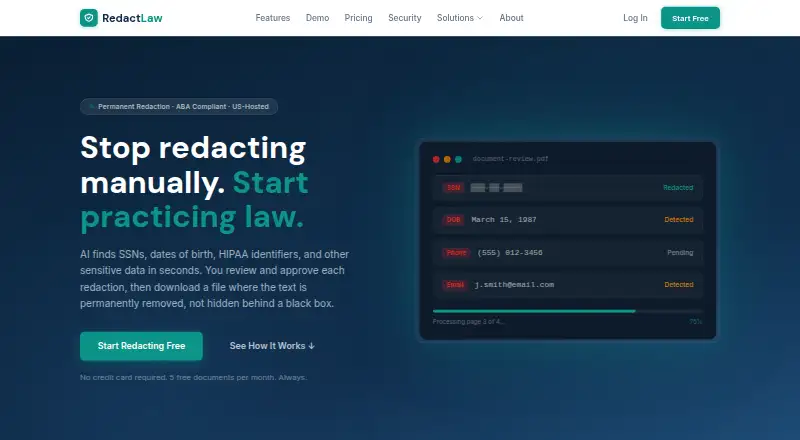
RedactLaw is an AI document-redaction platform designed exclusively for law firms. It identifies personally identifiable information and HIPAA identifiers with context-aware recognition, then gives each detection a confidence score for review. Reviewers can place detections beside the original document, approve or reject items individually, or process flagged items in bulk. The product says redaction permanently removes the underlying data and cleans metadata and hidden layers. It accepts PDF, DOCX, XLSX, JPEG, PNG, TIFF, and scanned images through OCR, producing PDF output. Legal templates cover HIPAA medical records, FRCP 5.2 filings, FOIA responses, financial discovery, employment records, and immigration or A-File work. Decisions are recorded with user attribution and timestamps, and audit reports can be exported as PDF or CSV. RedactLaw runs on the web, through an API, or as self-hosted software. The maker describes AES-256 encryption at rest, TLS 1.2 or higher in transit, U.S. data-center processing, and retention choices from 24 hours to manual deletion.
Good
- Context-aware AI detects PII and HIPAA identifiers
- Permanent redaction removes hidden data and metadata
- OCR handles scanned documents
- Legal templates cover common filing and records workflows
- Audit reports export to PDF or CSV
- Available as web, API, or self-hosted software
Watch out
- Free plan allows five documents monthly
- Free documents are limited to ten pages each
- Free tier supports one user
- Priority and dedicated support require paid plans
Who it suits
RedactLaw suits attorneys and legal practices handling personal injury, litigation, immigration, family-law, medical, employment, or discovery records. It also fits teams needing OCR, review controls, audit exports, role-based access, SSO/SAML, and documented retention choices.
Verdict
Pick RedactLaw if your legal workflow needs automated PII and HIPAA detection with reviewable, permanent PDF redaction. Its templates, audit trail, OCR, and deployment choices suit firms with formal document controls. Look elsewhere if your workload exceeds the free quotas without a paid plan or requires integrations listed as coming soon.
Plans and prices
From RedactLaw's own pricing page, checked 15 Oct 2026.
| Plan | Price | What it gives you |
|---|---|---|
| Free | Free | 5 documents/month · 10 pages/document · permanent redaction · basic PII detection · 1 user |
| Starter | $39 a month | 50 documents/month · 50 pages/document · PII + HIPAA detection · OCR · side-by-side preview · full audit trail · 1 user · $39/mo |
| Pro | $79 a month | 200 documents/month · 200 pages/document · custom rules · OCR · batch redaction · review mode · saved templates · up to 5 users · API access · $79/mo |
| Firm | $149 a month | Unlimited documents and pages · custom rules · OCR · batch redaction · review mode · saved templates · secure sharing · up to 20 users · API · SSO · admin dashboard · priority support · $149/mo |
| Enterprise | Priced on request | Unlimited documents, pages and users · API · SSO · admin dashboard · dedicated support and SLA · on-premise deployment · BAA · custom integrations · Custom |
The facts
Each one read from RedactLaw's own pages, with the date it was checked.
What it does
- Access controls
- The security page lists role-based access, SSO/SAML, audit logging, and required multi-factor authentication.checked 8 Oct 2026
- AI detection
- The service detects PII, HIPAA identifiers, SSNs, dates of birth, addresses and phone numbers using context-aware recognition and confidence scores.checked 15 Oct 2026
- AI privacy and retention
- The maker says customer documents are not used to train AI models and offers retention choices of 24 hours, 7 days, 30 days, or manual deletion.checked 8 Oct 2026
- AI training policy
- RedactLaw says customer documents are not used to train its AI models.checked 15 Oct 2026
- API access
- REST API access is included from the Pro tier upward, but the public pages do not provide endpoint or SDK documentation.checked 15 Oct 2026
- Audience
- The maker says RedactLaw was built for attorneys and describes workflows for personal injury, litigation, immigration, and family law practices.checked 8 Oct 2026
- Audit trail
- Every approval, rejection and edit is timestamped, attributed to a user and exportable as PDF or CSV.checked 15 Oct 2026
- Batch processing
- Batch mode applies one ruleset across hundreds of documents and provides a shared review queue.checked 15 Oct 2026
- Compliance
- RedactLaw says its infrastructure uses SOC 2 Type II certified providers and that HIPAA BAAs are available.checked 8 Oct 2026
- Compliance claims
- The maker states that its infrastructure uses SOC 2 Type II certified providers and that its practices align with ABA Rules 1.1 and 1.6 and Formal Opinion 477R.checked 15 Oct 2026
- Custom rules
- Users can define names, phrases, terms and regular-expression patterns, then save and share reusable rule sets.checked 15 Oct 2026
- Detection
- Its AI detects PII and HIPAA identifiers, uses context-aware recognition, and assigns confidence scores for review.checked 8 Oct 2026
- Encryption and hosting
- The maker says documents are encrypted at rest with AES-256 and in transit with TLS 1.2+, and processing runs in U.S. data centers.checked 8 Oct 2026
- File formats
- Supported uploads include PDF, DOCX, XLSX, JPEG, PNG and TIFF.checked 15 Oct 2026
- HIPAA BAA
- A BAA is available for Pro, Firm and Enterprise plans, with stated execution typically within 48 business hours.checked 15 Oct 2026
- Hosting location
- RedactLaw says processing and storage use AWS infrastructure in US-East and US-West regions and do not cross international borders.checked 15 Oct 2026
- Human review
- Users can review detections side by side with the original, approve or reject individual items, and bulk-review flagged items.checked 8 Oct 2026
- Integrations
- Clio, MyCase, PracticePanther, iManage, NetDocuments, Dropbox, OneDrive, Box and generic cloud storage are marked coming soon; REST API is marked available now.checked 15 Oct 2026
- Legal templates
- Templates cover HIPAA medical records, FRCP 5.2 filings, FOIA responses, financial discovery, employment records and immigration A-Files.checked 15 Oct 2026
- Limit: AI accuracy
- Terms warn that the AI can produce false positives and false negatives and require users to verify every redaction.checked 15 Oct 2026
- Limit: searchable output
- The interactive demo states that rebuilt redacted PDFs are not text-searchable because output is rendered as an image.checked 15 Oct 2026
The company
- Company founding
- The about page says the company was founded by a team responding to attorneys' redaction problems but gives no founding year.checked 15 Oct 2026
- Company legal entity
- The BAA identifies the maker as RedactLaw, Inc., a Delaware corporation.checked 15 Oct 2026
Where it runs
- Human approval
- Users review, approve, reject or flag proposed redactions before a file can be downloaded.checked 15 Oct 2026
The full review of RedactLaw
RedactLaw is legal-focused software for automating sensitive-data redaction while keeping attorneys in control of the final file. It is best for firms handling PII, medical information, and regulated records that need evidence of who approved each redaction. Its central advantage is permanent, reviewable PDF cleanup; its suitability depends on matching document volume, seats, and deployment requirements to the plan.
Overview
RedactLaw combines context-aware AI detection with a human approval workflow. It identifies personally identifiable information and HIPAA identifiers, assigns confidence scores, and lets reviewers compare each proposed change with the original. Individual approval or rejection supports careful matter-by-matter decisions, while bulk review is more practical for batches of similarly structured files.
The product says it permanently removes underlying content and also scrubs metadata and hidden layers. That is materially safer for filings and disclosures than merely placing a visual box over text. Processing covers legal documents and records, with templates for HIPAA medical records, FRCP 5.2 filings, FOIA responses, financial discovery, employment records, and immigration A-Files.
Security controls are aimed at formal legal operations. The maker says files are encrypted with AES-256 at rest and TLS 1.2 or newer in transit, processed in U.S. data centers, and excluded from AI-model training. Retention can be set to 24 hours, 7 days, 30 days, or manual deletion. Infrastructure uses SOC 2 Type II certified providers; HIPAA business associate agreements are available. Role-based access, SSO/SAML, audit logging, and required multifactor authentication support controlled team access.
Key features
OCR extends automated detection to scanned documents, not just digitally searchable text. RedactLaw accepts PDF, DOCX, XLSX, JPEG, PNG, and TIFF inputs, while PDF is the production output. The audit trail records decisions with user attribution and timestamps, and exports to PDF or CSV, giving firms a portable record for internal review or compliance files.
API access is included on higher tiers and is available now. Connectors for Clio, MyCase, PracticePanther, iManage, NetDocuments, Dropbox, OneDrive, and Box are listed as coming soon, so firms dependent on those systems should not assume a native workflow today.
Pricing
The free plan costs nothing and allows five documents monthly, up to 10 pages each, one user, basic PII detection, and permanent redaction. It is a sensible way for a solo attorney to evaluate the workflow, but the quota is quickly restrictive for active matters and does not include HIPAA detection, OCR, or a full audit trail. Support is community-based.
Starter costs $39 a month for 50 documents, 50 pages per document, all PII and HIPAA detection, OCR, a full audit trail, and one user. It suits a single practitioner with moderate volume; the one-seat limit and lack of listed API access make it less appropriate for a connected team process. Email support replaces the community tier.
Pro is $79 a month. Its 200-document and 200-page-per-document allowances, custom rules, batch redaction, up to five users, and API access fit a small practice standardizing repeatable work. It still imposes a defined monthly quota, so document-heavy litigation teams may outgrow it.
Firm costs $149 a month and removes document and page quotas, while supporting up to 20 users, API access, SSO, an admin dashboard, and priority support. This is the clearest fit for a growing firm with ongoing volume and centralized administration. Enterprise has custom pricing and adds unlimited documents, pages, and users, dedicated support with an SLA, on-premise deployment, a BAA, and custom integrations.
Platforms
RedactLaw is offered through the web, an API, and self-hosted deployment. Enterprise is the tier that explicitly includes on-premise deployment, while the web plans provide the straightforward starting point for individuals and teams.
Who it's for
The strongest match is a law firm in personal injury, litigation, immigration, or family law that must redact records repeatedly and prove what was changed. Solo users can start on Free or Starter; firms needing shared review, custom rules, integrations, or identity controls should budget for Pro or Firm. It is a weaker fit when a practice needs one of the forthcoming connectors immediately, or when a low-cost plan cannot accommodate its monthly volume.
Pros and cons
- Pros: Permanent removal includes metadata and hidden layers, reducing residual-data risk.
- Pros: Confidence scores, side-by-side review, and bulk approval keep attorneys involved in automated decisions.
- Pros: Legal templates, OCR, and broad file intake cover common records and filing scenarios.
- Pros: Attribution, timestamps, and PDF/CSV exports create a usable audit record.
- Cons: Free is capped at five documents and 10 pages per file, with only basic PII detection.
- Cons: Starter remains single-user and omits the API, while meaningful automation features begin at Pro.
- Cons: Several popular practice-management and storage integrations are not available yet.
Alternatives
Choose GoldFynch instead if you want a web eDiscovery service with a 90-day, one-case free allowance and storage/processing limits rather than a legal-redaction-focused subscription. Redactable is a better choice for occasional web redaction when three documents free and pay-as-you-go billing are preferable.
Consider Arctera eDiscovery for a broader eDiscovery platform spanning desktop, mobile, web, API, and self-hosted environments. Lexbe eDiscovery Platform fits usage-based hosting with unlimited users. Beagle suits fixed-price AI document-review packages. Exterro eDiscovery, iCONECT, and RelativityOne are paid alternatives for organizations evaluating larger eDiscovery environments.
For category-wide comparisons, see Legal eDiscovery Software and Document Redaction Software.
Verdict
Pick RedactLaw for a legal practice that needs automated PII and HIPAA detection, attorney review, and defensible permanent PDF redaction with an audit trail. Its tiered quotas and deployment options cover solo work through controlled firm operations. Look elsewhere if your workload outgrows the paid limits you can justify or your process depends on an integration that has not arrived.
Getting started
- Open https://redactlaw.com/
- Choose the web, API, or self-hosted deployment route
- Start the free plan or free trial, or select a paid plan
- Upload a PDF, DOCX, XLSX, JPEG, PNG, TIFF, or scanned image
- Review detections beside the original and approve or reject items
- Export the redacted PDF and, when needed, a PDF or CSV audit report
Limits worth knowing
The Free plan provides five documents per month, up to ten pages per document, basic PII detection, permanent redaction, and one user. Starter costs $39.00 per month and raises usage to 50 documents monthly and 50 pages per document; broader quotas and features require higher plans.
Questions
Does RedactLaw have a free plan?
Yes. The Free plan costs nothing and includes five documents per month, up to ten pages per document, basic PII detection, permanent redaction, and one user.
What does the Starter plan cost?
Starter costs $39 a month. It includes 50 documents monthly, 50 pages per document, PII and HIPAA detection, OCR, a full audit trail, and one user.
Which file types can it process?
It supports PDF, DOCX, XLSX, JPEG, PNG, TIFF, and scanned images through OCR. Redacted output is produced as PDF.
Can RedactLaw be self-hosted?
Yes. RedactLaw is offered through the web, an API, and self-hosted software.
Does it provide legal templates?
Templates include HIPAA Medical Records, FRCP 5.2 Filing, FOIA Response, Financial Discovery, Employment Records, and Immigration/A-File.
What security controls are listed?
The maker describes AES-256 encryption at rest, TLS 1.2+ in transit, U.S. processing, role-based access, SSO/SAML, audit logging, and required multi-factor authentication.
Alternatives to RedactLaw
- 1
GroupDocs.Redaction
AndroidiOSWebAPI7.6$1,999 usage-based - 2

Redactable
Free planWebAPI7.4From $19 a month - 3
Docuflair Redact
AndroidiOSWebLinux7.2From €3,588 a year - 4
BleachPDF
Free planOpen sourceLinuxmacOSSelf-hosted7.0Free plan - 5
Excise
Free planAPILinuxmacOSWindows6.8Free plan - 6
Redact PDF AI
AndroidiOSWebAPI6.7From $50 a month