Redact PDF AI
Redact PDF AI detects personal and sensitive information in PDFs and image files, then applies redactions intended to be permanent.
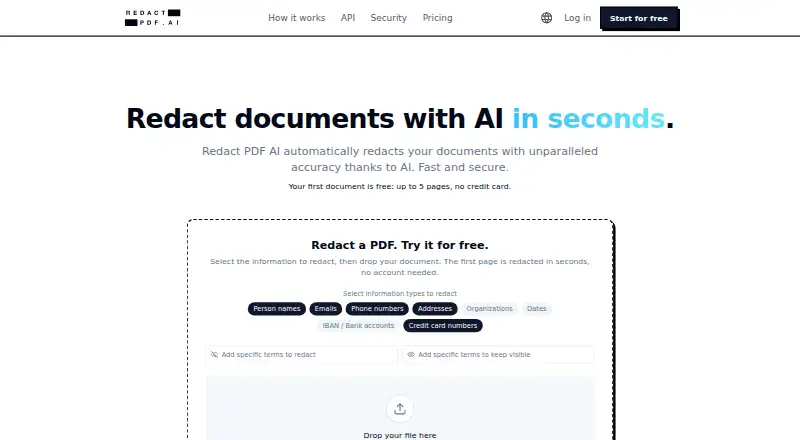
What Redact PDF AI is
Redact PDF AI detects personal and sensitive information in PDFs and image files, then applies redactions intended to be permanent. Users choose categories such as names, email addresses, phone numbers, dates, IBANs or card numbers. Built-in OCR handles scanned documents, and the service says it supports more than 100 languages, including mixed-language files. The Studio editor lets users refine marks, add highlights and rotate pages; excluded terms can be kept from masking. Multiple files can be processed together and downloaded as a ZIP. The features page lists PDFs up to 50 MB and documents of 1,000 or more pages. A REST API for asynchronous jobs, batch uploads, PII settings and retention controls is available on every plan under the same page quota. The maker says output pages are rasterized, embedding the redactions into pixels and removing recoverable text layers. Processing is on Microsoft Azure in Frankfurt and Switzerland North, with AES-256 at rest and TLS 1.2+ in transit. Files default to deletion after 14 days of inactivity, with shorter options available.
Good
- Detects selectable categories of sensitive information.
- OCR supports scanned documents and 100+ languages.
- Batch uploads can be downloaded as a ZIP.
- API is available on every plan.
- Default file deletion follows 14 days of inactivity.
Watch out
- Starter costs $50 a month.
- Business costs $250 a month.
- Prepaid credits are valid for 30 days.
Who it suits
It suits legal, accounting, real estate and healthcare professionals who handle sensitive documents. The OCR, language support and batch tools may also fit teams processing scanned or multilingual files.
Verdict
Redact PDF AI combines automated detection with editing and batch tools for documents and images. Review its page quotas and plan costs, and note that documents are processed in the cloud.
Plans and prices
From Redact PDF AI's own pricing page, checked 30 Sep 2026.
| Plan | Price | What it gives you |
|---|---|---|
| Prepaid Credits | $5, paid once | 50 pages credit · use for 30 days · quota top-up · First-time offer; $5 instead of $10 |
| Starter | $50 a month | 1,000 pages/month · PDF and image support · up to 1,000 pages per document · standard email support · Monthly |
| Business | $250 a month | 6,000 pages/month · up to 3 seats · priority phone and email support · Monthly |
| Enterprise | Priced on request | Uncapped pages · custom file formats, pipelines, and sources · SSO/SAML · unlimited seats · Contact sales |
The facts
Each one read from Redact PDF AI's own pages, with the date it was checked.
What it does
- API
- A REST API supports asynchronous jobs, batch uploads, PII controls, and configurable retention, and is available on every plan using the same page quota.checked 30 Sep 2026
- Batch processing
- Users can upload multiple files together and download the results as a ZIP archive.checked 30 Sep 2026
- Compliance
- The security page describes Azure infrastructure certifications including SOC 1, SOC 2, SOC 3, ISO 27017, and ISO 27018; it also says a DPA is available for business customers and a BAA can be discussed for healthcare.checked 30 Sep 2026
- Data location and encryption
- The maker says documents are processed on Microsoft Azure in Frankfurt and Switzerland North, with AES-256 encryption at rest and TLS 1.2+ in transit.checked 30 Sep 2026
- File types
- The service accepts PDFs and image files including JPG and PNG.checked 30 Sep 2026
- Integrations
- The maker links an official redact-pdf-mcp server on npm for use with Claude Code.checked 30 Sep 2026
- Intended users
- The maker describes use by legal, accounting, real estate, and healthcare professionals handling sensitive documents.checked 30 Sep 2026
- Large documents
- The features page says PDFs up to 50 MB and documents of 1,000+ pages are supported.checked 30 Sep 2026
- OCR and languages
- Built-in OCR supports scanned documents, and the service says it handles 100+ document languages, including mixed-language files.checked 30 Sep 2026
- PII detection
- Users can select categories including names, emails, phone numbers, addresses, organizations, dates, IBANs, and credit card numbers.checked 30 Sep 2026
- Purpose
- Redact PDF AI automatically detects and permanently redacts personal and sensitive information from documents.checked 30 Sep 2026
- Redaction output
- The security page says pages are rasterized and redactions are burned into pixels, removing recoverable text layers.checked 30 Sep 2026
- Review tools
- The Studio editor lets users adjust redactions, add highlights, and rotate pages; excluded terms can prevent specified words from being masked.checked 30 Sep 2026
- Support
- Starter includes standard email support, while Business includes priority phone and email support.checked 30 Sep 2026
- Training and retention
- The maker says customer documents are not used to train AI models and files default to automatic deletion after 14 days of inactivity, with 3-, 7-, or 14-day options.checked 30 Sep 2026
The full review of Redact PDF AI
Overview
Redact PDF AI is a cloud redaction service for teams and individuals who need to remove sensitive information from PDFs or images. Its strongest fit is document-heavy work where category-based detection, OCR and batch handling can reduce repetitive review; the trade-off is that documents are processed in the cloud.
It accepts PDFs, JPGs and PNGs, and can target names, email addresses, phone numbers, addresses, organizations, dates, IBANs and credit card numbers. Scanned pages are supported through OCR, and the service says it handles more than 100 languages, including mixed-language documents. For a broader comparison, browse Document Redaction Software.
The maker says completed pages are rasterized and redactions are burned into pixels, removing recoverable text layers. That is a meaningful safeguard against sharing a file whose black marks merely cover still-searchable text. It is not a local-processing tool: files are handled in the cloud.
Key features
- Selectable PII categories: Category controls let users focus detection on the information types relevant to a document, rather than treating every word as a candidate for masking.
- OCR for scans: Support for scanned pages and multilingual files makes the service more useful for mixed-source archives than a text-only workflow, though cloud processing may not suit every document policy.
- Studio editor: Users can adjust redactions, add highlights and rotate pages. Excluded terms can protect specified words from masking, giving reviewers a way to correct overbroad detection before exporting.
- Batch and large-file handling: Multiple files can be uploaded together and downloaded as a ZIP. The features page says PDFs up to 50 MB and documents of 1,000+ pages are supported, which suits substantial files and batch work.
- API access: The REST API supports asynchronous jobs, batch uploads, PII controls and configurable retention. It is included on every plan but draws from the same page quota, so automation does not add capacity.
- Security controls: The maker says processing runs on Microsoft Azure in Frankfurt and Switzerland North, with AES-256 encryption at rest and TLS 1.2+ in transit. Documents are not used to train AI models; automatic deletion follows 14 days of inactivity by default, with 3-, 7- or 14-day options. Azure infrastructure certifications include SOC 1, SOC 2, SOC 3, ISO 27017 and ISO 27018. Business customers can request a DPA, and a BAA can be discussed for healthcare.
The official redact-pdf-mcp server on npm is an additional route for using the service with Claude Code. As a cloud service, Redact PDF AI still depends on an organization being comfortable sending sensitive files to a provider.
Pricing
Paid plans are quota-based, and page use is shared by the web workflow and API.
- Prepaid Credits — $5, paid once: The first-time offer is $5 instead of $10 for 50 pages, usable for 30 days as a quota top-up. It is a low-commitment fit for occasional work, but 50 pages and the short use window make it unsuitable for a steady document queue.
- Starter — $50 a month: Includes 1,000 pages per month, PDF and image support, documents up to 1,000 pages, and standard email support. It suits an individual or small operation with predictable monthly volume; the quota is the main constraint for heavier use.
- Business — $250 a month: Raises the allowance to 6,000 pages per month and includes up to 3 seats plus priority phone and email support. This is the more practical tier for a small team that needs a larger shared allowance and faster support, but it costs five times Starter and still limits seats.
- Enterprise — custom pricing: Provides uncapped pages, custom file formats, pipelines and sources, SSO/SAML, and unlimited seats. It is aimed at larger deployments needing scale or organizational controls; contact sales for pricing.
Starter and Business are monthly plans. The service remains cloud-based at every tier, so paying for more pages does not change the processing model.
Platforms
Redact PDF AI is a cloud deployment with Android, iOS, macOS, Windows and web access, plus an API. That spread supports mixed-device use, while the API can connect automated workflows without a separate plan quota.
Who it's for
Legal, accounting, real estate and healthcare professionals are among the intended users. The combination of selectable PII categories, review controls and permanent pixel-level redaction is relevant when documents must be prepared for sharing, while the batch workflow and API favor recurring workloads. The cloud model is a poor fit where documents must remain on a local machine.
Pros and cons
Pros
- Broad document coverage: PDFs and common image formats, OCR, and stated support for 100+ languages cover scanned and mixed-language material.
- Review before export: Editable redactions, highlights, rotation and excluded terms provide useful correction tools around automated detection.
- Permanent output: Rasterization and pixel-burned redactions remove recoverable text layers, addressing a key risk of superficial black-box masking.
- Multiple ways to scale: Batch ZIP downloads and an API serve both manual and automated workflows, with larger page allowances on Business and uncapped pages on Enterprise.
Cons
- Cloud-only processing: Sensitive files leave the user’s device, making the service unsuitable for strict local-only requirements.
- Quota limits shape cost: Starter provides 1,000 pages monthly and Business 6,000; the API shares those limits, so integrations do not increase throughput.
- Business is a sizable step up: The $250.00 USD monthly fee buys 6,000 pages and at most three seats, which may be more than a solo user needs.
- Free and Enterprise pricing are less predictable: The free plan’s cap is unstated, while Enterprise requires a sales conversation.
Alternatives
- Philter is a better candidate when on-device redaction or self-hosting matters; its free desktop plan is for individual, non-commercial and evaluation use.
- BleachPDF suits readers who want free software that runs on their own computer, with Linux and macOS support rather than a cloud service.
- Docuflair Redact is worth comparing for organizations seeking a paid service with a free trial and broad platform support.
- PineThink Redact may fit personal single-document use on macOS or Windows; its free tier is limited to one document and personal use.
- PDFRedaction is a stronger fit for readers prioritizing local processing: its free web plan describes 100% local processing, OCR, image redaction and a 10-documents-per-day allowance for registered users.
- PrivacyScrubber is another free-tier web option, with usage limits based on characters, PDF pages and uploads.
- Excise is a free alternative for Linux, macOS or Windows.
- Objective RegWorks is a paid API, web and Windows option to consider for registration, licensing, compliance, investigation or enforcement work.
Verdict
Redact PDF AI is a strong choice for people and small teams handling recurring sensitive-document work who want OCR, editable automated redactions, batch processing and API access in one service. The permanent pixel-level output and configurable retention are compelling strengths, but cloud processing is the decisive limitation for local-only policies, and quotas should be matched carefully to monthly volume. Choose Starter for modest recurring use, Business when a small team needs more pages and priority support, and look elsewhere if keeping files on-device is mandatory.
Alternatives to Redact PDF AI
- 1
GroupDocs.Redaction
AndroidiOSWebAPI7.6$1,999 usage-based - 2

Redactable
Free planWebAPI7.4From $19 a month - 3

RedactLaw
Free planWebAPISelf-hosted7.4From $39 a month - 4
Docuflair Redact
AndroidiOSWebLinux7.2From €3,588 a year - 5
BleachPDF
Free planOpen sourceLinuxmacOSSelf-hosted7.0Free plan - 6
Excise
Free planAPILinuxmacOSWindows6.8Free plan