Excise
Excise is a free, open-source PDF editor for Windows, macOS, and Linux.
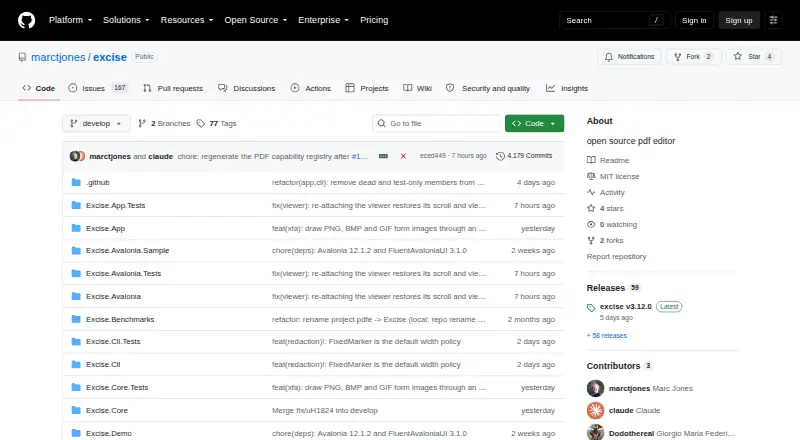
What Excise is
Excise is a free, open-source PDF editor for Windows, macOS, and Linux. It handles document tasks such as searching, copying selected text, organizing pages, adding annotations, and filling or flattening AcroForm fields. It can also create form fields and add Bates numbering. Its redaction engine removes text, images, and vector graphics from PDF content rather than hiding them under a black overlay. Redaction also removes metadata, attachments, JavaScript, thumbnails, and hidden layers by default, and reports what it removed. Command-line tools support batch workflows and stable JSON output, with checks for leaked redacted text and hidden text beneath overlays. Excise reads and writes AES-128 and AES-256 encryption and inspects digital signatures against the operating system trust store. Signature inspection does not check certificate revocation or assess timestamp and long-term validation material. Dynamic XFA layouts are experimental and cannot be filled. Builds are unsigned and not notarized, and there is no auto-update. The project describes its scope as an everyday PDF workbench, not a replacement for specialized Acrobat Pro workflows.
Good
- Redaction removes content rather than covering it.
- Redaction scrubs metadata and hidden document elements.
- CLI includes redaction leak and overlay checks.
- Reads and writes AES-128 and AES-256 encryption.
- Free, open-source, and cross-platform.
Watch out
- Digital signature inspection omits revocation checks.
- Dynamic XFA layouts are experimental and cannot be filled.
- Builds are unsigned and not notarized.
- No automatic updates.
Who it suits
Excise suits people who need PDF editing, form handling, and content-removing redaction on desktop systems. Its command-line tools and included developer libraries may also suit batch workflows or software projects.
Verdict
Excise combines everyday PDF editing with redaction and auditing tools, and is available at no cost. Check its limits around XFA, signature validation, and specialized print or JavaScript workflows before relying on it for those needs.
Plans and prices
From Excise's own pricing page, checked 8 Oct 2026.
| Plan | Price | What it gives you |
|---|---|---|
| Open source | Free | MIT licensed · no paid tiers stated |
The facts
Each one read from Excise's own pages, with the date it was checked.
What it does
- Annotation tools
- Yeschecked 20 Sep 2026
- Audit
- The CLI provides `unredact` to test whether redacted text still leaks and `audit` to find text hidden under opaque overlays.checked 8 Oct 2026
- Automation
- Excise includes a command-line tool with stable JSON output and batch workflows.checked 8 Oct 2026
- Developer libraries
- The repository includes managed-code PDF core and rendering libraries, an Avalonia viewer control, and a C ABI over Excise.Core.checked 8 Oct 2026
- Document cleanup
- Redaction scrubs metadata, attachments, JavaScript, thumbnails, and hidden layers by default and reports removals.checked 8 Oct 2026
- Downloads
- Self-contained packages are listed for Apple Silicon macOS, Windows 10/11 x64, Ubuntu/Debian, and x64 or ARM64 Linux.checked 8 Oct 2026
- Encryption and signatures
- Excise can read and write AES-128 and AES-256 encryption and inspect digital signatures against the operating system trust store.checked 8 Oct 2026
- Form creation
- Yeschecked 20 Sep 2026
- Forms
- Excise can fill and flatten AcroForm fields and create new fields; dynamic XFA layouts are experimental and XFA fields cannot be filled.checked 8 Oct 2026
- Integrations
- The project documents OCR using the system Tesseract and lists mutool and pdftotext as independent tools used to check redaction results.checked 8 Oct 2026
- Libraries and API
- The project includes managed PDF libraries, an Avalonia PDF viewer control, and a C ABI over Excise.Core for other languages.checked 8 Oct 2026
- Notable limitation
- Excise describes its scope as an everyday PDF workbench and says it is not an Acrobat Pro replacement for prepress, color-managed print production, JavaScript workflows, portfolio workflows, or certificate-authority trust decisions.checked 8 Oct 2026
- OCR
- Yeschecked 20 Sep 2026
- PDF conversion
- Nochecked 20 Sep 2026
- PDF tools
- The app supports PDF viewing, search, text selection and copying, page organization, annotations, Bates numbering, and file size reduction.checked 8 Oct 2026
- PDF workflows
- The app supports search, text selection and copying, annotations, page organization, AcroForm filling and flattening, and Bates numbering.checked 8 Oct 2026
- Product
- Excise is an open-source, cross-platform PDF editor for macOS, Windows, and Linux.checked 8 Oct 2026
- Redaction
- Its redaction engine removes text, images, and vector graphics from PDF content streams rather than covering them with a black box.checked 8 Oct 2026
- Redaction audit
- The `excise unredact` command checks whether a supposedly redacted PDF still leaks text, and `excise audit` detects text hidden beneath opaque overlays.checked 8 Oct 2026
- Release caveat
- Builds are not signed or notarized and have no auto-update; release assets include SHA-256 files for verification.checked 8 Oct 2026
- Security features
- It reads and writes AES-128 and AES-256 encryption and inspects digital signatures against the operating system trust store.checked 8 Oct 2026
- Security scope
- The project describes itself as not an Acrobat Pro replacement for prepress, color-managed print production, JavaScript workflows, portfolio workflows, or certificate-authority trust decisions.checked 8 Oct 2026
Money
- Free plan
- Yeschecked 20 Sep 2026
The company
- Maker
- The GitHub profile identifies the maintainer as Marc Jones and lists Hartford, Connecticut; it does not state a founding date.checked 8 Oct 2026
The full review of Excise
Overview
Excise is a free, open-source PDF editor for Windows, macOS and Linux, with a command-line interface for batch work. It suits people who want everyday PDF tools alongside content-removing redaction and ways to check for leaks. Its practical appeal is that redaction changes the document content rather than merely hiding it; its scope is not a fit for specialized print or JavaScript workflows.
Key features
Redaction and audit
Excise removes redacted text, images and vector graphics from PDF content streams instead of laying a black box over them. It also scrubs metadata, attachments, JavaScript, thumbnails and hidden layers by default, and reports what it removes. That combination is useful when disclosure risk matters, though redaction should not be treated as a substitute for checking the resulting file: the CLI's unredact command tests for surviving redacted text, while audit looks for text hidden beneath opaque overlays.
PDF work and forms
For routine document handling, Excise supports viewing, search, text selection and copying, annotations, page organization, Bates numbering and file-size reduction. It can fill and flatten AcroForms and create new form fields. OCR uses the system's Tesseract installation. These are a useful spread of workbench features, but Excise does not offer text editing or PDF conversion, so it is not a full replacement for software centered on rewriting document text or changing formats.
Automation and security
The command-line tool supports batch workflows and stable JSON output, which makes Excise more practical for repeatable processing than a desktop-only editor. The repository also includes managed-code PDF core and rendering libraries, an Avalonia viewer control and a C ABI over Excise.Core for other languages. It reads and writes AES-128 and AES-256 encryption, and inspects digital signatures against the operating system trust store. Signature inspection does not check certificate revocation or evaluate timestamp and long-term validation material, so it is not a basis for certificate-authority trust decisions.
Pricing
Excise's Open source plan costs nothing and is MIT licensed. No paid tiers are stated, so there is no cheaper tier that trades away features or a paid upgrade to budget for. The price makes it an appealing option for individuals and teams seeking a no-cost PDF workbench, but the available facts do not establish seat allowances, quotas or a support service.
Platforms
Excise supports Windows, macOS and Linux, with self-contained packages for Apple Silicon macOS, Windows 10/11 x64, Ubuntu/Debian and x64 or ARM64 Linux. Its OCR integration relies on system Tesseract. Release builds are not signed or notarized and do not auto-update; SHA-256 files are provided for verifying release assets.
Who it's for
Excise is best suited to people who need regular PDF viewing, annotation, page organization or AcroForm handling, and especially to those who want redaction that removes content with CLI checks for common leak paths. Its batch workflows and libraries also make it relevant to developers integrating PDF processing. It is the wrong choice for dynamic XFA forms: those layouts are experimental, may omit or move content, and cannot be filled in Excise. It also disclaims prepress, color-managed print production, JavaScript workflows and portfolio workflows, so users whose documents depend on those capabilities should look elsewhere.
Pros and cons
- Pro: Redaction removes underlying content and scrubs several related hidden-data sources, rather than relying on a visual cover-up.
- Pro: CLI audit commands and batch workflows give security-conscious users and developers ways to check files and automate repeat work.
- Pro: The free MIT-licensed plan includes everyday editing, annotations, forms and encryption support without a stated paid tier.
- Con: XFA fields cannot be filled, and experimental XFA rendering may omit or reposition content.
- Con: Signature checks omit revocation and long-term validation checks, limiting their value for high-assurance trust decisions.
- Con: Unsigned, unnotarized builds and no auto-update require users to verify and manage releases themselves; specialized print and JavaScript workflows are outside its scope.
Alternatives
Document Redaction Software and PDF editors are useful category pages for comparing more options.
- LocalRedact is another free option, with an AGPL-3.0-only Python package and optional local HTTP service; consider it if that packaging better suits your workflow.
- GroupDocs.Redaction is a paid option with a free plan and trial across desktop, mobile, web and self-hosted platforms; consider it if you need a broader platform range.
- Philter offers free personal, non-commercial and evaluation use with on-device redaction; consider it for that specific use case.
- BleachPDF is free, runs on your own computer and supports Linux and macOS; consider it if those platforms and local execution fit your needs.
- Docuflair Redact is a paid, cross-platform option with a free trial; consider it if you prefer a trial before committing to a paid tool.
- PineThink Redact has a free single-document personal-use plan and a paid tier at $6.99 a month after a 14-day free trial; consider it for occasional personal redaction or if you want a trial-based upgrade path.
- PDFRedaction is a web option whose free plan allows 10 documents per day for registered users, with local processing, OCR and image redaction; consider it if browser access and that daily allowance suit you.
- Redact PDF AI offers prepaid credits and a freemium model; consider it if a credit-based option fits your usage.
Verdict
Choose Excise if you want a no-cost, cross-platform PDF workbench whose redaction removes content and includes CLI checks for leaks. The combination of everyday PDF tools, automation and auditing is its strongest reason to choose it. Look elsewhere for fillable XFA forms, signature validation that checks revocation and long-term material, or specialized print and JavaScript work.
Getting started
- Visit the Excise GitHub repository.
- Download the package for Apple Silicon macOS, Windows 10/11 x64, Ubuntu/Debian, or x64 or ARM64 Linux.
- Install and open the graphical app, or use the command-line tool.
- For release assets, use the included SHA-256 files to verify downloads.
- Use the command-line audit tools to check redaction results when needed.
Limits worth knowing
Dynamic XFA layouts are experimental, may omit or move content, and cannot be filled in Excise. Signature inspection does not check certificate revocation or evaluate timestamp and long-term validation material.
Questions
Is Excise free?
Yes. The open-source plan is free under the MIT license, with no paid tiers stated.
Which platforms does Excise support?
Excise supports Windows, macOS, and Linux. Packages are listed for Apple Silicon macOS, Windows 10/11 x64, Ubuntu/Debian, and x64 or ARM64 Linux.
Can Excise create or fill PDF forms?
It can create new AcroForm fields and fill and flatten AcroForms. Dynamic XFA layouts are experimental and cannot be filled in Excise.
How does Excise handle redaction?
It removes text, images, and vector graphics from PDF content streams. By default, it also scrubs metadata, attachments, JavaScript, thumbnails, and hidden layers.
Does Excise check digital signatures?
It inspects signatures against the operating system trust store. The checks do not cover certificate revocation, timestamps, or long-term validation material.
Who maintains Excise?
The GitHub profile identifies Marc Jones as the maintainer and lists Hartford, Connecticut.
Alternatives to Excise
- 1
GroupDocs.Redaction
AndroidiOSWebAPI7.6$1,999 usage-based - 2

Redactable
Free planWebAPI7.4From $19 a month - 3

RedactLaw
Free planWebAPISelf-hosted7.4From $39 a month - 4
Docuflair Redact
AndroidiOSWebLinux7.2From €3,588 a year - 5
BleachPDF
Free planOpen sourceLinuxmacOSSelf-hosted7.0Free plan - 6
Redact PDF AI
AndroidiOSWebAPI6.7From $50 a month