JustCall Sales Dialer
JustCall Sales Dialer helps sales teams prioritize leads, place calls, and manage follow-up.
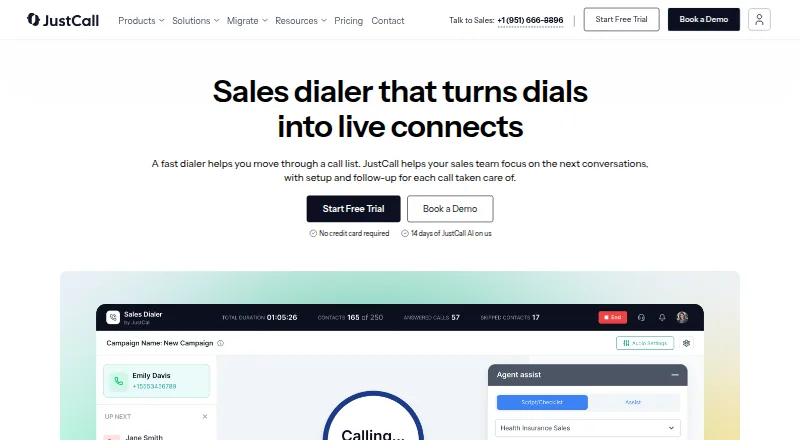
What JustCall Sales Dialer is
JustCall Sales Dialer helps sales teams prioritize leads, place calls, and manage follow-up. It offers Auto, Predictive, and Dynamic dialing modes, and lets users move priority leads and scheduled callbacks to the top of a queue. Reattempts, callbacks, and follow-ups can be based on call outcomes. The product describes tools for managing number health, caller identity, and call volume, alongside rep and campaign analytics, live call monitoring, and shared scorecards for coaching. During the trial, users can import contacts from Salesforce, HubSpot, and Pipedrive. JustCall advertises a 14-day trial with SalesPro features. The product is available across Android, iOS, macOS, Windows, web, API, and extension platforms. Listed plans include Team at $29 a month and Pro at $49 a month, both billed annually; Pro Plus is $89 a month, billed annually. Business and SalesPro pricing is not listed. Sales Dialer is available on Pro, Pro Plus, Business, and SalesPro, with a trial for users on other plans. The desktop app is not supported on Linux, and the web app is not compatible with iPads.
Good
- Offers Auto, Predictive, and Dynamic dialing
- Prioritizes leads and scheduled callbacks
- Automates follow-up based on call outcomes
- Includes live monitoring and shared call scorecards
- Advertises a 14-day SalesPro-feature trial
Watch out
- No free plan
- Desktop app is not supported on Linux
- Web app is not compatible with iPads
- Listed Team and Pro prices require annual billing
Who it suits
JustCall Sales Dialer suits sales teams that need lead queues, outcome-based follow-up, calling analytics, and coaching tools. Its listed integrations with Salesforce, HubSpot, and Pipedrive may suit teams using those CRMs.
Verdict
JustCall Sales Dialer combines dialing options with queue prioritization, outcome-based follow-up, analytics, and coaching features. Note the platform limits and that listed Team and Pro pricing is billed annually.
Plans and prices
From JustCall Sales Dialer's own pricing page, checked 14 Oct 2026.
| Plan | Price | What it gives you |
|---|---|---|
| Team | $29 a month | minimum 2 licenses · no Sales Dialer access · annually per user |
| Pro | $49 a month | minimum 2 licenses · Power Dialer included · annually per user |
| Pro Plus | $89 a month | minimum 2 licenses · Power and Predictive Dialer features · annually per user |
| Business | Priced on request | custom plan · minimum 2 licenses · enterprise compliance and SSO · monthly or annually |
| SalesPro | Priced on request | minimum 2 licenses · Power, Dynamic and Predictive Dialers · predictive dialing up to 10 lines · unlimited outbound calling · monthly or annually |
The facts
Each one read from JustCall Sales Dialer's own pages, with the date it was checked.
What it does
- Analytics
- Campaign and agent dashboards report connects, dispositions, talk time and call outcomes.checked 14 Oct 2026
- Analytics and coaching
- The product page describes rep and campaign outcome analytics, live call monitoring, and shared call scorecards for coaching.checked 29 Sep 2026
- API access tier
- The developer setup guide states that API and webhook access is available from the Team plan upward.checked 14 Oct 2026
- API and webhooks
- JustCall publishes REST API reference documentation, code examples, release logs and webhook event documentation.checked 14 Oct 2026
- Automation
- Sales Dialer supports reattempts, callbacks, and follow-ups based on call outcomes.checked 29 Sep 2026
- Broader integrations
- The integrations page states that JustCall has 70+ native integrations, Zapier connectivity to 6,000+ apps, and an open API.checked 29 Sep 2026
- CRM integrations
- The integration directory lists more than 70 native integrations, including HubSpot, Salesforce, Pipedrive, Zoho, Zendesk and Freshdesk.checked 14 Oct 2026
- Data protection
- JustCall says it uses TLS/SSL and AES 256 encryption for data in transit and at rest and performs daily backups.checked 29 Sep 2026
- Dialer embedding
- Developers can embed a slim dialer in their own CRM through a popup URL scheme and receive custom metadata through webhooks.checked 14 Oct 2026
- Dialing modes
- The product provides Auto/Power, Predictive and Dynamic dialing modes.checked 14 Oct 2026
- Documentation and support
- The help center has a Sales Dialer collection with 18 articles covering campaigns, analytics, workflows, number health, dispositions and calling controls.checked 14 Oct 2026
- Dynamic Dialer
- Dynamic Dialer continuously adds new CRM leads to an active campaign and prioritizes them.checked 14 Oct 2026
- Follow-up automation
- Call outcomes can trigger retries, callbacks, voicemail drops, messages and do-not-call actions.checked 14 Oct 2026
- Funding and backing
- LinkedIn says JustCall is backed by Peak XV, Base10 Partners and Eight Roads Ventures.checked 14 Oct 2026
- Lead prioritization
- The product page says users can put priority leads and scheduled callbacks at the top of the queue.checked 29 Sep 2026
- Legal entity
- The terms identify the provider as SaaS Labs US, Inc., a Delaware corporation with a San Francisco principal office.checked 14 Oct 2026
- Licence
- Terms grant customers a limited, non-exclusive licence to use the hosted service and downloadable software; an open-source licence is not provided.checked 14 Oct 2026
- Limit: call reliability
- G2 review analysis repeatedly mentions missed calls, delayed or missing interface events, connection problems, dropped calls and lag.checked 14 Oct 2026
- Limit: onboarding and support
- Trustpilot reviewers report slow communication, difficult migrations, unclear onboarding and trouble reaching effective human support.checked 14 Oct 2026
The company
- Company
- LinkedIn lists JustCall as a privately held SaaS Labs company founded in 2016, headquartered in Palo Alto, California, with 201–500 employees.checked 14 Oct 2026
- Founded
- 2016checked 23 Sep 2026
- Headquarters
- San Francisco, California, United Stateschecked 23 Sep 2026
Money
- Free plan
- Nochecked 19 Sep 2026
- Limit: billing and refunds
- GetApp reviews include complaints about being charged for unused service, automatic renewal and difficult or limited refunds.checked 14 Oct 2026
The full review of JustCall Sales Dialer
Overview
JustCall Sales Dialer is a sales calling tool for teams that need to prioritize leads, place calls, and manage follow-up. It suits teams that want multiple dialing modes alongside queue controls and coaching, but its plan availability and platform restrictions deserve attention.
The combination of predictive dialing, outcome-based follow-up, analytics, and call monitoring makes it more than a basic power dialer. It is a stronger fit for teams with an established calling process than for individuals seeking a free or narrowly scoped calling tool.
Key features
Dialing and queue control
Auto, Predictive, and Dynamic modes give teams options for how calls are placed. Priority leads and scheduled callbacks can move to the top of the queue, which helps reps focus on the next most important contact rather than working an undifferentiated list. Predictive dialing supports up to 10 lines, a substantial parallel-calling option for teams whose workflow suits it.
Follow-up and number management
Reattempts, callbacks, and follow-ups can be triggered by call outcomes, reducing the need to manage each next step manually. Number-health and caller-identity tools address the operational side of outbound calling, while voicemail automation and voicemail drop support faster handling of unanswered calls.
Analytics, coaching, and integrations
Rep and campaign outcome analytics help managers review calling activity; live call monitoring and shared scorecards add a coaching layer. Salesforce, HubSpot, and Pipedrive contacts can be imported during the trial. JustCall also offers 70+ native integrations, Zapier connectivity to 6,000+ apps, and an open API, which should help teams connect the dialer to broader workflows.
JustCall lists ISO 27001:2022 and SOC 2 Type 2 certifications and compliance with PCI DSS v4.0 Level 3 requirements. It says data is protected with TLS/SSL in transit and AES 256 at rest, with daily backups. Support is available through in-app chat and [email protected].
Pricing
There is no free plan. JustCall advertises a 14-day trial with access to SalesPro features; users on other plans can also get a trial. Sales Dialer is available on Pro, Pro Plus, Business, and SalesPro, so buyers should check plan fit before committing.
| Plan | Price and terms | What it includes |
|---|---|---|
| Team | $29 a month (billed annually) | Business phone system with CRM integrations; no dialer is stated among its inclusions. |
| Pro | $49 a month (billed annually) | Power dialer, advanced analytics and reporting, and Salesforce CTI integration. |
| Pro Plus | $89 a month (billed annually) | Power dialer, AI coaching and tracking, and advanced analytics and reporting. |
| Business | Custom pricing | Power dialer and enterprise features. |
| SalesPro | Custom pricing | Predictive dialer up to 10 lines, power and dynamic dialing, voicemail automation suite, and unlimited outbound calling. |
Pro is the entry point for a stated power dialer and advanced reporting; Pro Plus adds AI coaching and tracking. Team costs less but its stated inclusions do not include a dialer. Business and SalesPro may suit buyers seeking enterprise features or higher-capacity dialing, but require a custom quote. The trial is short at 14 days, so teams should assess the calling modes and integrations they need during that period.
Platforms
JustCall supports Android, iOS, macOS, Windows, web, browser extension, and API access. The desktop app does not support Linux, and the web app is not compatible with iPads—meaning neither is a fit for those device setups.
Who it's for
Sales teams that work prioritized lead queues, need outcome-driven callbacks, or want managers to monitor and coach calls should consider it. Teams that need predictive calling can use the SalesPro plan’s stated limit of up to 10 lines, while buyers who mainly need a basic business phone system may find the dialer-focused plans more than they require. Linux desktop users and iPad web users should look elsewhere.
Pros and cons
- Pros: Auto, Predictive, and Dynamic modes offer more than one outbound workflow.
- Pros: Priority queues and outcome-based follow-up help structure rep work and callbacks.
- Pros: Call monitoring, scorecards, and analytics give managers tools to review performance and coach.
- Cons: There is no free plan, and the trial lasts 14 days.
- Cons: The advertised entry Team plan does not state that it includes a dialer; the stated dialer plans begin with Pro.
- Cons: Business and SalesPro require custom pricing, making their costs less straightforward to compare.
- Cons: Linux desktop and iPad web use are unsupported.
Alternatives
Browse Sales Dialer Software if you want to compare the category, or Voicemail Drop Software and Business Phone Systems if those are your primary needs.
- CallTools is a paid alternative with a Power Contact Center plan offering unlimited local and domestic long-distance inbound and outbound minutes.
- DialerBee is worth comparing if you want a paid dialer with a free trial and a Starter plan at $69 a month, billed monthly, for up to 20 agents.
- Predictive Dialer is another paid option with a free trial and a Click-to-Call plan at $49 a month per user.
- Channels is a freemium alternative with a free plan and web, iOS, and Android support.
- Salesfinity is a paid alternative with a Gold plan at $299 a month per user for 1–5 sales reps and up to five parallel lines.
- Adversus is a paid option priced at €152 a month billed annually, with a three-license minimum.
- PhoneBurner offers a paid plan with a free trial; its Standard plan is $140 a year when billed annually.
- Power Dialer is another paid option with a free trial and a Click-to-Call plan at $49 a month per seat.
Verdict
Choose JustCall Sales Dialer if your team needs prioritized outbound queues, multiple dialing modes, structured follow-up, and manager coaching in one calling workflow. Its main drawback is the gap between the lower-cost Team plan and the plans that state dialer features, compounded by custom pricing for SalesPro and Business. If you need a free plan, use Linux or iPad web, or want simpler price comparisons, look elsewhere.
Getting started
- Open the JustCall Sales Dialer website
- Choose a supported platform such as Android, iOS, macOS, Windows, web, API, or extension
- Start the advertised 14-day trial with SalesPro features
- Import contacts from Salesforce, HubSpot, or Pipedrive during the trial
- Select a plan such as Pro, Pro Plus, Business, or SalesPro
- Configure dialing modes, queue priorities, and follow-up automation
Limits worth knowing
There is no free plan. The advertised trial lasts 14 days, while SalesPro predictive dialing supports up to 10 lines; annual pricing starts at $49/user/month.
Questions
Is there a free plan?
No. JustCall Sales Dialer is paid, with a 14-day trial available.
What does the trial include?
The advertised 14-day trial provides access to SalesPro features.
Which platforms are supported?
Platforms listed are Android, iOS, macOS, Windows, web, API, and extension.
Does it integrate with CRM systems?
Contacts can be imported from Salesforce, HubSpot, and Pipedrive during the trial. JustCall also lists more than 70 native integrations, Zapier connectivity to over 6,000 apps, and an open API.
What does Pro cost?
The Pro plan costs $49 a month when billed annually.
Is it available on Linux or iPad?
The desktop app is not supported on Linux, and the web app is not compatible with iPads.
Alternatives to JustCall Sales Dialer
- 1

Callingly
AndroidiOSWebAPI7.7From $80 a month - 2

Callmaker
Free planWebAPImacOSWindows7.4From €69 a year - 3

ConnectAndSell
Free planWebExtension7.4From $300 a month - 4
PowerDialer.ai
AndroidiOSWebAPI7.0From $45 a month - 5

Adversus
WebAPI6.9From €152 a month - 6

DialerBee
AndroidiOSWebAPI6.8From $69 a month