jAlbum
jAlbum is desktop software for making photo and video gallery websites from local media.
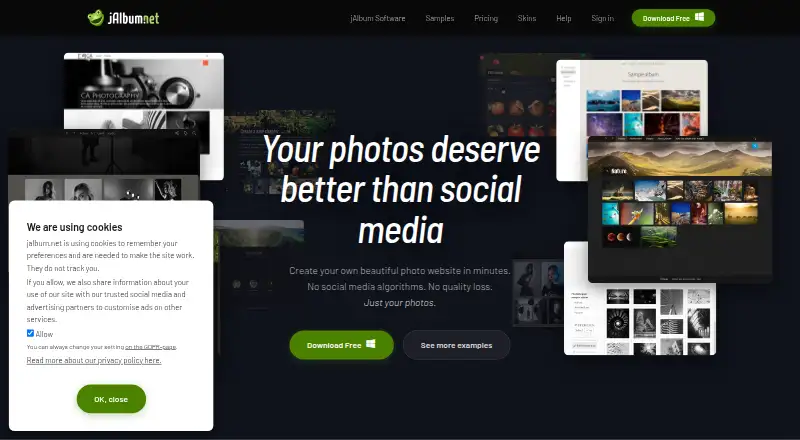
What jAlbum is
jAlbum is desktop software for making photo and video gallery websites from local media. Finished galleries can be published to a personal website through its FTP client or hosted on a jalbum.net account. Its built-in image editor supports cropping, sharpening, level adjustments, automatic correction, watermarks and batch processing. The organizer can arrange photos by date or location, remove duplicates and add tags. Users can select and customize from hundreds of album templates, called skins, to shape a gallery's presentation. jAlbum says generated albums do not depend on server-side scripting. The free license is listed as free and allows galleries with up to 24 objects; the maker also notes gallery size may be constrained by computer memory. Listed platforms include Android, iOS, Linux, macOS, web and Windows, though desktop is identified as the primary platform. Standard and Pro licenses include one year of priority email support, with replies within 24 hours on business days. The maker names photographers, artists, businesses, organizations and families as potential users.
Good
- Includes cropping, watermarks and batch processing.
- Organizes images by date and location.
- Offers hundreds of customizable album templates.
- Publishes through FTP or a jalbum.net account.
Watch out
- Free galleries are limited to 24 objects.
- Gallery size may depend on computer memory.
- Cloud sync is not available.
Who it suits
jAlbum may suit photographers, artists, families and organizations who want to turn local photos or videos into customizable web galleries. It also offers tools for sorting, editing and publishing media.
Verdict
jAlbum combines local-media organization and editing with gallery creation and publishing. The free license has a clear object limit, so check whether it fits the size of your planned galleries.
Plans and prices
From jAlbum's own pricing page, checked 7 Oct 2026.
| Plan | Price | What it gives you |
|---|---|---|
| Free | Free | Max. 24 objects · Forever · own-site storage |
| Power Account | — | 100 GB storage · commercial use · unlimited upgrades · custom domains · 100s of skins · monthly, yearly or two-year storage billing; page shows 15% annual and 32% two-year discounts |
| Premium Account | — | 10 GB storage · non-commercial use · unlimited upgrades · up to two custom domains · 100s of skins · monthly, yearly or two-year storage billing; page shows 15% annual and 32% two-year discounts |
| Pro License | — | commercial and non-commercial use · unlimited uploads · shopping-cart skin features · ad-free galleries · one-time license; one year of updates and support |
| Standard License | — | non-commercial use · unlimited uploads · ad-free galleries · dozens of skins · one-time license; one year of updates and support |
| Super Account | — | 300 GB storage · commercial use · unlimited upgrades · custom domains · 100s of skins · monthly, yearly or two-year storage billing; page shows 15% annual and 32% two-year discounts |
The facts
Each one read from jAlbum's own pages, with the date it was checked.
Where it runs
- Android app scope
- Google Play describes the Android app as a supplementary lite client with limited functionality compared with the desktop application.checked 15 Oct 2026
- Android complaints
- Google Play reviews report crashes, inability to update albums on users' own servers and earlier Android 12 folder-opening problems.checked 15 Oct 2026
What it does
- API surface
- The public Javadoc API exposes packages for components, filters, metadata, FTP/SFTP remote filesystems, scripting, views and related modules.checked 15 Oct 2026
- Audience
- The maker describes photographers, artists, businesses, organizations, and families as potential users.checked 7 Oct 2026
- Data deletion
- The GDPR page says personal data are deleted within 60 days after account closure.checked 15 Oct 2026
- Data handling
- jAlbum says it collects account email, name, username, and certain IP addresses, and deletes personal data within 60 days after account closure.checked 7 Oct 2026
- Developer extensibility
- The developer center documents skin creation, plugins, scripting, JSON data, tags, variables, Groovy and Java API/Javadoc resources.checked 15 Oct 2026
- Drag-and-drop workflow
- The application accepts drag-and-drop photos and videos, folder organization, captions and context-menu actions.checked 15 Oct 2026
- Editing
- The built-in image editor supports cropping, sharpening, level adjustments, auto-correction, watermarks, and batch processing.checked 7 Oct 2026
- Funding
- LinkedIn shows one funding round, a Series B dated November 16, 2008, with Nordic Venture Partners listed as investor.checked 15 Oct 2026
- Gallery generation
- A single Make action batch-processes images, scales them for the web and creates the gallery pages.checked 15 Oct 2026
- Generated galleries
- jAlbum says its generated albums do not rely on server-side scripting.checked 7 Oct 2026
- Help and support
- Official help includes tutorials, manuals, FAQ, developer center and a user forum, while paid licenses advertise priority email replies within 24 business hours.checked 15 Oct 2026
- Hosting flexibility
- Generated galleries can be uploaded through built-in FTP to any website or hosted on jalbum.net, with no server-side code required.checked 15 Oct 2026
- Image editing
- Editing includes captions, filters, crop, straighten, gamma, levels, artistic effects and text overlays while leaving originals untouched.checked 15 Oct 2026
- Image protection
- The software supports batch watermarks, copyright metadata, web-sized copies and optional right-click-save suppression in supported skins.checked 15 Oct 2026
- Integrations
- The jAlbum community site says users can connect with Facebook or Twitter to share albums.checked 7 Oct 2026
- Java requirement
- Installer packages bundle Java; unbundled ZIP versions require at least Java 18.checked 15 Oct 2026
- Large collections
- The maker says jAlbum handles galleries ranging from typical 70-image projects to portfolios containing 10,000–100,000 images.checked 15 Oct 2026
- Latest release
- Release notes state that jAlbum 40 launched on October 12, 2026 with rewritten image tools, local face recognition and tag-based grouping.checked 15 Oct 2026
The company
- Company history
- Founder David Ekholm started jAlbum in 2002 after finding existing photo-album software inadequate.checked 15 Oct 2026
- Company size
- LinkedIn lists jAlbum.net as privately held with 2–10 employees.checked 15 Oct 2026
- Founded
- 2002checked 28 Sep 2026
- Headquarters
- Stockholm, Swedenchecked 28 Sep 2026
The full review of jAlbum
jAlbum is desktop software for turning local photos and videos into publishable galleries. It suits photographers, artists, families, and organizations that want to prepare and present selected media on a website. Its appeal is the combination of organization, editing, and publishing; the free license’s 24-object ceiling quickly rules it out for larger galleries.
Overview
jAlbum takes media on a computer and builds photo and video gallery websites for a personal site or a jAlbum account. That makes it a presentation tool as much as a photo manager: users can choose how a gallery looks and where it is hosted. Generated galleries do not rely on server-side scripting, and an included FTP client can upload them to existing web hosting.
The workflow favors deliberate, locally managed galleries over a cloud-synced library. jAlbum has no cloud sync, so readers who want automatic synchronization across devices should look elsewhere. The free license is appropriate for a small selection, but its 24-object maximum is restrictive for a substantial album; gallery size may also be limited by the computer’s memory.
Key features
Organize and prepare media
The organizer can sort photos by date and location, remove duplicates, and add tags. RAW support, face recognition, and metadata tools extend its photo-management capabilities. The built-in editor handles cropping, sharpening, level adjustments, automatic correction, watermarks, and batch processing. Together, these tools help users select and prepare images before publication, although the central purpose remains building galleries rather than syncing a general-purpose library.
Choose a presentation and publish
Hundreds of templates, known as skins, provide options for gallery presentation and can be customized. Users can publish through FTP to their own hosting or to a jAlbum account, and the community site supports sharing albums through Facebook or Twitter. The choice of own-site publishing is useful for users who already manage a website; hosted accounts offer a simpler destination for those who do not want to upload galleries themselves.
Pricing
The Free plan costs nothing, lasts forever, and allows galleries of up to 24 objects with own-site storage. It is a sensible way to make a compact gallery, but the object cap is the main constraint for anyone publishing more than a small selection.
Paid options split between licenses for own-site publishing and accounts with hosted storage. The Standard License has custom pricing and includes non-commercial use, unlimited uploads, own-site storage, and one year of updates and support. The Pro License also has custom pricing; it adds commercial use and shopping cart features while including unlimited uploads, own-site storage, and one year of updates and support. Standard suits personal or other non-commercial publishing, while Pro is the relevant license for commercial galleries and sales features. Standard and Pro include one year of priority email support, with replies within 24 hours on business days.
Hosted accounts have custom pricing. The Premium Account provides 10 GB of storage, non-commercial use, a Standard license, and priority email support. The Power Account provides 100 GB of storage and commercial features. The Super Account provides 300 GB, a Pro license, commercial use, and a shopping cart. These tiers suit users who want jAlbum-hosted galleries, with the larger accounts aimed at greater storage needs and commercial use. The free plan’s own-site storage and 24-object limit are the key trade-offs for readers deciding whether to move to a paid option.
Platforms
jAlbum’s primary platform is desktop, with versions for Windows, macOS, and Linux. Android, iOS, and web are also supported. That range gives readers several ways to access the service, though its gallery creation workflow is centered on desktop software.
Who it's for
jAlbum is a strong fit for photographers and artists who want to curate, edit, and publish galleries, and for families, businesses, and organizations that need a designed presentation for photos or videos. It is less suitable for people seeking a continuously synced photo library, or anyone who needs more than 24 objects in a free gallery.
Pros and cons
- Pros: Local organization, editing, and gallery creation sit in one workflow, including RAW support, face recognition, metadata tools, and batch processing.
- Pros: Hundreds of customizable skins and FTP publishing give users control over gallery presentation and their own hosting.
- Pros: Generated galleries do not rely on server-side scripting, which suits straightforward website publishing.
- Cons: The free license stops at 24 objects per gallery, too small for many full albums.
- Cons: There is no cloud sync, so jAlbum is not a fit for readers who prioritize an automatically synchronized library.
- Cons: Paid plans use custom pricing, making it harder to compare the cost of hosted storage or commercial features in advance.
Alternatives
Ente Photos is a freemium option across Android, iOS, Linux, macOS, web, and Windows, with a free plan offering 10 GB, one replica, and 100 Locker items. Consider it when a cross-platform photo service and a stated free storage allowance matter more than jAlbum’s gallery publishing workflow.
PhotoPrism offers a free, self-hosted Community plan with unlimited storage and instances, AGPL open-source software, and community support. It is the alternative to consider when self-hosting and storage without a stated cap are priorities.
Lomorage is free software for Android, iOS, Linux, macOS, self-hosted, web, and Windows use; it requires external storage and has no rate or account-number limit. Choose it when free software and bringing your own storage are central requirements.
Amazon Photos has a free plan with 5 GB of shared photo and video storage, and an Amazon Prime benefit with unlimited full-resolution photo storage. It may suit readers whose priority is hosted photo storage within those terms.
Tonfotos has a free license for lifetime use with full functionality and a limited number of people on photos. It is an alternative for readers who want that desktop photo-management model rather than gallery website publishing.
Flickr offers a free plan with 1,000 public photo and video uploads shown with ads, plus a Pro plan for $8 a month billed annually with unlimited uploads. Consider it when a public photo-sharing service and its upload limits or Pro plan fit better than publishing galleries through jAlbum.
Synology Photos is free and requires a Synology NAS. It is suited to readers who already have that hardware and want a photo service tied to it.
Damselfly is free, open-source, and self-hosted, for readers who prefer that setup.
Browse Photo Management Software for more options.
Verdict
Choose jAlbum if you want a desktop workflow for organizing and editing local media, designing a gallery, and publishing it to your own site or a jAlbum account. Its breadth makes it a compelling fit for people presenting curated work, especially when FTP publishing and customizable skins matter. Look elsewhere if cloud sync is essential or if you need a large free gallery: the 24-object cap is a hard limit, and paid plan prices require a custom quote.
Getting started
- Visit https://jalbum.net/en/.
- Review the listed platforms: Android, iOS, Linux, macOS, web, and Windows.
- Select the Free license or review the listed account and license options.
- Organize and edit local media, then choose and customize a gallery skin.
- Publish with the FTP client to web hosting or to a jAlbum account.
Limits worth knowing
The Free license allows galleries of at most 24 objects, and gallery size may otherwise be constrained by computer memory. Its listed plan includes own-site storage.
Questions
Is jAlbum free?
Yes. The Free license is listed as lasting forever.
What does the free license include?
It allows galleries of at most 24 objects and lists own-site storage.
Where can I publish galleries?
Users can upload galleries to web hosting with the included FTP client or publish them to a jAlbum account.
What platforms does jAlbum list?
It lists Android, iOS, Linux, macOS, web, and Windows, with desktop as the primary platform.
Can jAlbum be used for commercial work?
The Pro License, Power Account, and Super Account list commercial use or commercial features. The Standard License is listed for non-commercial use.
Does jAlbum offer cloud sync?
No. The listed cloud sync status is no.
Alternatives to jAlbum
- 1

Ente Photos
Free planOpen sourceAndroidiOSWebLinux8.6From $2.49 a month - 2
Lychee
Free planOpen sourceAndroidiOSWebAPI8.5Free plan - 3

Google Photos
Free planAndroidiOSWebAPI8.3Free plan - 4

iCloud Backup
Free planAndroidiOSWebAPI8.3From $0.99 a month - 5

Flickr
Free planAndroidiOSWebAPI8.2From $82 a year - 6
Tonfotos
Free planAndroidiOSLinuxmacOS8.0$59 one-time