
Amazon Photos
Amazon Photos stores, searches, shares, displays, and prints photos and videos from compatible devices.
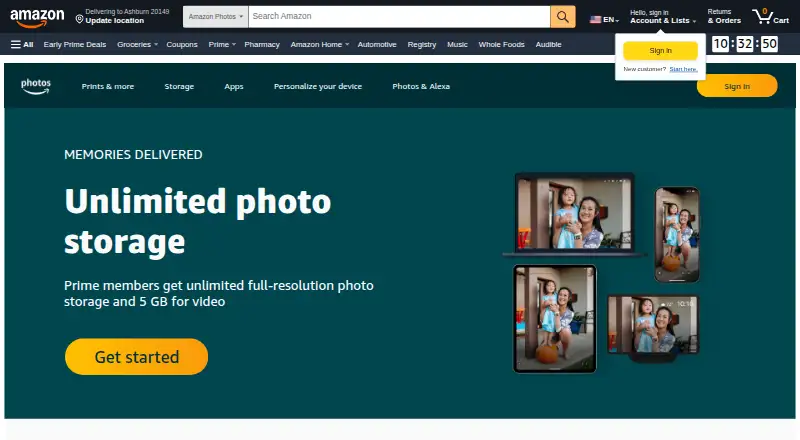
What Amazon Photos is
Amazon Photos stores, searches, shares, displays, and prints photos and videos from compatible devices. Auto-Save backs up a mobile camera roll on iOS or Android, while Desktop Backup saves folders from Windows or Mac computers. Image recognition organizes photos by people, places, things, and dates, and users can search with natural-language queries. Family Vault supports up to six members, each with an Amazon Photos account at no additional cost; sharing groups can have up to 50 members each. Photos can also appear on Echo Show, Echo Spot, and Fire TV devices. The built-in editor can crop, adjust, and filter photos, and U.S. customers can use Amazon Prints for prints, photo books, and gifts. Free storage is 5 GB shared across photos and videos. The Amazon Prime Photos benefit provides unlimited full-resolution photo storage and 5 GB for videos and other files. Paid storage options include 50 GB for $0.99 a month and 2 TB for $11.99 a month. The service is for personal, non-commercial use. Accounts over quota cannot upload, sync, or share, and files are deleted after 180 days until they are no longer over quota.
Good
- Automatic camera-roll backup on iOS and Android.
- Desktop Backup saves folders from Windows or Mac.
- Search supports people, places, things, dates, and natural language.
- Family Vault supports up to six members.
- Built-in editor crops, adjusts, and filters photos.
Watch out
- Free storage is 5 GB across photos and videos.
- Service is for personal, non-commercial use only.
- Over-quota accounts cannot upload, sync, or share.
- Over-quota files are deleted after 180 days.
Who it suits
Amazon Photos suits people who want to back up and organize personal photos and videos across mobile and desktop devices. Family Vault may suit households sharing access among up to six members.
Verdict
Amazon Photos combines automatic backup, search, sharing, editing, and display options. Review the storage allowance and over-quota deletion policy before relying on it as an archive.
Plans and prices
From Amazon Photos's own pricing page, checked 1 Oct 2026.
| Plan | Price | What it gives you |
|---|---|---|
| Amazon Prime Photos benefit | Free | unlimited full-resolution photo storage · 5 GB for videos and other files |
| Free Amazon Photos storage | Free | 5 GB shared storage for photos and videos |
| 50 GB | $0.99 a month | about 7 hours of 1080p HD video · $0.99/month |
| 100 GB | $1.99 a month | about 14 hours of 1080p HD video · $1.99/month |
| 1 TB | $6.99 a month | about 140 hours of 1080p HD video · $6.99/month |
| 2 TB | $11.99 a month | about 280 hours of 1080p HD video · $11.99/month |
The facts
Each one read from Amazon Photos's own pages, with the date it was checked.
Where it runs
- Amazon devices
- Photos can be displayed on Echo Show, Echo Spot, and Fire TV devices, including as Echo Show backgrounds or Fire TV screensavers.checked 1 Oct 2026
What it does
- Automatic backup
- Auto-Save backs up a camera roll automatically from iOS or Android, and Desktop Backup saves folders from Windows or Mac computers.checked 1 Oct 2026
- Core service
- Amazon Photos securely stores, searches, shares, displays, and prints photos and videos from compatible devices.checked 1 Oct 2026
- Editing
- The built-in editor can crop, adjust, and apply filters to photos.checked 1 Oct 2026
- Family Vault
- Family Vault supports up to six members, with each member receiving an Amazon Photos account at no additional cost.checked 1 Oct 2026
- File compatibility
- Supported formats include JPEG, PNG, GIF, TIFF, AVIF, HEIF, HEVC, HEIC, ProRaw, MP4, QuickTime, AVI, WMV, and several RAW formats.checked 1 Oct 2026
- Inactive-account retention
- After two years without upload, download, or sign-in activity, all files are deleted after prior notification.checked 1 Oct 2026
- Over-quota retention
- An account over its storage quota cannot upload, sync, or share, and after 180 days files are deleted until the account is no longer over quota.checked 1 Oct 2026
- Personal use limit
- The service is for personal, non-commercial use only.checked 1 Oct 2026
- Printing integration
- Amazon Prints lets U.S. customers create prints, photo books, and gifts from their Amazon Photos account.checked 1 Oct 2026
- Sharing groups
- Users can create up to 2,500 sharing groups with up to 50 members in each group.checked 1 Oct 2026
- Smart search
- Image recognition organizes photos by people, places, things, and dates, and the service supports natural-language search.checked 1 Oct 2026
- Storage infrastructure
- Amazon Photos stores original customer content and generated assets in Amazon S3 Intelligent-Tiering.checked 1 Oct 2026
- Tagging controls
- Photo tagging uses image-recognition technology, is enabled automatically when the service is first used, and can be disabled in account settings.checked 1 Oct 2026
The company
- Headquarters
- Seattle, Washington, United Stateschecked 28 Sep 2026
The full review of Amazon Photos
Amazon Photos is a personal photo and video service for keeping a library backed up, searchable, shareable, and viewable across devices. It suits people with phone and computer libraries, especially Prime members whose collections are mostly photos. Its strongest case is unlimited full-resolution photo storage for Prime members, while the free tier is small and quota policies make it unwise to treat as a risk-free sole archive.
Overview
Amazon Photos stores original media and generated assets in Amazon S3 Intelligent-Tiering, with original-quality storage and support for formats including JPEG, HEIC, ProRaw, MP4, AVI, and several RAW types. That breadth helps preserve a mixed library, but the service is for personal, non-commercial use only.
Storage rules deserve attention: an over-quota account cannot upload, sync, or share, and after 180 days files are deleted until the account is back within its allowance. After two years without an upload, download, or sign-in, all files are deleted after prior notification. Anyone relying on it for irreplaceable media should keep another copy and avoid leaving the account inactive.
Key features
Auto-Save backs up camera rolls on iOS and Android; Desktop Backup saves folders from Windows and Mac computers. Together they make it practical to consolidate phone and computer libraries, though video can consume a modest allowance quickly.
Image recognition groups photos by people, places, things, and dates, while natural-language search offers a more direct way to find an image than browsing folders. Tagging is enabled automatically on first use but can be disabled in account settings, a useful control for people who do not want recognition-based tagging.
Sharing supports up to 2,500 groups, each with as many as 50 members. Family Vault is a separate option for up to six members, each with an Amazon Photos account at no extra cost. This is generous for household sharing, although the extensive group ceiling matters more to people who routinely share beyond one family circle.
The built-in editor handles cropping, adjustments, and filters rather than replacing a dedicated editing suite. Amazon Photos can also display pictures on Echo Show, Echo Spot, and Fire TV, including as backgrounds or screensavers. U.S. customers can order prints, photo books, and gifts through Amazon Prints.
Pricing
The free Amazon Photos storage plan costs nothing and shares 5 GB across photos and videos. It is suitable for a small library or a trial run, but not much of a long-term home for a phone library that includes video.
Prime members get the Amazon Prime Photos benefit at no cost: unlimited full-resolution photo storage, plus 5 GB for videos and other files. It is the clear fit for photo-heavy Prime households, but it does not remove the video cap or the retention rules.
Paid storage plans expand capacity without requiring the Prime photo benefit: 50 GB costs $0.99 a month (about 7 hours of 1080p HD video), 100 GB costs $1.99 a month (about 14 hours), 1 TB costs $6.99 a month (about 140 hours), and 2 TB costs $11.99 a month (about 280 hours). The smaller tiers suit people who need a modest buffer beyond free storage; larger libraries and frequent video backups will need the TB options. The stated video durations make clear that capacity, not photo organization features, is the main distinction among these paid plans.
Platforms
Amazon Photos supports Android, iOS, macOS, web, and Windows. Phone backup, desktop folder backup, and browser access cover the usual personal-library mix, while Echo and Fire TV add display options for people already using those devices.
Who it's for
Choose Amazon Photos if automatic backup, searchable personal photos, household sharing, and original-quality storage matter more than advanced editing. Prime members with mostly still images get the strongest storage proposition. It is less suitable for people who need a large video allowance on the free tier, commercial use, or an archive that can safely be abandoned.
Pros and cons
- Pro: Prime includes unlimited full-resolution photo storage, which is valuable for a photo-heavy collection.
- Pro: Automatic phone and desktop backups cover both mobile camera rolls and computer folders.
- Pro: Family Vault covers six members at no additional cost, and sharing groups can include up to 50 members.
- Con: The standard free plan gives just 5 GB shared by photos and videos, limiting its usefulness as a growing archive.
- Con: Over-quota and inactive-account deletion rules put files at risk if capacity or account activity is neglected.
- Con: Editing is limited to crop, adjustments, and filters, so it is not a substitute for a full photo editor.
Alternatives
Ente Photos is worth considering for a free 10 GB allowance or a Starter plan with 50 GB and a family plan at $2.49 a month; it also supports Linux, which Amazon Photos does not.
Lomorage suits people who want free software with external storage, no rate limit, and no account-number limit, and who are comfortable with self-hosting.
Tonfotos offers a lifetime free license with the paid version's functionality but limits the number of people on photos, making it an option for those who prefer a desktop-oriented library without a subscription.
Flickr may suit people comfortable with a public-upload model: its free plan allows 1,000 photo and video uploads and shows ads, while Pro costs $8 a month billed annually and offers unlimited uploads.
Google Photos is another free-plan photo service for Android and iOS users who want a mobile-focused alternative.
Synology Photos is a free option for people who already have, or want to use, a Synology NAS.
Damselfly is free, open-source, and self-hosted, for users who want to manage a library on their own setup.
PhotoStructure offers a free Lite tier and a free trial, and may suit people who want portable libraries and duplicate or edited-copy grouping.
Browse more options in Photo Management Software or Photo Storage Services.
Verdict
Amazon Photos is a strong choice for Prime members whose libraries are primarily photos: unlimited full-resolution photo storage, automatic backups, search, and family sharing make a convincing package. Look elsewhere if you need a generous video allowance without Prime, commercial use, or an archive that remains safe through long inactivity or over-quota periods.
Alternatives to Amazon Photos
- 1

Cryptee
Free planOpen sourceAndroidiOSWebLinux8.6From €3 a month - 2

Ente Photos
Free planOpen sourceAndroidiOSWebLinux8.6From $2.49 a month - 3

IDrive
Free planAndroidiOSWebLinux8.4From $0.25 a month - 4
Permafiles
Free planOpen sourceAndroidiOSWebLinux8.4From £1.99 a month - 5
Stingle Photos
Free planOpen sourceAndroidiOSWebAPI8.4From $29.90 a year - 6

Google Photos
Free planAndroidiOSWebAPI8.3Free plan