
PhotoPrism
PhotoPrism is an AI-powered app for browsing, organizing, and sharing photos and videos.
What PhotoPrism is
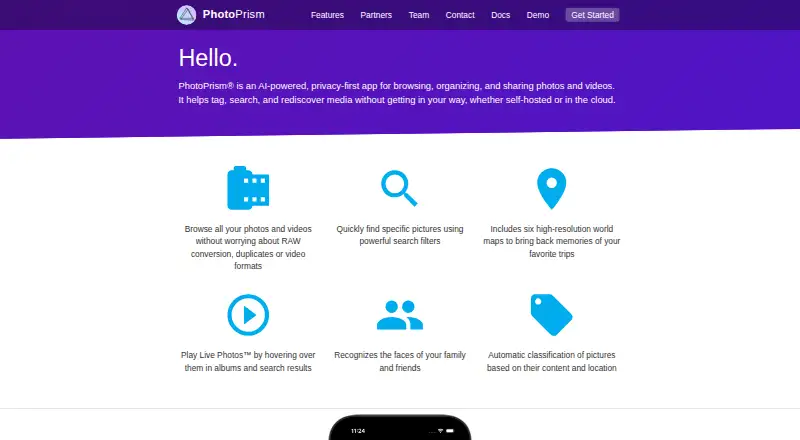
PhotoPrism is an AI-powered app for browsing, organizing, and sharing photos and videos. It can be self-hosted or used in the cloud, with Android, iOS, Linux, macOS, Windows, and web platforms. It classifies pictures by content and location, recognizes faces, and combines search filters with six high-resolution world maps. The app indexes, views, and converts popular image, video, and RAW formats, including JPEG, PNG, HEIF, HEIC, MP4, MOV, WebP, and WebM. It also extracts and merges Exif, XMP, and other metadata, including Google Photos JSON. Albums can be shared through secret links that can optionally expire; recipients need neither an app nor an account. PhotoSync can back up iOS and Android phones, and WebDAV clients such as Finder and Windows Explorer can connect.
Good
- Classifies pictures by content and location.
- Recognizes faces and supports face search.
- Supports popular image, video, and RAW formats.
- Album links can optionally expire.
- Free Community edition includes unlimited storage and instances.
Watch out
- Community Edition is self-hosted.
- Community support is through public forums and chat.
- Community image resolution is limited to 900 MP.
Who it suits
PhotoPrism suits people who want to organize and search photo and video collections across supported formats, including those who prefer self-hosting. Its sharing links also suit users who want recipients to view albums without registering or installing an app.
Verdict
PhotoPrism combines AI-assisted organization, broad format support, and album sharing, with both self-hosted and cloud options. Consider the deployment and support details alongside the plan that fits your needs.
Plans and prices
From PhotoPrism's own pricing page, checked 9 Oct 2026.
| Plan | Price | What it gives you |
|---|---|---|
| Community | Free | Self-hosted · unlimited storage and instances · AGPL open source · community support |
| Essentials | €2 a month | Self-hosted · unlimited storage · personal use · additional user roles · 3D vector and satellite maps · enhanced geocoding · € 2.00 / mo; billed annually |
| Plus | €6 a month | Self-hosted · unlimited storage · personal use · user management UI · vector graphics support · private members chat · from € 6.00 / mo; billed annually |
| PikaPods | $6.50 a month | Fully managed · flexible storage and instances · hosting provider support · from $ 6.50 / mo |
| Starter | €79 a month | On-premises · unlimited storage · up to 10 users · commercial license · email and chat support · € 79.00 / mo |
| Business | €219 a month | On-premises · unlimited storage · 25–150 user accounts · support level agreement · from € 219.00 / mo |
| Enterprise | €1,499 a month | On-premises · unlimited storage · custom user accounts and licensing · enterprise SLA · from € 1499.00 / mo |
The facts
Each one read from PhotoPrism's own pages, with the date it was checked.
What it does
- AI organization
- It automatically classifies pictures by content and location and recognizes faces.checked 9 Oct 2026
- Audience
- The maker describes PhotoPrism Pro as providing organizations additional configuration and deployment options on their own infrastructure, backed by its team.checked 9 Oct 2026
- Formats
- PhotoPrism supports indexing, viewing, and converting popular image, video, and RAW formats, including JPEG, PNG, HEIF, HEIC, MP4, MOV, WebP, and WebM.checked 9 Oct 2026
- Integrations
- PhotoSync can back up iOS and Android phones, while WebDAV clients such as Windows Explorer and Finder can connect to PhotoPrism.checked 9 Oct 2026
- Limits
- The editions comparison lists a maximum image resolution of 900 MP for Community, Essentials, and Plus, and 150 MP for PikaPods.checked 9 Oct 2026
- Metadata
- It extracts and merges Exif, XMP, and other metadata, including Google Photos JSON.checked 9 Oct 2026
- Mobile access
- PhotoPrism's Progressive Web App provides a native app-like experience and can be installed on the home screen of major operating systems and mobile devices.checked 9 Oct 2026
- Privacy
- PhotoPrism says it will not sell user data or share it with Google, Amazon, Microsoft, or Apple unless users intentionally upload files to those services.checked 9 Oct 2026
- Product
- PhotoPrism is an AI-powered app for browsing, organizing, and sharing photos and videos, available self-hosted or in the cloud.checked 9 Oct 2026
- Search and maps
- The feature overview describes combined search filters and six high-resolution world maps.checked 9 Oct 2026
- Security
- The editions comparison lists two-factor login, app passwords, client credentials, session monitoring, and hardened security for Plus.checked 9 Oct 2026
- Sharing
- Users can share albums with secret links that can optionally expire, without recipients installing an app or registering.checked 9 Oct 2026
- Support
- Community users can get help through public forums and community chat; Plus includes private chat, and team plans list email and chat or SLA support.checked 9 Oct 2026
- Supported systems
- The Community Edition is available for Mac, Linux, and Windows via Docker, and PhotoPrism also runs on DigitalOcean, Raspberry Pi, FreeBSD, and many NAS devices.checked 9 Oct 2026
The company
- Headquarters
- Berlin, Germanychecked 28 Sep 2026
- Team privacy
- The maker says Team Editions run fully on-premises and are GDPR-compliant, keeping media and user data in the organization's infrastructure.checked 9 Oct 2026
The full review of PhotoPrism
Overview
PhotoPrism is a photo and video library for people who want AI-assisted cataloguing, searchable media, and control over where their collection runs. It is a strong fit for self-hosters and organizations with on-premises requirements; less so for anyone who wants a managed service without choosing a hosting plan or provider.
Its appeal is the combination of content and face search, broad media support, and sharing that does not force recipients to sign up. The trade-off is that deployment choices and plan-specific limits matter: most options are self-hosted or on-premises, and the managed PikaPods plan has a lower image-resolution ceiling.
Key features
PhotoPrism automatically classifies photos by content and location and recognizes faces. Combined search filters and six high-resolution world maps give users more than folders to navigate a large library; Essentials adds enhanced geocoding and 3D vector and satellite maps. Face search and original-quality storage are supported.
It indexes, displays, and converts popular image, video, and RAW formats, including JPEG, PNG, HEIF, HEIC, MP4, MOV, WebP, and WebM. It also extracts and merges Exif, XMP, and other metadata, including Google Photos JSON. That makes it suited to collections assembled from different devices and services. The resolution ceiling is 900 MP on Community, Essentials, and Plus, but 150 MP on PikaPods.
Albums can be shared by secret link, with optional expiration; recipients do not need an account or app. PhotoSync can back up iOS and Android phones, while WebDAV lets clients such as Finder and Windows Explorer connect. The Progressive Web App can be installed on the home screen of major operating systems and mobile devices, offering app-like access without a native-app requirement.
Community Edition runs on Mac, Linux, and Windows through Docker, and PhotoPrism also runs on DigitalOcean, Raspberry Pi, FreeBSD, and many NAS devices. The maker says it will not sell user data or share it with Google, Amazon, Microsoft, or Apple unless users intentionally upload files to those services. Team Editions run on-premises and are described as GDPR-compliant, keeping media and user data within the organization's infrastructure. Plus lists two-factor login, app passwords, client credentials, session monitoring, and hardened security.
Pricing
Community is free, self-hosted, open source under AGPL, and offers unlimited storage and instances with community support. It is the clearest choice for technically capable individuals who want to run their own library without a subscription, but help is through public forums and community chat.
Essentials costs € 2.00 / mo, billed annually. It keeps unlimited storage and self-hosting for personal use, adding user roles, 3D vector and satellite maps, and enhanced geocoding. This is the lower-cost paid step for personal users who want richer maps and role options. Plus costs from € 6.00 / mo, billed annually, and adds a user-management UI, vector graphics support, private members chat, and listed security features. It suits personal deployments that need more administration or private support, though both plans remain self-hosted.
PikaPods costs from $ 6.50 / mo and is fully managed, with flexible storage and instances plus hosting-provider support. It avoids self-hosting administration, but its maximum image resolution is 150 MP, compared with 900 MP on Community, Essentials, and Plus.
For organizations, Starter is € 79.00 / mo for on-premises use, unlimited storage, up to 10 users, a commercial license, and email and chat support. Business starts at € 219.00 / mo for 25–150 user accounts, unlimited storage, and a support level agreement. Enterprise starts at € 1499.00 / mo, with unlimited storage, custom user accounts and licensing, and an enterprise SLA. These tiers suit organizations that need commercial licensing and support commitments; Enterprise is the option when account counts and licensing must be custom. Pro is described as providing organizations additional configuration and deployment options on their own infrastructure, backed by the maker's team, at custom pricing.
Platforms
PhotoPrism supports Android, iOS, Linux, macOS, Windows, web, and self-hosted deployments. Its PWA provides installable home-screen access, while Docker and support for devices and systems including Raspberry Pi and NAS hardware make self-managed installation flexible. Readers seeking an ordinary native mobile app should note that the mobile experience described is a Progressive Web App.
Who it's for
PhotoPrism is best for individuals with mixed photo and video libraries who value search, metadata handling, original-quality storage, and control over a self-hosted collection. Community suits users comfortable with community support; Essentials and Plus serve personal users who want paid mapping, management, or support additions. PikaPods is the better fit for users who prefer managed hosting. Organizations needing on-premises infrastructure, user accounts, licensing, or service-level support have dedicated plans; casual users who want a simple hosted photo account may find the deployment and plan distinctions more than they need.
Pros and cons
- Pro: AI classification, face recognition, combined filters, and maps offer several routes into a large collection.
- Pro: Broad image, video, RAW, and metadata support accommodates libraries from varied sources.
- Pro: Secret-link album sharing does not require recipients to register or install an app.
- Pro: Free Community includes unlimited storage and instances for self-hosters.
- Con: Self-hosted plans require users to manage deployment themselves; the fully managed option is a separate paid plan.
- Con: PikaPods' 150 MP image ceiling is substantially lower than the 900 MP limit on the other listed editions.
- Con: Community support is public rather than private, while private chat and organizational support are tied to paid plans.
Alternatives
For a broader shortlist, browse Photo Sharing Software, Photo Management Software, and Photo Storage Services.
Consider EventPics as another freemium option with a free plan and Android, iOS, macOS, web, Windows, and API platforms. PixShare has a free tier limited to one album and 50 images with public link sharing, so it may suit a small, simple sharing need. Pic-Time offers a free plan and trial, with 10GB of photo storage that drops to 3GB after six months, plus 1GB of video storage and client galleries; consider it if those gallery and print-store tools are the priority.
Picflow has a free tier with 2 GB storage, 50 workflow credits, and one included seat. Flickr caps its free tier at 1,000 public photo and video uploads and shows ads. LibrePhotos is a free, MIT-licensed self-hosted option with no paid tier. Piwigo offers a free self-hosted plan with features, themes, and plugins. CloudSpot may suit client-gallery sharing: its free tier includes 5 GB, up to three client galleries, JPEG-only support, and a 2048px download limit.
Verdict
Choose PhotoPrism if you want a searchable, format-flexible photo and video library with meaningful self-hosting or on-premises control, and are willing to match the deployment to your needs. Its strongest reason to choose is the pairing of capable organization and sharing with unlimited-storage self-hosted plans. Look elsewhere if you want a straightforward managed service without plan-specific trade-offs, or if PikaPods' 150 MP ceiling does not suit your images.
Getting started
- Visit https://www.photoprism.app/.
- Choose the free self-hosted Community edition or a paid plan for personal, managed, or organizational use.
- For Community Edition, use Docker on Mac, Linux, or Windows, or run PhotoPrism on a supported server or NAS.
- Install the Progressive Web App on a home screen for app-like mobile access.
- Connect a phone backup through PhotoSync or a WebDAV client such as Finder or Windows Explorer.
Limits worth knowing
Community, Essentials, and Plus list a maximum image resolution of 900 MP; PikaPods lists 150 MP. Community is self-hosted, while fully managed hosting is listed under PikaPods at $6.50 a month.
Questions
Is PhotoPrism free?
Yes. The Community plan is free and includes unlimited storage and instances; it is self-hosted and AGPL open source.
Which platforms does PhotoPrism support?
The listed platforms are Android, iOS, Linux, macOS, self-hosted, web, and Windows. Its Progressive Web App can be installed on home screens of major operating systems and mobile devices.
Can I share albums with people who do not use PhotoPrism?
Yes. Albums can be shared using secret links, optionally with an expiry, and recipients do not need to install an app or register.
Is PhotoPrism open source?
The Community edition is listed as AGPL open source.
What is the image resolution limit?
Community, Essentials, and Plus list a maximum of 900 MP; PikaPods lists a maximum of 150 MP.
Alternatives to PhotoPrism
- 1

Cryptee
Free planOpen sourceAndroidiOSWebLinux8.6From €3 a month - 2

Ente Photos
Free planOpen sourceAndroidiOSWebLinux8.6From $2.49 a month - 3

IDrive
Free planAndroidiOSWebLinux8.4From $0.25 a month - 4
Permafiles
Free planOpen sourceAndroidiOSWebLinux8.4From £1.99 a month - 5
Stingle Photos
Free planOpen sourceAndroidiOSWebAPI8.4From $29.90 a year - 6

Google Photos
Free planAndroidiOSWebAPI8.3Free plan