GudDesk
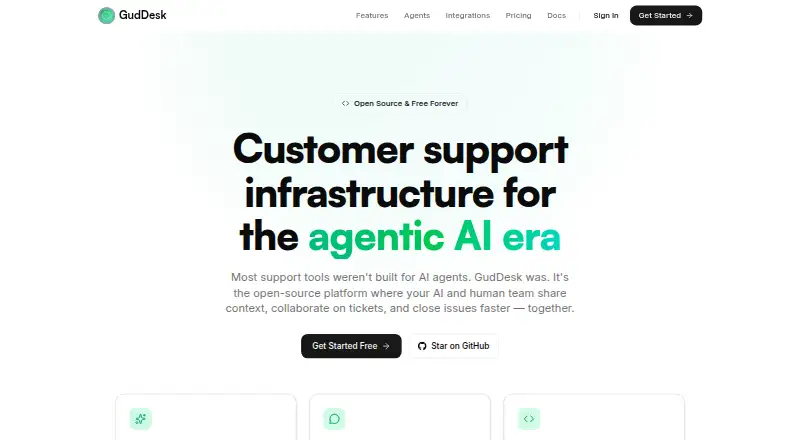
GudDesk is an open-source customer messaging platform with live chat, a shared inbox, a knowledge base, AI agents, and workflow automation.
What GudDesk is
GudDesk is an open-source customer messaging platform with live chat, a shared inbox, a knowledge base, AI agents, and workflow automation. Its embeddable widget supports real-time messaging, custom colors, and visitor tracking. The inbox combines chat, email, and bot conversations with assignment, tags, priorities, internal notes, and collision detection. GudDesk provides GudBot, TriageBot, and OnboardBot; custom agents can be connected through webhooks and the REST API. The knowledge base supports article editing, collections, a searchable public help center, article suggestions, analytics, and AI-agent integration. Automation rules can assign, tag, route, notify, and escalate conversations in response to lifecycle events. The product is self-hostable under the AGPL-3.0 license, with Docker Compose or bare-metal deployment using PostgreSQL and Node.js. Its free plan includes up to 2 workspace members and 500 conversations per month. Pro costs $29 a month, billed flat, and includes unlimited members and conversations.
Good
- Combines chat, email, and bot conversations in one inbox.
- Includes three named AI agents.
- Provides a searchable help center and article analytics.
- Self-hosted deployment is available under AGPL-3.0.
- Pro includes unlimited members and conversations.
Watch out
- Free plan is limited to 2 workspace members.
- Free plan is limited to 500 conversations monthly.
- Several listed integrations are marked as soon.
Who it suits
GudDesk is aimed at SaaS companies, ecommerce businesses, startups, agencies, and open-source projects handling customer conversations. Its self-hosted option may suit teams that want deployment on their own infrastructure.
Verdict
GudDesk combines messaging, knowledge-base publishing, and workflow automation, with hosted and self-hosted options. Its free plan has member and conversation caps; Pro costs $29 a month, billed flat.
Plans and prices
From GudDesk's own pricing page, checked 1 Oct 2026.
| Plan | Price | What it gives you |
|---|---|---|
| Pro Plan | $29 a month | unlimited workspace members · unlimited conversations · built-in Claude-powered AI · Slack integration · priority email support · flat |
| Free Plan | — | up to 2 workspace members · 500 conversations / month · unlimited knowledge base articles · community support · forever |
The facts
Each one read from GudDesk's own pages, with the date it was checked.
What it does
- AI agents
- GudDesk provides GudBot, TriageBot, and OnboardBot, and supports custom agents through webhooks and the REST API.checked 1 Oct 2026
- Automation
- Automation rules can assign, tag, route, notify, and escalate conversations based on lifecycle events.checked 1 Oct 2026
- Data residency
- Hosted-cloud data is stored in data centers in the United States and the European Union, while self-hosted data remains on the customer's infrastructure.checked 1 Oct 2026
- Integrations
- Available or listed integrations include Claude AI, Slack, n8n, webhooks, REST API, and the Widget SDK; email, WhatsApp, Telegram, Salesforce, HubSpot, Pipedrive, Zapier, Make, Google Analytics, and PostHog are marked soon.checked 1 Oct 2026
- Knowledge base
- The knowledge base provides article editing, collections, a public searchable help center, article suggestions, analytics, and AI-agent integration.checked 1 Oct 2026
- Live chat
- Its embeddable widget supports real-time messaging, custom colors, and visitor tracking.checked 1 Oct 2026
- Open source
- GudDesk is self-hostable and licensed under AGPL-3.0 in its documentation.checked 1 Oct 2026
- Product
- GudDesk is an open-source customer messaging platform with live chat, a shared inbox, a knowledge base, AI-powered agents, and workflow automations.checked 1 Oct 2026
- Security
- The privacy policy states that GudDesk uses TLS/SSL in transit, encryption at rest for sensitive data, regular security audits, access controls, and secure development practices.checked 1 Oct 2026
- Self-hosting
- Self-hosted deployment is supported with Docker Compose or bare metal, using PostgreSQL and Node.js.checked 1 Oct 2026
- Shared inbox
- The unified inbox handles chat, email, and bot conversations with assignment, tags, priorities, internal notes, and collision detection.checked 1 Oct 2026
- Support
- Documentation lists GitHub Issues, GitHub Discussions, and [email protected] for help; the Pro plan includes priority email support.checked 1 Oct 2026
- Target users
- GudDesk presents use cases for SaaS companies, ecommerce businesses, startups, agencies, and open-source projects.checked 1 Oct 2026
Money
- Free limits
- The Free plan includes up to 2 workspace members and 500 conversations per month.checked 1 Oct 2026
The full review of GudDesk
GudDesk is a customer-support platform that combines live chat, a shared inbox, a searchable help center, AI agents, and workflow automation. It suits teams that want those tools together and may prefer to host the software themselves. Its range is appealing, but the free plan’s small team and conversation caps make it a starter tier rather than a long-term fit for busier support desks.
Overview
GudDesk brings chat, email, and bot conversations into one inbox, alongside a public knowledge base and automation rules. This makes it relevant to teams trying to coordinate customer support and self-service in one workspace. The combination is broader than chat alone, though teams should weigh that breadth against the work of operating a self-hosted deployment or the limits of the free plan.
The platform is open source under AGPL-3.0 and can run through Docker Compose or on bare metal, using PostgreSQL and Node.js. That option gives infrastructure control to teams prepared to manage it; it is less suitable for organizations that want to avoid deployment and maintenance responsibilities. Hosted-cloud data is stored in the United States and European Union, while self-hosted data remains on the customer’s infrastructure. GudDesk’s privacy policy says it uses TLS/SSL in transit, encryption at rest for sensitive data, regular security audits, access controls, and secure development practices.
Key features
Chat and shared inbox
The embeddable chat widget supports real-time messaging, custom colors, and visitor tracking. In the shared inbox, teams can assign conversations, add tags and priorities, leave internal notes, and use collision detection to reduce the chance of overlapping replies. Chat, email, and bot conversations share this workflow, which is useful for teams managing several request types together. Email is a supported request channel, though the email integration itself is marked as coming soon.
AI, knowledge, and automation
GudDesk includes GudBot, TriageBot, and OnboardBot, and supports custom agents through webhooks and the REST API. AI ticket triage and knowledge answers are supported, while built-in Claude-powered AI is included with Pro. The knowledge base supports article editing, collections, a public searchable help center, article suggestions, analytics, and AI-agent integration. Automation rules can assign, tag, route, notify, or escalate conversations based on lifecycle events, and SLA management is supported. Together, these tools can connect self-service and routing; teams should consider whether the integrations they need are live before committing, since WhatsApp, Telegram, Salesforce, HubSpot, Pipedrive, Zapier, Make, Google Analytics, and PostHog are marked as coming soon.
Integrations and support
Available or listed integrations include Claude AI, Slack, n8n, webhooks, the REST API, and the Widget SDK. Documentation points users to GitHub Issues, GitHub Discussions, and [email protected]; Pro adds priority email support. That gives teams community support on the free plan and a direct priority channel on the paid plan.
Pricing
GudDesk has a free plan and a single stated paid plan. There is no free trial, so teams choosing the hosted option should evaluate the free tier within its limits before moving to Pro.
- Free Plan: Billed forever, with up to 2 workspace members and 500 conversations per month, unlimited knowledge base articles, and community support. The member and conversation caps make it appropriate for a very small team or a low-volume deployment, but either limit may force an upgrade as support grows. The plan’s price is custom pricing.
- Pro Plan: $29 a month, billed flat. It includes unlimited workspace members and conversations, built-in Claude-powered AI, Slack integration, and priority email support. The flat monthly price removes per-seat scaling as a cost concern, while unlimited conversations suit teams that have outgrown the free cap. It is the practical choice for growing support operations that need those allowances.
Platforms
GudDesk supports web, API, and self-hosted use. The self-hosting route is best for teams comfortable operating PostgreSQL and Node.js deployments; teams that want hosted service can use the web platform, with hosted-cloud data stored in the United States and European Union.
Who it's for
GudDesk presents use cases for SaaS companies, ecommerce businesses, startups, agencies, and open-source projects. It is a strong fit for small teams that want shared support workflows, knowledge publishing, and automation in one system, especially when infrastructure control matters. It is less compelling for a team that needs a larger free tier or depends on an integration currently marked as coming soon.
Pros and cons
- Pros: A unified inbox for chat, email, and bot conversations gives teams one place to assign, prioritize, and annotate support work.
- Pros: The public help center, article suggestions, AI answers, and conversation automation connect self-service content with support handling.
- Pros: AGPL-3.0 licensing and self-hosted deployment let technically capable teams keep data on their own infrastructure.
- Cons: The free plan stops at 2 members and 500 conversations per month, limiting its usefulness for larger or busier teams.
- Cons: Self-hosting requires PostgreSQL and Node.js and operational responsibility, while several named integrations remain marked as coming soon.
- Cons: Pro’s $29 a month billed-flat cost is necessary for unlimited members and conversations, so growing teams cannot retain the free tier’s economics.
Alternatives
For a broader comparison, see AI IT Service Desk Software.
- Desk Support Monkey is another freemium, open-source, self-hostable option, and it offers a free trial.
- FreeITSM is a free alternative with API, Linux, self-hosted, web, and Windows platforms.
- Tessio offers a free self-hosted community plan with 5 admin/agent seats, unlimited requesters, and full core ITSM.
- Nova-Suite offers a free-forever self-hosted standard plan with unlimited agents and a broad ITSM feature set.
- ManageEngine ServiceDesk Plus is a freemium option across mobile, desktop, and web, with its Standard plan at $13 a month billed monthly.
- Console is a paid, web-based alternative with a free trial.
- Freshservice is a paid alternative with a free trial and a Starter plan at $19 a month billed annually.
- Zammad is a paid alternative with a free trial, self-hosted and Linux options, and a Starter v2 plan at €7 a month billed annually.
Verdict
Choose GudDesk if your team wants customer messaging, knowledge publishing, AI assistance, and workflow automation in one open-source system, with the option to self-host. Its strongest case is that breadth paired with infrastructure choice. Look elsewhere if you need a generous free tier, a turnkey self-hosting experience, or an integration that is still marked as coming soon.
Getting started
- Open https://www.guddesk.com/
- Choose the Free Plan or Pro Plan
- Use the hosted web service or deploy it self-hosted
- For self-hosting, use Docker Compose or bare metal with PostgreSQL and Node.js
- Add the chat widget, channels, knowledge-base content, and integrations
Limits worth knowing
The Free Plan allows up to two workspace members and 500 conversations per month, with community support. Pro removes member and conversation limits and adds Claude-powered AI, Slack integration, and priority email support for $29 a month.
Questions
Is GudDesk open source?
Yes. GudDesk is self-hostable and licensed under AGPL-3.0 in its documentation.
What does the Free Plan include?
The Free Plan is billed forever and includes up to two workspace members, 500 conversations per month, unlimited knowledge-base articles, and community support.
How much is Pro?
The Pro Plan costs $29 a month, billed flat. It includes unlimited workspace members and conversations, built-in Claude-powered AI, Slack integration, and priority email support.
Can GudDesk be self-hosted?
Yes. Deployment is supported with Docker Compose or bare metal using PostgreSQL and Node.js.
Which integrations are available now?
Listed available integrations include Claude AI, Slack, n8n, webhooks, the REST API, and the Widget SDK. Email, WhatsApp, Telegram, Salesforce, HubSpot, Pipedrive, Zapier, Make, Google Analytics, and PostHog are marked soon.
Where is hosted data stored?
Hosted-cloud data is stored in data centers in the United States and the European Union. Self-hosted data remains on the customer’s infrastructure.
Alternatives to GudDesk
- 1

Jira
Free planAndroidiOSWebAPI8.4Free plan - 2

ManageEngine ServiceDesk Plus
AndroidiOSWebAPI8.0From $10 a month - 3
Zammad
Open sourceWebAPILinuxmacOS8.0From €9 a month - 4

Freshservice
AndroidiOSWebAPI7.9From $19 a month - 5

HaloITSM
AndroidiOSWebAPI7.9From £33 a month - 6

InvGate Service Desk
AndroidiOSWebAPI7.9From $500 a year