Google Tasks
Google Tasks lets users capture, organize, and track to-dos in Google apps they use every day.
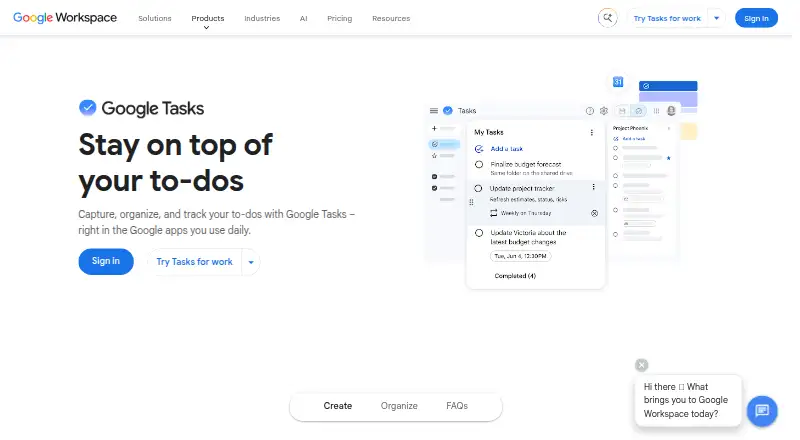
What Google Tasks is
Google Tasks lets users capture, organize, and track to-dos in Google apps they use every day. Users can turn an email into a task and return to the original message from that task. Tasks with a date and time appear in Google Calendar, where users can receive reminders; tasks can also repeat daily, weekly, monthly, or annually. Separate lists and starred tasks help organize work, while subtasks, due dates, and notifications are included. Tasks and lists sync across computers, phones, and tablets when signed in to the same Google Account. Users can open Tasks at tasks.google.com or in the side panel of Gmail, Calendar, Chat, and Drive. In Google Chat spaces, users can assign tasks to teammates, set deadlines, and track progress. Tasks assigned in a shared Google document appear in the assignee's task list, though that feature is available on some Business and Enterprise plans. Google lists mobile apps for iPhone, iPad, and Android. Google Tasks is free and available on Android, iOS, and the web.
Good
- Free access on Android, iOS, and web
- Tasks can be created from Gmail messages
- Recurring tasks support daily through annual schedules
- Lists and tasks sync across signed-in devices
- Google Chat spaces support task assignment
Watch out
- Offline access is not available
- Shared-document task delegation is limited to some plans
Who it suits
Google Tasks suits people who want a free to-do list connected to Google apps and Calendar. Chat users can also assign tasks to teammates and follow deadlines and progress.
Verdict
Google Tasks covers personal lists, reminders, recurring work, and some team task assignment within Google apps. Its listed platform support is broad, but offline access is not available.
Plans and prices
From Google Tasks's own pricing page, checked 11 Oct 2026.
| Plan | Price | What it gives you |
|---|---|---|
| Google Tasks | Free | Google Tasks access; task lists; subtasks; due dates and notifications |
The facts
Each one read from Google Tasks's own pages, with the date it was checked.
Where it runs
- Android data safety
- The Google Play listing says the app’s data is encrypted in transit and that users can request deletion of their data.checked 11 Oct 2026
- Cross-device sync
- Tasks and task lists sync across computer, phone, and tablet when signed in to the same Google Account.checked 11 Oct 2026
- Mobile apps
- Google lists its Tasks mobile app for iPhone and iPad, and its Google Play listing identifies Google LLC as the developer.checked 11 Oct 2026
- Supported platforms
- Web,iOS,Androidchecked 23 Sep 2026
What it does
- Calendar
- A task with a date and time appears in Google Calendar, where users can receive reminders.checked 11 Oct 2026
- Calendar sync
- Yeschecked 23 Sep 2026
- Chat collaboration
- In a Google Chat space, users can assign tasks to teammates, set deadlines, and track progress.checked 11 Oct 2026
- Docs delegation limit
- Tasks assigned in a shared Google document populate the assignee’s task list, and this feature is available on some Business and Enterprise plans.checked 11 Oct 2026
- Gmail
- Users can turn an email into a task and return to the original message from that task.checked 11 Oct 2026
- Lists and priorities
- Users can create separate task lists and star important tasks.checked 11 Oct 2026
- Offline access
- nonechecked 23 Sep 2026
- Purpose
- Google Tasks lets users capture, organize, and track to-dos in Google apps they use daily.checked 11 Oct 2026
- Recurring tasks
- Yeschecked 23 Sep 2026
- Repeating tasks
- Tasks can repeat daily, weekly, monthly, or annually.checked 11 Oct 2026
- Subtasks
- Users can break larger tasks into smaller steps by adding subtasks under a main task.checked 11 Oct 2026
- Support
- The Google Play listing provides [email protected] as the app support email.checked 11 Oct 2026
- Task reminders
- Yeschecked 23 Sep 2026
- Web and Workspace access
- Users can access Tasks at tasks.google.com or in the side panel of Workspace apps including Gmail, Calendar, Chat, and Drive.checked 11 Oct 2026
Money
- Free plan
- Yeschecked 23 Sep 2026
The full review of Google Tasks
Overview
Google Tasks is a lightweight to-do app built around Google’s everyday tools. It is best for people who already use Gmail or Calendar and want personal reminders and recurring tasks without paying for another service. Its main trade-off is a narrow scope: it connects well to Google apps, but it cannot be used offline.
Key features
Turning an email into a task keeps the source message within reach, a practical advantage when a follow-up depends on a conversation. Add a date and time and the task appears in Google Calendar, where reminders can put it alongside scheduled commitments. Daily, weekly, monthly, and annual repeats cover common routines; subtasks help divide larger to-dos, while separate lists and starred tasks provide basic organization and prioritization.
Tasks and lists sync across computers, phones, and tablets when signed in to the same Google Account. Access is available at tasks.google.com and in the side panels of Gmail, Calendar, Chat, and Drive. That makes it convenient for work already happening in Google’s apps, though the feature set is better suited to a personal task list than a comprehensive planning system.
Collaboration works in particular Google contexts. In Chat spaces, users can assign tasks to teammates, set deadlines, and track progress. Tasks assigned in shared Google documents appear in the assignee’s task list, but that capability is available only on some Business and Enterprise plans. It is useful for teams already working in those spaces, not a reason to expect broad team-management tools from the app.
Pricing
Google Tasks is free. Its free plan includes access to Tasks, task lists, subtasks, due dates, and notifications, making it a reasonable choice for personal use without a subscription. No paid Tasks tier is listed, so readers seeking a broader paid feature set should consider other products rather than expect to upgrade within Tasks.
Platforms
Google Tasks is available on web, iOS, and Android. The web app works at tasks.google.com, while mobile apps cover iPhone, iPad, and Android devices. Cross-device syncing depends on signing in to the same Google Account. There is no offline access, which makes Tasks a poor fit for people who need to review or update their lists without a connection.
Who it's for
Choose Google Tasks if you want a free, uncomplicated way to manage personal to-dos from Gmail, Calendar, or other Google Workspace apps. It is also a sensible fit for recurring reminders and small assignments in Google Chat spaces. Look elsewhere if offline use is essential, or if your work calls for a more extensive task-management system.
Pros and cons
- Pro: Email-to-task links keep the original Gmail message accessible, helping preserve context for follow-ups.
- Pro: Dated tasks appear in Google Calendar and can receive reminders, combining to-dos with scheduled commitments.
- Pro: The free plan includes subtasks, lists, due dates, and notifications, with no subscription cost.
- Con: Tasks cannot be accessed offline, limiting its usefulness when connectivity is unavailable.
- Con: Document-based task assignment is restricted to some Business and Enterprise plans, so it is not a universal collaboration option.
Alternatives
These alternatives focus on task queues and background job processing rather than personal to-do lists. Pick one when your need is to run or schedule software jobs, not organize everyday reminders.
- IronWorker offers a free Basic plan with one concurrency, five hours per month, 512 MB of RAM, a 30-minute runtime, and 50 scheduled tasks; choose it if those job-processing limits fit your needs.
- Django Q2 is free, MIT-licensed software for readers who want an open-source option.
- Faktory offers a free AGPL-licensed OSS plan without dedicated support, plus Enterprise additional packs at $99 a month; consider it if that model fits your job-processing needs.
- Graphile Worker is free, open-source, and MIT-licensed; its Worker Pro Launch Offer starts at $25 a month for sponsorship. It may suit readers looking for that open-source approach or sponsorship option.
- Hangfire has a free Open plan with Hangfire Core under LGPL 3.0, commercial use, and SQL Server 2008 R2+ or in-memory storage; consider it if those terms and storage options suit your work.
- pg-boss is MIT-licensed open-source software that runs in your own database with no per-job charges, a fit for readers who want that arrangement.
- Gearman is open-source software under the BSD license; choose it if that is the alternative you are seeking.
- Inngest has a free plan with five seats, 50,000 executions, 500,000 events ingested, and 24-hour trace history. Pick it if those execution and event limits fit your workflow.
For more options, browse Task Queue Software, To-do list apps, or Task Management Software.
Verdict
Google Tasks is a strong choice for Google users who want free personal lists, recurring to-dos, and reminders tied to Gmail and Calendar. Its convenience inside those apps is the reason to choose it; the lack of offline access and its limited scope are reasons to look elsewhere.
Getting started
- Open tasks.google.com or a Google Workspace app side panel
- Sign in to the same Google Account used on your devices
- Create task lists and add tasks or convert Gmail messages into tasks
- Add subtasks, due dates, reminders, or repeating schedules
- Install the Google Tasks app on Android, iPhone, or iPad
Questions
Is Google Tasks free?
Yes. The listed Google Tasks plan costs nothing and includes task access, lists, subtasks, due dates, and notifications.
Which platforms support Google Tasks?
Google Tasks is available on the web, Android, iOS, iPhone, and iPad.
Can tasks repeat?
Yes. Repeating schedules can be daily, weekly, monthly, or annual.
Does Google Tasks work with Gmail and Calendar?
You can turn Gmail messages into tasks, and dated tasks appear in Google Calendar with reminders.
Can teams assign tasks?
Google Chat spaces support assignments, deadlines, and progress tracking. Shared-document assignments are available on some Business and Enterprise plans.
Alternatives to Google Tasks
- 1

Inngest
Free planOpen sourceWebAPILinuxmacOS8.3From $99 a month - 2
Hangfire
Free planOpen sourceWebAPILinuxSelf-hosted8.0From $500 a year - 3
Graphile Worker
Free planOpen sourceAPILinuxmacOSSelf-hosted7.9From $25 a month - 4
Gearman
Free planOpen sourceAPILinuxmacOSSelf-hosted7.3Free plan - 5
IronWorker
Free planWebAPILinuxSelf-hosted6.9From $169 a month - 6
Trigger.dev
Free planWebAPISelf-hosted6.8From $10 a month