GitUI
GitUI brings a Git GUI-style workflow into the terminal, with keyboard-only controls and context-based help.
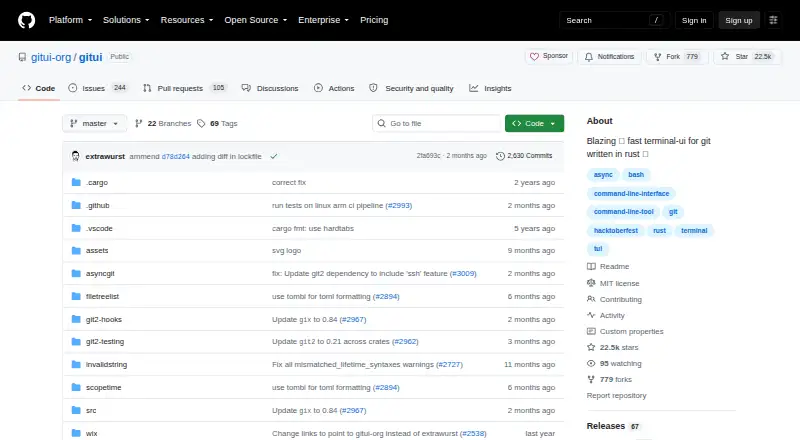
What GitUI is
GitUI brings a Git GUI-style workflow into the terminal, with keyboard-only controls and context-based help. Users can inspect changes and commit, amend, stage, unstage, revert, or reset work at file, hunk, or line level. Stash tools cover saving, applying, popping, dropping, and inspecting stashes. Branch controls include creation, renaming, deletion, checkout, and work with remote branches, alongside pushing and fetching. GitUI can browse or search commit history, inspect committed diffs, and work with submodules. Commit workflows support several Git hooks, and GPG signing is listed with shortcomings. The project is free and licensed under MIT, which includes an as-is warranty disclaimer. The README describes GitUI as beta, with possible bugs or missing features, while calling it reasonably stable for personal use. It does not fully replace the Git shell, lacks sparse repository support, and requires explicit setup of an HTTPS credential helper. Listed platforms include Android, Linux, macOS, and Windows; desktop platforms are Linux, macOS, and Windows.
Good
- Keyboard-only controls with contextual help
- Change operations reach file, hunk, or line level
- Includes stash and branch workflows
- Commit history can be searched
- Free under the MIT License
Watch out
- Project is in beta and may have missing features
- Does not fully replace the Git shell
- No sparse repository support
- HTTPS credential helper must be configured explicitly
Who it suits
GitUI may suit Git users who prefer keyboard controls and want a terminal-based interface for common change, branch, stash, and history workflows. Its beta status makes it a less suitable choice for someone requiring a complete replacement for the Git shell.
Verdict
GitUI provides broad Git workflows in a keyboard-driven terminal interface, but its README still identifies it as beta. Check its sparse repository and credential-helper limitations against your workflow.
Plans and prices
From GitUI's own pricing page, checked 8 Oct 2026.
| Plan | Price | What it gives you |
|---|---|---|
| Free | Free | Open-source terminal Git client |
| GitUI | Free | full source code · terminal Git workflow · community support · self-hosted |
The facts
Each one read from GitUI's own pages, with the date it was checked.
What it does
- Async API
- The project uses an asynchronous Git API to keep the terminal interface responsive.checked 15 Oct 2026
- Beta status
- The project describes GitUI as beta software that may contain bugs and missing features.checked 15 Oct 2026
- Branches
- Its branch list supports creating, renaming, deleting and checking out branches, including remote branches.checked 15 Oct 2026
- Branches and remotes
- It supports branch creation, renaming, deletion, checkout, and remote branches, as well as pushing and fetching.checked 8 Oct 2026
- Build requirements
- Building requires Rust/Cargo 1.88 or newer, Perl 5.12 or newer, a C compiler and Python for the full test suite.checked 15 Oct 2026
- Changes
- Users can inspect, commit, amend, stage, unstage, revert, and reset changes at file, hunk, or line level.checked 8 Oct 2026
- Commit workflow
- GitUI can inspect, create, amend and hook commits, including pre-commit and commit-message hooks.checked 15 Oct 2026
- Context help
- Context-sensitive help is built in so users do not need to memorize every shortcut.checked 15 Oct 2026
- Controls
- It offers keyboard-only controls and context-based help.checked 8 Oct 2026
- Customization
- Themes and key bindings can be customized, including Vim-like bindings.checked 15 Oct 2026
- Developer structure
- The Cargo workspace includes asyncgit, filetreelist, git2-hooks, git2-testing and scopetime components.checked 15 Oct 2026
- Diagnostics
- Logging is enabled with gitui -l and writes platform-specific log files under the user cache directories.checked 15 Oct 2026
- GPG signing
- GPG commit signing exists but the project documents shortcomings with that feature.checked 15 Oct 2026
- History and diffs
- Users can browse and search commit history and inspect diffs for committed changes.checked 15 Oct 2026
- History and submodules
- Users can browse or search the commit log, inspect committed diffs, and work with submodules.checked 8 Oct 2026
- Hooks and signing
- Commit workflows support several Git hooks, and GPG commit signing is listed with shortcomings.checked 8 Oct 2026
- Independent adoption
- In the same Reddit discussion, a user said they used GitUI because it was Rust-based and avoided the slowness they experienced with graphical tools over SSH.checked 15 Oct 2026
- Independent view: creator motivation
- The creator's launch article says GitUI was started as a side project for terminal users who found existing GUIs slow, resource-heavy or cumbersome.checked 15 Oct 2026
- Independent view: not a full replacement
- A 2022 independent review describes GitUI as useful beside the Git CLI rather than as a complete replacement for it.checked 15 Oct 2026
- Installation channels
- Official instructions cover package managers including Homebrew, MacPorts, Winget, Scoop, Chocolatey, Nix, Termux and Cargo.checked 15 Oct 2026
- Keyboard control
- The interface is designed for keyboard-only navigation and operation.checked 15 Oct 2026
- Large-repository benchmark
- In the project's Linux-repository benchmark, GitUI processed more than 900,000 commits in 24 seconds using about 0.17 GB of memory and reported no freezes or crashes.checked 15 Oct 2026
- Latest release changes
- Version 0.28.1 added proper pre-push-hook support, improved the version message, raised the Rust minimum version to 1.88 and fixed slow status loading in large repositories.checked 15 Oct 2026
- License
- The repository and Cargo metadata identify the software as MIT licensed, permitting use, modification, distribution and sale subject to notice requirements.checked 15 Oct 2026
The full review of GitUI
GitUI is a terminal-based Git client for developers who want visual, keyboard-only control without leaving a shell-oriented workflow. It is especially suitable for personal projects and users comfortable falling back to Git commands when needed. The free MIT-licensed package covers a wide range of repository work, but its beta status and stated gaps make it a less convincing sole client for demanding team workflows.
Overview
GitUI presents repository state through a Git GUI-style interface inside the terminal. Keyboard controls and context-based help reduce the need to remember every command while keeping interaction text-based. You can move from inspecting a change to preparing a commit without opening a separate desktop application.
The project describes itself as beta and reasonably stable for personal use, while warning that bugs and missing features may remain. It also says GitUI does not fully replace the Git shell. In practice, it works best as a focused front end for common operations, with ordinary Git commands retained for edge cases and unsupported tasks.
Key features
Granular change management
GitUI lets you inspect, commit, amend, stage, unstage, revert, and reset at file, hunk, or line level. That fine control is valuable when a single file contains edits for multiple commits: you can separate related work instead of staging the whole file. It also supports reviewing the exact scope of a commit before recording it.
Stashes, branches, and remotes
Stashes can be saved, applied, popped, dropped, and inspected, giving terminal users a complete set of routine temporary-work controls. Branch tools cover creation, renaming, deletion, checkout, and remote branches, while push and fetch support the normal exchange of local and remote work. These functions make GitUI useful for everyday repository maintenance rather than only for viewing status.
History, submodules, and commit safeguards
You can browse or search the commit log, inspect committed diffs, and work with submodules. Commit workflows support several Git hooks, and GPG commit signing is included, although the project identifies shortcomings in that signing support. Users who require dependable signing behavior should verify that it meets their policy before making GitUI central to their process.
Pricing
GitUI has one plan: Free at free. It is an open-source terminal Git client, with no free trial because the software is already free. The distributed package can also be deployed in a self-hosted setup, so there is no subscription tier, seat charge, renewal term, or usage quota to budget for.
The trade-off is scope rather than price. There is no paid plan that adds sparse-checkout support, large-file handling, or a more complete replacement for the Git shell. Organizations needing those capabilities must supplement GitUI with Git itself or choose another tool.
Platforms
GitUI runs on Linux, macOS, and Windows desktop systems, and the directory also lists Android support. It is distributed software and supports self-hosted deployment. The project lists nested repositories as supported. Large-file handling is listed as none, and sparse checkout is not supported, which can rule it out for repositories that depend on selective working trees or specialized large-asset workflows.
Who it's for
GitUI is a strong fit for developers who already understand Git and prefer keyboard-driven terminal work but want a visual overview of changes, branches, stashes, and history. It is particularly practical for personal repositories, where the project's stated beta stability is easier to accept and a missing feature can be handled with a command.
It is a weaker choice for teams that require a mature, all-in-one client, rely on sparse repositories, need large-file workflows, or expect every Git operation to be available in the interface. Users who are uncomfortable with Git fundamentals may also find the need to fall back to the shell limiting.
Pros and cons
Pros
- Broad daily Git coverage: staging and resets down to individual lines, stash management, branch and remote operations, history search, and submodules are handled in one terminal interface.
- Keyboard-first workflow: context-based help and keyboard-only controls suit users who want speed without a mouse-driven desktop client.
- No purchase barrier: the MIT-licensed, free plan has no seat, renewal, or trial conditions and can be self-hosted.
- Nested repository support: projects using nested repositories are not excluded by the listed capabilities.
Cons
- Beta project status: the README warns of bugs and missing features, even while calling it reasonably stable for personal use.
- Not a Git-shell replacement: unsupported or unusual operations still require standard Git commands.
- No sparse checkout or large-file handling: selective repository layouts and large assets are outside its stated support.
- Credential setup and signing caveats: HTTPS credential.helper must be configured explicitly, and GPG signing has acknowledged shortcomings.
Alternatives
Diversion is the better direction for users seeking a freemium service across desktop, web, API, and self-hosted environments, with a free Education plan for up to 10 users when eligibility requirements are met.
Unity Version Control suits teams wanting cloud seats and storage in a freemium model, with usage beyond included limits billed pay-as-you-go.
Darcs is another free, open-source version-control system for Linux, macOS, Windows, and self-hosted deployments.
Fossil offers a free, self-hosted option under a 2-clause BSD license, including web availability.
Accessibility Test Framework for Android is a free cross-platform project focused on Android accessibility testing rather than general Git client workflows.
Magit is the natural alternative for Emacs users who want a free package installed through Emacs' package manager or its development repository.
Apache Subversion is a free open-source version-control option for teams whose workflows are built around SVN rather than Git.
BitKeeper provides a free open-source alternative under the Apache 2.0 License.
See more tools in Version Control Software.
Verdict
Choose GitUI if you want a free, keyboard-driven terminal interface that handles detailed staging, branches, stashes, remotes, history, and submodules while keeping Git close at hand. Look elsewhere if sparse checkout, large-file workflows, dependable GPG signing, or a fully self-contained replacement for the Git shell is essential, or if beta software is unsuitable for your team.
Alternatives to GitUI
- 1

Unity
Free planAndroidiOSWebAPI8.4Free plan - 2

Unity Version Control
Free planWebAPILinuxmacOS8.1Free plan - 3

Perforce P4 (Helix Core)
Free planWebAPILinuxmacOS7.9From $39 a month - 4

Diversion
Free planWebAPILinuxmacOS7.8From $25 a month - 5

GitHub CodeQL
Free planWebExtensionLinuxmacOS7.5From $30 a month - 6

Gitnuro
Free planOpen sourceLinuxmacOSWindows7.4Free plan