
GeoMaps
GeoMaps turns spreadsheet, CRM, and database records into interactive maps for location analysis and business-trip planning.
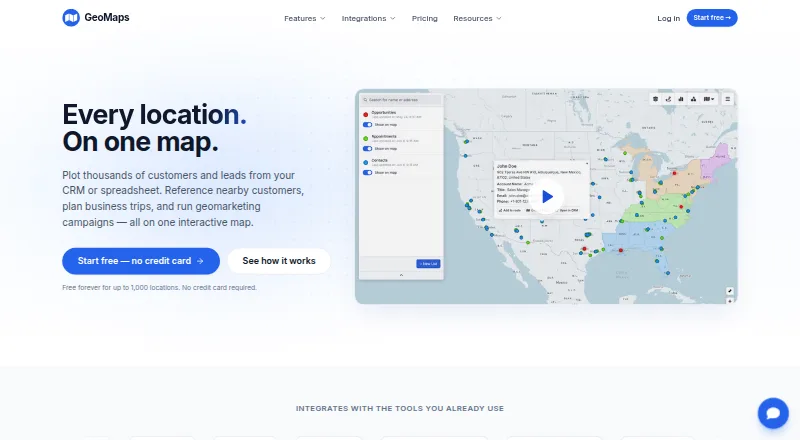
What GeoMaps is
GeoMaps turns spreadsheet, CRM, and database records into interactive maps for location analysis and business-trip planning. Users can plot and filter thousands of records, customize map markers, and locate nearby places. Maps can combine territories, administrative boundaries, drive-time areas, radius rings, and imported shapefiles. For planning travel, GeoMaps creates multi-stop routes with drive times that users can share, print, or export to navigation apps. Visualization options include heatmaps, clusters, grids, region shading, demographic data, geographic centers, and H3 hexagons. Integrations include Google Sheets, Excel, HubSpot, PostgreSQL, Zapier, Make, and n8n, alongside other spreadsheet, CRM, database, automation, and REST API connections. Its AI map-generation feature accepts a description and creates a map linked to data. GeoMaps targets sales, field operations, and territory teams. iOS and Android companion apps display existing lists, records, layers, and routes. The service says imported customer data is used only to provide the service as instructed, and its API is limited to 120 requests per minute per key.
Good
- Maps spreadsheet, CRM, and database records
- Supports territories, boundaries, and drive-time areas
- Builds shareable multi-stop routes
- Includes integrations such as Sheets and HubSpot
- iOS and Android apps show existing records and routes
Watch out
- Free plan is limited to 1,000 locations and one user
- REST API is limited to 120 requests per minute per key
Who it suits
GeoMaps suits sales, field operations, and territory teams that need to explore location data, manage territories, or plan multi-stop routes. Its web, mobile, API, and self-hosted platforms offer several ways to work with that data.
Verdict
GeoMaps combines location mapping, territory tools, route planning, and business-data integrations. Check the free plan's location and user limits, and the API rate limit, against your needs.
Plans and prices
From GeoMaps's own pricing page, checked 28 Sep 2026.
| Plan | Price | What it gives you |
|---|---|---|
| Free | Free | 1,000 locations · 1 user · Up to 25 stops per route · 500 prospects a month · All 30+ integrations · Community support · Free forever |
| Pro | $20 | 20,000 locations · 5 users included · Up to 100 stops per route · Unlimited prospects · No watermark on public maps · All 30+ integrations · Priority email support · billed yearly, or $25/mo monthly |
| Enterprise | $79 | 100,000 locations · Unlimited users · Up to 100 stops per route · Unlimited prospects · No watermark on public maps · All 30+ integrations · Dedicated support + SLA · billed yearly, or $99/mo monthly |
The facts
Each one read from GeoMaps's own pages, with the date it was checked.
What it does
- AI map generation
- GeoMaps says users can describe a map and have its AI generate one connected to their data and ready to share.checked 28 Sep 2026
- API limit
- The REST API is rate-limited to 120 requests per minute per key.checked 28 Sep 2026
- Hosting and transfers
- GeoMaps says its application and database are hosted in the United States and that transfers outside the EEA use safeguards such as Standard Contractual Clauses or the EU–US Data Privacy Framework where applicable.checked 28 Sep 2026
- Integrations
- GeoMaps lists spreadsheet, CRM, database, automation, and REST API integrations, including Google Sheets, Excel, HubSpot, PostgreSQL, Zapier, Make, and n8n.checked 28 Sep 2026
- Intended users
- GeoMaps describes itself as built for sales, field operations, and territory teams.checked 28 Sep 2026
- Map layers
- Maps can include drawn territories, administrative boundaries, drive-time areas, radius rings, and imported shapefiles.checked 28 Sep 2026
- Routes
- GeoMaps builds multi-stop routes with drive times that users can share, print, or export to navigation apps.checked 28 Sep 2026
- Security and privacy
- GeoMaps says it does not sell customer data and processes imported customer data only to provide the service and on the customer's instructions.checked 28 Sep 2026
- Support
- The listed plans include community support, priority email support, or dedicated support with an SLA depending on tier.checked 28 Sep 2026
- Visualization
- The product offers heatmaps, clusters, grids, region shading, demographic data, geographic centers, and H3 hexagons.checked 28 Sep 2026
- What it does
- GeoMaps turns spreadsheet, CRM, and database data into interactive maps for exploring locations and planning business trips.checked 28 Sep 2026
The company
- Headquarters
- Spainchecked 28 Sep 2026
Where it runs
- Mapping
- Users can plot thousands of records, customize markers, filter data, and find nearby locations.checked 28 Sep 2026
- Mobile apps
- GeoMaps offers iOS and Android companion apps for viewing existing lists, records, layers, and routes.checked 28 Sep 2026
The full review of GeoMaps
Overview
GeoMaps is a mapping tool for turning business records into maps and planning routes. It is a strong fit for sales, field-operations, and territory teams working across a sizable location base. Its breadth stands out, but the free plan is best treated as a personal trial of the workflow, not a team deployment.
Key features
GeoMaps can plot thousands of records from spreadsheets, CRMs, and databases, with customizable markers, filters, and nearby-location search. Those tools make it useful for examining where accounts are concentrated and finding locations around a point of interest. Territory outlines, administrative boundaries, drive-time areas, radius rings, and imported shapefiles add context for coverage planning.
Routes include drive times and can be shared, printed, or exported to navigation apps. Free supports up to 25 stops per route; paid plans raise that to 100. That gives occasional users a workable starting point, while teams planning longer itineraries will need a paid tier. Heatmaps, clusters, grids, region shading, demographic data, geographic centers, and H3 hexagons provide several ways to interpret location patterns.
Integrations cover spreadsheets, CRMs, databases, automation tools, and REST APIs, with Google Sheets, Excel, HubSpot, PostgreSQL, Zapier, Make, and n8n among the named connections. CRM sync is supported. AI map generation can turn a description into a map connected to the user's data and ready to share. The REST API's 120-requests-per-minute-per-key limit matters for integrations that need frequent updates.
iOS and Android companion apps let users view existing lists, records, layers, and routes. They extend access to field staff, though the stated mobile role is viewing existing work rather than creating or editing maps.
Pricing
Free: free, forever. It includes 1,000 locations, one user, routes of up to 25 stops, 500 prospects a month, all 30+ integrations, and community support. This is enough to assess a small dataset or individual workflow, but the single seat and location cap rule it out for most teams.
Pro: $20 a year, billed yearly, or $25/mo monthly. It includes 20,000 locations, five users, up to 100 stops per route, unlimited prospects, maps without a public watermark, all 30+ integrations, and priority email support. This is the practical tier for a small team that needs CRM-linked mapping and prospect capacity beyond Free; five included seats set a clear ceiling.
Enterprise: $79 a year, billed yearly, or $99/mo monthly. It includes 100,000 locations, unlimited users, routes up to 100 stops, unlimited prospects, no watermark on public maps, all 30+ integrations, and dedicated support with an SLA. It suits larger deployments that need more location capacity and a support commitment. Both paid tiers list an annual price as well as a monthly billing option.
GeoMaps says it does not sell customer data and processes imported data only to provide the service on the customer's instructions. Its application and database are hosted in the United States; transfers outside the EEA use safeguards such as Standard Contractual Clauses or the EU–US Data Privacy Framework where applicable.
Platforms
GeoMaps is available on web, iOS, Android, API, and self-hosted platforms. The mobile apps are companions for viewing existing work, while the API is rate-limited to 120 requests per minute per key.
Who it's for
Sales, field-operations, and territory teams should consider GeoMaps when they need location analysis, territory context, and multi-stop routing alongside CRM and spreadsheet data. Solo users can start free if 1,000 locations and 25-stop routes are sufficient. Teams that need more than five users or 20,000 locations must look to Enterprise; those needing a view-only mobile companion may find the mobile apps useful for field access.
Pros and cons
Pros
- Broad map analysis: Territories, drive-time areas, shapefiles, demographics, and H3 hexagons support more than basic pin plotting.
- Useful field routing: Paid plans allow routes of up to 100 stops and let users share, print, or export them to navigation apps.
- Wide integration mix: All 30+ integrations are included even on Free, spanning CRM, spreadsheet, database, and automation tools.
Cons
- Restrictive free capacity: One user and 1,000 locations make Free a poor fit for a working team or broad account base.
- Paid seat limits differ sharply: Pro includes five users, while unlimited seats require Enterprise.
- API throughput is bounded: The 120-requests-per-minute-per-key cap may constrain high-frequency API workflows.
- Mobile is for viewing: The companion apps cover existing lists, records, layers, and routes, not a stated full mapping workflow.
Alternatives
For more sales-mapping options, see Sales Mapping Software.
- Badger Maps is worth comparing for teams seeking route optimization up to 120 stops and native iOS and Android apps, with a 14-day free plan.
- SalesRabbit Appointment Management offers a free single-user tier with limited core features and a $59 a month team plan.
- Scribble Maps may suit users focused on creating and saving maps; its free tier allows five lifetime map saves for one user.
- ODL Studio is a free, open-source option for Linux, macOS, and Windows.
- Create Mappins offers a web-based free plan capped at three maps and 20 pins per map.
- Gradient Works is another sales-oriented mapping option, with a free tier that includes 1,000 credits and five rep users.
- Mapline is an alternative with a free plan.
- TerraMap is a territory-planning alternative whose Starter plan is $49 a month and includes up to three territory models and two users.
Verdict
GeoMaps is a strong choice for sales and field teams that need territory-aware mapping, routes, and broad data integrations in one workflow. Its free tier is useful for an individual proving out the approach, but the low location and seat caps make Pro the realistic entry point for a small team. Look elsewhere if you need larger routes than 100 stops, more than five seats without moving to Enterprise, or mobile map editing.
Getting started
- Visit https://geomaps.co/.
- Choose the Free, Pro, or Enterprise plan.
- Import spreadsheet, CRM, or database records, or connect a listed integration.
- Create a map and configure markers, filters, or layers.
- Build routes or visualizations, then share, print, or export as needed.
- Install the iOS or Android companion app to view existing records, layers, and routes on mobile.
Limits worth knowing
The Free plan allows 1,000 locations, one user, routes of up to 25 stops, and 500 prospects a month. Pro allows 20,000 locations, five included users, and routes of up to 100 stops; Enterprise allows 100,000 locations, unlimited users, and routes of up to 100 stops. The REST API is rate-limited to 120 requests per minute per key.
Questions
Is GeoMaps free?
Yes. Its Free plan costs nothing and is billed free forever; it includes 1,000 locations and one user.
How much do paid GeoMaps plans cost?
The listed starting price is $20/mo (annual). Pro is listed at $20 a year when billed yearly, or $25/mo monthly; Enterprise is $79 a year when billed yearly, or $99/mo monthly.
Which platforms does GeoMaps support?
GeoMaps lists Android, iOS, API, self-hosted, and web platforms. Its companion mobile apps show existing lists, records, layers, and routes.
Which integrations are listed?
GeoMaps lists spreadsheet, CRM, database, automation, and REST API integrations, including Google Sheets, Excel, HubSpot, PostgreSQL, Zapier, Make, and n8n.
Does GeoMaps support territory management and CRM sync?
Yes. Territory management and CRM sync are listed features.
How does GeoMaps handle customer data?
GeoMaps says it does not sell customer data and processes imported data only to provide the service and on the customer's instructions. Its application and database are hosted in the United States; transfers outside the EEA use safeguards such as Standard Contractual Clauses or the EU–US Data Privacy Framework where applicable.
Alternatives to GeoMaps
- 1
SalesRabbit Appointment Management
Free planAndroidiOSWebAPI8.2From $59 a month - 2

Badger Maps
Free planAndroidiOSWebAPI8.1From $12 a month - 3

Scribble Maps
Free planAndroidiOSWebAPI8.1From $168 a year - 4

Maptitude
AndroidiOSWebAPI7.8From $795 a year - 5

Gradient Works
Free planWebAPI7.5From $799 a month - 6
Workday Adaptive Planning
AndroidiOSWebAPI7.5