
Create Mappins
Create Mappins is a web platform for creating, customizing, and sharing interactive maps with pins, locations, and data layers.
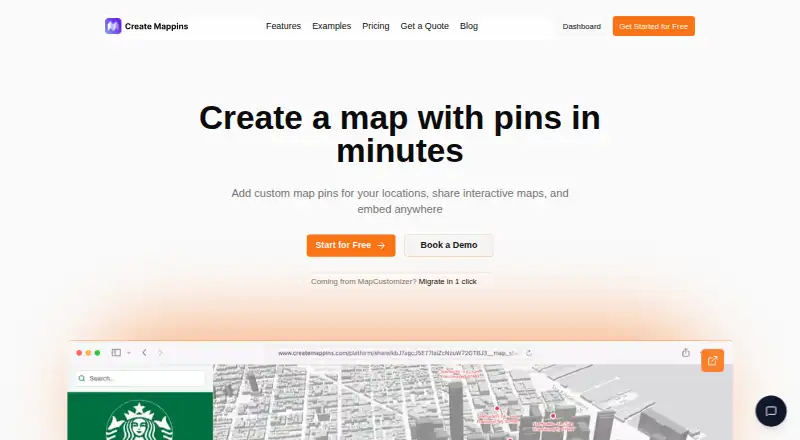
What Create Mappins is
Create Mappins is a web platform for creating, customizing, and sharing interactive maps with pins, locations, and data layers. Users can upload location data from CSV, and the site says maps update in seconds without technical setup. Layers can represent competitors, partners, demographics, or logistics zones; finished maps can be shared by link or embedded on a website. A MapCustomizer import tool preserves pin names, descriptions, and marker colors. Teams can coordinate edits with roles and permissions, while analytics track map views, pin interactions, and activity by region. Sales teams can import CSV exports from Salesforce, HubSpot, Pipedrive, or another CRM, but the product does not describe direct CRM connections. The service is offered for personal, educational, and commercial purposes. The Free plan is free, billed forever, and allows up to 3 maps with 20 pins per map. Pro costs $20 a month, billed monthly, and Business costs $90 a month, billed monthly; both list unlimited maps and pins. A free trial is available.
Good
- Imports location data from CSV.
- Maps can be shared by link or embedded.
- Team roles and permissions support coordinated edits.
- Analytics track views, pin interactions, and regional activity.
Watch out
- Free plan is limited to 3 maps.
- Free plan allows 20 pins per map.
- No direct CRM sync is listed.
- Mobile access is listed as none.
Who it suits
It suits individuals and teams who need to build and share maps for personal, educational, or commercial use. Teams can coordinate map edits, while sales users can import CRM data from CSV exports.
Verdict
Create Mappins combines map creation, data layers, team editing, and sharing, with CSV import available at every plan level. The free map and pin limits and lack of direct CRM sync are important distinctions when choosing a plan.
Plans and prices
From Create Mappins's own pricing page, checked 3 Oct 2026.
| Plan | Price | What it gives you |
|---|---|---|
| Free | Free | Up to 3 maps · 20 pins per map · Community support · forever |
| Pro | $20 a month | Unlimited pins and maps · Priority support · monthly |
| Business | $90 a month | Unlimited pins and maps · Dedicated support · Custom onboarding · monthly |
The facts
Each one read from Create Mappins's own pages, with the date it was checked.
What it does
- Analytics
- The site says analytics can track map views, pin interactions, and region-level activity.checked 3 Oct 2026
- Collaboration
- The site describes team roles and permissions for coordinating map edits across departments.checked 3 Oct 2026
- Data handling
- The privacy policy says Create Mappins does not sell or rent personal or business data to third parties.checked 3 Oct 2026
- Data import
- Users can upload location data from CSV, and the site says maps update in seconds without technical setup.checked 3 Oct 2026
- Integrations
- The sales-team page describes importing CSV exports from Salesforce, HubSpot, Pipedrive, or any CRM; it does not describe a direct CRM connection.checked 3 Oct 2026
- Intended users
- The terms say the service is offered for personal, educational, and commercial purposes.checked 3 Oct 2026
- MapCustomizer migration
- The site offers a tool to import MapCustomizer maps, preserving pin names, descriptions, and marker colors.checked 3 Oct 2026
- Map layers
- Maps can include overlays such as competitors, partners, demographics, or logistics zones.checked 3 Oct 2026
- Notable limits
- The Free plan allows up to 3 maps and 20 pins per map; Pro and Business list unlimited maps and pins.checked 3 Oct 2026
- Security
- The privacy policy says it uses technical, administrative, and physical safeguards and notes that no internet-based service can guarantee absolute security.checked 3 Oct 2026
- Security reporting
- The security page invites vulnerability reports at [email protected] and lists Firebase/Firestore and Cloud Storage security rules among its in-scope areas.checked 3 Oct 2026
- Sharing
- Maps can be shared by link or embedded on a website.checked 3 Oct 2026
- Support
- The Free plan includes community support, Pro includes priority support, and Business includes dedicated support.checked 3 Oct 2026
- What it does
- Create Mappins is a web-based platform for creating, customizing, and sharing interactive maps with pins, locations, and data layers.checked 3 Oct 2026
The company
- Headquarters
- Newark, Delaware, United Stateschecked 28 Sep 2026
The full review of Create Mappins
Overview
Create Mappins is a browser-based tool for building interactive maps from pins, locations, and layered data. It is a sensible fit for individuals, educators, and departments that need a shared geographic view without installing software. The main trade-off is that updates arrive through file imports rather than a live CRM connection, and the service has no mobile access.
Key features
CSV import is the foundation of the workflow. You can upload location data and bring in exports from Salesforce, HubSpot, Pipedrive, or another CRM, with maps updating in seconds and no technical setup. That is useful for periodic territory or account refreshes, but it remains a manual export-and-import cycle; organizations requiring records to flow automatically from a CRM should choose a connected platform instead.
Layered maps can place competitors, partners, demographics, and logistics zones over the same geography. This gives sales and operations teams context for territory decisions rather than just a collection of markers. Territory management is supported, while activity heatmaps are not, so the product is stronger for organizing coverage than for visualizing intensity or movement.
Maps can be shared by URL or embedded on a website, making distribution straightforward for people who only need to view the result. Team roles and permissions help departments divide editing responsibility. Built-in analytics cover map views, pin interactions, and activity at regional level, providing a useful indication of engagement without turning the product into a full business-intelligence suite.
Organizations moving from MapCustomizer get a dedicated migration tool that retains pin names, descriptions, and marker colors. That preservation reduces the cost of switching for existing users. Security safeguards are described as technical, administrative, and physical, and the company says it does not sell or rent personal or business data. Vulnerability reports can be sent to [email protected].
Pricing
The Free plan costs free, billed forever. It allows up to three maps and 20 pins per map, with community support. Those caps are adequate for a small demonstration, classroom project, or occasional personal map, but a working sales territory can outgrow them quickly. A free trial is also offered.
Pro costs $20 a month, billed monthly, and removes the map and pin limits. Priority support makes it the sensible individual or small-team upgrade when the free quotas interfere with regular work. It does not add a stated mobile experience or direct CRM sync, so paying more does not change those product boundaries.
Business costs $90 a month, billed monthly. It retains unlimited maps and pins and adds dedicated support and custom onboarding. This tier is aimed at departments that need guided rollout or a more accountable support relationship; smaller users are unlikely to need it solely for capacity.
Platforms
Create Mappins runs on the web. There is no mobile access, which favors desk-based planners and coordinators over field representatives who need to consult or edit maps away from a computer.
Who it's for
Choose it for territory planning, partner or competitor mapping, logistics context, educational maps, and internal dashboards that can be refreshed by CSV. Its roles, embeds, and regional analytics make it workable for cross-department collaboration. Look elsewhere if your process depends on live CRM synchronization, mobile use, or activity heatmaps.
Pros and cons
- Pros: CSV imports accept common CRM exports without technical setup; layered data supports richer territory decisions; link sharing and embeds broaden access; MapCustomizer migration preserves key pin details; Business adds custom onboarding and dedicated support.
- Cons: There is no direct CRM sync, so updates require file handling; the Free plan stops at three maps and 20 pins per map; no mobile access limits field use; no activity heatmaps means less insight into concentration or movement.
Alternatives
For route-focused field sales with native iOS and Android apps and optimization for up to 120 stops, choose Badger Maps instead. GeoMaps is the better choice when you need Android, iOS, self-hosted deployment, or a free tier with 1,000 locations and 30-plus integrations.
Pick SalesRabbit Appointment Management for appointment workflows and team management, or Scribble Maps for a general map-making service with a free tier limited to five lifetime saves and a $19/month Pro Basic option. ODL Studio is a free, open-source desktop alternative for Linux, macOS, and Windows.
Gradient Works suits revenue teams seeking market-mapping and scenario tools, while Mapline is another web and API mapping option with custom-priced plans. For more formal territory modeling with optimization, user limits, and larger data-point quotas, consider TerraMap. Browse the Sales Mapping Software list for additional category options.
Verdict
Create Mappins is a strong choice for desktop-based teams that need shareable, layered territory maps and can keep source data current through CSV exports. Pro is the practical starting point once the free caps hurt productivity, while Business earns its price when onboarding and dedicated support matter. Choose another product if live CRM updates, mobile field access, or heatmap analysis is central to your work.
Alternatives to Create Mappins
- 1
SalesRabbit Appointment Management
Free planAndroidiOSWebAPI8.2From $59 a month - 2

Badger Maps
Free planAndroidiOSWebAPI8.1From $12 a month - 3

Scribble Maps
Free planAndroidiOSWebAPI8.1From $168 a year - 4

Maptitude
AndroidiOSWebAPI7.8From $795 a year - 5

Gradient Works
Free planWebAPI7.5From $799 a month - 6
Workday Adaptive Planning
AndroidiOSWebAPI7.5