Focuster
Focuster is a web and iOS task planner that places to-do items into a calendar.
What Focuster is
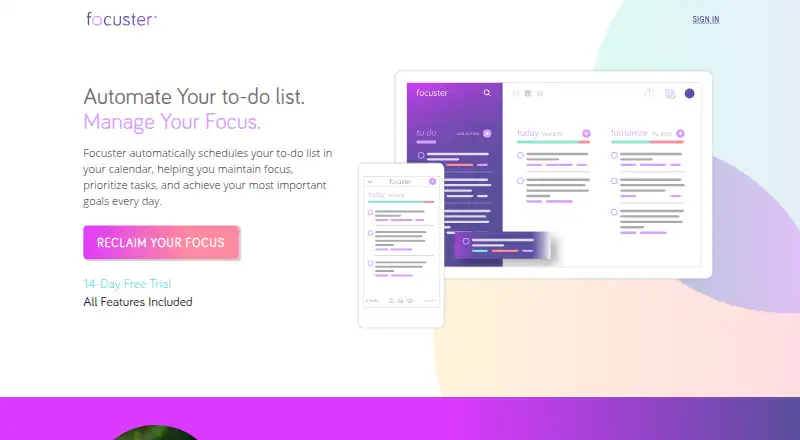
Focuster is a web and iOS task planner that places to-do items into a calendar. After connecting a Google account, it looks for open time for important tasks and adjusts schedules when appointments change. Users can order tasks by priority, estimate durations, and plan one day in Day View or up to two weeks in Multi view. The service recommends selecting three main goals for each day. A Now view, reminders, Chrome push notifications, and daily planning emails help keep attention on current work. Tasks can be captured by sending email to a personal inbox address, which uses the subject as the title and body as the note. The Chrome extension opens the Now view in new tabs and provides a capture shortcut. Integrations include Zapier workflows and named services such as Gmail, Evernote, Trello, and Slack. Focuster has a 14-day trial and no free plan.
Good
- Automatically schedules tasks in Google Calendar
- Adjusts schedules when appointments change
- Supports planning up to two weeks
- Captures tasks by email
- Offers reminders and notifications
Watch out
- No dedicated Android app
- No free plan
- Time blocking requires Focuster PRO
- iOS app was described as beta
Who it suits
Focuster suits people who want priorities and task durations placed into Google Calendar automatically. It fits web and iOS users; Android users rely on a mobile browser.
Verdict
Focuster centers task planning around calendar availability, priorities, and changing appointments. Its trial allows evaluation, but Android users need the mobile browser and time blocking is reserved for PRO users.
The facts
Each one read from Focuster's own pages, with the date it was checked.
Where it runs
- Android
- The help center says there is no specific Android app and that Focuster Mobile can be used in a mobile browser.checked 9 Oct 2026
- Browser extension
- The Chrome extension shows the Focuster Now view in new tabs and provides a quick capture shortcut.checked 9 Oct 2026
- iOS
- The help center says Focuster has an iOS app for iPhone and iPad.checked 9 Oct 2026
- Supported platforms
- web,ioschecked 20 Sep 2026
What it does
- API
- Focuster provides an API key in account settings for integrations and supports adding tasks by sending email to a personal inbox address.checked 9 Oct 2026
- Calendar scheduling
- After connecting a Google account, Focuster finds free calendar time for important tasks and adjusts the schedule when events change.checked 9 Oct 2026
- Calendar sync
- Changes to actions in Focuster and events in Google Calendar sync between the two services.checked 9 Oct 2026
- Chrome extension
- The Chrome extension shows the Focuster Now view on new tabs and offers shortcuts for capturing tasks.checked 9 Oct 2026
- Feature limit
- Time blocking is described as a feature for Focuster PRO users.checked 9 Oct 2026
- Focus tools
- Focuster offers a Now view and notifications to help users stay engaged with their current task.checked 9 Oct 2026
- Integrations
- The maker’s help article describes Zapier workflows and names Gmail, Evernote, Trello, and Slack among the apps with integrations.checked 9 Oct 2026
- Mobile
- The Focuster Mobile help article describes mobile task lists, calendar views, scheduling, and settings, and says the iOS app was in beta at the time it was written.checked 9 Oct 2026
- Notifications
- Settings include reminders, push notifications for Chrome users, and daily planning emails.checked 9 Oct 2026
- Priorities
- Users can order tasks by priority, estimate their duration, and schedule them into open calendar time.checked 9 Oct 2026
- Purpose
- Focuster automatically schedules tasks in a calendar to help users prioritize work and maintain focus.checked 9 Oct 2026
- Recurring tasks
- Yeschecked 20 Sep 2026
- Scheduling
- Focuster finds free time in a Google Calendar to schedule important tasks and adjusts the schedule when appointments change.checked 9 Oct 2026
- Scheduling limit
- The settings guide says users can turn off scheduling all actions so Focuster schedules only the next three actions.checked 9 Oct 2026
- Support
- The maker links to its Help Center from the homepage.checked 9 Oct 2026
- Task capture
- Each user has a unique inbox email address that turns received emails into actions, using the subject as the title and the body as the note.checked 9 Oct 2026
- Time blocking
- The help center says time blocking is a feature for Focuster PRO users and uses Google Calendar events tagged with #block.checked 9 Oct 2026
Money
- Free plan
- Nochecked 20 Sep 2026
- Goal planning
- The site recommends writing down and prioritizing the top three goals for the day.checked 9 Oct 2026
- Planning horizon
- Day View is for planning one day, while Multi view supports planning up to two weeks in advance.checked 9 Oct 2026
Alternatives to Focuster
- 1
Pomodoist
Free planOpen sourceAndroidiOSWebAPI9.2Free plan - 2

Any.do
Free planAndroidiOSWebmacOS8.8Free plan - 3

TickTick
Free planAndroidiOSWebLinux8.7From $49.99 a year - 4

Routine
Free planAndroidiOSWebLinux8.7From $5 a month - 5

Nozbe
Free planAndroidiOSWebmacOS8.6From $6 a month - 6

Vikunja
Free planAndroidiOSWebAPI8.5From €4 a month