Focusky
Focusky is a presentation maker for online and video presentations, PowerPoint-to-video conversion, mind maps, and product or service displays.
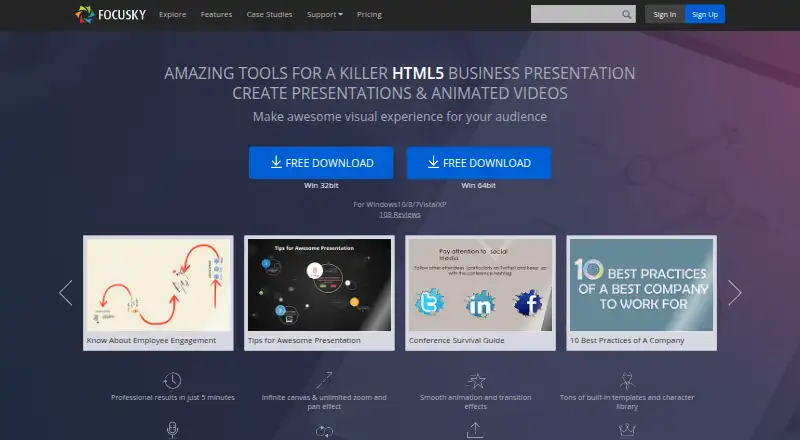
What Focusky is
Focusky is a presentation maker for online and video presentations, PowerPoint-to-video conversion, mind maps, and product or service displays. Its desktop editor uses a limitless canvas with zooming and panning to arrange content and guide attention. Presentations can use animated mind-map layouts, moving from whole to part or part to whole, as well as object effects, action paths, and hand-drawn animation. The editor includes text, images, video, background music, shapes, formulas, charts, screen recording, and voice narration. Publishing formats include HTML, EXE, ZIP, APP, MP4, and PDF; APP output runs on Mac OS. A mobile app can access and present Focusky presentations online or offline. Focusky lists PowerPoint import and source PowerPoint download, presenter mode, and customizable encryption settings. The free plan includes 10G cloud storage and 50 uploads per month, with a watermark on published presentations and limited output and online features. Standard costs $9.90 a month and includes 100G cloud storage, 200 uploads per month, and 30 offline presentations per month. Listed platforms are Android, iOS, macOS, and Windows.
Good
- Imports PowerPoint files.
- Publishes to HTML, EXE, ZIP, APP, MP4, or PDF.
- Includes screen recording and voice narration.
- Plans have no presentation view limits.
Watch out
- Free published presentations carry a watermark.
- Free plan has limited output and online features.
- Standard limits offline presentations to 30 per month.
Who it suits
Focusky may suit educators preparing lessons, people making business mind maps or conference presentations, and teams explaining products or services. Its online and offline presentation options support different display settings.
Verdict
Focusky combines a zoomable canvas, animation, and varied publishing formats for presentations and mind maps. The free plan has a watermark and limited output; check the plan's storage, upload, and offline-presentation limits before choosing.
Plans and prices
From Focusky's own pricing page, checked 3 Oct 2026.
| Plan | Price | What it gives you |
|---|---|---|
| Free | Free | 10G cloud storage · 50 uploads/month · watermark on published presentations · limited output and online features |
| Standard | $9.90 a month | 100G cloud storage · 200 uploads/month · 720P HD video · 30 offline presentations/month · 1 user · $9.9 / month |
| Professional | $99 a year | Unlimited cloud storage and uploads · 1080P HD video · unlimited offline presentations · 2 users · $99 / year |
| ENTERPRISE | $399, paid once | Unlimited cloud storage and uploads · 1080P HD video · unlimited offline presentations · 10 users · $399 PERMANENT |
The facts
Each one read from Focusky's own pages, with the date it was checked.
What it does
- Animation
- Focusky offers object animation effects, action paths, and hand-drawn animation effects.checked 3 Oct 2026
- Canvas and zoom
- The desktop app uses a limitless canvas with zooming and panning to organize and direct attention to presentation content.checked 3 Oct 2026
- Cloud storage
- Focusky says its upload service stores presentation data on its server using Amazon S3.checked 3 Oct 2026
- Integrations
- The pricing page lists PowerPoint import and source PowerPoint download among its features.checked 3 Oct 2026
- Media and creation tools
- The editor supports text, images, video, background music, shapes, formulas, charts, screen recording, and voice narration.checked 3 Oct 2026
- Mobile viewing
- Focusky describes a mobile app for accessing and presenting online or offline Focusky presentations.checked 3 Oct 2026
- Offline access
- Yeschecked 20 Sep 2026
- PowerPoint import
- Yeschecked 20 Sep 2026
- Presenter mode
- Yeschecked 20 Sep 2026
- Product
- Focusky is a digital presentation maker for creating online and video presentations, PPT-to-video conversions, mind maps, and product or service displays.checked 3 Oct 2026
- Publishing formats
- Presentations can be published as HTML, EXE, ZIP, APP, MP4, or PDF; the APP format runs on Mac OS.checked 3 Oct 2026
- Publishing limit
- The pricing page says local publishing is limited to 30 per month on Standard and unlimited on Professional and Enterprise.checked 3 Oct 2026
- Security
- Focusky says users can customize encryption settings to protect a presentation from unauthorized access.checked 3 Oct 2026
- Support
- Focusky says its support team is available 24/7 and that support, upgrades, and cloud hosting have no additional charge beyond the plan.checked 3 Oct 2026
- Usage limit
- Focusky states that its plans have no presentation view limits.checked 3 Oct 2026
- Who it is for
- Focusky describes uses including lessons, business mind mapping, meetings and conferences, and product explanations for online or offline display.checked 3 Oct 2026
Money
- Free plan
- Yeschecked 20 Sep 2026
Where it runs
- Mind mapping
- Focusky supports animated presentations in a mind-mapping style, arranging content from whole to part or part to whole.checked 3 Oct 2026
- Supported platforms
- Windows,macOSchecked 20 Sep 2026
The full review of Focusky
Overview
Focusky is a presentation maker for creating zoomable, animated presentations, mind maps, videos and product displays. It is best suited to educators and business presenters who need to explain connected ideas or direct attention across a visual canvas. Its flexible publishing formats are a strong draw, while the Free plan’s watermark and output restrictions make it less suitable for finished work.
Key features
The desktop editor uses a limitless canvas with zoom and pan, letting a presenter move from a broad view into specific details rather than follow a fixed slide sequence. This works well for lessons, mind maps and product explanations where relationships between topics matter; it also puts more responsibility on the presenter to make the path through the material clear.
Mind-map-style presentations can move from whole to part or part to whole. Object effects, action paths and hand-drawn animation offer several ways to emphasize content, but animation is most useful when it helps the audience follow the explanation rather than compete with it.
The editor brings together text, images, video, background music, shapes, formulas and charts, plus screen recording and voice narration. PowerPoint import offers a route for adapting existing decks, and source PowerPoint download is included among the pricing-page features. Presenter mode and offline access support live delivery.
Publishing options include HTML, EXE, ZIP, APP, MP4 and PDF, with APP output running on Mac OS. That range can serve both online sharing and downloadable or video presentations, though video resolution and offline publishing allowances depend on the plan. A mobile app can access and present Focusky presentations online or offline. Focusky also offers customizable encryption settings; its upload service stores presentation data on its server using Amazon S3.
Pricing
Focusky has a Free plan and paid plans starting at $9.90/mo. All plans have no presentation view limits, but storage, upload, video, offline-publishing and user allowances vary. Focusky says support, upgrades and cloud hosting cost nothing beyond the plan price, and its support team is available 24/7.
| Plan | Price | What it includes |
|---|---|---|
| Free | free | 10G cloud storage, 50 uploads/month, watermark on published presentations, limited output and online features |
| Standard | $9.90 a month | Billed $9.9 / month; 100G cloud storage, 200 uploads/month, 720P HD video, 30 offline presentations/month and 1 user |
| Professional | $99 a year | Billed $99 / year; unlimited cloud storage and uploads, 1080P HD video, unlimited offline presentations and 2 users |
| Enterprise | $399 a month | Billed Permanent plan with a one-time fee.; unlimited storage and uploads, unlimited offline presentations and 10 multi-user accounts |
Free is for trying the editor or sharing within its constraints; the watermark and limited output make it a poor fit for polished delivery. Standard suits an individual who needs more storage and uploads, 720P video and a defined offline allowance, but its 30 local presentations per month may constrain frequent publishing. Professional raises video quality to 1080P and removes storage, upload and offline-presentation caps, while adding a second user; its annual billing suits users ready to commit for a year. Enterprise is aimed at larger teams needing 10 accounts and unlimited publishing allowances. Its price is shown as $399.00 per month, while the billing term is described as a one-time permanent plan.
Platforms
Focusky lists Android, iOS, macOS and Windows platforms, while its supported-platforms entry specifies Windows and macOS. The desktop app supplies the zoomable canvas, and the mobile app is for accessing and presenting online or offline presentations. APP publishing runs on Mac OS.
Who it's for
Focusky is a good fit for teachers, business users and presenters building lessons, mind maps, meetings, conferences or product explanations. It is particularly suited to material that benefits from moving between an overview and detail, or from online and offline delivery in different formats. A conventional slide workflow may be a better choice for presenters who do not need a spatial canvas or its animation options.
Pros and cons
- Pros: A limitless zoomable canvas and mind-map flow help show relationships and move between overview and detail.
- Pros: Multiple export formats, PowerPoint import and source PowerPoint download support varied presentation workflows.
- Pros: Professional removes storage and upload caps and allows unlimited offline presentations, which benefits frequent publishers.
- Cons: Free adds a watermark and limits output and online features, restricting its usefulness for polished sharing.
- Cons: Standard limits local publishing to 30 presentations a month and video to 720P, which may not suit high-volume or higher-resolution output.
- Cons: The stated Enterprise price and one-time permanent-plan billing description do not align, so buyers should clarify the term before committing.
Alternatives
For other options, compare Animated Presentation Software and Presentation software.
- Powtoon is worth considering for a free animation workflow with screen recording, basic templates and characters; its Free plan caps videos at 720p and three minutes and adds a watermark.
- Animaker has a free plan with basic animation tools, limited premium assets and watermarked exports, plus a free trial.
- HeyGen may suit users seeking short videos: its free plan allows three videos per month, each up to one minute.
- OpenDeck is a free alternative with no in-app purchases.
- Decks.Studio offers three decks a month and five AI refinements a day on its free plan, but PDF export is watermarked and PPTX/DOCX export is unavailable.
- OpenSlides is a free, open-source desktop app with no subscription.
- Animiz may suit Windows users who can work within a free plan capped at five scenes per project, 576P video and watermarked output.
- Kinoslide offers a web-based option with a free allowance of five starting credits and videos up to two minutes.
Verdict
Choose Focusky if you need to guide an audience through a zoomable visual canvas and publish the result in formats ranging from HTML to video. Its broad creation and export tools make it especially appealing for lessons, mind maps and product explanations. Look elsewhere if you need unrestricted polished output on a free plan, a straightforward linear deck, or a clearly stated Enterprise billing term.
Getting started
- Open the Focusky website
- Choose the free plan or a paid plan
- Use the Windows or macOS desktop app, or the Android or iOS mobile app
- Import a PowerPoint file or create content on the canvas
- Add media, animations, narration, or presenter mode
- Publish as a supported file format or present online or offline
Limits worth knowing
The Free plan includes 10G cloud storage, 50 uploads per month, a watermark on published presentations, and limited output and online features. Standard includes 30 offline presentations per month and local publishing limited to 30 per month; Professional and Enterprise list unlimited offline presentations and local publishing.
Questions
Is Focusky free?
Yes. The Free plan costs nothing and includes 10G cloud storage and 50 uploads per month, with a watermark and limited output and online features.
How much do paid plans cost?
Standard is $9.90 a month, Professional is $99 a year, and Enterprise is listed at $399 a month with a permanent-plan, one-time-fee note.
Which platforms does Focusky support?
Android, iOS, macOS, and Windows are listed. Desktop support is specified for Windows and macOS.
Can Focusky work offline?
Yes. Focusky lists offline access, and its mobile app can access and present presentations online or offline.
Can I import PowerPoint files?
Yes. PowerPoint import and source PowerPoint download are listed features.
What publishing formats are available?
Presentations can be published as HTML, EXE, ZIP, APP, MP4, or PDF. APP output runs on Mac OS.
Alternatives to Focusky
- 1
LibreOffice Impress
Free planOpen sourceAndroidiOSWebAPI9.4$8.99 one-time - 2
Microsoft PowerPoint
Free planAndroidiOSWebmacOS9.1Free plan - 3

Pitch
Free planAndroidiOSWebAPI9.0From €10 a month - 4

Zoho Show
Free planAndroidiOSWebAPI8.9From $2.50 a month - 5

WPS Office
Free planAndroidiOSWebAPI8.9From $41.99 a year - 6
Google Slides
Free planAndroidiOSWeb8.6From $7 a month