Express Burn
Express Burn burns audio, video, and data to CD, DVD, and Blu-ray discs on Windows and macOS.
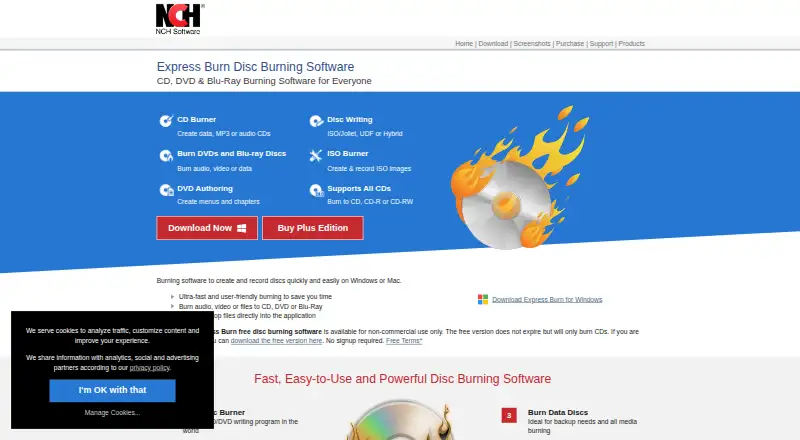
What Express Burn is
Express Burn burns audio, video, and data to CD, DVD, and Blu-ray discs on Windows and macOS. It can create MP3 or audio CDs using formats such as WAV, MP3, WMA, OGG, and FLAC. For video discs, it supports DVD and Blu-ray burning, chapter management, and PAL or NTSC output. DVD authoring includes over 20 menu templates, which users can customize with their own images. Data discs can use ISO/Joliet, UDF, or Hybrid formats, and the software can create and burn ISO images. Other listed capabilities include bootable data discs, disc copying, dual-layer DVD and Blu-ray burning, and recordable or rewritable media. Command-line operation allows automation and integration with other programs. The free edition does not expire but is for non-commercial use and burns CDs only. Paid annual plans cost $34.99 a year for CD burning, $49.99 a year for CD and DVD recording, or $59.95 a year for all supported disc types. NCH says audio and video functions are for users’ own content and cannot be used to break copy or region protections.
Good
- Burns audio, video, and data discs.
- Creates and burns ISO images.
- Supports bootable data discs and disc copying.
- DVD authoring includes over 20 menu templates.
- Command-line operation supports automation.
Watch out
- Free edition burns CDs only.
- Free edition is for non-commercial use.
- DVD and Blu-ray burning require a paid plan.
Who it suits
Express Burn suits Windows and macOS users who need to create audio, video, or data discs. Its free edition is limited to non-commercial CD burning, while DVD and Blu-ray capabilities are included in paid plans.
Verdict
Express Burn covers several disc types and includes authoring, ISO, and command-line options. The free edition is restricted to non-commercial CD burning, so users needing DVD or Blu-ray support should review the paid annual plans.
Plans and prices
From Express Burn's own pricing page, checked 2 Oct 2026.
| Plan | Price | What it gives you |
|---|---|---|
| Express Burn Free | Free | Non-commercial use · does not expire · burns CDs only |
| Express Burn Plus CD Burner Annual Plan | $34.99 a year | Audio and data CD burning · Annual |
| Express Burn Plus CD + DVD Authoring Annual Plan | $49.99 a year | CD and DVD recording · Annual |
| Express Burn Plus CD + DVD + Blu-ray Authoring Annual Plan | $59.95 a year | All supported disc types · Annual |
The facts
Each one read from Express Burn's own pages, with the date it was checked.
What it does
- Audio
- It creates MP3 or audio CDs and supports formats including WAV, MP3, WMA, OGG, and FLAC.checked 2 Oct 2026
- Automation
- The software supports command-line operation for automation and integration with other programs.checked 2 Oct 2026
- Content restrictions
- NCH says the software cannot be used to break copy-protected or region-protected videos and audio/video functions are for users' own content.checked 2 Oct 2026
- Data and ISO
- Data discs can use ISO/Joliet, UDF, or Hybrid formats, and the software can create and burn ISO images.checked 2 Oct 2026
- Disc support
- It supports recordable and rewritable discs, dual-layer DVD and Blu-ray burning, bootable data discs, and disc copying.checked 2 Oct 2026
- DVD authoring
- DVD authoring includes over 20 menu templates and lets users add custom images to templates.checked 2 Oct 2026
- Privacy
- NCH says its programs may collect anonymous usage data such as how often menus or options are used.checked 2 Oct 2026
- Purpose
- Express Burn burns audio, video, and data to CD, DVD, and Blu-ray discs.checked 2 Oct 2026
- Security
- NCH says its site uses SSL to encrypt personal information in transit and that it does not store credit card information.checked 2 Oct 2026
- Support
- Express Burn support offers troubleshooting and how-to articles, a forum, a help manual, and a contact option for technical support.checked 2 Oct 2026
- Video
- It burns video DVDs and Blu-ray discs, supports chapter management, and offers PAL or NTSC output.checked 2 Oct 2026
The company
- Founded
- 1993checked 28 Sep 2026
- Headquarters
- Canberra, Australian Capital Territory, Australiachecked 28 Sep 2026
- Maker
- NCH Software Pty Ltd says its software development team has released more than 80 applications since 1993.checked 2 Oct 2026
Money
- Free edition limit
- The free edition is for non-commercial use, does not expire, and only burns CDs.checked 2 Oct 2026
Where it runs
- Platforms
- The product page lists Windows 7 to 11 and macOS 10.5 or above, along with a disc drive that supports burning, as system requirements.checked 2 Oct 2026
The full review of Express Burn
Overview
Express Burn is desktop software for making audio CDs, video discs, and data discs. It is a strong fit for people who need authoring and multiple disc formats, but less compelling for anyone who only needs an occasional basic burn.
Its command-line support and ISO tools extend it beyond a simple disc-writing utility. The main trade-off is that the free edition stops at non-commercial CD burning, while DVD and Blu-ray work requires an annual plan.
Key features
Express Burn can create MP3 or audio CDs from WAV, MP3, WMA, OGG, and FLAC files. That range helps when a project’s audio comes from different formats. The free edition’s CD-only limit still makes it suitable only for non-commercial use and leaves no free route to DVD or Blu-ray authoring.
Video features include DVD and Blu-ray burning, chapter management, and PAL or NTSC output. DVD authoring offers more than 20 menu templates, which users can customize with their own images. These options make Express Burn more capable for structured video discs than a basic data burner, but they matter only if the paid plan includes the disc type the project needs.
For data, users can choose ISO/Joliet, UDF, or Hybrid formats. Express Burn can create and burn ISO images, as well as copy discs and make bootable data discs. Support for recordable and rewritable media and dual-layer DVD and Blu-ray adds flexibility across disc types. Command-line operation can suit repeatable tasks or integration with other programs; it is unnecessary overhead for someone who burns discs only occasionally.
NCH says the software must not be used to break copy-protected or region-protected media, and that its audio and video functions are intended for users’ own content. NCH also says its programs may collect anonymous usage data, such as how often menus or options are used. The company says its site encrypts personal information in transit with SSL and does not store credit card information.
Support includes troubleshooting and how-to articles, a forum, a help manual, and a contact option for technical support. Express Burn is made by NCH Software Pty Ltd, whose development team says it has released more than 80 applications since 1993.
Pricing
Express Burn uses a freemium model. The free edition costs nothing, does not expire, and permits non-commercial CD burning only. It is a practical no-cost choice for personal CD projects, but not for commercial work or projects requiring DVD or Blu-ray.
- Express Burn Plus CD Burner Annual Plan: $34.99 a year, billed annually. It covers audio and data CD burning, making it the paid option for users who need more than the free edition while staying with CDs.
- Express Burn Plus CD + DVD Authoring Annual Plan: $49.99 a year, billed annually. It adds CD and DVD recording for users who need DVD authoring but not Blu-ray.
- Express Burn Plus CD + DVD + Blu-ray Authoring Annual Plan: $59.95 a year, billed annually. It includes all supported disc types and is the relevant plan for users who need Blu-ray alongside CD and DVD.
The paid tiers are annual commitments rather than one-time purchases. Choosing the cheapest paid plan means giving up DVD and Blu-ray support; the DVD tier still excludes Blu-ray.
Platforms
Express Burn runs on macOS and Windows. It suits users on either desktop platform, but not those looking for a Linux version.
Who it's for
Choose Express Burn if you need a Windows or Mac tool for authoring audio CDs, creating ISO images, or making video discs with chapter and menu options. Its command-line operation is a particular advantage for users automating repeated jobs. Skip it if you need only free commercial burning, a Linux app, or a free way to burn DVDs and Blu-rays.
Pros and cons
- Pros: Multiple disc formats, ISO creation and burning, bootable discs, and copying cover a broad range of disc tasks.
- Pros: Chapter management, PAL or NTSC output, and customizable DVD menu templates support more deliberate video authoring.
- Pros: The free edition does not expire, which suits non-commercial CD burning without a time limit.
- Cons: The free edition is non-commercial and CD-only, so DVD and Blu-ray users must pay annually.
- Cons: Blu-ray support requires the highest annual tier; the cheaper paid plans stop at CD or DVD.
- Cons: It is not an option for Linux users.
Alternatives
For a wider selection of ISO-focused tools, browse ISO Creation Software.
- PhotoDirector is another freemium macOS and Windows option, with a limited free plan and an annual paid plan.
- Open Burning Suite is a free, open-source alternative for Linux as well as macOS and Windows.
- ImgBurn is a free Windows disc-burning application for readers who want freeware rather than a freemium product.
- InfraRecorder is free CD/DVD burning software for Windows, though it is marked beta.
- SysTools ISO Creator may suit ISO work, but its free version limits large ISO files and saving edited or bootable ISOs.
- AnyBurn offers free personal and business use, including disc burning, audio CD ripping, image-file tools, and bootable USB creation on Windows.
- Disc Studio is a free Windows alternative for personal and commercial use, with no ads, account, or trial clock.
- Alcohol 52% has a 15-day trial and a free edition for Windows users.
Verdict
Express Burn is a sensible choice for macOS and Windows users who need more than basic CD writing, especially those making authored video discs or automating repeatable burns. Its broad disc support and ISO tools are the main reasons to choose it. Look elsewhere if you need free commercial use, Linux support, or DVD and Blu-ray burning without an annual plan.
Getting started
- Visit https://www.nch.com.au/burn/
- Choose Windows or macOS
- Select the free edition or a paid annual plan
- Install Express Burn on the chosen computer
- Add audio, video, data, or ISO content
- Burn to supported recordable or rewritable media
Limits worth knowing
The free edition costs nothing, does not expire, is non-commercial, and burns CDs only. Paid plans cost $34.99 a year for audio and data CDs, $49.99 a year for CD and DVD recording, or $59.95 a year for all supported disc types.
Questions
Which operating systems support Express Burn?
Express Burn supports Windows and macOS.
What does the free edition include?
Express Burn Free costs nothing, does not expire, is for non-commercial use, and burns CDs only.
How much do the paid plans cost?
The CD plan is $34.99 a year, the CD and DVD authoring plan is $49.99 a year, and the CD, DVD, and Blu-ray plan is $59.95 a year.
Can Express Burn create ISO files?
Yes. It can create and burn ISO images, and data discs can use ISO/Joliet, UDF, or Hybrid formats.
Can it copy protected discs?
No. NCH says the audio and video functions cannot be used to break copy-protected or region-protected material and are for users’ own content.
Alternatives to Express Burn
- 1
Alcohol 52%
Free planWindows7.3$27 one-time - 2
Avidemux
Free planOpen sourceWebLinuxmacOSWindows7.3Free plan - 3

AnyBurn
Free planWindows7.1$39.95 one-time - 4
Active@ ISO Manager
Free planWindows6.6Free plan - 5

SysTools ISO Creator
Free planmacOSWindows6.6$29 one-time - 6
BurnAware
Free planWindows6.5$29.95 one-time