
SysTools ISO Creator
SysTools ISO Creator is desktop software for creating and editing ISO files from local files and folders on Windows and macOS.
What SysTools ISO Creator is
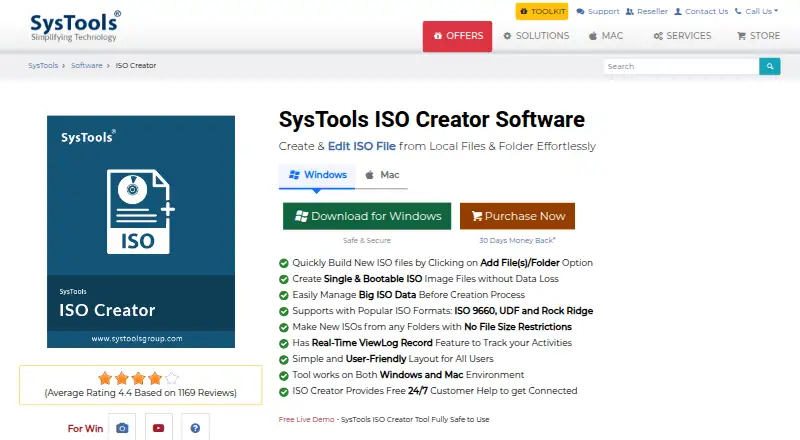
SysTools ISO Creator is desktop software for creating and editing ISO files from local files and folders on Windows and macOS. It supports ISO 9660, UDF, and Rock Ridge formats, and can make bootable images from system files or installation folders that contain the necessary files. When building an image, it keeps the source folder structure, filenames, and paths. Its real-time activity log can also produce a report of actions. The product is described as offline software that neither needs an internet connection nor sends data to a cloud or server. The free version is limited when handling large ISO files and saving edited or bootable images. The Full Version costs $29, paid once and removes those limits. Windows requirements include 100 MB of free disk space, 4 GB RAM, and Microsoft .NET Framework 4.5 or above; the product page says to run it as administrator on Windows 10 and 11. On Mac, it requires 200 MB of free disk space and 4 GB RAM, supports Intel and Apple Silicon M1, and requires the system region to be United States and language to be English.
Good
- Creates bootable ISO images from suitable system files or folders
- Preserves source folder structure, names, and paths
- Works offline without cloud or server uploads
- Supports ISO 9660, UDF, and Rock Ridge
- Includes activity logging and action reports
Watch out
- Free edition limits large ISO file handling
- Free edition limits saving edited or bootable ISOs
- Disc burning is not supported
- Mac requires United States region and English language
Who it suits
It suits people who need to create or edit ISO files locally, including bootable images, and want to preserve source folder paths. Mac users need a United States system region and English language setting; Windows 10 and 11 users are advised to run it as administrator.
Verdict
SysTools ISO Creator focuses on local ISO creation and editing, with bootable-image support and source structure preservation. The free version has limits on large files and saving edited or bootable images; the Full Version is $29, paid once.
Plans and prices
From SysTools ISO Creator's own pricing page, checked 4 Oct 2026.
| Plan | Price | What it gives you |
|---|---|---|
| Free Version | Free | Large ISO files limited · Saving edited/bootable ISOs limited |
| Full Version | $29, paid once | No file limit · Save all ISO files · Starting At $29 |
The facts
Each one read from SysTools ISO Creator's own pages, with the date it was checked.
What it does
- Activity log
- The product includes a real-time ViewLog record feature to track activities and can generate a report of actions.checked 4 Oct 2026
- Bootable images
- It can create bootable ISO images from system files or installation folders containing the necessary files.checked 4 Oct 2026
- Folder structure
- The software preserves the original folder structure, file names, and paths when creating ISO files.checked 4 Oct 2026
- ISO formats
- It supports ISO 9660, UDF, and Rock Ridge formats.checked 4 Oct 2026
- Offline use
- The product page describes the software as offline and says it does not require an internet connection or upload data to a cloud or server.checked 4 Oct 2026
- Purpose
- SysTools ISO Creator creates and edits ISO files from local files and folders.checked 4 Oct 2026
- Support
- The product page advertises free 24/7 technical and customer support.checked 4 Oct 2026
The company
- Company history
- SysTools says it was established in 2007 and has more than 18 years of experience.checked 4 Oct 2026
- Headquarters
- New Delhi, Indiachecked 28 Sep 2026
- Maker certifications
- SysTools says its ISO 9001:2015 and 27001:2013 certifications reflect its commitment to quality and compliance.checked 4 Oct 2026
Money
- Free edition limits
- The free version limits handling large ISO files and saving edited or bootable ISOs; the full version removes those limits according to the comparison table.checked 4 Oct 2026
Where it runs
- Mac requirements
- The Mac version requires 200 MB of free disk space and 4 GB RAM, supports Intel and Apple Silicon M1, and requires the system region to be United States and language to be English.checked 4 Oct 2026
- Platforms
- The product is available for Windows 11 and 10 (64 bit) and macOS X 11.0 (Big Sur) through macOS X 15.0 (Sequoia) and above.checked 4 Oct 2026
- Windows requirements
- The Windows version requires 100 MB of free disk space, 4 GB RAM, and Microsoft .NET Framework 4.5 or above; the page says to run it as administrator on Windows 10 and 11.checked 4 Oct 2026
Alternatives to SysTools ISO Creator
- 1
Alcohol 52%
Free planWindows7.3$27 one-time - 2
Avidemux
Free planOpen sourceWebLinuxmacOSWindows7.3Free plan - 3

AnyBurn
Free planWindows7.1$39.95 one-time - 4
Express Burn
Free planmacOSWindows6.7From $34.99 a year - 5
Active@ ISO Manager
Free planWindows6.6Free plan - 6
BurnAware
Free planWindows6.5$29.95 one-time