Disc Studio
Disc Studio is a Windows workbench for handling disc images, archives, optical discs, and USB media.
What Disc Studio is
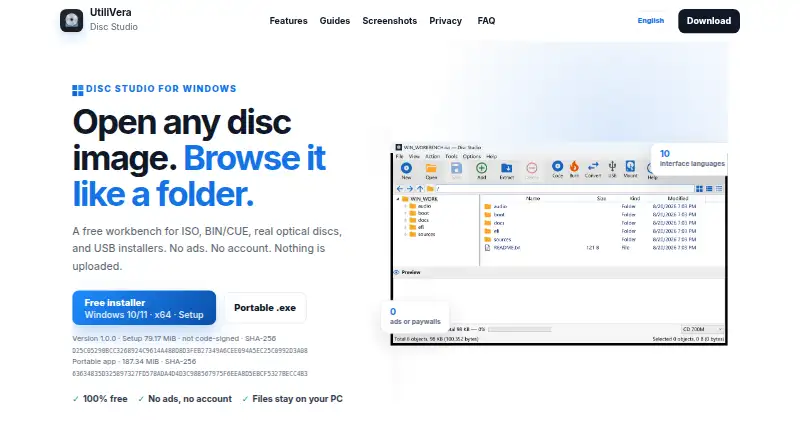
Disc Studio is a Windows workbench for handling disc images, archives, optical discs, and USB media. It opens formats including ISO, BIN/CUE, NRG, MDF, CCD, DMG, WIM, VHD, ZIP, and 7z; the listed format support also includes ESD, VHDX, VMDK, RAR, and DSIM. You can browse image contents, add or remove files, extract them, and save images as ISO, DSIM, or BIN/CUE in 2048 or 2352 mode. The app can browse CDs and DVDs and extract audio from mixed-mode or audio BIN/CUE images as WAV or raw BIN files. For mounting, it supports Windows, WinCDEmu, or ImDisk, with as many as eight drive slots. It can burn with IMAPI, copy discs to ISO, create bootable USB drives, and handle WIM/ESD work. A command-line counterpart covers create, convert, mount, hash, USB, and burn jobs. The maker says operations stay on the PC and work offline after the first download. It is free for personal and commercial use.
Good
- Free for personal and commercial use
- Opens a broad range of image and archive formats
- Mounts images with up to eight drive slots
- Includes command-line create, convert, mount, hash, USB, and burn jobs
Watch out
- Requires 64-bit Windows 10 or 11
- Does not support PowerISO DAA images
- Download is not Authenticode-signed; SmartScreen may warn
Who it suits
Disc Studio suits Windows users who need to browse or convert image files, burn data discs, or prepare USB installers. It also fits users who want local image operations or command-line jobs.
Verdict
Disc Studio brings image browsing, conversion, mounting, burning, and bootable USB creation into one Windows utility. Check its format and disc-authoring limitations, and expect a possible SmartScreen warning on first run.
Plans and prices
From Disc Studio's own pricing page, checked 30 Sep 2026.
| Plan | Price | What it gives you |
|---|---|---|
| Free | Free | No ads · No account · No trial clock · Free for personal and commercial use |
The facts
Each one read from Disc Studio's own pages, with the date it was checked.
What it does
- Burning and USB
- Disc Studio can burn with IMAPI, copy a disc to ISO, write a bootable USB, and use DISM-style tools for WIM/ESD work.checked 30 Sep 2026
- Command line
- A command-line twin is included for create, convert, mount, hash, USB, and burn jobs.checked 30 Sep 2026
- Edit and convert
- Users can add, remove, extract, and save image contents, and save images as ISO, DSIM, or BIN/CUE in 2048 or 2352 mode.checked 30 Sep 2026
- Image and archive formats
- It can open formats including ISO, BIN/CUE, NRG, MDF, CCD, DMG, WIM, VHD, ZIP, and 7z.checked 30 Sep 2026
- Intended users
- The maker describes the desktop app as free for personal and commercial use and highlights everyday ISO work, BIN/CUE conversion, disc browsing, mounting, data-disc burning, and USB installers.checked 30 Sep 2026
- Mounting
- Images can be mounted with Windows, WinCDEmu, or ImDisk, with up to eight drive slots available.checked 30 Sep 2026
- Notable limitations
- The maker says PowerISO DAA images, true CD-DA burning, VCD authoring, CDDB, and CD-TEXT are not supported or included.checked 30 Sep 2026
- Optical discs and audio
- The app can browse CDs and DVDs and extract audio tracks from mixed-mode or audio BIN/CUE images as WAV or raw BIN files.checked 30 Sep 2026
- Privacy
- The maker says image operations run on the Windows PC, files are not uploaded, and the app works offline after the first download.checked 30 Sep 2026
- Purpose
- Disc Studio is a Windows workbench for opening disc images, browsing their contents, extracting files, converting formats, mounting images, and writing to discs or USB drives.checked 30 Sep 2026
- Signing
- The current download is not Authenticode-signed, so Windows SmartScreen may warn on first run.checked 30 Sep 2026
Where it runs
- Windows requirements
- The app requires 64-bit Windows 10 or 11, and the maker says neither download requires a separate .NET installation.checked 30 Sep 2026
The full review of Disc Studio
Disc Studio is a free Windows utility for working with disc images, optical media, and bootable USB drives. It suits people who want image editing, conversion, mounting, and burning in one place, especially for everyday ISO and BIN/CUE jobs. Its breadth is useful, but unsupported disc formats and authoring features matter if your work goes beyond data discs.
Overview
Disc Studio covers a broad workflow: open an image, browse or extract its files, edit its contents, convert it, then mount or write it. It also handles optical-disc browsing and bootable USB creation, so it can replace several narrow utilities for routine Windows tasks.
That range has boundaries. PowerISO DAA images, true CD-DA burning, VCD authoring, CDDB, and CD-TEXT are not supported or included. The current download is not Authenticode-signed, so Windows SmartScreen may warn when you first run it.
Key features
Browse, edit, and convert images
Disc Studio opens ISO, BIN/CUE, NRG, MDF, CCD, DMG, WIM, VHD, ZIP, and 7z, among other formats. You can add or remove contents, extract files, and save images as ISO, DSIM, or BIN/CUE in 2048 or 2352 mode. This makes it practical for inspecting and reshaping common images, though DAA users will need another tool.
Mount, burn, and create USB media
Mount images through Windows, WinCDEmu, or ImDisk, with up to eight drive slots. Disc Studio can burn using IMAPI, copy a disc to ISO, write bootable USB drives, and use DISM-style tools for WIM/ESD work. It can also browse CDs and DVDs and extract audio tracks from mixed-mode or audio BIN/CUE images as WAV or raw BIN files. These are useful capabilities for general disc and installer tasks, but they do not amount to full audio-disc or VCD authoring.
Command line and privacy
A command-line twin supports create, convert, mount, hash, USB, and burn jobs, a meaningful advantage for repeatable or scripted work. The maker says image operations stay on the Windows PC, files are not uploaded, and the app works offline after its first download.
Pricing
Disc Studio is free for personal and commercial use: free. The Free plan has no ads, requires no account, and has no trial clock. There are no paid tiers or trial period to weigh against its feature set.
Platforms
Disc Studio runs on 64-bit Windows 10 or 11. Neither download requires a separate .NET installation. It is not a fit for users who need a macOS or Linux version.
Who it's for
Choose Disc Studio if you want a single Windows workbench for everyday ISO handling, BIN/CUE conversion, disc browsing, mounting, data-disc burning, and USB installers—particularly if command-line access or offline use matters. Look elsewhere if you need DAA support, CD-DA burning, VCD authoring, CDDB, or CD-TEXT.
Pros and cons
Pros
- Broad image workflow at no cost: editing, conversion, mounting, burning, and USB creation sit together in a free personal-and-commercial-use app.
- Useful format and mount coverage: it opens numerous image and archive types and offers up to eight mount slots through Windows or third-party mounting tools.
- Command-line companion: common creation, conversion, hashing, mounting, USB, and burning jobs can be handled without the desktop interface.
- Offline privacy posture: the maker says file operations remain on the PC and the app works offline after download.
Cons
- Missing specialist disc features: DAA, true CD-DA burning, VCD authoring, CDDB, and CD-TEXT are outside its scope.
- First-run warning is possible: the current download lacks Authenticode signing, which can prompt Windows SmartScreen.
- Windows only: the 64-bit Windows 10/11 requirement excludes users on other operating systems.
Alternatives
- ISO Creation Software is a category guide for comparing ISO tools.
- Open Burning Suite is another free option, with support for Linux, macOS, and Windows; choose it if cross-platform availability matters more than Disc Studio's described image-editing workflow.
- AnyBurn has a free plan for personal and business use that includes disc burning, audio CD ripping, image-file tools, and bootable USB creation. Pick it if audio CD ripping is a priority.
- SysTools ISO Creator has a free version with limits on large ISO files and saving edited or bootable ISOs, plus a full version starting at 29.00 USD one-time. Disc Studio is the stronger fit if you want its stated workflow without those described free-version limits.
- ImgBurn is freeware for Windows disc burning and also supports Linux; choose it for a burning-focused alternative.
- AnyToISO offers a Windows Standard Pro license for 22.95 USD one-time, per PC, with lifetime technical support and free minor updates; consider it if that license arrangement fits your needs.
- InfraRecorder is free CD/DVD burning software for Windows, marked beta.
- Express Burn is a freemium option for macOS and Windows.
- UltraISO costs 29.95 USD one-time; its unregistered version has a 300MB document limit, removed upon registration.
Verdict
Disc Studio is a strong choice for Windows users who want a free, broad toolkit for common image, mounting, burning, and bootable-USB jobs, with command-line support as a bonus. Its all-in-one scope is the main reason to choose it; its unsupported disc-authoring features and possible SmartScreen warning are the clearest reasons to look elsewhere.
Alternatives to Disc Studio
- 1
Alcohol 52%
Free planWindows7.3$27 one-time - 2
Avidemux
Free planOpen sourceWebLinuxmacOSWindows7.3Free plan - 3

AnyBurn
Free planWindows7.1$39.95 one-time - 4
Express Burn
Free planmacOSWindows6.7From $34.99 a year - 5
Active@ ISO Manager
Free planWindows6.6Free plan - 6

SysTools ISO Creator
Free planmacOSWindows6.6$29 one-time