ImgBurn
ImgBurn is a free application for burning CD, DVD, HD DVD, and Blu-ray discs.
What ImgBurn is
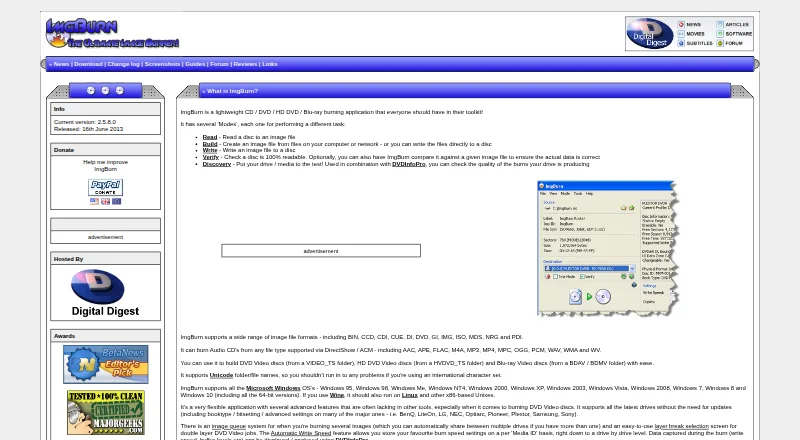
ImgBurn is a free application for burning CD, DVD, HD DVD, and Blu-ray discs. It can read a disc into an image file, create images or discs from files, write images to discs, verify readability, and test drives or media. Supported image formats include BIN, CCD, CDI, CUE, DI, DVD, GI, IMG, ISO, MDS, NRG, and PDI. It can burn Audio CDs from supported DirectShow or ACM file types and build DVD Video, HD DVD Video, or Blu-ray Video discs from specified folder structures. An image queue can share jobs across multiple drives, and automatic write-speed settings can be stored by media ID and drive. The download page lists version 2.5.8.0, released June 16, 2013. The site lists Windows 95 through Windows 10, including 64-bit versions; it says Linux and other x86-based Unix systems should run it through Wine. The maker directs users to its forum Guides section for illustrated instructions and says corporate users should handle their own support.
Good
- Free disc-burning application
- Reads, builds, writes, and verifies disc images
- Supports many image formats
- Can create audio and video discs
- Queues jobs across multiple drives
Watch out
- Download page lists a 2013 release
- Linux use requires Wine
- Cannot be bundled with commercial applications or sold
Who it suits
ImgBurn suits people who need to create or verify disc images and burn optical media. Linux and other x86 Unix users need Wine, according to the site.
Verdict
ImgBurn covers common disc-image and burning tasks, including verification and drive testing. Its listed release is old, and Linux use depends on Wine.
Plans and prices
From ImgBurn's own pricing page, checked 29 Sep 2026.
| Plan | Price | What it gives you |
|---|---|---|
| ImgBurn | Free | Freeware · Windows disc burning application |
The facts
Each one read from ImgBurn's own pages, with the date it was checked.
What it does
- Audio and video
- It can burn Audio CDs from DirectShow or ACM supported file types and build DVD Video, HD DVD Video and Blu-ray Video discs from the specified folder structures.checked 29 Sep 2026
- Diagnostics
- The Discovery mode can test a drive or media, and burn data such as write speed and buffer levels can be viewed or analyzed with DVDInfoPro.checked 29 Sep 2026
- Disc burning
- ImgBurn is a lightweight application for burning CD, DVD, HD DVD and Blu-ray discs.checked 29 Sep 2026
- Download version
- The download page lists version 2.5.8.0, released June 16, 2013, with a listed file size of 3,870 KB.checked 29 Sep 2026
- Drive features
- It supports current drives without requiring updates and lists booktype, bitsetting and advanced settings support for many major drive brands.checked 29 Sep 2026
- Image formats
- Supported image formats include BIN, CCD, CDI, CUE, DI, DVD, GI, IMG, ISO, MDS, NRG and PDI.checked 29 Sep 2026
- Installer offers
- The changelog says the installer stopped bundling the Ask.com toolbar and that OpenCandy handled product offerings during installation.checked 29 Sep 2026
- License limits
- The maker says ImgBurn cannot be bundled with a commercial application or sold, while individuals may use it at home or work.checked 29 Sep 2026
- Modes
- Its modes read discs to image files, build images or discs from files, write images to discs, verify disc readability, and test drives or media.checked 29 Sep 2026
- Optional utilities
- BurnPlot and DVDInfoPro can plot ImgBurn IBG burn data, and the download page says these utilities are optional and not required for ImgBurn to function.checked 29 Sep 2026
- Privacy and security
- The site privacy policy says forum registration requests an email address, the site uses cookies, Google AdSense and Google Analytics, and account information is password protected; it also says transmission security cannot be guaranteed.checked 29 Sep 2026
- Queues and speed
- Features include an image queue that can share jobs across multiple drives and automatic write speed settings stored by media ID and drive.checked 29 Sep 2026
- Support
- The maker directs users to the forum’s Guides section for illustrated how-to guides and says corporate users should handle their own support issues.checked 29 Sep 2026
Where it runs
- Linux compatibility
- The site says ImgBurn should also run on Linux and other x86-based Unix systems when used with Wine.checked 29 Sep 2026
- Windows support
- The site lists support for Windows 95 through Windows 10, including 64-bit versions.checked 29 Sep 2026
The full review of ImgBurn
Overview
ImgBurn is a free optical-disc utility for creating, writing and checking disc images. It is best suited to Windows users who need broad image-format support, drive diagnostics or repeat burning workflows rather than a modern media-management suite. Its long feature list is compelling for specialist disc work, but its dated release and Wine-dependent Linux compatibility make the choice less straightforward on newer systems.
Key features
ImgBurn covers the complete disc workflow: read a disc into an image file, build an image or disc from files, write an image to media, verify readability, and test a drive or blank media. That combination suits archival, replication and troubleshooting tasks, not just one-off image burning.
It accepts BIN, CCD, CDI, CUE, DI, DVD, GI, IMG, ISO, MDS, NRG and PDI images. It can burn Audio CDs from DirectShow- or ACM-supported file types and build DVD Video, HD DVD Video and Blu-ray Video discs from the required folder structures. This breadth helps when projects arrive in mixed legacy formats. ImgBurn does not edit image contents or convert between image formats, so those jobs require another application.
An image queue can share jobs across multiple drives, a useful advantage for repeat production. Automatic write-speed settings are saved by media ID and drive, reducing manual tuning when the same media is used again. Discovery mode tests drives or media, while write speed and buffer-level data can be viewed or analyzed with DVDInfoPro. BurnPlot and DVDInfoPro can plot ImgBurn IBG burn data, but they are optional utilities and are not needed for ImgBurn itself.
Drive support includes booktype, bitsetting and advanced settings for many major brands, and the application is designed to work with current drives without requiring updates. Those controls will appeal to experienced users seeking predictable media behavior, while newcomers may find the breadth more technical than necessary.
Pricing
The ImgBurn plan costs free. It is freeware with no trial period, so there is no trial expiry or paid renewal to manage. Individuals may use it at home or at work, but it cannot be bundled with a commercial application or sold. The free plan supplies the full disc-burning application; there is no cheaper tier that removes features and no paid tier for additional capabilities.
The installer history deserves attention. The changelog says the Ask.com toolbar was removed, while OpenCandy handled product offerings during installation. Read installer screens carefully rather than accepting every offer by default.
Platforms
The software runs on Windows, with the maker naming support from Windows 95 through Windows 10, including 64-bit editions. Linux and other x86-based Unix systems may run it through Wine, so Linux users should expect a compatibility layer rather than a native package. The dated Windows support range and 2013 release make it a better fit for established Windows disc setups than for users seeking a current cross-platform experience.
Who it's for
Choose ImgBurn if you burn varied image formats, need verification or drive/media testing, or operate several drives and want queued jobs and remembered speed settings. It is also a practical no-cost option for users building video discs from specified folder structures or making Audio CDs from supported source files.
Look elsewhere if you need image editing, image conversion, native Linux support, or a contemporary interface and maintenance cadence. Corporate users should be prepared to handle their own support issues; the maker points users to the forum's Guides section for illustrated how-to material.
Pros and cons
Pros
- Broad image coverage: support for 13 named image formats handles many older and specialist disc projects.
- Full burn-and-check workflow: reading, building, writing, verification and Discovery testing are in one utility.
- Useful repeat-burn controls: queued jobs, multi-drive sharing and media-specific speed settings suit production work.
- Free for personal and workplace use: the zero-cost plan has no trial deadline.
- Advanced drive controls: booktype, bitsetting and brand-specific settings give experienced users more control.
Cons
- Old release: version 2.5.8.0 dates from June 16, 2013, which weakens its appeal for users expecting active modernization.
- No image editing or conversion: ImgBurn cannot reshape or translate images without another tool.
- Linux requires Wine: Unix users do not get a native installation path.
- Technical extras: DVDInfoPro and BurnPlot are separate optional utilities, and advanced settings may be excessive for occasional burners.
- Installer and privacy considerations: OpenCandy product offers have been part of installation history; the site uses cookies, Google AdSense and Google Analytics, and says transmission security cannot be guaranteed.
Alternatives
For a wider comparison of image-making tools, see ISO Creation Software. PhotoDirector is a freemium macOS and Windows option with a limited free Essential plan, making it more relevant when broader media work matters than optical-disc diagnostics. mkpsxiso is free, GPL-2.0 open-source and cross-platform, a better direction for users creating PlayStation-style images on Linux or macOS.
Express Burn offers freemium macOS and Windows software with a free non-commercial plan and a trial, so it suits users who prefer a current commercial product with a trial path. Folder2ISO is a free cross-platform choice when the task is simply turning a folder into an ISO; commercial use or distribution requires the author's permission.
Open Burning Suite is free, open source and BSD 2-Clause licensed for users who prioritize an open-source cross-platform burner. InfraRecorder is free Windows CD/DVD software in beta, suitable when a simpler Windows-focused burner is acceptable. SysTools ISO Creator has a free version with limits on large ISO files and saving edited or bootable ISOs, plus a full version starting at 29.00 USD once; choose it when ISO creation and editing matter more than ImgBurn's drive diagnostics. Active@ ISO Manager is another free Windows option for users who want a dedicated ISO-management utility.
Verdict
ImgBurn is the right choice for a technically minded Windows user who wants a free, format-flexible burner with verification, drive testing and repeat-job controls. Its strongest reason to choose it is the unusually complete optical-disc workflow at no cost. Look elsewhere if native Linux support, image editing or conversion, a newer release, or a less technical installation experience matters more than specialist burning control.
Alternatives to ImgBurn
- 1
Alcohol 52%
Free planWindows7.3$27 one-time - 2
Avidemux
Free planOpen sourceWebLinuxmacOSWindows7.3Free plan - 3

AnyBurn
Free planWindows7.1$39.95 one-time - 4
Express Burn
Free planmacOSWindows6.7From $34.99 a year - 5
Active@ ISO Manager
Free planWindows6.6Free plan - 6

SysTools ISO Creator
Free planmacOSWindows6.6$29 one-time