Folder2ISO
Folder2ISO is a free, portable tool that creates an ISO image from a folder.
What Folder2ISO is
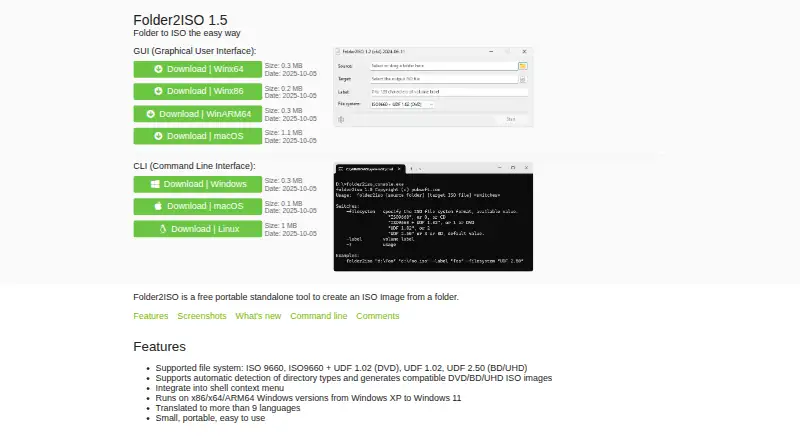
Folder2ISO is a free, portable tool that creates an ISO image from a folder. It supports ISO 9660, ISO 9660 with UDF 1.02, UDF 1.02, and UDF 2.50. The software can detect directory types and generate compatible DVD, BD, and UHD ISO images. GUI downloads are listed for Windows x86, x64, and ARM64, and macOS; command-line downloads are listed for Windows, macOS, and Linux. For Windows, the site lists support from Windows XP through Windows 11 across x86, x64, and ARM64 versions. The command-line interface takes a source folder and target ISO file, with switches for filesystem format and volume label. Windows shell context-menu integration is included, and the software is translated into more than nine languages. The homepage lists version 1.5, dated 2025-10-05, with improved preservation of file and folder creation and modification dates. Folder2ISO creates images but does not burn discs, edit images, or convert images. Its license permits noncommercial use and distribution; commercial use or distribution requires the author's permission. The software is provided as-is without express or implied warranties.
Good
- Supports four ISO and UDF filesystem formats.
- Detects directory types for DVD, BD, and UHD images.
- Command-line downloads include Linux.
- Windows shell context-menu integration is listed.
- Preserves file and folder dates in version 1.5.
Watch out
- Does not burn discs.
- Does not edit or convert images.
- Commercial use or distribution requires the author's permission.
- Provided without express or implied warranties.
Who it suits
Folder2ISO suits users who need to make an ISO image from a folder, including through a command-line interface. Its license is limited to noncommercial use and distribution unless the author grants permission.
Verdict
Folder2ISO focuses on creating ISO images from folders, with GUI and command-line downloads and several filesystem options. It is limited to image creation, and commercial use or distribution requires permission.
Plans and prices
From Folder2ISO's own pricing page, checked 8 Oct 2026.
| Plan | Price | What it gives you |
|---|---|---|
| Free | Free | Noncommercial use and distribution; commercial use or distribution requires the author's permission |
The facts
Each one read from Folder2ISO's own pages, with the date it was checked.
What it does
- Command line
- The command-line interface accepts a source folder and target ISO file, with switches for filesystem format and volume label.checked 8 Oct 2026
- Commercial use
- The license permits use and distribution for noncommercial purposes; commercial use or distribution requires permission from the author.checked 8 Oct 2026
- Disc types
- It can automatically detect directory types and generate compatible DVD, BD, and UHD ISO images.checked 8 Oct 2026
- Downloads
- The site lists GUI downloads for Windows x64, x86, and ARM64 and macOS, plus command-line downloads for Windows, macOS, and Linux.checked 8 Oct 2026
- File systems
- It supports ISO 9660, ISO 9660 + UDF 1.02, UDF 1.02, and UDF 2.50.checked 8 Oct 2026
- Integration
- The listed features include integration into the Windows shell context menu.checked 8 Oct 2026
- Languages
- The site says the software is translated into more than nine languages.checked 8 Oct 2026
- Latest listed version
- The homepage lists version 1.5, dated 2025-10-05, with improved preservation of file and folder creation and modification dates.checked 8 Oct 2026
- Purpose
- Folder2ISO is a free, portable standalone tool for creating an ISO image from a folder.checked 8 Oct 2026
- Warranty
- The software is provided as-is without express or implied warranties, and the author disclaims liability for specified damages including data loss.checked 8 Oct 2026
Where it runs
- Windows support
- The site says it runs on x86, x64, and ARM64 Windows versions from Windows XP to Windows 11.checked 8 Oct 2026
The full review of Folder2ISO
Folder2ISO turns a folder into an ISO image, with graphical and command-line options for desktop users. It is a sensible choice for focused, noncommercial image creation, but not for burning discs or managing images after creation.
Overview
Folder2ISO’s strength is its narrow remit: it makes an image from a folder without adding the broader tasks found in disc utilities. That keeps it relevant when the goal is simply to package files as an ISO. Its four filesystem choices and automatic handling of DVD, BD, and UHD directory types offer useful control, though users who need to burn or transform images will need another tool.
Version 1.5, dated 2025-10-05, improves preservation of file and folder creation and modification dates. That is a practical advantage for archives where timestamps matter. The software comes without express or implied warranties, and its author disclaims liability for specified damages, including data loss.
Key features
- Filesystem formats: Choose ISO 9660, ISO 9660 + UDF 1.02, UDF 1.02, or UDF 2.50. This range helps when a particular format is required, but does not turn Folder2ISO into an image editor or converter.
- DVD, BD, and UHD image support: Folder-type detection can generate compatible images for these disc types, reducing the need to select a target blindly.
- GUI and command line: A graphical interface suits occasional jobs; the command-line interface accepts a source folder and target ISO file, with switches for filesystem format and volume label. That makes the command-line option the more appropriate fit for scripted workflows.
- Windows shell integration: The context-menu integration can shorten the route from a folder to an image for Windows users.
- Language support: The software is translated into more than nine languages, broadening its usability across locales.
Pricing
Free: free. The plan permits noncommercial use and distribution, making it a straightforward option for personal projects and other noncommercial work. Commercial use or distribution requires the author’s permission, so businesses should not assume the zero price covers their use.
There are no paid tiers to weigh against the free plan. The key trade-off is licensing rather than features: commercial users need permission, and anyone seeking burning, editing, or conversion must look elsewhere.
Platforms
Folder2ISO is available for Linux, macOS, and Windows. GUI downloads are offered for Windows x64, x86, and ARM64, as well as macOS; command-line downloads cover Windows, macOS, and Linux. The Windows release is described as supporting x86, x64, and ARM64 systems from Windows XP through Windows 11. Linux users have a command-line download, while the listed GUI options do not include Linux.
Who it's for
Folder2ISO fits people who need to package a folder as an ISO, want a choice of filesystem format, or need a command-line route on Linux, macOS, or Windows. Its timestamp-preservation improvement is especially relevant to archive workflows. It is a poor fit for users who need disc burning, image editing, or image conversion, and commercial users should secure permission before using or distributing it.
Pros and cons
- Pro: The free plan supports noncommercial use and distribution, so personal image creation has no stated purchase cost.
- Pro: Four filesystem formats and automatic DVD, BD, and UHD handling provide meaningful format flexibility for a focused tool.
- Pro: GUI and command-line downloads cover different working styles, including Linux command-line use.
- Con: Commercial use or distribution requires the author’s permission, limiting its suitability as an unrestricted business tool.
- Con: It does not burn discs, edit images, or convert image formats, so it cannot replace a broader disc-workflow application.
- Con: The software is provided as-is and disclaims warranties and liability for specified damages, including data loss.
Alternatives
For a broader comparison, see the ISO Creation Software category.
- PhotoDirector is a freemium macOS and Windows option with a limited-feature free plan; consider it when that alternative’s feature set is a better match.
- mkpsxiso is a free, GPL-2.0-licensed option for Linux, macOS, and Windows; choose it if that licensing and platform combination better suits your needs.
- Express Burn has a free non-commercial plan and a free trial on macOS and Windows; consider it if you need an alternative with a trial.
- Open Burning Suite is a free, BSD 2-Clause-licensed option for Linux, macOS, and Windows; it may suit readers seeking that license and platform coverage.
- ImgBurn is freeware for Linux and Windows described as a disc-burning application; choose it when disc burning is the priority.
- InfraRecorder is free CD/DVD burning software for Windows; consider it for that operating system and task.
- SysTools ISO Creator has a free version with limits on large ISO files and saving edited or bootable ISOs, plus a full version starting at 29.00 USD once; consider it if those editing or bootable-image needs matter.
- Active@ ISO Manager is a free Windows option; compare it if you want another Windows-specific choice.
Verdict
Choose Folder2ISO if you need a focused way to create folder-based ISO images for noncommercial use, especially when filesystem options, command-line access, or preserved timestamps matter. Its limited scope is also its main reason to look elsewhere: it will not burn, edit, or convert images, and commercial use requires permission.
Getting started
- Open the Folder2ISO website
- Download the GUI build for Windows or macOS, or a command-line build for Windows, macOS, or Linux
- Launch the portable tool or command-line executable
- Select a source folder and destination ISO file
- Choose the filesystem format and volume label when using command line
- Create the ISO image
Limits worth knowing
The Free plan costs nothing and permits noncommercial use and distribution. Commercial use or distribution requires the author’s permission.
Questions
Is Folder2ISO free?
Yes. The Free plan is listed as free.
Which operating systems are supported?
Downloads are listed for Windows, macOS, and Linux. Windows support includes x86, x64, and ARM64 versions from Windows XP through Windows 11.
What ISO formats can it create?
Supported formats are ISO 9660, ISO 9660 plus UDF 1.02, UDF 1.02, and UDF 2.50.
Does Folder2ISO burn discs?
No. Disc burning is not included.
Can it edit or convert ISO images?
No. Image editing and image conversion are not included.
Can businesses distribute it commercially?
The license allows noncommercial use and distribution. Commercial use or distribution requires the author’s permission.
Alternatives to Folder2ISO
- 1
Alcohol 52%
Free planWindows7.3$27 one-time - 2
Avidemux
Free planOpen sourceWebLinuxmacOSWindows7.3Free plan - 3

AnyBurn
Free planWindows7.1$39.95 one-time - 4
Express Burn
Free planmacOSWindows6.7From $34.99 a year - 5
Active@ ISO Manager
Free planWindows6.6Free plan - 6

SysTools ISO Creator
Free planmacOSWindows6.6$29 one-time