EasyOCR
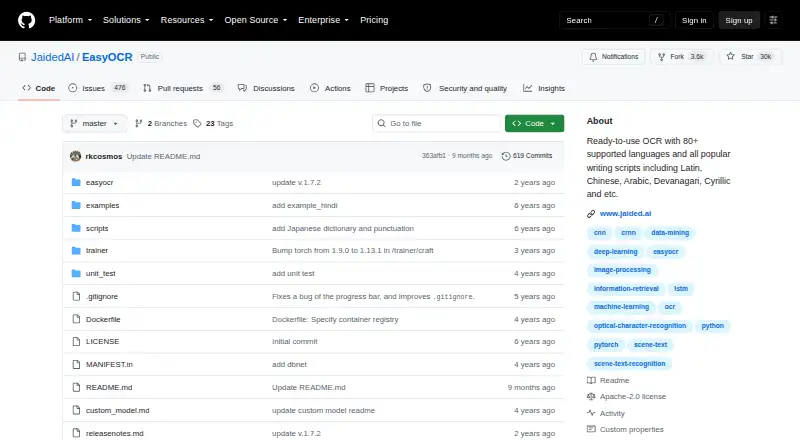
EasyOCR is a Python library for extracting text from images, including natural-scene text and dense documents.
What EasyOCR is
EasyOCR is a Python library for extracting text from images, including natural-scene text and dense documents. It supports more than 80 languages, and can read compatible languages together. Its `readtext` method can return recognized text with bounding-box coordinates and confidence values, or text alone. You can provide images as file paths, NumPy arrays, bytes, or URLs. EasyOCR can use a GPU when available or run in CPU-only mode; pretrained models download automatically, with manual downloads available for offline use. Its API supports custom recognition networks and configurable detection, recognition, decoding, and text-box merging. Installation options include pip, source, and Docker; Windows users may need to install PyTorch manually first. The project provides a web demo and is integrated into Hugging Face Spaces through Gradio. EasyOCR is free, with no paid plans listed, and its public repository uses the Apache-2.0 license. Handwriting recognition is not supported; the README lists it as planned work.
Good
- Supports more than 80 languages.
- Accepts file paths, arrays, bytes, and URLs.
- Can run with a GPU or CPU-only.
- Offers pip, source, and Docker installation.
Watch out
- Handwriting recognition is not supported.
- Windows users may need to install PyTorch manually first.
Who it suits
EasyOCR suits developers who need image text extraction across many languages and want configurable recognition options. It is not a fit for handwriting recognition.
Verdict
EasyOCR offers broad language support and flexible image input for software-based OCR workflows. Check the handwriting limitation and Windows installation requirement before choosing it.
Plans and prices
From EasyOCR's own pricing page, checked 4 Oct 2026.
| Plan | Price | What it gives you |
|---|---|---|
| EasyOCR | Free | Open-source OCR library · no paid plans listed |
The facts
Each one read from EasyOCR's own pages, with the date it was checked.
What it does
- Compute options
- The Reader can use a GPU when available or run in CPU-only mode.checked 4 Oct 2026
- Customization
- The API supports custom recognition networks and configurable detection, recognition, decoding, and text-box merging options.checked 4 Oct 2026
- Handwriting OCR
- Nochecked 23 Sep 2026
- Input formats
- Images can be supplied as a file path, NumPy array, bytes, or URL.checked 4 Oct 2026
- Installation
- The maker documents installation through pip, from source, or with Docker; Windows users may need to install PyTorch manually first.checked 4 Oct 2026
- Integrations
- The repository says EasyOCR is integrated into Hugging Face Spaces using Gradio and provides a web demo.checked 4 Oct 2026
- Issue handling
- The repository says that issues older than six months are automatically closed and can be reopened if critical.checked 4 Oct 2026
- Languages
- The project states that it supports more than 80 languages, and compatible languages can be read together.checked 4 Oct 2026
- License
- The public GitHub repository identifies EasyOCR as licensed under Apache-2.0.checked 4 Oct 2026
- Model downloads
- Pretrained models download automatically when EasyOCR is used, and can also be downloaded manually for offline environments.checked 4 Oct 2026
- Notable limitation
- The README lists handwritten text support as planned work.checked 4 Oct 2026
- Purpose
- EasyOCR is a Python module for extracting text from images, including natural scene text and dense document text.checked 4 Oct 2026
- Recognition output
- The readtext method returns detected text with bounding box coordinates and confidence values, with an option for text-only output.checked 4 Oct 2026
- Security
- The maker pages reviewed do not state a security certification or compliance claim for EasyOCR.checked 4 Oct 2026
- Support
- The repository directs enterprise inquiries to Jaided AI for custom OCR/AI implementation, training or fine-tuning, and deployment services.checked 4 Oct 2026
- Supported inputs
- imagechecked 23 Sep 2026
- Supported languages
- 80checked 23 Sep 2026
Money
- Free plan
- Yeschecked 23 Sep 2026
The company
- Maker
- jDai Lab says it was founded in 2020 and describes itself as a small, independent AI research lab; the about page does not state its headquarters.checked 4 Oct 2026
Where it runs
- Primary platform
- desktopchecked 23 Sep 2026
The full review of EasyOCR
EasyOCR is a free Python OCR library for developers who need to extract text from images in software workflows. Its broad language coverage and configurable API make it a flexible choice, but it does not recognize handwriting and is not a ready-made desktop document editor.
Overview
EasyOCR reads natural-scene text as well as dense document text. Its readtext method can return recognized text with bounding-box coordinates and confidence values, or text alone. The coordinates are useful when an application needs to locate words in an image, not merely capture their content.
Images can be passed as file paths, NumPy arrays, bytes, or URLs. That range suits workflows drawing from different image sources, though the library itself is designed for integration into software rather than direct document editing. It is licensed under Apache-2.0.
Key features
Multilingual image recognition
EasyOCR supports more than 80 languages, and compatible languages can be read together. That makes it a strong candidate for mixed-language image collections. Handwriting recognition, by contrast, is planned work; choose another tool if handwritten material is central to the job.
Configurable processing and compute
The API exposes detection, recognition, decoding, and text-box merging options, and permits custom recognition networks. Developers can tune a pipeline to a particular application, but that flexibility comes with integration work rather than the simplicity of a finished desktop app.
A Reader can use a GPU when one is available or run in CPU-only mode. Pretrained models download automatically on use, with manual downloads also possible for offline environments. Docker and source installation are documented alongside pip; Windows users may need to install PyTorch manually first, adding a setup step on that platform.
The project also provides a web demo and says EasyOCR is integrated into Hugging Face Spaces using Gradio. These offer ways to try the library, but do not change its core role as a Python module.
Pricing
EasyOCR is free: its open-source library plan costs nothing, and there are no paid plans. There is no subscription tier or paid upgrade to weigh against the free option. The tradeoff is that users need to build or integrate their own OCR workflow.
The library does not provide searchable PDF or Word export. Readers who need those outputs should consider a different tool or build that functionality into their workflow.
Platforms
EasyOCR is available for Linux, macOS, Windows, and self-hosted use. Its primary platform is desktop, but its Python-module format makes it most relevant to people developing or maintaining software workflows. GPU use is optional; CPU-only operation is supported. Windows users should account for the possible manual PyTorch installation.
Who it's for
Choose EasyOCR if you are a developer who needs image-based text extraction, multilingual coverage, flexible image inputs, and control over recognition settings without paying for a library license. It is especially well suited to custom pipelines that need text locations or confidence values as well as recognized words.
Look elsewhere if you need handwriting OCR, a consumer-facing document editor, or built-in searchable PDF and Word export. The library's configuration options are an advantage for software teams, not a substitute for a ready-to-use document application.
Pros and cons
- Pros: More than 80 supported languages, including compatible-language combinations, suits multilingual image workflows.
- Pros: Bounding boxes, confidence values, and text-only output let developers choose how recognition results feed into an application.
- Pros: GPU and CPU-only modes, multiple image input types, and manual model downloads support varied deployment setups.
- Cons: Handwriting recognition is not supported, excluding workflows centered on handwritten text.
- Cons: Windows installation may require manually installing PyTorch, which adds setup friction.
- Cons: No searchable PDF or Word export means users needing those outputs must supply another tool or their own processing.
Alternatives
OCR.space is worth considering when a hosted service and searchable PDF output matter more than EasyOCR's configurable Python-library approach. Its free plan includes 25,000 requests per month, a 1 MB file-size limit, up to three PDF pages, 500 requests per day per IP, and searchable PDF with a watermark.
Tesseract OCR is another free, Apache License 2.0 open-source OCR engine for readers comparing free OCR software across a wider range of platforms.
docTR is a free open-source Python library to consider if its Python 3.11-or-higher requirement and pip, Git, or Docker installation options fit your development environment better.
OCRmyPDF is a free self-hosted option for a PDF-oriented workflow, though it depends on external OCR and PDF tools.
Veryfi Invoices OCR API is aimed at invoice processing and offers a $500 a month Starter plan with a $500 monthly minimum commitment; consider it when a paid invoice-focused service is a better fit than a free general image OCR library.
PaddleOCR offers an Official API Free Tier with a daily document parsing limit of 20,000 pages; it may suit readers looking for a page-limited API tier instead.
Dynamsoft Label Recognizer is a paid option with a free trial for readers considering a commercial label-recognition module.
Amazon Textract AnalyzeExpense is a paid expense-analysis API with a free tier for new AWS customers covering up to 100 pages per month for three months; consider it when expense analysis is the requirement.
For broader comparisons, browse OCR API Software or OCR software.
Verdict
EasyOCR is a strong free choice for developers building multilingual image OCR into their own software, particularly when bounding boxes, confidence values, and adjustable processing matter. Its main reasons to look elsewhere are decisive: it does not handle handwriting, lacks built-in searchable PDF and Word export, and requires a Python integration rather than offering a finished desktop editor.
Getting started
- Open the EasyOCR GitHub repository
- Install through pip, source, or Docker
- Install PyTorch first on Windows if needed
- Use the Reader with an image file, array, bytes, or URL
- Allow pretrained models to download automatically or download them manually for offline use
Questions
Is EasyOCR free?
Yes. The listed EasyOCR plan costs nothing, and no paid plans are listed.
Which platforms does EasyOCR support?
It supports Linux, macOS, Windows, and self-hosted deployments, with desktop as its primary platform.
How many languages can it read?
The project states support for more than 80 languages, including compatible languages read together.
Can EasyOCR process handwriting?
No. Handwriting recognition is listed as planned work.
What input types can I provide?
Images may be supplied as file paths, NumPy arrays, bytes, or URLs.
Is EasyOCR open source?
Yes. The public repository identifies it as licensed under Apache-2.0.
Alternatives to EasyOCR
- 1
FreeOCR.AI
Free planWebAPImacOSWindows8.2From $80 a year - 2
Tesseract OCR
Free planAndroidAPILinuxmacOS7.9Free plan - 3

Open-Capture
Free planOpen sourceWebAPILinuxSelf-hosted7.9Free plan - 4
ScanScan
AndroidiOSWebmacOS7.7CN¥30 one-time - 5
Prizmo
Free planiOSmacOS7.7Free plan - 6
Tungsten OmniPage
APILinuxmacOSSelf-hosted7.6€99 one-time