
Dropbox Fax (formerly HelloFax)
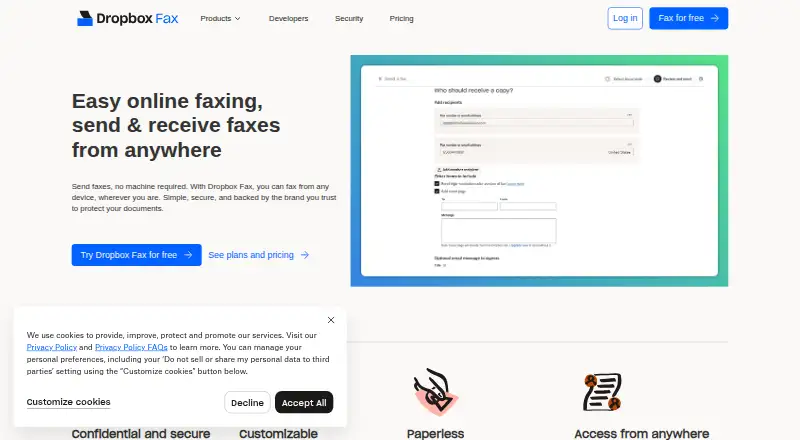
Dropbox Fax, formerly HelloFax, is a web service for sending and receiving faxes through email or a browser.
What Dropbox Fax (formerly HelloFax) is
Dropbox Fax, formerly HelloFax, is a web service for sending and receiving faxes through email or a browser. It provides a virtual fax number and supports international faxing. The free option sends five pages, with up to 20 additional pages available through sharing or quick actions; free use is sending-only, and inbound faxing requires a paid account. Paid access offers flexible plans or pay-as-you-go, but no paid price is listed. Faxes can be sent from any device and accessed through the cloud on a computer, tablet, or mobile device, though the listed platform is web and there are no mobile apps. Received faxes arrive as PDFs, and uploaded files are used for sending; supported formats include PDF and DOCX. The service can route inbound faxes, set up multiple numbers and users, and transfer an existing fax number in the US and Canada. It integrates with Dropbox, Google Drive, Box, OneDrive, and Evernote, and offers an API and SDKs. Transmissions are encrypted. Its trial policy says there is no trial and no credit card is required.
Good
- Send five pages free and earn up to 20 more.
- Supports international faxing.
- Received faxes arrive as PDFs.
- Integrates with five named cloud services.
- Can transfer existing numbers in the US and Canada.
Watch out
- Free access is sending-only.
- Inbound faxing requires a paid account.
- No mobile apps are listed.
- No paid price is listed.
Who it suits
It suits people or organizations that want to send faxes online and receive them through a paid account. Teams needing multiple fax numbers, routing, or cloud access across devices may find its listed features useful.
Verdict
Dropbox Fax offers online and email faxing, with a limited free sending allowance and paid inbound service. Check the lack of mobile apps and the unlisted paid price against your faxing needs.
Plans and prices
From Dropbox Fax (formerly HelloFax)'s own pricing page, checked 15 Sep 2026.
| Plan | Price | What it gives you |
|---|---|---|
| Free | Free | 5 free outbound fax pages · Up to 20 additional pages can be earned · Sending only; inbound faxing requires a paid account |
| Free faxing | Free | Send 5 pages for free; earn up to 20 more pages by sharing or completing quick actions. |
| Paid plans | Priced on request | Upgrade anytime with flexible plans or pay-as-you-go. |
The facts
Each one read from Dropbox Fax (formerly HelloFax)'s own pages, with the date it was checked.
Money
- Additional free pages
- Earn up to 20 more pages through sharing or quick actions.checked 27 Sep 2026
- Billing options
- Paid access offers flexible plans or pay-as-you-go.checked 27 Sep 2026
- Free page allowance
- Send 5 pages for free.checked 27 Sep 2026
- Free plan
- Yeschecked 15 Sep 2026
- Trial policy
- There is no trial and no credit card is required.checked 27 Sep 2026
What it does
- Cloud integrations
- Integrates with Dropbox, Google Drive, Box, OneDrive, and Evernote.checked 27 Sep 2026
- Developer tools
- Provides an API and SDKs for developers.checked 27 Sep 2026
- Email faxing
- Send and receive faxes through email or the web.checked 27 Sep 2026
- Fax customization
- Set up as many fax numbers and users as needed and route inbound faxes.checked 27 Sep 2026
- Inbound faxing
- Yeschecked 15 Sep 2026
- Industry recognition
- Wirecutter recognized it as the best online faxing service for multiple years.checked 27 Sep 2026
- International faxing
- International faxing is listed as a feature.checked 27 Sep 2026
- Mobile access
- Receive faxes on a computer, tablet, or mobile device.checked 27 Sep 2026
- Number porting
- Transfer an existing fax number to Dropbox Fax without downtime or lost faxes.checked 27 Sep 2026
- Paperless delivery
- Received faxes arrive as PDFs, and sent faxes use uploaded files.checked 27 Sep 2026
- Porting availability
- Number transfer is currently available in the US and Canada.checked 27 Sep 2026
- Registered users
- Dropbox says it is trusted by over 700 million registered users worldwide.checked 27 Sep 2026
- Supported file types
- Upload PDF, DOCX, and other common document types.checked 27 Sep 2026
- Transmission encryption
- All transmissions are encrypted for security.checked 27 Sep 2026
- Virtual fax number
- Yeschecked 15 Sep 2026
Where it runs
- Mobile apps
- Nochecked 15 Sep 2026
- Supported devices
- Fax from any device and access faxes through the cloud.checked 27 Sep 2026
The full review of Dropbox Fax (formerly HelloFax)
Overview
Dropbox Fax, formerly HelloFax, is a web-based service for sending and receiving faxes through a browser or email. It suits occasional senders who want to avoid paper and users who need cloud-based inbound faxing; its strongest trade-off is a small free sending allowance against paid inbound access and no dedicated mobile app.
Faxes arrive as PDFs, and outgoing documents can be uploaded rather than printed and scanned. Transmissions are encrypted, and international faxing is supported, making the service useful for straightforward digital fax workflows across locations.
Key features
Dropbox Fax covers both ends of a fax workflow: send uploaded files and receive faxes through the web or email. Common file types include PDF and DOCX. Connections to Dropbox, Google Drive, Box, OneDrive, and Evernote can make it more convenient to work with documents already stored in those services.
Paid accounts can receive faxes using virtual numbers. The service supports setting up multiple numbers and users and routing incoming faxes, which is useful for teams that need to direct documents to the right people. Existing fax numbers can be transferred without downtime or lost faxes, though porting is available only in the US and Canada. Developers can also use its API and SDKs.
Pricing
The free plan costs nothing and permits five outbound pages. Sharing or completing quick actions can earn up to 20 more pages. This is a reasonable way to handle occasional outgoing faxes, but it is not a standing free inbound service: receiving faxes requires a paid account.
Paid access offers flexible plans or pay-as-you-go, but the paid plans have custom pricing. That makes the free allowance easy to evaluate, while regular senders and anyone needing a fax number for inbound documents will need to weigh the paid cost against their expected volume. The pricing note mentions a 30-day trial, but there is no trial; no credit card is required for the free plan.
Platforms
Dropbox Fax is a web service, not a mobile app. You can access faxes on a computer, tablet, or mobile device through the cloud, and send or receive by email, but readers who want a dedicated Android or iOS app should look elsewhere.
Who it's for
It is a good fit for people who fax occasionally, already keep documents in supported cloud services, or need paid inbound faxing with routing and multiple users. It is less compelling for frequent senders who need predictable published pricing, people who require a permanent free allowance beyond the limited outbound pages, or app-first mobile users.
Pros and cons
- Pros: free outbound sending: Five pages are included, with up to 20 more earnable, which helps occasional users avoid paying for every small faxing task.
- Pros: cloud and email workflow: Web and email faxing, PDF delivery, common file uploads, and five cloud integrations reduce the need to handle paper documents.
- Pros: configurable inbound service: Paid users can use virtual numbers, route inbound faxes, and transfer numbers in the US and Canada.
- Cons: inbound faxing is paid: The free plan only covers sending, so anyone who needs to receive faxes must upgrade.
- Cons: no mobile apps: Mobile access works through the cloud, but there is no dedicated app for readers who prefer app-based faxing.
- Cons: paid price is custom: Without a published price, recurring users cannot readily compare the cost to their expected fax volume.
Alternatives
Choose FAX.PLUS if you want Android and iOS apps alongside web access, or a larger free sending allowance of 10 pages; its Basic plan is $6.99 a month. FaxTerra is another app-based option, with 10 free pages per month for sending to the US and Canada.
For low-cost paid access with a dedicated fax number, OVHcloud Fax has a €0.99 a month EcoFax Pro plan, plus a per-page sending charge. WestFax may suit users who want a defined monthly allowance: its Solo plan is $14.99 a month for 500 pages and one user license.
TELUS Cloud Fax is an alternative with a single-number plan that specifies monthly inbound and outbound page allowances. iFax offers paid plans including 200 pages for $12.49 a month. For web-only faxing with a free allowance, consider Browserfax, which offers 20 pages on its free plan. eFax is another paid option, with plans for individuals, businesses, and corporate use.
Browse Online Fax Services for more faxing options, or File Sharing Software if document storage and sharing matter more than faxing.
Verdict
Dropbox Fax is best for occasional fax senders and teams that need a digital inbound workflow connected to cloud documents. Its free outbound pages and email-based access are practical strengths, but paid inbound service, custom pricing, and the lack of mobile apps make it a weaker choice for frequent faxing or app-first users.
Getting started
- Visit https://fax.dropbox.com/.
- Use the web service or send and receive faxes through email.
- Send up to five pages on the free plan.
- Earn up to 20 additional pages through sharing or quick actions.
- Choose flexible paid access or pay-as-you-go if you need inbound faxing.
Limits worth knowing
The free plan allows five outbound pages, with up to 20 additional pages available through sharing or quick actions. It does not include inbound faxing; that requires a paid account.
Questions
Is Dropbox Fax free?
Yes. The Free plan costs nothing and includes five outbound fax pages, with up to 20 more available through sharing or quick actions.
Can I receive faxes on the free plan?
No. Inbound faxing requires a paid account.
Which platforms and devices does it support?
The listed platform is web, and mobile apps are not available. Faxes can be accessed through the cloud on a computer, tablet, or mobile device.
Does Dropbox Fax have a trial?
No. Its trial policy says there is no trial and no credit card is required.
What integrations does it offer?
It integrates with Dropbox, Google Drive, Box, OneDrive, and Evernote.
Can I transfer an existing fax number?
Yes. Transfers are currently available in the US and Canada, without downtime or lost faxes.
Alternatives to Dropbox Fax (formerly HelloFax)
- 1
FAX.PLUS
Free planAndroidiOSWeb8.6From $6.99 a month - 2
GotFreeFax
Free planAndroidiOSWebAPI8.6Free plan - 3

eFax
AndroidiOSWebAPI8.4$18.99 usage-based - 4
MyFax
AndroidiOSWebAPI8.4From $5 a month - 5
OTG Networks vFax
Free planAndroidiOSWebmacOS8.3From $15 a month - 6

Consensus Cloud Fax
AndroidiOSWebAPI8.3From $18.99 a month