Doccano
Doccano is a free, open-source data labeling tool for machine-learning practitioners.
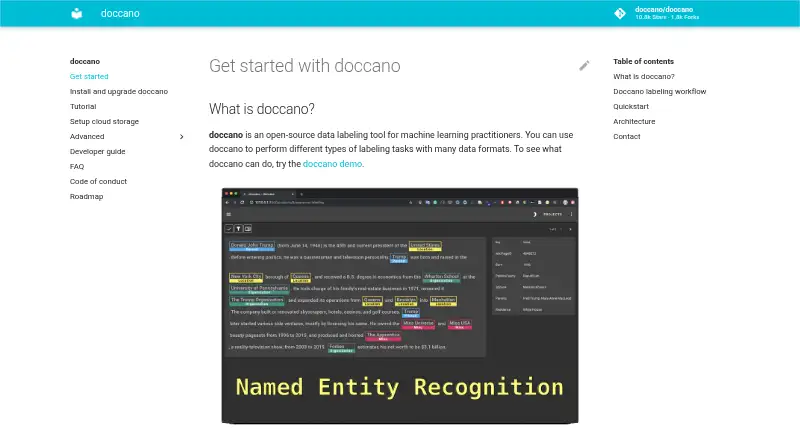
What Doccano is
Doccano is a free, open-source data labeling tool for machine-learning practitioners. It supports text classification, sequence labeling, and sequence-to-sequence annotation, with applications such as sentiment analysis, named entity recognition, and text summarization. Users can configure a project, import datasets, add collaborators, annotate examples, and export labeled datasets. REST APIs let scripts connect with the tool for labeling data using machine-learning models, and multiple people can annotate collaboratively. Installation options include pip, Docker, Docker Compose, source, or cloud deployment; Linux, Windows, or macOS machines running Python 3.8 or later are listed. SQLite 3 is the default database, with PostgreSQL configuration described and MySQL mentioned as an option. Imported datasets can be stored using Amazon S3 or Google Cloud Storage. The project also lists mobile support, emoji support, a dark theme, and multiple languages. Integration guidance includes Amazon Comprehend Sentiment Analysis and custom REST APIs for auto-labeling. One upgrade caution applies: the installation guide warns that upgrading with SQLite 3 can result in database loss.
Good
- Supports three listed text annotation tasks
- Allows collaborative annotation
- Offers REST APIs for scripts
- Installs on Linux, Windows, and macOS
Watch out
- Upgrading with SQLite 3 can lose the database
- Requires Python 3.8 or later
Who it suits
Doccano suits machine-learning practitioners creating labeled text datasets for tasks such as sentiment analysis, entity recognition, and summarization. Teams can collaborate on annotations or connect scripts through its REST API.
Verdict
Doccano provides a free, open-source route to collaborative text labeling, with multiple installation and storage options. Users of SQLite 3 should account for the stated database-loss risk when upgrading.
Plans and prices
From Doccano's own pricing page, checked 3 Oct 2026.
| Plan | Price | What it gives you |
|---|---|---|
| doccano | Free | Open-source annotation tool; install with pip, Docker, or Docker Compose |
The facts
Each one read from Doccano's own pages, with the date it was checked.
What it does
- Annotation tasks
- It supports text classification, sequence labeling, and sequence-to-sequence annotation tasks.checked 3 Oct 2026
- API
- Doccano provides a RESTful API, and its documentation says it can be integrated with scripts through REST APIs.checked 3 Oct 2026
- Cloud storage
- The documentation describes storing imported datasets in Amazon S3 or Google Cloud Storage.checked 3 Oct 2026
- Collaboration
- Features include collaborative annotation and multi-language support.checked 3 Oct 2026
- Database options
- SQLite 3 is the default database, and the installation guide also describes PostgreSQL and mentions MySQL as an option.checked 2 Oct 2026
- Data storage
- SQLite 3 is the default database; the installation guide also describes configuring PostgreSQL and other database systems.checked 3 Oct 2026
- Deployment
- The repository lists one-click deployment options for AWS and Heroku, and the guide supports installation locally or in the cloud.checked 3 Oct 2026
- Installation
- Doccano can be installed using pip, Docker, or Docker Compose.checked 3 Oct 2026
- Integrations
- The auto-labeling guide demonstrates Amazon Comprehend Sentiment Analysis and allows users to configure a custom REST API.checked 3 Oct 2026
- Interface
- The project lists mobile support, emoji support, and a dark theme among its features.checked 3 Oct 2026
- Known upgrade limitation
- The installation guide warns that upgrading the package while using SQLite 3 can lose the database.checked 3 Oct 2026
- Labeling workflow
- Users can configure a project, import datasets, add users, annotate data, and export labeled datasets.checked 2 Oct 2026
- Login integrations
- The OAuth guide describes social login via GitHub and Active Directory, and provides Okta setup instructions.checked 3 Oct 2026
- Operating systems
- The installation guide says doccano can be installed on Linux, Windows, or macOS machines running Python 3.8 or later.checked 3 Oct 2026
- Project origin
- The repository citation lists the project year as 2018 and names Hiroki Nakayama and four coauthors.checked 3 Oct 2026
- Purpose
- Doccano is an open-source text annotation tool for machine-learning practitioners.checked 3 Oct 2026
- REST API
- Doccano can be integrated with scripts through REST APIs for labeling data with machine learning models.checked 2 Oct 2026
- Support
- The project directs users to its FAQ and invites them to contact the author for help and feedback.checked 3 Oct 2026
- Supported systems
- The install guide says doccano can be installed on Linux, Windows, or macOS machines running Python 3.8 or later.checked 2 Oct 2026
- Upgrade limitation
- The installation guide warns that upgrading can lose the database when SQLite3 is used.checked 2 Oct 2026
- Use cases
- It can create labeled data for sentiment analysis, named entity recognition, and text summarization.checked 3 Oct 2026
- Web interface
- The frontend is a JavaScript web app built with Vue.js and Nuxt.js.checked 2 Oct 2026
The company
- Founded
- 2018checked 28 Sep 2026
- Team collaboration
- The roadmap lists collaboration with multiple people as supported functionality.checked 2 Oct 2026
The full review of Doccano
Doccano is a free tool for preparing labeled data for machine-learning projects. It suits practitioners and teams who want to run their own annotation workflow, connect scripts through an API, and choose how to deploy and store data. Its breadth is appealing, but SQLite users need to plan carefully around upgrades.
Overview
Doccano brings dataset import, project setup, team annotation, and export into a single workflow. Supported text tasks include classification, sequence labeling, and sequence-to-sequence annotation, with potential applications such as sentiment analysis, named entity recognition, and text summarization. It also lists image and audio/video annotation, model-assisted labeling, and review capabilities.
As an open-source project dating to 2018, Doccano offers deployment choices rather than a managed-product-only approach. That flexibility favors teams comfortable selecting their own installation and database setup; teams seeking a tightly bounded hosted service may prefer a different fit.
For more options, see Data Labeling Software.
Key features
- Configurable workflow: Set up projects, import datasets, add users, annotate records, and export labeled datasets. The sequence makes Doccano useful for teams that need control over the labeling process from intake through output.
- Collaborative annotation and review: Multiple people can work on annotation, and a review workflow is included. This supports shared projects, though the facts do not establish particular approval roles or review stages.
- REST API and model assistance: Scripts can integrate through REST APIs, and the auto-labeling guide demonstrates Amazon Comprehend Sentiment Analysis as well as custom REST API configuration. This makes Doccano a stronger candidate for workflows that pair human labeling with model or script-based assistance.
- Interface options: The project lists multi-language support, mobile support, emoji support, and a dark theme. These are useful accommodations for varied teams and data, without changing the need to choose an appropriate deployment.
- Storage and login integrations: Imported datasets can be stored in Amazon S3 or Google Cloud Storage. OAuth documentation covers GitHub and Active Directory social login and provides Okta setup instructions.
Pricing
Doccano's doccano plan costs free and is an open-source annotation tool installable with pip, Docker, or Docker Compose. There are no paid tiers described. That makes it a straightforward option for users able to handle installation and operations themselves; it does not come with a stated hosted-service tier or seat allowance.
Platforms
Doccano is available through the web and can be self-hosted, with API, Linux, macOS, and Windows support. The installation guide supports Linux, Windows, or macOS machines running Python 3.8 or later. Installation routes include pip, Docker, Docker Compose, source, and cloud deployment. The choice is useful for teams that need deployment flexibility, but requires them to manage the setup they choose.
SQLite 3 is the default database; PostgreSQL is also described, and MySQL is mentioned as an option. The upgrade warning is material: upgrading while using SQLite 3 can result in database loss. Teams relying on that default should account for this risk before upgrading.
Who it's for
Doccano is best suited to machine-learning practitioners and teams creating labeled datasets who value open-source software, collaborative work, API integration, and control over deployment or storage. It is less suitable for users who want to avoid operational choices or cannot accommodate the SQLite upgrade risk in their workflow.
Pros and cons
- Pro: Free, open-source access combined with several installation routes gives technically capable teams flexibility without a paid plan.
- Pro: The project workflow, collaboration, review, and REST API cover both shared manual labeling and script-assisted processes.
- Pro: S3 and Google Cloud Storage support provide options for imported datasets beyond the default database.
- Con: SQLite 3 upgrades can lose the database, so relying on the default carries a concrete maintenance risk.
- Con: Installation and database options place deployment decisions on the user, which may not suit teams seeking a managed service.
Alternatives
- LightlyStudio is another free, open-source option with Linux, macOS, self-hosted, web, and API platforms; consider it when you want to compare another open-source labeling tool.
- Label Studio has a free plan and free trial in a freemium model; consider it if you want to compare a freemium alternative.
- Potato offers a free self-hosted plan with all features included and no paid tiers or usage limits; it may fit users prioritizing those stated terms.
- Roboflow has a free tier with 10 credits monthly, stated as enough for about 30 model trainings or 80,000 inferences; consider it if that credit-based allowance matches your workload.
- Argilla is free, open-source software deployable on Hugging Face Spaces or your own infrastructure; consider it for those deployment options.
- CVAT offers a limited personal and small-team Community plan under the MIT license, plus an online free plan capped at one member, one project, three tasks, and 1 GB; it may suit users whose needs fit those limits.
- Datasaur has a free plan capped at one user, 5,000 labels per year, and 100 MB of storage, with a personal workspace and a Growth trial up to 14 days; consider it if those caps fit a personal project.
- BasicAI offers private-cloud deployment starting at $6,600 a year, with custom seats, storage, model calls, and on-premise deployment options; consider it when those deployment arrangements are a priority.
Verdict
Choose Doccano if you need a free, open-source labeling workflow that combines team annotation, API-based integration, and flexible deployment. Its main advantage is that breadth of control; look elsewhere if you want to avoid self-managed setup or cannot accept the SQLite upgrade risk.
Getting started
- Open the Doccano website.
- Choose pip, Docker, Docker Compose, source installation, or cloud deployment.
- For a local machine installation, use Linux, Windows, or macOS with Python 3.8 or later.
- Configure a project, import a dataset, and add users.
- Annotate the data and export the labeled dataset.
Questions
How much does Doccano cost?
The listed plan is free, and Doccano is open source.
Which annotation tasks does it support?
The roadmap lists text classification, sequence labeling, and sequence-to-sequence annotation.
Which operating systems can run it?
The installation guide covers Linux, Windows, and macOS machines running Python 3.8 or later.
Can Doccano connect to other tools?
It provides REST APIs for scripts and machine learning models. The auto-labeling guide demonstrates Amazon Comprehend Sentiment Analysis and custom REST APIs.
What should SQLite users know before upgrading?
The installation guide warns that upgrading while using SQLite 3 can result in database loss.
Alternatives to Doccano
- 1

Roboflow
Free planAndroidiOSWebAPI8.3From $39 a month - 2

Label Studio
Free planOpen sourceWebAPILinuxmacOS8.2From $99 a month - 3
LightlyStudio
Free planOpen sourceWebAPILinuxmacOS7.7Free plan - 4
VGG Image Annotator
Free planOpen sourceWebLinuxmacOSSelf-hosted7.7Free plan - 5
MakeSense.ai
Free planOpen sourceWebLinuxmacOSSelf-hosted7.6Free plan - 6
Segments.ai
Free planWebAPI7.0Free plan