
CVAT
CVAT is a platform for turning images, video, 3D data, and audio into labeled datasets for AI workflows.
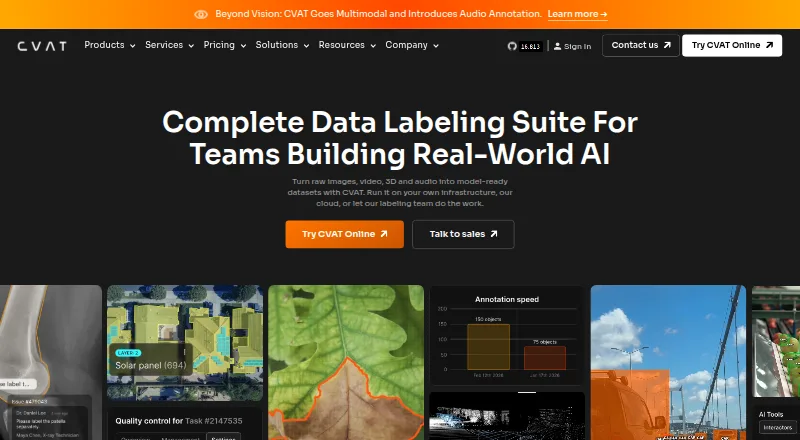
What CVAT is
CVAT is a platform for turning images, video, 3D data, and audio into labeled datasets for AI workflows. Its annotation tools cover boxes, masks, polygons, keypoints, skeletons, object tracks, and other shapes. Teams can review annotation jobs through validation and acceptance stages, and assess quality with ground truth, honeypots, and consensus workflows. Storage options include Amazon S3, Azure Blob Storage, Google Cloud Storage, S3-compatible buckets, and self-hosted storage. CVAT names SAM 2, SAM 3, Ultralytics, Hugging Face models, and custom models as labeling aids. It exports to more than 20 formats, including COCO, YOLO, KITTI, Cityscapes, and Pascal VOC, and supports automation through its API, SDK, and CLI. Deployment choices include managed cloud, self-hosting, on-premises, and air-gapped options. CVAT lists encryption, role-based access, SSO, access logging, and audit trails, but does not currently hold ISO 27001 or SOC 2 certifications.
Good
- Handles image, video, 3D, and audio annotation.
- Supports review stages and quality assessment workflows.
- Exports to more than 20 formats.
- Offers managed cloud and self-hosted deployment.
Watch out
- Community lacks automated quality assurance and SSO.
- Community lacks SAM and built-in AI agent integrations.
- No ISO 27001 or SOC 2 certification.
Who it suits
CVAT suits teams and individuals preparing labeled data for AI workflows, especially those who need several annotation types, review controls, or managed and self-hosted deployment options.
Verdict
CVAT brings annotation, quality review, storage integrations, and export tools together for AI dataset work. Check Community plan limitations and certification status against your team's requirements.
Plans and prices
From CVAT's own pricing page, checked 29 Sep 2026.
| Plan | Price | What it gives you |
|---|---|---|
| Community | Free | Limited plan for personal use and small teams · MIT license |
| CVAT Online Free | Free | 1 member · 1 project · 3 tasks · 1 GB internal storage |
| CVAT Online Team Yearly | $23 | 2–50 seats · $23/per user · $46 / per month for 2 seats · Save 30% |
| CVAT Online Solo Yearly | $23 | Unlimited plan for personal workspace only · $23 / per month · Save 30% |
| CVAT Online Team Monthly | $33 a month | 2–50 seats · pay as you go · $33/per user · $66 / per month for 2 seats |
| CVAT Online Solo Monthly | $33 a month | Unlimited plan for personal workspace only · $33 / per month |
| Enterprise Basic | $12,000 a year | Single-instance deployment · essential support for critical issues · $12,000 per year |
| Enterprise Premium | Priced on request | Advanced deployment · customization · priority expert support · up to 3 instances · 100 dev hours · Custom |
The facts
Each one read from CVAT's own pages, with the date it was checked.
What it does
- AI integrations
- The platform names SAM 2, SAM 3, Ultralytics, Hugging Face models, and custom models as ways to accelerate labeling.checked 29 Sep 2026
- Annotation features
- Its visual annotation tools include boxes, pixel masks, polygons, keypoints, skeletons, and object tracks.checked 29 Sep 2026
- Certification limits
- CVAT says it does not currently hold ISO 27001 or SOC 2 certifications.checked 29 Sep 2026
- Community edition limits
- The Enterprise page says Community lacks automated quality assurance, SSO, SAM integration, built-in AI agent integrations, and advanced reporting.checked 29 Sep 2026
- Deployment
- CVAT is offered as a managed cloud service or as a self-hosted deployment, including on-premises and air-gapped options.checked 29 Sep 2026
- Exports and automation
- CVAT exports data in more than 20 formats, including COCO, YOLO, KITTI, Cityscapes, and Pascal VOC, and supports automation through its API, SDK, and CLI.checked 29 Sep 2026
- Purpose
- CVAT turns raw images, video, 3D data, and audio into labeled datasets for AI workflows.checked 29 Sep 2026
- Quality control
- Teams can review jobs through validation and acceptance stages and assess quality with ground truth, honeypots, and consensus workflows.checked 29 Sep 2026
- Security controls
- CVAT lists encryption in transit and at rest, role-based access controls, SSO, access logging, and audit trails among its security features.checked 29 Sep 2026
- Storage integrations
- CVAT supports Amazon S3, Azure Blob Storage, Google Cloud Storage, S3-compatible buckets, and self-hosted storage.checked 29 Sep 2026
- Support
- Enterprise Basic includes 24-hour email support with a 24-hour response SLA and a private helpdesk channel for urgent critical issues.checked 29 Sep 2026
The company
- Company history
- CVAT began as an internal Intel tool in 2017, was released as open source in 2018, and spun out as an independent company in 2022.checked 29 Sep 2026
- Founded
- 2022checked 23 Sep 2026
The full review of CVAT
Overview
CVAT is a dataset-labeling platform for teams working with image, video, 3D, or audio data. It is best suited to collaborative AI projects that need varied annotation tools and flexible deployment; its main trade-off is that several quality and AI capabilities are reserved for Enterprise.
Teams can choose the managed cloud service or deploy CVAT themselves, including on-premises and in air-gapped environments. That range makes it adaptable, but organizations requiring ISO 27001 or SOC 2 certification should look elsewhere: CVAT does not currently hold either certification.
Key features
CVAT supports boxes, pixel masks, polygons, polylines, points, ellipses, cuboids, keypoints, skeletons, tags, and object tracks. This breadth suits datasets spanning detection, segmentation, and tracking, rather than projects tied to one annotation style. Common image formats include JPEG, PNG, BMP, GIF, PPM, and TIFF.
Teams can route jobs through validation and acceptance, then assess quality with ground truth, honeypots, and consensus workflows. These options support structured review when multiple people contribute, though Community lacks automated quality assurance. Storage connections cover Amazon S3, Azure Blob Storage, Google Cloud Storage, S3-compatible buckets, and self-hosted storage, giving teams choices for fitting annotation work into existing storage setups.
For assisted labeling, CVAT names SAM 2, SAM 3, Ultralytics, Hugging Face models, and custom models. Community lacks SAM integration and built-in AI agent integrations, so those capabilities are not a reason to choose the free Community edition. Exports span more than 20 formats, including COCO, YOLO, KITTI, Cityscapes, and Pascal VOC; an API, SDK, and CLI provide routes to automate workflows. Security features include encryption in transit and at rest, role-based access, SSO, access logging, and audit trails, but these controls do not replace formal certification where that is a requirement.
Pricing
CVAT has a free Community edition under the MIT license, positioned for personal use and small teams. It gives users an open-source option, but lacks automated quality assurance, SSO, SAM integration, built-in AI agent integrations, and advanced reporting.
CVAT Online Free costs nothing and is capped at 1 member, 1 project, 3 tasks, and 1 GB of internal storage. It is suitable for a small evaluation or tightly limited personal workload, not ongoing multi-person production.
CVAT Online Solo Yearly costs $23 a year, billed $23 / per month, with a 30% saving; it is an unlimited plan for a personal workspace only. Solo Monthly costs $33 a month for the same personal-workspace positioning. The yearly option lowers the monthly rate, while monthly billing avoids an annual commitment.
For teams, CVAT Online Team Yearly costs $23 a year, billed $23 per user and $46 per month for 2 seats, with a 30% saving; it covers 2–50 seats. Team Monthly costs $33 a month, billed $33 per user and $66 per month for 2 seats, with 2–50 seats and pay-as-you-go terms. These are the listed rates; teams should weigh the annual saving against the monthly plan’s flexibility.
Enterprise Basic costs $12,000 a year for a single-instance deployment and essential support for critical issues. It includes 24-hour email support with a 24-hour response SLA and a private helpdesk channel for urgent critical issues, making it the clearest fit for organizations that need those support terms. Enterprise Premium has custom pricing and includes advanced deployment, customization, priority expert support, up to 3 instances, and 100 dev hours.
Platforms
CVAT is available as a web service, through an API, and as self-hosted software. Self-hosting includes on-premises and air-gapped deployments; managed cloud suits teams that prefer not to run their own instance.
Who it's for
CVAT is a strong fit for AI teams labeling varied media, coordinating annotation and review, or integrating work with cloud and self-hosted storage. Community is most appropriate for personal use and small teams that can accept its feature gaps. Teams needing SSO, automated quality assurance, or integrated AI assistance should evaluate Enterprise options; organizations with mandatory ISO 27001 or SOC 2 certification needs should not treat CVAT as a fit.
Pros and cons
- Pro: Broad annotation types and more than 20 export formats support mixed data-labeling workflows without narrowing the project to one task type.
- Pro: Cloud, on-premises, and air-gapped deployment options accommodate different infrastructure needs.
- Pro: Validation, acceptance, and quality-assessment workflows give collaborative teams ways to review annotation work.
- Con: The free online tier allows only 1 member, 1 project, 3 tasks, and 1 GB of internal storage, limiting its use beyond a small trial workload.
- Con: Community omits automated quality assurance, SSO, SAM integration, built-in AI agent integrations, and advanced reporting.
- Con: CVAT does not currently hold ISO 27001 or SOC 2 certifications, which rules it out for some procurement requirements.
Alternatives
Roboflow is worth comparing for teams that want a freemium option across web, mobile, API, and self-hosted platforms; its Free Tier includes 10 credits a month, enough to train about 30 models or run 80,000 inferences.
Label Studio is another freemium option, with a free trial and support for Linux, macOS, Windows, web, API, and self-hosted deployments.
Supervisely may suit teams that value stated free-tier quotas: its Community plan includes 5 GB storage, 10,000 files, 2 members, and unlimited projects and annotations. Its Pro plan starts at €199 a month.
BasicAI is an alternative to consider for private-cloud deployment, with pricing starting at $6,600 a year and customizable seats, storage, model calls, and on-premise options.
COCO Annotator is a free, MIT-licensed self-hosted option that requires Docker.
Labelbox is another freemium alternative available on web and through an API.
Pixano is a free alternative available for self-hosted and web use, among other platforms.
Dataloop is a paid alternative available on the web.
Explore more options in AI Image Annotation Tools, Image Annotation Software, AI Data Labeling Tools, Video Annotation Software, and Data Labeling Software.
Verdict
Choose CVAT if your team needs broad annotation support, structured review, and the freedom to use managed cloud or self-hosted deployment. Its strongest case is the combination of workflow breadth and deployment choice; its clearest reasons to look elsewhere are Community’s missing enterprise capabilities and the absence of ISO 27001 and SOC 2 certifications.
Alternatives to CVAT
- 1

Roboflow
Free planAndroidiOSWebAPI8.3From $39 a month - 2

LandingLens
Free planWebAPISelf-hostedWindows7.0Free plan - 3
Supervisely
Free planWebAPISelf-hosted6.9From €199 a month - 4

Ultralytics Platform
Free planWebAPISelf-hosted6.7From $29 a month - 5
Clarifai Visual Search
WebAPISelf-hosted6.1 - 6
NVIDIA TAO Toolkit
Free planLinuxSelf-hosted5.9Free plan