MakeSense.ai
MakeSense.ai is a browser-based tool for labeling photos and preparing datasets for computer vision projects.
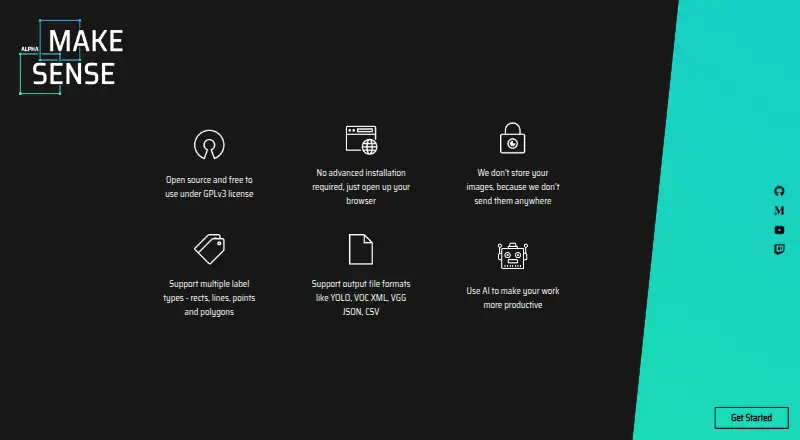
What MakeSense.ai is
MakeSense.ai is a browser-based tool for labeling photos and preparing datasets for computer vision projects. It supports point, line, rectangle, polygon, and label annotations. Listed model integrations include YOLOv5, SSD pretrained on COCO, and PoseNet; users can also load their own YOLOv5 models exported to TensorFlow.js format. Export options include CSV, YOLO, VOC XML, VGG JSON, and COCO JSON, while imports include YOLO, VOC XML, and COCO JSON. Which formats are available depends on the annotation type, and the format matrix marks some combinations as unsupported. The project says images are not sent to a server and that AI features run using TensorFlow.js. It works in a browser across operating systems, and documentation covers local and Docker setup; the Docker setup serves the application on localhost:3000. The project describes the tool as suitable for small computer vision deep-learning projects and dataset preparation. MakeSense.ai was founded in 2019, is licensed under GPL-3.0, and credits Piotr Skalski as author and copyright holder. The Free plan costs nothing.
Good
- Supports five annotation types.
- Includes YOLOv5, SSD, and PoseNet integrations.
- Offers five listed export formats.
- Images are not sent to a server, according to the project.
Watch out
- Some annotation and format combinations are unsupported.
- Imports and exports depend on annotation type.
Who it suits
MakeSense.ai suits people preparing labeled datasets for small computer vision projects. It may also fit users who want browser-based annotation and local or Docker setup options.
Verdict
MakeSense.ai covers common annotation types and dataset formats in a browser-based tool. Check its format matrix first, since some combinations are not supported.
Plans and prices
From MakeSense.ai's own pricing page, checked 21 Oct 2026.
| Plan | Price | What it gives you |
|---|---|---|
| Free | Free | browser photo labeling · no image upload to server |
The facts
Each one read from MakeSense.ai's own pages, with the date it was checked.
What it does
- AI models
- Its listed AI integrations include YOLOv5, SSD pretrained on COCO, and PoseNet.checked 7 Oct 2026
- Annotation features
- The tool supports point, line, rectangle, polygon, and label annotations.checked 7 Oct 2026
- API and SDK documentation
- The public documentation presents no product API or SDK; its documented extensibility is local code, model loading and inference-server connection.checked 21 Oct 2026
- Custom models
- Users can load their own YOLOv5 models exported to TensorFlow.js format.checked 7 Oct 2026
- Docker self-hosting
- The repository includes Docker instructions for running the application locally.checked 21 Oct 2026
- Documentation
- The public documentation contains separate pages for imports, exports, shortcuts and local setup.checked 21 Oct 2026
- Export formats
- Supported exports include CSV, YOLO, VOC XML, VGG JSON and COCO JSON, depending on annotation type.checked 21 Oct 2026
- Image classification
- Image-level labels are available for classification tags.checked 21 Oct 2026
- Implementation stack
- The application is written in TypeScript and uses React with Redux.checked 21 Oct 2026
- Import formats
- Supported imports include YOLO and COCO JSON for rectangles and COCO JSON for polygons; other combinations are marked unsupported or not applicable.checked 21 Oct 2026
- Independent praise: privacy
- CheckThat.ai characterizes the tool as free, open-source, browser-based and processing data locally for privacy.checked 21 Oct 2026
- Independent use
- Researchers have used MakeSense.ai in scientific image-labeling work, including X-ray scattering datasets.checked 21 Oct 2026
- Intended users
- The project describes the tool as suitable for small computer vision deep learning projects and dataset preparation.checked 7 Oct 2026
- Latest release
- The releases page lists version 1.11.0-alpha dated 20 December 2022 as the latest release shown.checked 21 Oct 2026
- Licence
- The code is released under the GNU GPL-3.0 licence.checked 21 Oct 2026
- Limit: batch workflows
- The same paper reports that MakeSense.ai lacks batch labeling and similarity-based annotation suggestions.checked 21 Oct 2026
- Limit: image adjustment
- The paper reports no built-in brightness or contrast adjustment tools.checked 21 Oct 2026
- Limit: model accuracy
- A 2021 CEUR paper describes the neural-network choices as limited and reports low object-detection accuracy in its comparison.checked 21 Oct 2026
- Limit: thumbnail information
- The paper reports that thumbnails show whether an image is labeled but not its specific labels or label totals.checked 21 Oct 2026
- Line annotation
- Lines support edge or boundary annotations.checked 21 Oct 2026
- Local deployment
- The repository documents cloning the code, installing dependencies with npm and serving it at localhost:3000.checked 21 Oct 2026
Where it runs
- Cross-platform
- The project describes itself as cross-platform because it runs in a browser across operating systems.checked 21 Oct 2026
- Cross-platform use
- The project says it works in a browser across operating systems and requires no complicated installation.checked 7 Oct 2026
The company
- Founded
- 2019checked 28 Sep 2026
The full review of MakeSense.ai
MakeSense.ai is an image-labeling tool for people preparing datasets for computer-vision projects. It is best suited to small projects that need familiar annotation types and model assistance at no cost. The browser-based workflow and local hosting options keep setup light, though the format matrix can constrain established pipelines.
Overview
MakeSense.ai focuses on labeling photos and preparing datasets, rather than a wider computer-vision workflow. It supports points, lines, rectangles, polygons, and labels, with model-assisted labeling from YOLOv5, SSD pretrained on COCO, and PoseNet. That range covers common annotation work for small projects, but unsupported format combinations may interrupt a workflow built around a specific annotation and file type.
The project says images stay on the user's device because they are not sent to a server, and its AI features run in TensorFlow.js. This browser-based approach suits users who want to avoid a complicated installation. Those who prefer to host the application themselves can use its local setup or Docker instructions; the Docker setup serves the app on localhost:3000.
Key features
Annotation and model assistance
The combination of manual annotation types and model-assisted labeling gives small teams several ways to prepare image datasets. Users can load their own YOLOv5 model if it is exported to TensorFlow.js format, a compatibility requirement to account for when choosing a custom model.
Dataset formats
MakeSense.ai imports YOLO, VOC XML, and COCO JSON, and exports CSV, YOLO, VOC XML, VGG JSON, and COCO JSON for supported annotation types. The breadth is useful when moving data between common formats, but support depends on the annotation and import/export combination. Check the matrix against the formats your project actually needs before committing to it.
Pricing
The Free plan costs nothing and includes browser-based photo labeling, model-assisted labeling, and dataset export to CSV, YOLO, VOC XML, VGG JSON, and COCO JSON. It is a straightforward fit for individuals and small projects that can work within the supported format combinations. No paid tier is needed for the listed labeling capabilities.
Platforms
MakeSense.ai supports web use and lists Linux, macOS, and Windows, as well as self-hosting. Its cross-platform browser approach avoids complicated installation, while documented local and Docker setups give users a self-hosted option. The project is licensed under GPL-3.0.
Who it's for
MakeSense.ai is aimed at small computer-vision deep-learning projects and dataset preparation. It fits people who want common image annotations, model assistance, and a free browser workflow, especially when keeping images off a server matters. Teams with fixed format requirements should confirm the matrix supports every step of their pipeline.
Pros and cons
- Pro: The free plan includes five annotation types, model-assisted labeling, and several import and export formats, making it practical for small dataset projects without a subscription.
- Pro: The project says images are not sent to a server, and AI runs in TensorFlow.js, which suits users who want browser-based labeling with images kept on their device.
- Pro: Local and Docker setup options serve users who want to host the application themselves.
- Con: Some annotation and format combinations are unsupported, which can make it a poor fit for pipelines with strict import or export needs.
- Con: Custom model loading is limited to YOLOv5 models exported in TensorFlow.js format.
Alternatives
Label Studio is worth considering for readers looking for a freemium option with a free trial across web, desktop, API, and self-hosted platforms.
VGG Image Annotator is another free option, released under a two-clause BSD license, with no paid tiers or usage limits stated.
Roboflow may suit readers who want a freemium option with a stated monthly credit allowance for model training and inference.
CVAT offers a free Community plan for personal use and small teams, plus an online free plan capped at one member, one project, three tasks, and 1 GB.
Vailabel Studio is a free, open-source option for Linux, macOS, and Windows that does not require an account.
Annota AI is a freemium alternative with a free plan for one member, two datasets, and 4 GB of storage, plus €4 in monthly credits.
Labellerr offers a free researcher plan with 2,500 data credits, one seat, one workspace, and up to 10 projects.
Segments.ai is a paid alternative that offers a free academic license for non-commercial research, with a license request required.
For more options, browse Image Annotation Software, AI Image Annotation Tools, and Data Labeling Software.
Verdict
Choose MakeSense.ai for small computer-vision projects that need free image labeling, model assistance, and a browser or self-hosted workflow. Its privacy approach and range of common formats are compelling; the main reason to look elsewhere is a pipeline that depends on a format and annotation combination the tool does not support.
Getting started
- Open https://www.makesense.ai/ in a browser
- Use the browser version on Linux, macOS or Windows
- Choose an annotation type such as point, line, rectangle, polygon or label
- Load a listed model integration or a TensorFlow.js-exported YOLOv5 model
- Export the dataset in a supported format
- For local hosting, follow the documented local or Docker setup at localhost:3000
Limits worth knowing
The Free plan costs nothing. Some annotation and import/export combinations in the format matrix are not yet supported.
Questions
Is MakeSense.ai free?
Yes. The Free plan costs nothing.
Which platforms does it support?
It works on Linux, macOS, Windows and the web, with documented self-hosted operation.
Which annotation types are available?
Point, line, rectangle, polygon and label annotations are supported.
Can I use my own model?
Yes. Users can load their own YOLOv5 models exported to TensorFlow.js format.
Which formats can I export?
Exports include CSV, YOLO, VOC XML, VGG JSON and COCO JSON, subject to supported annotation combinations.
Is it open source?
The project is licensed under GPL-3.0 and credits Piotr Skalski as author and copyright holder.
Alternatives to MakeSense.ai
- 1

Roboflow
Free planAndroidiOSWebAPI8.3From $39 a month - 2

Label Studio
Free planOpen sourceWebAPILinuxmacOS8.2From $99 a month - 3
VGG Image Annotator
Free planOpen sourceWebLinuxmacOSSelf-hosted7.7Free plan - 4
Segments.ai
Free planWebAPI7.0Free plan - 5

CVAT
Free planWebAPISelf-hosted6.9Free plan - 6
Supervisely
Free planWebAPISelf-hosted6.9From €199 a month