
DishCost
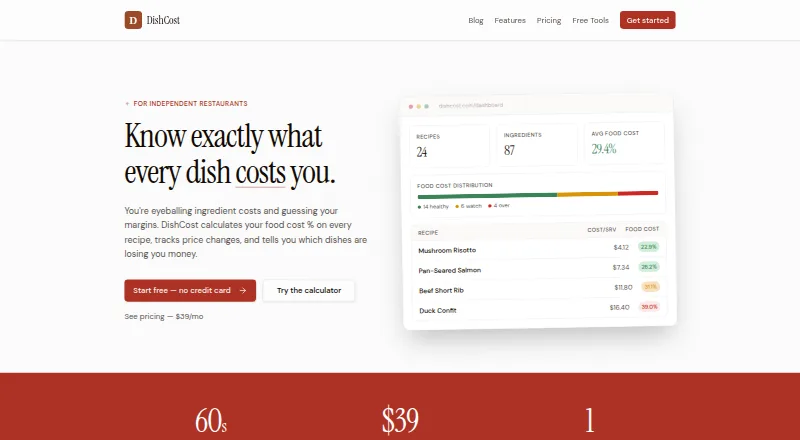
DishCost helps independent restaurants calculate recipe costs, follow ingredient price changes, and identify menu items with weak margins.
What DishCost is
DishCost helps independent restaurants calculate recipe costs, follow ingredient price changes, and identify menu items with weak margins. Recipe views include ingredient line costs, total and per-serving cost, food cost percentage, a suggested price, and profit per serving. Updating an ingredient price recalculates recipes and prep items that use it, including dishes built from those prep items. Users can enter weekly order counts to sort dishes into Stars, Plowhorses, Puzzles, and Dogs. Ingredients and prices can be imported in bulk using CSV and a downloadable template. Pro adds CSV order-guide imports from Sysco, US Foods, BEK, or other vendors, plus PDF and CSV exports and email support. The product is intended for one kitchen at a single location. It does not include multi-location dashboards, live POS sync, inventory counts, invoice OCR, or in-app per-recipe nutrition and allergen tagging. Free tools have no time limit; Pro costs $39 per month for one kitchen, with unlimited recipes and ingredients.
Good
- Shows per-serving cost, food cost percentage, and profit.
- Ingredient price changes recalculate related recipes and prep items.
- Bulk ingredient and price CSV import is supported.
- Free tools have no time limit.
Watch out
- Designed for a single kitchen at one location.
- No live POS sync or inventory counts.
- No in-app per-recipe nutrition or allergen tagging.
- Pro costs $39 per month.
Who it suits
DishCost suits independent, single-location restaurants that need to cost recipes and track ingredient price changes for one kitchen. It may fit operators who want menu profitability categories but do not need inventory counts or live POS sync.
Verdict
DishCost focuses on recipe costing and ingredient-price effects for a single kitchen, with menu categorization and CSV imports. Its free tools have no time limit, while Pro adds vendor order-guide imports, exports, and email support.
Plans and prices
From DishCost's own pricing page, checked 28 Sep 2026.
| Plan | Price | What it gives you |
|---|---|---|
| Free tier | Free | No time limit · free tools include recipe costing calculator and nutrition tools; account tier supports recipes, with most Pro features read-only |
| Pro | $39 a month | One kitchen · unlimited recipes and ingredients · no per-seat fees · Monthly through Stripe; charged on the same date each month |
The facts
Each one read from DishCost's own pages, with the date it was checked.
What it does
- AI connector
- The AI connector can read approved recipes, ingredients, costs, and price history, but cannot create, edit, or delete records or manage billing.checked 28 Sep 2026
- Automatic recalculation
- Changing an ingredient price recalculates every recipe and prep item that uses it, including dishes that use that prep item.checked 28 Sep 2026
- CSV import
- DishCost supports bulk CSV import of ingredients and prices, with a downloadable template.checked 28 Sep 2026
- Distributor imports
- Pro supports CSV order guide imports from Sysco, US Foods, BEK, or other vendors, with column mapping and price updates by SKU.checked 28 Sep 2026
- Exports and support
- Pro includes PDF and CSV export and email support.checked 28 Sep 2026
- Intended customers
- DishCost is built for independent, single-location restaurants and covers recipe costing for one kitchen.checked 28 Sep 2026
- Menu engineering
- Users can add weekly order counts to categorize dishes as Stars, Plowhorses, Puzzles, and Dogs.checked 28 Sep 2026
- Product limits
- DishCost does not include multi-location dashboards, live POS sync, inventory counts, invoice OCR, or in-app per-recipe nutrition and allergen tagging.checked 28 Sep 2026
- Purpose
- DishCost calculates food cost percentage for restaurant recipes, tracks ingredient price changes, and identifies dishes with weak margins.checked 28 Sep 2026
- Security and privacy
- DishCost says it uses access controls, encrypted network connections, scoped authorization, and account-bound queries, and does not sell personal or restaurant data.checked 28 Sep 2026
- Support
- The contact page lists [email protected] and says replies usually arrive within a few hours.checked 28 Sep 2026
The company
- Founded
- 2025checked 28 Sep 2026
- Headquarters
- Wilmington, Delaware, United Stateschecked 28 Sep 2026
- Maker and location
- The contact page identifies Justin as founder and gives DishCost's address as Wilmington, Delaware, United States.checked 28 Sep 2026
Money
- Free access
- The free tier has no time limit, and the food cost calculator and other free tools can be used without an account.checked 28 Sep 2026
- Recipe costing
- Recipes show ingredient line costs, total and per-serving cost, food cost percentage, suggested price, and profit per serving.checked 28 Sep 2026
The full review of DishCost
DishCost is a web-based recipe-costing tool for independent restaurants managing one kitchen. It is best for operators who want to understand how ingredient-price changes affect dish margins, without adopting a broader restaurant-management system. Its connected cost calculations are useful; its single-kitchen scope is a firm boundary.
Overview
DishCost ties ingredient prices to recipes and prep items, then recalculates their costs when a price changes. For a kitchen with overlapping ingredients, that can show the reach of a price increase without recalculating each dish separately. The trade-off is a focused product: it has no inventory counts, live POS sync, invoice OCR, multi-location dashboards, or in-app per-recipe nutrition and allergen tagging.
Key features
Recipe costing and recalculation
Recipe views can include ingredient line costs, total and per-serving cost, food cost percentage, suggested price, and profit per serving. When an ingredient price changes, the update carries through recipes and prep items that use it, including dishes built from that prep item. Yield and portion scaling are supported, making the costing more useful when quantities change. Operators still need another tool for stock counts or invoice capture.
Menu analysis and imports
Adding weekly order counts lets users sort dishes into Stars, Plowhorses, Puzzles, and Dogs. That gives cost figures a sales-volume context, but does not amount to live sales tracking: DishCost has no POS sync. Bulk CSV import of ingredients and prices, supported by a downloadable template, can reduce setup work. Pro adds CSV order-guide imports from Sysco, US Foods, BEK, or other vendors, with column mapping and price updates by SKU, plus PDF and CSV exports.
AI connector and data protections
The AI connector can read approved recipes, ingredients, costs, and price history, but cannot change records or manage billing. DishCost says it uses access controls, encrypted network connections, scoped authorization, and account-bound queries, and does not sell personal or restaurant data.
Pricing
The Free tier costs nothing with no time limit. Its free tools include a recipe-costing calculator and nutrition tools that can be used without an account; the account tier supports recipes, while most Pro features are read-only. There is no free trial, but the permanent free access is useful for evaluating the calculator without a subscription.
Pro costs $39 a month, billed monthly through Stripe on the same date each month. It covers one kitchen, unlimited recipes and ingredients, and has no per-seat fees; it also includes vendor order-guide imports, PDF and CSV exports, and email support. This is the practical choice for a single-location operator who needs those workflows. It is not a multi-kitchen plan, and the absence of per-seat fees does not change the one-kitchen limit.
Platforms
DishCost runs on the web. Its free calculator and other free tools do not require an account.
Who it's for
DishCost fits independent, single-location restaurants that want recipe-level cost visibility, price-change recalculation, and basic menu categorization. It is less suitable for operators who need inventory tracking, live POS data, invoice OCR, multi-location reporting, or nutrition and allergen tags attached to individual recipes.
Pros and cons
- Pros: Ingredient-price changes recalculate linked recipes and prep items, which helps reveal cost effects across a menu.
- Pros: A no-time-limit free tier and account-free calculator make basic costing accessible without a recurring commitment.
- Pros: Pro includes unlimited recipes and ingredients for one kitchen without per-seat fees.
- Cons: The product is limited to one kitchen and lacks multi-location dashboards, making it a poor fit for restaurant groups.
- Cons: No inventory counts, live POS sync, or invoice OCR means operators must handle those operational workflows elsewhere.
- Cons: Pro's price is recurring at $39 a month; the free account tier keeps most Pro features read-only.
Alternatives
Consider Restaurant Recipe Costing Software to compare more tools in the category. Chefy may suit a venue that wants a free forever core plan with costing, recipes, bulk product import, wastage recording, real-time costing updates, and team access included. Cucinovo is a web option with a free forever plan aimed at one household and one user, with unlimited recipes, ingredients, categories, sub-recipes, and shopping lists. Freecost is worth considering for operators who prioritize unlimited recipes, menu items, and ingredients across multiple kitchens on one account, with Android as well as web access.
RistoBrain offers a €19/month Base plan for one location with food-cost analytics, invoice upload, and a basic AI advisor, so it may be a better fit when invoice processing matters. Cilurzo Foodcost is another freemium web option. Enplace offers a free single-restaurant plan through selectively approved private beta access. Galley may suit teams seeking a broader platform across many device types; its SMB Accelerator starts at $99/month and includes recipes, menus, costing, and simplified onboarding without long contracts. Ratatool offers a web trial with four recipes and 15 ingredients, without a subscription or credit card.
Verdict
Choose DishCost if you run one independent kitchen and want ingredient-price changes to flow through recipe and prep-item costs, with menu categorization and optional vendor imports. Its permanent free tools make a low-commitment starting point; Pro's per-month charge is justified chiefly when its imports and exports matter. Look elsewhere if you need inventory, POS or invoice automation, per-recipe nutrition and allergen tagging, or multi-location oversight.
Alternatives to DishCost
- 1
reciProfity
AndroidiOSWebAPI7.7From $30 a month - 2

Cucinovo
Free planWeb7.4From €7 a month - 3

Cilurzo Foodcost
Free planWebAPI7.3From €79 a month - 4

Galley
AndroidiOSWebAPI6.8From $99 a month - 5
Melba by FoodMeUp
AndroidiOSWebAPI6.8From €15 a month - 6
Optimum Control
AndroidiOSWindows6.8From $25 a month