Cloud Custodian
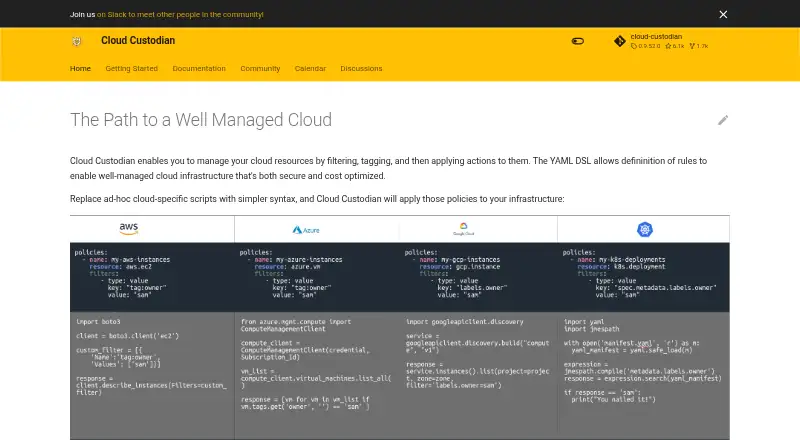
Cloud Custodian manages cloud resources through policies written in YAML.
What Cloud Custodian is
Cloud Custodian manages cloud resources through policies written in YAML. Each policy names a resource type, filters for selecting resources and actions to apply to matches. It supports security enforcement, compliance, tag policies, cleanup of unused resources and cost management for AWS, Azure and Google Cloud Platform resources. Policies can respond to provider events through serverless features or run periodically as cron jobs. Before actions run, users can validate policies and preview matches in dry-run mode. Runs can generate policy metrics, structured resource records and logs for cloud metrics, storage and logging services. Documented event connections include AWS CloudWatch Events and Config Rules, Azure EventGrid, and GCP AuditLog and Pub/Sub. The project documents installation on Linux, macOS and Windows, as well as operation through Docker or Kubernetes. Kubernetes, Tencent Cloud and OpenStack support are in beta; Terraform integration is in alpha. The project is free and open source under the Apache 2.0 license. One AWS constraint is that event-triggered policies run only in the same region and account, unlike periodic policies, which may run across regions and accounts.
Good
- Free and open source under Apache 2.0
- Supports AWS, Azure and Google Cloud Platform
- Dry-run previews matching resources before actions
- Policies can run on events or schedules
- Produces metrics, resource records and logs
Watch out
- Kubernetes support is in beta
- Tencent Cloud and OpenStack support are in beta
- Terraform integration is in alpha
- AWS event policies are limited to same region and account
Who it suits
Cloud Custodian suits teams managing cloud resources who want policy-based controls for security, compliance, tagging or cost management. It is relevant to users working with AWS, Azure or Google Cloud Platform resources.
Verdict
Cloud Custodian offers policy-based controls across three major cloud providers, with preview and reporting options. Note the maturity labels for beta and alpha integrations and the AWS event-policy constraint.
Plans and prices
From Cloud Custodian's own pricing page, checked 29 Sep 2026.
| Plan | Price | What it gives you |
|---|---|---|
| Cloud Custodian | Free | Open source · Apache 2.0 license · Free for everyone to use |
The facts
Each one read from Cloud Custodian's own pages, with the date it was checked.
What it does
- Beta and alpha support
- The homepage says Kubernetes, Tencent Cloud, and OpenStack support is in beta, while Terraform integration is currently in alpha.checked 29 Sep 2026
- Cloud providers
- The documentation describes policy support for AWS, Azure, and Google Cloud Platform resources.checked 29 Sep 2026
- Community support
- The project points users to Slack, a mailing list, GitHub discussions, and community meetings that are open to users and developers of every skill level.checked 29 Sep 2026
- Deployment options
- The project documents installation on Linux, macOS, and Windows, and running through Docker or Kubernetes; its homepage also describes local, instance, and AWS Lambda execution.checked 29 Sep 2026
- Enforcement
- Cloud Custodian integrates with provider serverless features to enforce policies in response to events, and can also run as a cron job on a server.checked 29 Sep 2026
- Integration examples
- Documented event integrations include AWS CloudWatch Events and Config Rules, Azure EventGrid, and GCP AuditLog and Pub/Sub.checked 29 Sep 2026
- Metrics and records
- Runs can produce policy metrics, structured resource records, and logs for cloud provider metrics, storage, and logging services.checked 29 Sep 2026
- Notable execution limit
- The AWS documentation says event-triggered policies can run only in the same region and account, while periodic policies may run in a different region and account.checked 29 Sep 2026
- Policy controls
- Policies specify a resource type, filters to narrow resources, and actions to apply to matching resources.checked 29 Sep 2026
- Policy preview
- Users can validate policies and run them in dry-run mode to see matching resources without executing actions.checked 29 Sep 2026
- Purpose
- Cloud Custodian manages cloud resources by filtering and tagging them, then applying actions through policies written in a YAML domain specific language.checked 29 Sep 2026
- Security reporting
- The project asks people to report security vulnerabilities to its security team at [email protected] and says it will acknowledge reports by email.checked 29 Sep 2026
The company
- Maker and history
- The site identifies the project as a community project and states that it was accepted to CNCF on June 25, 2020; it does not state a headquarters or founding date.checked 29 Sep 2026
Money
- Security and cost
- It supports security policy enforcement, compliance, tag policies, cleanup of unused resources, and cost management.checked 29 Sep 2026
The full review of Cloud Custodian
Overview
Cloud Custodian is a policy-as-code tool for teams managing resources across major cloud providers. It is best suited to operators comfortable defining and running YAML policies; the trade-off is that it offers a flexible toolkit rather than a turnkey governance service.
Key features
Policies with a preview step
A policy names a resource type, filters the resources to target, and specifies actions for matches. That pattern can cover security enforcement, compliance, tagging, removal of unused resources, and cost management. Validation and dry-run mode show which resources match before actions execute, a useful safeguard for teams automating consequential changes. Policy testing, admission control, runtime enforcement, CI/CD integration, and reporting are also supported.
Event-driven and scheduled runs
Policies can respond to cloud-provider events through serverless integrations or run periodically as a server cron job. Documented integrations include AWS CloudWatch Events and Config Rules, Azure EventGrid, and GCP AuditLog and Pub/Sub. AWS event-triggered policies must run in the same account and region; periodic policies can run from a different account and region. That distinction matters for teams centralizing scheduled governance across accounts.
Records and deployment
Runs can produce policy metrics, structured resource records, and logs for cloud-provider metrics, storage, and logging services. The project documents installation on Linux, macOS, and Windows, as well as Docker and Kubernetes deployment; execution options include local machines, instances, and AWS Lambda. AWS, Azure, and Google Cloud Platform resources are covered by policy support. Kubernetes, Tencent Cloud, and OpenStack integrations are beta, while Terraform integration is alpha, so teams relying on those should account for their lower maturity.
Pricing
Cloud Custodian is free: its plan costs nothing, billed Free for everyone to use, and is open source under the Apache 2.0 license. There is no free trial because the project is already free. This removes a subscription barrier for teams able to operate the policies themselves; the project does not offer paid tiers with different quotas or seats.
Platforms
Cloud Custodian supports Linux, macOS, Windows, and self-hosted use. Docker and Kubernetes are documented deployment routes, and policies can run locally, on an instance, or through AWS Lambda. The platform options suit teams choosing their own execution environment rather than looking for a single hosted console.
Who it's for
It fits cloud and platform teams that want one policy model for governance tasks across AWS, Azure, and GCP, and that can review YAML and manage execution. Dry runs and reporting help teams control risk and inspect outcomes. It is less suitable for readers seeking a managed product with a graphical workflow, or for teams whose required integration is still in beta or alpha.
Pros and cons
- Pros: Free, Apache 2.0 software with policy support spanning AWS, Azure, and GCP, making it practical for teams standardizing controls across providers.
- Pros: Validation and dry runs expose matching resources before actions run, reducing the risk of unintended automated changes.
- Pros: Event-based and scheduled execution, plus metrics, records, and logs, support both responsive controls and ongoing review.
- Cons: Policies are written in YAML and users manage their own execution, which puts operational responsibility on the adopting team.
- Cons: AWS event-triggered policies are constrained to the same account and region, limiting centralized event response across boundaries.
- Cons: Kubernetes, Tencent Cloud, and OpenStack support is beta, and Terraform integration is alpha, making them less mature choices.
Alternatives
For a broad comparison, see Cloud Governance Software and Infrastructure Policy as Code Tools.
- OmniGCloud is worth considering when a SaaS workspace and connector-based approach are preferable; its free plan includes one connector, one SaaS workspace, basic CSV export, and a basic audit trail.
- Kyverno is another free, Apache-licensed open-source option for teams evaluating policy tools across Linux, macOS, Windows, and self-hosted environments.
- AWS Control Tower may suit teams wanting an AWS service with no additional Control Tower charge, while bearing in mind that underlying AWS services are billed by usage.
- CGPulse offers a free plan with two cloud accounts, ten scans per month, one tracked initiative, five auto-fixes per month, and watermarked PDF reports; its free trial is another option to evaluate.
- Kubewarden is a free option for readers comparing policy tools across Linux, macOS, Windows, and self-hosted platforms.
- Powerpipe is a free, open-source tool from Turbot for teams considering another Linux, macOS, Windows, self-hosted, or web option.
- AWS Config is a paid, usage-based alternative for AWS-focused readers; charges depend on configuration items recorded, active rules, and other usage.
- CoreStack Cloud Governance is a paid option for teams seeking a product or bundle with unlimited CoreStack Assessments and willing to request custom pricing.
Verdict
Choose Cloud Custodian if your team wants free, flexible policy automation across AWS, Azure, and GCP and can own YAML authoring and operations. Its preview workflow and varied execution options are compelling; look elsewhere if you need a managed interface or depend on integrations that remain beta or alpha.
Getting started
- Install Cloud Custodian using the documented instructions for Linux, macOS or Windows.
- Alternatively, use the documented Docker or Kubernetes operation route.
- Write a YAML policy specifying a resource type, filters and actions.
- Validate the policy and use dry-run mode to preview matching resources.
- Choose event-driven execution or run policies as a cron job on a server.
Limits worth knowing
Kubernetes, Tencent Cloud and OpenStack support are in beta, and Terraform integration is in alpha. For AWS, event-triggered policies can run only in the same region and account; periodic policies may run in a different region and account.
Questions
How much does Cloud Custodian cost?
Cloud Custodian is free for everyone to use and is open source under the Apache 2.0 license.
Which cloud providers does it support?
Its documented policy support covers AWS, Azure and Google Cloud Platform resources. Kubernetes, Tencent Cloud and OpenStack support are in beta.
What is its policy language?
Policies are written in YAML and specify a resource type, filters and actions.
Can I preview policies before they act?
Yes. Users can validate policies and run them in dry-run mode to view matching resources without executing actions.
How can policies be run?
They can respond to provider events through serverless features or run as cron jobs on a server. The project also describes local, instance and AWS Lambda execution.
Is Terraform integration available?
Terraform integration is currently in alpha.
Alternatives to Cloud Custodian
- 1
Kyverno
Free planOpen sourceWebAPILinuxmacOS7.7Free plan - 2

CGPulse
Free planWebAPI7.3From €99 a month - 3
OmniGCloud
Free planWebAPISelf-hosted7.3From $39 a month - 4

Open Policy Agent Gatekeeper
Free planOpen sourceAPILinuxSelf-hosted7.2Free plan - 5
Google Cloud Organization Policy
Free planWebAPILinuxmacOS7.1Free plan - 6
Powerpipe
Free planWebLinuxmacOSSelf-hosted7.1Free plan