OmniGCloud
OmniGCloud is a multi-cloud control plane for governance, FinOps, deployment, and automated compliance.
What OmniGCloud is
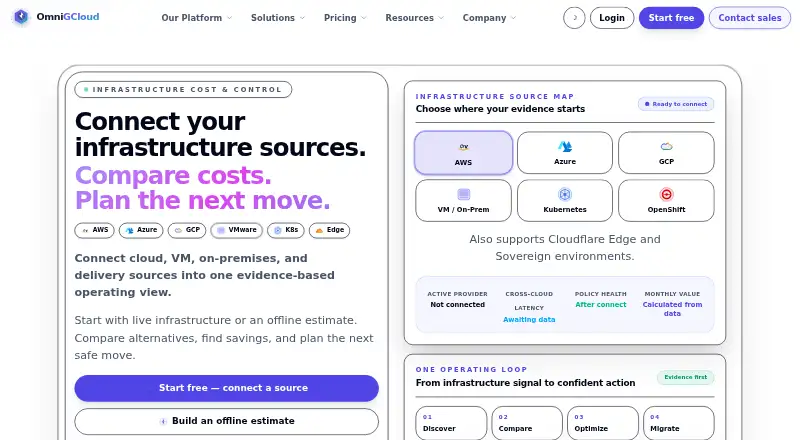
OmniGCloud is a multi-cloud control plane for governance, FinOps, deployment, and automated compliance. It brings infrastructure evidence together for discovery, cost comparison, optimization, and migration planning across sources including AWS, Azure, Google Cloud, VMware, Kubernetes, OpenShift, Cloudflare Edge, and sovereign environments. Governance views cover monitoring, executive summaries, costs and anomalies, compliance and risk, approvals, action journals, and ledger-backed deployments. Named integrations and workflows include GitHub, Spark, Kafka, F5 BIG-IP, VMware AVI/NSX, Envoy, and Terraform-related tools. Developers can use a CLI, REST API, OpenAPI specification, and SDKs. Security features described include capability-based access control, scoped sessions, audit trails, encryption in transit by default, and configurable storage posture. Deployment options vary by edition and include SaaS, private tenant, dedicated, private-cloud, sovereign, offline, air-gapped, and partner-managed setups. Higher tiers list priority or dedicated support, while free includes basic support. The trust page says compliance claims are not made without support, and data residency is handled per enterprise rollout.
Good
- Brings infrastructure evidence together for planning and comparison.
- Lists AWS, Azure, GCP, VMware, and Kubernetes sources.
- Offers CLI, REST API, OpenAPI specification, and SDKs.
- Deployment options include offline and air-gapped setups.
Watch out
- Free plan allows one connector.
- Free plan is limited to a single SaaS workspace.
Who it suits
OmniGCloud is aimed at individual evaluators, product and platform teams, operations groups, regulated enterprises, and system integrators managing infrastructure across cloud or private environments. The free plan is for individual evaluators and small pilots, with one connector and a single SaaS workspace.
Verdict
OmniGCloud combines governance, cost views, deployment workflows, and evidence management across a wide range of listed infrastructure sources. The one-connector free tier is a narrow starting point; paid plans start at $39/user/mo (annual).
Plans and prices
From OmniGCloud's own pricing page, checked 15 Oct 2026.
| Plan | Price | What it gives you |
|---|---|---|
| Free | Free | 1 connector · single SaaS workspace · basic CSV export · basic audit trail · basic support · $0 forever |
| Team | $39 a month | Up to 10 connectors per workspace · shared SaaS workspaces · scheduled CSV/PDF exports · team review-ready evidence packs · $39/ seat / mo, billed annually |
| Pro | $79 a month | Up to 20 connectors · shared SaaS workspaces · scheduled CSV/PDF exports · exportable evidence packs · $79/ mo, billed annually |
| Business | $239 a month | Up to 100 connectors · shared SaaS and private tenant deployments · full report export suite · compliance evidence packs with audit exports · $239/ mo, billed annually |
| Partner/SI | Priced on request | Custom or project-based connectors · partner-managed multi-tenant or private deployments · project and customer handoff exports · delivery evidence packs · Custom contact sales |
| Platform | Priced on request | Custom connector packs · private control-plane deployments · white-label report bundles · signed evidence packages · Custom contact sales |
| Government/Offline | Priced on request | Custom or air-gapped connectors · disconnected or sovereign deployment · offline export bundles · offline evidence archives and chain-of-custody · Custom contact sales |
| Enterprise | Priced on request | Custom or negotiated connectors · dedicated tenant or private deployment · full export suite plus API delivery · customer-defined evidence retention and export · Custom contact sales |
The facts
Each one read from OmniGCloud's own pages, with the date it was checked.
Where it runs
- Approval workflows
- Workflows include approvals, action journals, ledger-backed deployments, automations and webhooks.checked 15 Oct 2026
What it does
- Certification language
- The trust page explicitly says it makes no unsupported certification claims, despite marketing pages displaying examples such as FIPS 140-3 and SOC 2 Type II.checked 15 Oct 2026
- Changelog
- The changelog highlights platform stability, clearer navigation, simpler onboarding and more consistent product, documentation and marketing routes.checked 15 Oct 2026
- CLI
- The homepage displays an omnigcloud command-line interface at version 1.4.0.checked 15 Oct 2026
- Cloud and infrastructure sources
- The homepage lists AWS, Azure, GCP, VMware, Kubernetes, OpenShift, Cloudflare Edge, and sovereign environments as supported sources.checked 29 Sep 2026
- Cloud coverage
- Published infrastructure sources include AWS, Azure, Google Cloud, VMware, Kubernetes, OpenShift, Cloudflare Edge and sovereign environments.checked 15 Oct 2026
- Compliance claims
- The trust page says it makes no unsupported certification claims, and its launch path avoids unsupported claims about certified compliance.checked 29 Sep 2026
- Connector caps
- The listed Team, Pro and Business editions cap connectors at 10 per workspace, 20 and 100 respectively.checked 15 Oct 2026
- Core workflow
- The platform combines infrastructure discovery, cost comparison, optimization and migration planning in one workflow.checked 15 Oct 2026
- Custom pricing
- Enterprise, Platform, Government/Offline and Partner/SI editions use contact-sales pricing rather than published amounts.checked 15 Oct 2026
- Data handling
- The launch path is described as using read-only access, tenant-scoped lead capture and auditable handling, while avoiding unsupported certification claims.checked 15 Oct 2026
- Data residency
- Residency is handled per enterprise rollout with support for region-aware configurations.checked 15 Oct 2026
- Deployment choices
- Published editions span SaaS, shared workspaces, private tenants, dedicated tenants, private-cloud, sovereign, offline, air-gapped and partner-managed deployments.checked 15 Oct 2026
- Deployment options
- Pricing lists SaaS, private tenant, dedicated, private-cloud, sovereign, offline, air-gapped, and partner-managed deployment options across different editions.checked 29 Sep 2026
- Developer access
- OmniGCloud provides documentation for a CLI, REST API, OpenAPI specification, and SDKs.checked 29 Sep 2026
- Developer API
- Documentation navigation advertises a REST API, OpenAPI specification, CLI reference and SDK reference.checked 15 Oct 2026
- Documentation scope
- The documentation landing page lists getting-started guides, tutorials, API references, architecture diagrams, governance material, SDK references and whitepapers.checked 15 Oct 2026
- Encryption
- The trust page says encryption in transit is enabled by default and storage posture is configurable.checked 15 Oct 2026
- FinOps
- OmniGCloud says it can identify waste, explain spend, automate rightsizing and track cloud economics.checked 15 Oct 2026
- Governance
- The platform page lists monitoring and executive summaries, cost and anomaly views, compliance and risk visibility, approvals, action journals, and ledger-backed deployments.checked 29 Sep 2026
The company
- Company identity
- The footer identifies the maker as OmniGCloud Platform.checked 15 Oct 2026
- Company mission
- The company page states a mission to make multi-cloud manageable without sacrificing security or speed.checked 15 Oct 2026
Money
- Free tier limit
- The Free plan is for individual evaluators and small pilots and is limited to one connector and a single SaaS workspace.checked 29 Sep 2026
- Free-tier limit
- The Free edition is limited to one connector and one SaaS workspace.checked 15 Oct 2026
The full review of OmniGCloud
OmniGCloud is a multi-cloud control plane for bringing infrastructure evidence into governance, cost review, and deployment work. It is best suited to teams coordinating several cloud or infrastructure environments. Its broad workflow coverage is a strength, but the one-connector Free tier is only a small pilot starting point.
Overview
OmniGCloud connects discovery, cost comparison, optimization, and migration planning in one workflow across hybrid infrastructure. Its listed sources span AWS, Azure, Google Cloud, VMware, Kubernetes, OpenShift, Cloudflare Edge, and sovereign environments. That breadth can help teams compare and govern different environments in one place; it may be more than a single-cloud team needs.
Governance covers monitoring and executive summaries, cost and anomaly views, compliance and risk visibility, approvals, action journals, and ledger-backed deployments. Policy as code, drift detection, compliance frameworks, and automated remediation broaden its role beyond reporting. The practical value depends on how many connectors and what kind of deployment a team needs, since both vary by plan.
Key features
Governance and evidence
Approvals, audit trails, and ledger history give teams a way to record review and deployment activity. Evidence packs and export options become more substantial on higher plans, making plan choice important for teams with audit or reporting needs. The Free plan's basic audit trail and CSV export are a limited evaluation setup, not the full evidence workflow.
Integrations and developer access
Alongside cloud and infrastructure sources, named integrations include GitHub, Spark, Kafka, F5 BIG-IP, VMware AVI/NSX, Envoy, and Terraform-related workflows. CLI, REST API, OpenAPI documentation, and SDKs give technical teams several ways to work with the platform. Connector ceilings still matter: Team allows up to 10 per workspace, Pro 20, and Business 100.
Security and deployment
Security features include capability-based role access, scoped sessions, audit trails, encryption in transit by default, and configurable storage posture. Data residency is handled through region-aware configurations for enterprise rollouts. The trust page avoids unsupported certification claims, so buyers should not treat the product as proof of a particular certification.
Deployment choices range from SaaS to private tenant, dedicated, private-cloud, sovereign, offline, air-gapped, and partner-managed arrangements across editions. Deploy workflows support approvals, rollbacks, and ledger history, while service health is monitored continuously. This range is useful for varied operating constraints, though private and disconnected deployments sit in custom-priced tiers.
Pricing
OmniGCloud has a free tier and annual-billed paid plans. The tiers differ not just in connector capacity but also in evidence exports and deployment scope.
- Free: free, billed $0 forever. It includes one connector, a single SaaS workspace, basic CSV export, and a basic audit trail, with basic support. This suits individual evaluation or a small pilot, but not a team that needs multiple sources.
- Team: $39 a month, billed $39/ seat / mo, billed annually. It supports up to 10 connectors per workspace, shared SaaS workspaces, scheduled CSV/PDF exports, and team review-ready evidence packs. It is the entry paid fit for collaborative review, with the seat-based annual term worth noting.
- Pro: $79 a month, billed $79/ mo, billed annually. It raises capacity to 20 connectors and adds exportable evidence packs, while retaining shared SaaS workspaces and scheduled CSV/PDF exports. It fits teams that have outgrown Team's connector limit; no additional deployment type is stated for this tier.
- Business: $239 a month, billed $239/ mo, billed annually. It allows up to 100 connectors, shared SaaS and private tenant deployments, a full report export suite, and compliance evidence packs with audit exports. This is the clearest fit for larger or more audit-focused teams that need private tenancy.
- Partner/SI: custom pricing. Custom or project-based connectors, partner-managed multi-tenant or private deployments, project and customer handoff exports, and delivery evidence packs suit system integrators and project-based delivery.
- Platform: custom pricing. Custom connector packs, private control-plane deployments, white-label report bundles, and signed evidence packages target organizations building a managed or white-label service.
- Enterprise: custom pricing. It offers negotiated connectors, a dedicated tenant or private deployment, the full export suite plus API delivery, and customer-defined evidence retention and export. It fits organizations needing tailored deployment and evidence controls.
- Government/Offline: custom pricing. Custom or air-gapped connectors, disconnected or sovereign deployment, offline export bundles, and offline evidence archives with chain-of-custody make this the specialized option for offline or sovereign requirements.
Team, Pro, and Business all require annual billing, and only Team is explicitly priced per seat. Higher tiers add capacity, evidence capabilities, or deployment modes; buyers who need those specialized options should expect a custom quote rather than assume they are part of the lower plans.
Platforms
OmniGCloud is offered through API, self-hosted, and web platforms. Hybrid cloud coverage and the range of infrastructure sources make it relevant to teams managing both cloud and other infrastructure environments.
Who it's for
It is a strong candidate for product and platform teams, cross-functional operations teams, regulated enterprises, and system integrators that need shared governance, cost views, deployment workflows, or evidence management across multiple environments. Individual evaluators can start free, but the one-connector cap makes that tier a poor proxy for a larger rollout. A team with a single provider and no need for consolidated evidence may prefer a narrower tool.
Pros and cons
- Pros: Broad coverage across major cloud, virtualization, container, edge, and sovereign sources makes it suitable for mixed environments.
- Pros: Governance, cost and anomaly views, approvals, drift detection, remediation, and evidence workflows bring operational and review tasks together.
- Pros: API, CLI, OpenAPI, and SDK access give technical teams multiple integration routes.
- Cons: Free is limited to one connector and one SaaS workspace, so it is useful mainly for evaluation or a small pilot.
- Cons: Connector limits rise by tier, and private, sovereign, offline, or partner-managed deployments require custom-priced plans.
- Cons: The stated trust posture does not claim certified compliance, so organizations requiring a specific certification should not infer one from the product's compliance features.
Alternatives
Choose Cloud Custodian if a free, open-source tool under the Apache 2.0 license better fits your needs than a multi-cloud commercial control plane. Kyverno is another free Apache-licensed open-source project to consider instead.
AWS Control Tower may suit an AWS-focused reader seeking a service with no additional Control Tower charge, while remembering underlying AWS service usage is billed. For a scan-based cloud governance option with a free tier and free trial, consider CGPulse. Kubewarden is a free alternative to consider.
AWS Config may fit readers looking for a paid, usage-based AWS service. CoreStack Cloud Governance is worth considering when a choice of one product, a bundle, or a bundle with unlimited assessments is preferable. Jamcracker may be a better fit for MSPs, system integrators, enterprises, or cloud teams seeking a cloud management platform across AWS, Azure, Google Cloud, VMware, and private clouds. Browse Cloud Governance Software for more options.
Verdict
OmniGCloud is best for platform and operations teams that need governance, cost review, deployment records, and evidence across a varied infrastructure estate. Its main case is the breadth of sources and workflows in one control plane; its main drawback is the sharp gap between a one-connector free pilot and the custom-priced deployments some organizations will need. Choose it when consolidated multi-environment oversight is the priority, and look elsewhere if a free open-source tool or a narrower provider-specific service is enough.
Getting started
- Visit https://www.omnigcloud.com/.
- Choose the Free plan for one connector and a single SaaS workspace, or review paid plans beginning at $39 per seat per month billed annually.
- Select a deployment option available for the chosen edition.
- Connect infrastructure sources and use the platform’s CLI, REST API, OpenAPI specification, or SDKs as needed.
Limits worth knowing
The Free plan is limited to one connector and a single SaaS workspace, with basic CSV export, a basic audit trail, and basic support. Team costs $39 per seat per month billed annually and allows up to 10 connectors per workspace.
Questions
Does OmniGCloud have a free plan?
Yes. Free costs $0 forever and includes one connector, a single SaaS workspace, basic CSV export, a basic audit trail, and basic support.
What does the Team plan cost?
Team is $39 per seat per month, billed annually. It supports up to 10 connectors per workspace and includes shared SaaS workspaces, scheduled CSV/PDF exports, and team review-ready evidence packs.
Which platforms and environments does it support?
Listed sources include AWS, Azure, GCP, VMware, Kubernetes, OpenShift, Cloudflare Edge, and sovereign environments. Deployment options vary by edition and include SaaS, private tenant, dedicated, private-cloud, sovereign, offline, air-gapped, and partner-managed options.
What integrations and developer interfaces are named?
The homepage names AWS, Azure, Google Cloud, VMware, Kubernetes, OpenShift, Cloudflare, GitHub, Spark, Kafka, F5 BIG-IP, VMware AVI/NSX, Envoy, and Terraform-related workflows. Developer documentation covers a CLI, REST API, OpenAPI specification, and SDKs.
What security capabilities does OmniGCloud describe?
It describes capability-based RBAC, scoped sessions, audit trails, encryption in transit by default, and configurable storage posture. It also says data residency is addressed per enterprise rollout with region-aware configuration support.
Are certifications or compliance claims stated?
The trust page says OmniGCloud makes no unsupported certification claims and that its launch path avoids unsupported claims about certified compliance.
Alternatives to OmniGCloud
- 1
Kyverno
Free planOpen sourceWebAPILinuxmacOS7.7Free plan - 2

CGPulse
Free planWebAPI7.3From €99 a month - 3

Open Policy Agent Gatekeeper
Free planOpen sourceAPILinuxSelf-hosted7.2Free plan - 4
Google Cloud Organization Policy
Free planWebAPILinuxmacOS7.1Free plan - 5
Powerpipe
Free planWebLinuxmacOSSelf-hosted7.1Free plan - 6

AWS Control Tower
Free planWebAPI6.7Free plan