Google Cloud Terraform Policy Validation
Google Cloud Terraform Policy Validation checks Terraform plans against organizational security and governance constraints before infrastructure changes are …
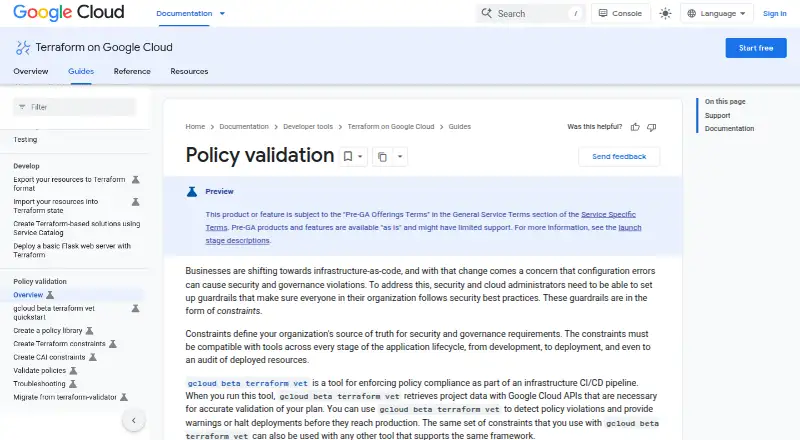
What Google Cloud Terraform Policy Validation is
Google Cloud Terraform Policy Validation checks Terraform plans against organizational security and governance constraints before infrastructure changes are applied. The `gcloud beta terraform vet` command evaluates Terraform plan JSON files, retrieving project data through Google Cloud APIs. It can identify violations, issue warnings, or halt deployments before production; it returns exit code 0 when no violations are found and 2 when violations are found. Platform teams can put validation between plan and apply in CI/CD workflows using Cloud Build, Jenkins, or GitHub Actions. The command accepts Terraform 0.12 or later plan JSON and requires a policy library plus the Google Cloud CLI `terraform-tools` component. Policies can address supported resources from Terraform's Google and Google-beta providers, and constraints can be reused with other tools that support the framework. The listed command is free and client-side. The feature is in Preview under Pre-GA terms, where support may be limited. Security Command Center IaC validation requires Premium or Enterprise activation at the organization level and a specified role; that workflow also requires Terraform Google provider version 5.5 or later. Sensitive fields in resource changes are removed during validation.
Good
- Free client-side command
- Can warn about or halt policy-violating deployments
- Integrates with Cloud Build, Jenkins, and GitHub Actions
- Accepts Terraform 0.12 or later plan JSON
- Sensitive resource-change fields are removed
Watch out
- Feature is in Preview under Pre-GA terms
- Requires a policy library and CLI component
- Security Command Center workflow requires Premium or Enterprise activation
- Security Command Center workflow requires Terraform Google provider 5.5 or later
Who it suits
This tool suits platform teams that want to check Terraform plans against policy in CI/CD before deployment. Security Command Center validation is for organizations with Premium or Enterprise activation and the required role.
Verdict
Google Cloud Terraform Policy Validation places policy checks before deployment and supports several CI/CD workflows. Teams should account for its prerequisites and Preview status, especially when using the Security Command Center workflow.
Plans and prices
From Google Cloud Terraform Policy Validation's own pricing page, checked 1 Oct 2026.
| Plan | Price | What it gives you |
|---|---|---|
| gcloud beta terraform vet | Free | beta · client-side tool · available at no charge |
The facts
Each one read from Google Cloud Terraform Policy Validation's own pages, with the date it was checked.
What it does
- API data retrieval
- Validation retrieves project data through Google Cloud APIs to accurately evaluate a plan.checked 30 Sep 2026
- Automation
- The tool automates policy validation to reduce manual errors.checked 1 Oct 2026
- Availability
- The policy validation documentation labels the feature Preview and says Pre-GA offerings may have limited support.checked 1 Oct 2026
- CI/CD enforcement
- The tool is designed to enforce policy compliance in infrastructure CI/CD pipelines.checked 30 Sep 2026
- CI/CD use
- Platform teams can add guardrails between Terraform plan and apply stages to validate infrastructure requests before deployment.checked 1 Oct 2026
- CLI tool
- The `gcloud beta terraform vet` command validates whether a Terraform plan complies with policies.checked 30 Sep 2026
- Constraint reuse
- The same constraints can be used with other tools that support the same framework.checked 1 Oct 2026
- Deployment controls
- It detects policy violations and can provide warnings or halt deployments before production.checked 1 Oct 2026
- Integrations
- Google Cloud IaC validation can be run through Google Cloud CLI or integrated with Cloud Build, Jenkins, and GitHub Actions.checked 30 Sep 2026
- Launch stage
- The policy validation feature is in Preview and subject to Google Cloud Pre-GA terms with potentially limited support.checked 30 Sep 2026
- Policy library
- Using the tool requires a policy library and the Google Cloud CLI `terraform-tools` component.checked 30 Sep 2026
- Provider support
- Policies can be written for resources from Terraform's google and google-beta providers.checked 1 Oct 2026
- Purpose
- gcloud beta terraform vet enforces policy compliance as part of an infrastructure CI/CD pipeline.checked 1 Oct 2026
- Result codes
- The command returns exit code 0 when no violations are found and exit code 2 when violations are found.checked 30 Sep 2026
- Reusable constraints
- The same constraints can be used with other tools supporting the framework.checked 30 Sep 2026
- Security policies
- Security Command Center IaC validation supports organization policies and Security Health Analytics detectors.checked 1 Oct 2026
- Security requirements
- Security Command Center IaC validation requires Premium or Enterprise activation at the organization level and the Security Posture Shift-Left Validator role.checked 30 Sep 2026
- Sensitive data
- Sensitive fields in resource changes are removed when encountered, and users are instructed not to include passwords or personally identifiable information in Terraform plan files.checked 1 Oct 2026
- Sensitive data handling
- Sensitive fields in resource changes are removed when encountered by the IaC validation feature.checked 30 Sep 2026
- Service prerequisites
- IaC validation requires Security Command Center Premium or Enterprise activated at the organization level.checked 1 Oct 2026
- Support
- Until gcloud beta terraform vet is generally available, users are directed to open support tickets in the terraform-google-conversion GitHub repository.checked 1 Oct 2026
- Supported policies
- IaC validation supports organization policies, organization policy custom constraints excluding policies that include tags, and Security Health Analytics custom modules.checked 30 Sep 2026
The company
- Founded
- 1998checked 28 Sep 2026
- Headquarters
- Mountain View, California, USAchecked 28 Sep 2026
The full review of Google Cloud Terraform Policy Validation
Google Cloud Terraform Policy Validation checks Terraform plans against organizational security and governance constraints before deployment. It suits platform teams building guardrails into infrastructure CI/CD; its strongest case is catching policy violations before production, though Preview status and workflow prerequisites call for caution.
Overview
The beta gcloud beta terraform vet command evaluates Terraform plan JSON against a policy library, using Google Cloud API data to assess plans. Teams can configure checks to warn or stop a deployment, adding a policy gate between plan and apply rather than relying on manual review.
Validation returns exit code 0 when it finds no violations and 2 when it finds violations, which gives CI/CD workflows a clear signal for handling a failed check. The tool supports Terraform 0.12 or later plan JSON and policies for resources from the google and google-beta providers. Unsupported asset types in a file are ignored while supported types are validated, so a successful run should not be read as coverage of every asset in a plan.
Key features
- Policy guardrails: Constraints can flag violations, warn, or halt deployment before production. This makes the tool useful where teams need consistent checks at the infrastructure change stage.
- Pipeline integration: Run validation through the Google Cloud CLI or connect it to Cloud Build, Jenkins, or GitHub Actions. That gives platform teams several routes to automate checks in existing workflows.
- Reusable constraints: Constraints can also be used by other tools that support the same framework, reducing the need to maintain separate policy logic for each compatible tool.
- Policy testing and reporting: Policy testing and reporting are supported, alongside admission control. Runtime enforcement is not, so this is a pre-deployment control rather than a runtime policy monitor.
- Data handling: Sensitive fields in resource changes are removed when encountered. Users are still instructed not to put passwords or personally identifiable information in Terraform plan files.
The policy language is Rego, and the workflow requires a policy library plus the Google Cloud CLI terraform-tools component. These dependencies suit teams prepared to manage policy code and CLI setup; they add overhead for users seeking a ready-made, standalone check.
Pricing
gcloud beta terraform vet: free (billed available at no charge; beta · client-side tool). The tool has no listed seat or usage quota, and there is no separate paid plan described. The trade-off is not a cheaper tier with reduced features, but beta maturity: the feature is in Preview under Google Cloud Pre-GA terms, which may mean limited support.
Platforms
Google Cloud Terraform Policy Validation is available for Linux, macOS, and Windows. Its input is Terraform plan JSON; the Google Cloud CLI and related component form part of the workflow.
Who it's for
This is a strong fit for platform and security teams that already use Terraform with Google Cloud and want policy checks to block or flag infrastructure changes before apply. Teams using Security Command Center IaC validation need Premium or Enterprise activated at the organization level, the Security Posture Shift-Left Validator role, and Terraform Google provider version 5.5 or later. That route supports organization policies, organization policy custom constraints except those that include tags, and Security Health Analytics custom modules.
It is less suitable for teams that need general runtime enforcement, broad validation of unsupported asset types, or a workflow without a policy library and CLI component. The Security Command Center path also carries activation and role requirements, while Preview status makes it a less comfortable choice for organizations that require mature support commitments.
Pros and cons
Pros
- Stops policy violations before production: teams can use warnings or halt deployment to make governance part of the plan-to-apply process.
- Fits common CI/CD workflows: Cloud Build, Jenkins, and GitHub Actions are supported integration routes.
- No charge for the beta CLI tool: the listed plan costs nothing.
- Constraints can be reused: compatible tools can share the same policy constraints.
Cons
- Preview and beta status: Pre-GA offerings may have limited support; until general availability, support tickets are directed to the terraform-google-conversion GitHub repository.
- Setup is not turnkey: validation needs a policy library and the CLI terraform-tools component.
- Coverage has boundaries: unsupported assets are ignored, and Security Command Center validation has service, role, policy, and provider-version requirements.
- No runtime enforcement: checks address plans before deployment, not running infrastructure.
Alternatives
Choose Open Policy Agent if you want a free, open-source policy engine across API, Linux, macOS, self-hosted, web, and Windows environments. For broader infrastructure provisioning rather than this focused policy-validation workflow, consider Terraform, which has a free plan with 500 managed resources, one concurrent remote run, and one concurrent agent run.
HashiCorp Nomad is another freemium option. Kubewarden, AWS CloudFormation, Cloud Custodian, Conftest, and cfn-lint are other listed alternatives.
Browse Infrastructure Policy as Code Tools for more options in the category.
Verdict
Google Cloud Terraform Policy Validation is a practical choice for platform teams that want Rego-based constraints to gate Terraform plans in Google Cloud-oriented CI/CD workflows, at no charge for the beta client-side tool. Choose it when pre-deployment guardrails are the goal and your team can accept Preview status and its setup requirements; look elsewhere if you need runtime enforcement or a more mature support footing.
Getting started
- Open the Google Cloud Terraform Policy Validation documentation.
- Install the Google Cloud CLI and its `terraform-tools` component.
- Prepare a policy library and Terraform plan JSON from Terraform 0.12 or later.
- Run `gcloud beta terraform vet` against the plan.
- Add the validation step to Cloud Build, Jenkins, or GitHub Actions if using a CI/CD workflow.
Limits worth knowing
The feature is in Preview under Pre-GA terms, and support may be limited. Security Command Center IaC validation requires Premium or Enterprise activation at the organization level, the Security Posture Shift-Left Validator role, and Terraform Google provider version 5.5 or later.
Questions
How much does Google Cloud Terraform Policy Validation cost?
The `gcloud beta terraform vet` command is listed as free.
Which Terraform plans can it validate?
It accepts Terraform 0.12 or later plan JSON files.
Which CI/CD tools can run the validation?
Validation can be integrated with Cloud Build, Jenkins, and GitHub Actions.
What does the command return when it finds violations?
It returns exit code 2 when violations are found and exit code 0 when none are found.
Is runtime enforcement supported?
No. Runtime enforcement is not supported; policy validation is designed for Terraform plans and CI/CD workflows.
What does Security Command Center IaC validation require?
It requires Security Command Center Premium or Enterprise activated at the organization level and the Security Posture Shift-Left Validator role.
Alternatives to Google Cloud Terraform Policy Validation
- 1

Terraform
Free planWebAPILinuxmacOS8.0Free plan - 2

AWS CloudFormation
Free planiOSWebAPILinux7.7Free plan - 3
Kyverno
Free planOpen sourceWebAPILinuxmacOS7.7Free plan - 4

Open Policy Agent Gatekeeper
Free planOpen sourceAPILinuxSelf-hosted7.2Free plan - 5

Fairwinds Polaris
Free planWebLinuxmacOSSelf-hosted7.1Free plan - 6
Google Cloud Organization Policy
Free planWebAPILinuxmacOS7.1Free plan