
Clew
Clew adds product tours, tooltips, modals and onboarding checklists inside a product.
What Clew is
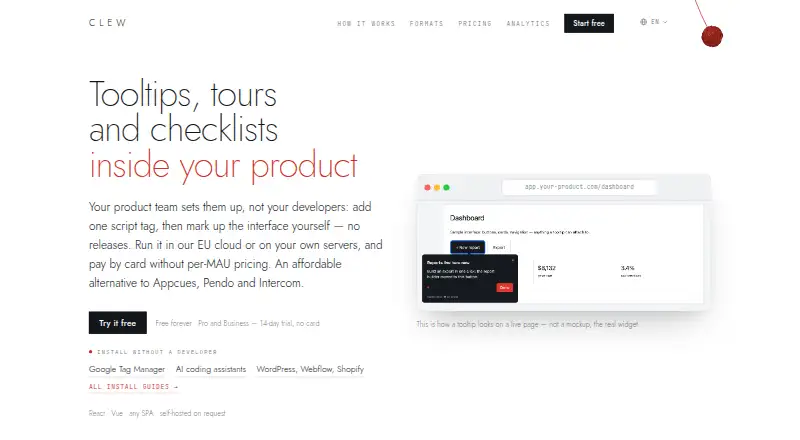
Clew adds product tours, tooltips, modals and onboarding checklists inside a product. A team can install a script tag, then create and publish overlays in a visual editor without another site release. The widget works with React, Vue, plain HTML and single-page apps, including client-side route changes. Setup guides cover Google Tag Manager, AI coding assistants, WordPress, Webflow and Shopify. Clew tracks views, completions and dismissals using an anonymous in-browser ID; it says those counts do not use IP addresses or personal data. If a tooltip can no longer find its target, Clew flags and skips that step rather than crashing the tour. EU cloud hosting and a self-hosted option are available; the self-hosted plan is aimed at regulated industries and keeps data within the customer's perimeter, according to Clew. The Free plan allows one site, one team seat and up to three published tours. Pro costs $14.99 per month and includes A/B testing. Pro and Business offer a 14-day trial without requiring a credit card.
Good
- Publishes overlays without another site release.
- Supports React, Vue, plain HTML and single-page apps.
- Flags and skips broken tooltip steps.
- Pro and Business trials do not require a credit card.
Watch out
- Free plan is limited to one site and one team seat.
- Free plan allows up to three published tours.
- Pro costs $14.99 per month.
- Some listed integrations are coming soon on specified plans.
Who it suits
Clew suits product teams that want to create in-app guidance and onboarding flows through a visual editor. Its self-hosted option may suit banks, public-sector organizations and regulated industries.
Verdict
Clew provides no-code overlays and product tours with cloud and self-hosted options. Review plan limits and hosting needs before selecting an option.
Plans and prices
From Clew's own pricing page, checked 29 Sep 2026.
| Plan | Price | What it gives you |
|---|---|---|
| Free | Free | 1 site · 1 team seat · up to 3 published tours · tours and tooltips · 1 month analytics history · docs support |
| Pro | $14.99 a month | 3 sites · 3 team seats · up to 20 published tours · 1 A/B test at a time · 3 months analytics history · email support · $14.99/mo |
| Business | $39.99 a month | 10 sites · 10 team seats · unlimited tours · 5 A/B tests at a time · 12 months analytics history · priority support · $39.99/mo |
| Lifetime | $499, paid once | Unlimited sites and tours · 10 team seats · 5 A/B tests at a time · 12 months analytics history · email support · $499 one-time |
| Self-hosted | $1,499, paid once | Unlimited sites, seats, tours and A/B tests · unlimited analytics history · one year of updates and support · $1,499 one-time |
The facts
Each one read from Clew's own pages, with the date it was checked.
What it does
- A/B testing
- A/B tests compare a tour variant with a control group and are available on Pro and higher plans.checked 29 Sep 2026
- AI integration
- The Pro plan includes an MCP server to manage tours from Claude, Cursor and ChatGPT.checked 29 Sep 2026
- Analytics
- Clew tracks views, completions and dismissals with an anonymous in-browser ID and says it does not use IP addresses or personal data for those counts.checked 29 Sep 2026
- Audience
- Clew describes its self-hosted plan as intended for banks, the public sector and regulated industries.checked 29 Sep 2026
- Broken steps
- When a tooltip can no longer find its target element, Clew flags and skips the broken step rather than crashing the tour.checked 29 Sep 2026
- Compatibility
- The widget works with React, Vue, plain HTML and single-page apps, following client-side route changes.checked 29 Sep 2026
- Hosting and privacy
- Clew offers EU cloud hosting and a self-hosted option that it says keeps data within the customer's perimeter.checked 29 Sep 2026
- Install options
- Clew provides setup guides for Google Tag Manager, AI coding assistants, and site builders including WordPress, Webflow and Shopify.checked 29 Sep 2026
- Other integrations
- The plan comparison lists integrations and webhooks as coming soon on Business, Lifetime and Self-hosted plans.checked 29 Sep 2026
- Product
- Clew provides product tours, tooltips, modals and onboarding checklists inside a product.checked 29 Sep 2026
- Setup
- The product team can add a script tag and create or publish overlays in a visual editor without further site releases.checked 29 Sep 2026
- Usage limits
- The pricing page says visitors and tooltip views are uncapped, while cloud plans are subject to fair use.checked 29 Sep 2026
The company
- Headquarters
- Amsterdam, Netherlandschecked 28 Sep 2026
Money
- Trial
- Pro and Business have a 14-day free trial that does not require a credit card.checked 29 Sep 2026
The full review of Clew
Clew is a web onboarding tool for product teams that want to publish in-app guidance without another site release. It suits teams building tours and contextual help, especially those that need self-hosting; its appeal is flexible publishing and hosting, while its free tier is tightly capped.
Overview
Once a team adds Clew’s script tag, it can create and publish product tours, tooltips, modals and onboarding checklists in a visual editor. That gives product teams room to update guidance without waiting for a site release. The widget supports React, Vue, plain HTML and single-page apps, including client-side route changes, so it fits a range of web app setups. It is not a general-purpose mobile onboarding tool.
Setup guides cover Google Tag Manager, AI coding assistants, WordPress, Webflow and Shopify. Teams can choose EU cloud hosting or self-hosting, which Clew says keeps data within the customer’s perimeter. That choice is valuable for organizations with hosting constraints, though self-hosting comes with a substantially higher one-time price.
Key features
Guidance, analytics and resilience
Clew combines tours, tooltips, modals and checklists in one editor. Its analytics track views, completions and dismissals using an anonymous in-browser ID; Clew says those counts do not use IP addresses or personal data. History limits matter more than visitor or tooltip-view quotas: those are uncapped, subject to fair use on cloud plans, while analytics retention ranges from one month on Free to unlimited on Self-hosted.
If a tooltip loses its target element, Clew flags and skips that step rather than letting it crash the tour. This is a useful safeguard for changing interfaces, although it cannot prevent the guidance from becoming incomplete when a target moves.
Testing and AI workflow
A/B testing compares a tour variant with a control group and starts on Pro, which allows one test at a time. Business and Lifetime allow five concurrent tests, while Self-hosted has no stated test cap. Pro also includes an MCP server for managing tours from Claude, Cursor and ChatGPT. Integrations and webhooks are marked as coming soon on Business, Lifetime and Self-hosted, so those plans should not be chosen on the expectation that those connections are already available.
Pricing
Clew has a free plan and paid plans from $14.99 a month. Pro and Business include a 14-day free trial without requiring a credit card.
- Free — free: One site, one team seat, up to three published tours, tours and tooltips, one month of analytics history and docs support. It is a practical way to start, but the seat, site and tour caps make it a limited option for a growing team.
- Pro — $14.99 a month (billed $14.99/mo): Three sites, three team seats, up to 20 published tours, one A/B test at a time, three months of analytics history and email support. This is the entry point for testing tours and using the MCP server, but the low seat count and single-test limit constrain larger or more experimental teams.
- Business — $39.99 a month (billed $39.99/mo): Ten sites and seats, unlimited tours, five concurrent A/B tests, 12 months of analytics history and priority support. It suits teams running guidance across several products or needing more room for concurrent tests.
- Lifetime — $499, paid once (billed $499 one-time): Unlimited sites and tours, ten seats, five concurrent A/B tests, 12 months of analytics history and email support. The one-time payment may suit teams preferring not to pay monthly, but it still caps seats at ten and analytics history at one year.
- Self-hosted — $1,499, paid once (billed $1,499 one-time): Unlimited sites, seats, tours, A/B tests and analytics history, plus one year of updates and support. It is aimed at banks, the public sector and regulated industries, and its price makes it a poor fit for teams that do not need self-hosting.
Platforms
Clew supports web apps and self-hosted deployment. Its widget compatibility includes React, Vue, plain HTML and single-page apps. The listed setup guides provide multiple installation routes, but the product’s platform scope remains web rather than mobile.
Who it's for
Clew is a strong fit for product teams that want to publish onboarding guidance independently of site releases, need a visual editor for several types of in-product help, or want control over hosting. The Free tier can establish whether the basic workflow fits, while Pro is the first plan with A/B testing. Regulated organizations with a self-hosting requirement have a dedicated option; teams needing many seats should account for the limits on Pro, Business and Lifetime before committing.
Pros and cons
- Pros: Product teams can publish overlays without another site release, and support for common web frameworks and site builders offers several ways to install Clew.
- Pros: EU cloud and self-hosted options give teams a hosting choice, with self-hosting intended for regulated organizations.
- Pros: Broken tooltip targets are skipped instead of crashing the tour, and visitor and tooltip-view quotas are uncapped subject to cloud fair use.
- Cons: Free is limited to one site, one seat and three published tours, with only one month of analytics history.
- Cons: Pro’s three seats and one concurrent A/B test can limit team growth and experimentation; Business and Lifetime still cap seats at ten.
- Cons: Self-hosted requires a 1499.00 USD one-time payment, and updates and support are included for one year.
Alternatives
For a broader comparison, see User Onboarding Software.
- Wakeline is worth considering if Android or iOS support matters alongside web and extension support; its free plan allows three flows, 1,000 monthly active users and one teammate.
- Driver.js is the simpler free choice for teams that want unlimited projects, commercial use and no attribution requirement.
- Candu may suit teams focused on overlays: its free plan includes three live experiences and unlimited user licenses, while its Starter plan is $199 a month when paid annually.
- Guidez is another freemium option, with a free Hobby plan capped at 100 MAU per month, one team member and one environment.
- Guida.js is a free, open-source web option under the MIT license, with a small minified-and-gzipped footprint and no external dependencies.
- Usertour is an alternative for teams seeking an open-source core and Docker self-hosting.
- Appcues is a paid alternative with no free plan; its Start plan supports up to 3,000 MAUs and 10 published experiences, but pricing is custom pricing.
- HelpHero may suit teams that prefer pricing by active users: its plan for up to 1,000 MAU costs $55 a month and includes standard and advanced features.
Verdict
Choose Clew if your product team wants to manage web onboarding guidance without another site release, particularly if self-hosting is a requirement. The visual editor, framework compatibility and resilient handling of broken tooltip targets are persuasive strengths. Look elsewhere if you need mobile onboarding, more seats at the entry price, or a lower-cost self-hosted option.
Getting started
- Visit https://tryclew.io/ and choose a plan.
- Install Clew with a script tag or use a setup guide for Google Tag Manager, an AI coding assistant or a supported site builder.
- Create overlays in the visual editor and publish them in your product.
- Use the 14-day trial on Pro or Business without entering a credit card.
Limits worth knowing
The Free plan includes one site, one team seat and up to three published tours, with one month of analytics history. Pro and Business trials last 14 days; cloud plans are subject to fair use.
Questions
Is there a free plan?
Yes. The Free plan costs $0 and includes one site, one team seat and up to three published tours.
How much do the paid plans cost?
Pro is $14.99 per month and Business is $39.99 per month. Lifetime costs $499 one-time, and Self-hosted costs $1,499 one-time.
Does Clew offer a free trial?
Pro and Business have a 14-day free trial that does not require a credit card.
Which platforms does Clew support?
Clew is available as a web product and a self-hosted option. Its widget supports React, Vue, plain HTML and single-page apps.
Does Clew support A/B testing?
Yes. Pro and higher plans include A/B testing; Pro allows one test at a time, while Business allows five.
Can Clew be self-hosted?
Yes. Clew says self-hosting keeps data within the customer’s perimeter and describes the plan as intended for banks, the public sector and regulated industries.
Alternatives to Clew
- 1

Helppier
AndroidiOSWebAPI7.7From $49 a month - 2

Candu
Free planWebAPIExtension7.5From $199 a month - 3

Wakeline
Free planAndroidiOSWebExtension7.5From $41 a month - 4

Chameleon
WebAPIExtension7.2From $279 a month - 5

Guidez
Free planWebAPIExtension7.2From $79 a month - 6

Inline Manual
WebAPIExtensionSelf-hosted7.2From $3 a month