Callwrap
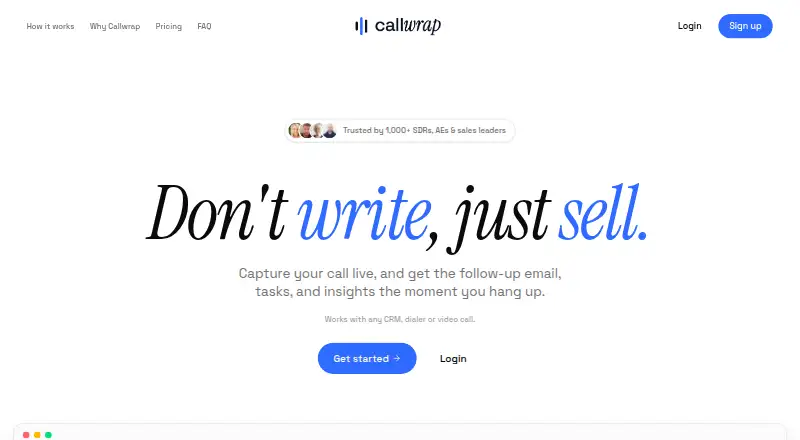
Callwrap captures sales calls live and generates follow-up emails, tasks, insights, and CRM-ready notes when a call ends.
What Callwrap is
Callwrap captures sales calls live and generates follow-up emails, tasks, insights, and CRM-ready notes when a call ends. Users start recording and select the call tab; the service provides live transcripts with speakers separated. Its site says it works with any CRM, dialer, or video call. Callwrap is aimed at SDRs, account executives, and sales leaders. The free Starter plan costs nothing and includes 20 calls per month, transcripts and AI summaries, follow-up emails and auto tasks, plus a personal dictionary and templates. Pro costs $19 per user per month and adds unlimited calls, follow-up emails, tasks, and history, with priority support. Enterprise pricing is custom; its listed features include SSO/SAML, admin controls and roles, CRM integrations, audit logs, data residency, and dedicated support with an SLA. With Privacy Mode enabled, customer content is not used to train AI models. Users are responsible for complying with recording and transcription laws and obtaining required participant consent or notice. Users must be at least 16 years old.
Good
- Live transcripts separate speakers.
- Generates emails, tasks, insights, and CRM-ready notes.
- Starter includes 20 calls per month.
- Privacy Mode excludes customer content from AI training.
Watch out
- Starter is limited to 20 calls per month.
- Pro costs $19 per user per month.
- Users must handle recording consent and legal compliance.
- Users must be at least 16.
Who it suits
Callwrap suits SDRs, account executives, and sales leaders who want call transcripts and generated follow-up materials. Teams should account for their responsibility to comply with recording and transcription laws.
Verdict
Callwrap combines live transcription with generated sales follow-ups, with plan limits and support varying by tier. Before using it, consider the call cap and your responsibility to obtain any required notice or consent.
Plans and prices
From Callwrap's own pricing page, checked 9 Oct 2026.
| Plan | Price | What it gives you |
|---|---|---|
| Starter | Free | 20 calls per month · transcripts and AI summaries · follow-up emails and auto tasks · personal dictionary and templates |
| Pro | $19 a month | Everything in Free · unlimited calls · unlimited follow-up emails and tasks · unlimited history · priority support · $19 per user/mo |
| Enterprise | Priced on request | Everything in Pro · SSO/SAML · admin controls and roles · CRM integrations · audit logs and data residency · dedicated support and SLA · Custom |
The facts
Each one read from Callwrap's own pages, with the date it was checked.
What it does
- Call workflow
- The product generates follow-up emails, tasks, insights, and CRM-ready notes from calls.checked 9 Oct 2026
- Compatibility
- The home page says Callwrap works with any CRM, dialer, or video call.checked 9 Oct 2026
- Eligibility
- The terms say users must be at least 16 years old to use the service.checked 9 Oct 2026
- Enterprise access
- The Enterprise plan lists SSO/SAML, admin controls, and roles.checked 9 Oct 2026
- Enterprise controls
- The Enterprise plan lists audit logs and data residency.checked 9 Oct 2026
- Intended users
- The home page describes Callwrap as serving SDRs, account executives, and sales leaders.checked 9 Oct 2026
- Privacy mode
- Callwrap's terms state that with Privacy Mode enabled, customer content is not used to train AI models.checked 9 Oct 2026
- Product
- Callwrap captures sales calls live and generates follow-up emails, tasks, and insights when the call ends.checked 9 Oct 2026
- Recording
- Callwrap captures both sides of a conversation live after the user starts recording and selects the call tab.checked 9 Oct 2026
- Recording consent
- The terms make users responsible for complying with applicable recording and transcription laws and obtaining required participant consent or notice.checked 9 Oct 2026
- Support
- The site lists priority support for Pro, and dedicated support with an SLA for Enterprise.checked 9 Oct 2026
- Templates
- The Starter plan includes a personal dictionary and templates.checked 9 Oct 2026
- Transcription
- Callwrap provides live transcripts with speakers separated.checked 9 Oct 2026
The full review of Callwrap
Callwrap is a sales-call tool that turns recorded conversations into transcripts and follow-up work. It is best suited to salespeople who want call notes and next steps in one workflow. The free plan is useful for modest call volume; frequent users need to decide whether Pro’s $19 per user per month is worth unlimited calls and history.
Overview
Once a user starts recording and selects the call tab, Callwrap captures both sides of the conversation and transcribes them live with speakers separated. When the call ends, it can generate follow-up emails, tasks, insights, and CRM-ready notes. This makes it a focused sales workflow tool rather than simply a place to store recordings: the main benefit is carrying a conversation into concrete follow-up, though recording must be started by the user.
The home page says Callwrap works with any CRM, dialer, or video call, which makes it relevant to teams using different calling setups. Its stated follow-up channel is email. With Privacy Mode enabled, customer content is not used to train AI models. Users are responsible for complying with applicable recording and transcription laws and obtaining any required participant notice or consent; users must be at least 16.
Key features
Live capture and generated follow-up
Live, speaker-separated transcripts provide a record of the conversation, while generated emails, tasks, insights, and CRM-ready notes can reduce the manual work after a call. That combination is most useful to SDRs and account executives who need to move quickly from a conversation to next steps. The workflow depends on starting the recording and selecting the call tab, so it is not a substitute for remembering to capture the call.
Dictionary and templates
The Starter plan includes a personal dictionary and templates. Those tools give free users some room to tailor the workflow, but the 20-call monthly limit makes Starter better suited to occasional use than a busy sales calendar.
Enterprise controls and support
Enterprise adds SSO/SAML, admin controls and roles, audit logs, data residency, CRM integrations, and dedicated support with an SLA. These controls make the custom-priced tier the relevant option for organizations with administrative or support requirements; the Pro tier instead offers priority support.
Pricing
| Plan | Price | What it includes | Best fit |
|---|---|---|---|
| Starter | free | 20 calls per month, transcripts and AI summaries, follow-up emails and auto tasks, personal dictionary, and templates | Individuals or teams with light call volume |
| Pro | $19 a month, billed $19 per user/mo | Everything in Free, unlimited calls, unlimited follow-up emails and tasks, unlimited history, and priority support | Salespeople who regularly exceed the free call cap |
| Enterprise | Custom pricing | Everything in Pro, SSO/SAML, admin controls and roles, CRM integrations, audit logs, data residency, and dedicated support with an SLA | Organizations that need additional administration and support controls |
Starter’s 20-call monthly ceiling is the key trade-off: it offers transcripts, summaries, and follow-up without a subscription, but frequent callers will need to upgrade or ration use. Pro removes the call limit and adds unlimited history, but its per-user monthly billing makes the cost scale with the number of paid seats. Enterprise is custom pricing for organizations that need its added controls and service commitments.
Platforms
Callwrap is available on Linux, macOS, Windows, and the web. That range suits teams working across desktop operating systems, though platform availability alone does not change the requirement to start recording.
Who it's for
Callwrap is aimed at SDRs, account executives, and sales leaders who want a call transcript plus generated follow-up in the same workflow. Starter suits lighter use; Pro is the clearer fit for regular callers who need unlimited calls and history. Organizations that require SSO/SAML, audit logs, or dedicated support should consider Enterprise. It is a weaker fit for people who need follow-up beyond email or cannot rely on users to initiate recording.
Pros and cons
- Pros: Live speaker-separated transcripts are paired with emails, tasks, insights, and CRM-ready notes, helping connect calls to follow-up work.
- Pros: Starter provides a no-cost entry point with 20 calls per month, summaries, follow-up, a personal dictionary, and templates.
- Pros: Pro removes call and history limits, while Enterprise adds administrative and support controls for larger organizations.
- Cons: Starter’s 20-call cap can quickly constrain regular sales use.
- Cons: Recording requires a user to start capture and select the call tab, leaving a manual step before the workflow can help.
- Cons: Follow-up is through email, and users must handle applicable consent or notice requirements themselves.
Alternatives
For broader sales follow-up options, browse Sales Follow-Up Software.
- Fellow is worth considering if a free plan with five lifetime AI notes per user, plus a free trial, better matches occasional note-taking needs.
- Claap may suit buyers who want unlimited recording across desktop, Chrome extension, and audio, with a Pro plan priced at €29 a month billed annually.
- JOEY is another freemium option with a free trial.
- FollowUpThen is a fit to consider for email follow-ups, with a free plan allowing 50 active followups per month.
- Avoma may suit teams comparing a Startup plan at $19 a month billed annually, with up to 25 paid seats and free view-only seats.
- CloseFlow offers a 30-day free account period with every available feature and no automatic charge.
- TrackerSuite Sales Tracker may be relevant to teams comparing a free plan for up to five users and a Growth plan priced at 45.41 DKK per user per month.
- Sybill is an option for buyers considering a free tier with unlimited recordings and transcripts, subject to its stated storage and AI-summary allowances.
Verdict
Callwrap is a solid choice for salespeople who want live transcripts and generated follow-up from the same recorded call, especially if 20 monthly calls are enough or unlimited Pro usage justifies $19 per user per month. Look elsewhere if the call cap is too restrictive, if you need follow-up channels beyond email, or if your team needs recording to begin without a user action.
Getting started
- Open the Callwrap website
- Choose the Starter, Pro, or Enterprise plan
- Use Callwrap on Linux, macOS, web, or Windows
- Start recording and select the call tab
- Enable Privacy Mode when customer content should not train AI models
Limits worth knowing
Starter permits 20 calls per month. Pro provides unlimited calls, follow-up emails, tasks, and history; Enterprise pricing is custom.
Questions
Is Callwrap free?
Yes. The Starter plan is free and allows 20 calls per month.
How much does Pro cost?
Pro is billed at $19 per user per month.
Which platforms support Callwrap?
Callwrap is available on Linux, macOS, web, and Windows.
Does Callwrap work with CRM systems?
Its website says it works with any CRM, dialer, or video call. Enterprise also lists CRM integrations.
Can customer content train AI models?
With Privacy Mode enabled, customer content is not used to train AI models.
What does Enterprise include?
Enterprise has custom pricing and lists SSO/SAML, admin controls and roles, CRM integrations, audit logs, data residency, and dedicated support with an SLA.
Alternatives to Callwrap
- 1

Avoma
Free planAndroidiOSWebAPI8.4From $19 a month - 2

Fellow
Free planAndroidiOSWebAPI8.3From $7 a month - 3
Claap
Free planAndroidiOSWebAPI8.2From €32 a month - 4

Sybill
Free planAndroidiOSWebAPI8.2From $30 a month - 5
FollowUpThen
Free planAndroidiOSWebLinux8.1From $4 a month - 6
JOEY
Free planAndroidiOSWebExtension7.4From $150 a month