Sybill
Sybill is an AI assistant for sales teams that handles follow-up work and sales collateral while surfacing deal insights.
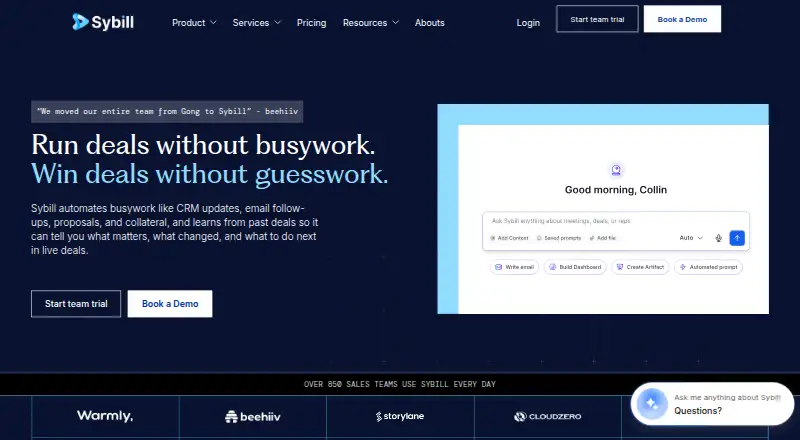
What Sybill is
Sybill is an AI assistant for sales teams that handles follow-up work and sales collateral while surfacing deal insights. Ask Sybill works across calls, emails and deals. Users can customize meeting summaries with fields and drag-and-drop ordering, including MEDDPICC, next steps, tasks and nonverbal cues. Sybill records Zoom, Google Meet, Microsoft Teams and Webex meetings, and can capture in-person conversations and Slack huddles. It collects call to-dos and can draft follow-up emails or create calendar invites. Native CRM integrations include HubSpot, Salesforce, Zoho CRM, Microsoft Dynamics 365 and Pipedrive. Its bot-free Invisible Recorder is a desktop app that currently requires a Mac with Apple Silicon M1 or newer. Sybill is available on the web and macOS, with API access listed. The Free plan includes 20 AI meeting summaries and briefs per month and three months of storage. Only recorder seats are billed; collaborators can view shared recordings and summaries for free.
Good
- Customizable summaries can include MEDDPICC and next steps.
- Records four listed video meeting services.
- Native integrations with five listed CRMs.
- Free plan includes 20 summaries and briefs monthly.
- Collaborators can view shared recordings for free.
Watch out
- Invisible Recorder requires Apple Silicon M1 or newer.
- Free plan storage lasts three months.
Who it suits
Sybill suits sales teams looking to organize call follow-up and deal information across meetings, email and CRM tools. The Invisible Recorder is for users with a Mac running Apple Silicon M1 or newer.
Verdict
Sybill combines meeting capture, tailored summaries and sales-task assistance with CRM integrations. The Free plan provides a way to start, while the bot-free desktop recorder has a specific Mac hardware requirement.
Plans and prices
From Sybill's own pricing page, checked 15 Oct 2026.
| Plan | Price | What it gives you |
|---|---|---|
| Free | Free | 500 AI credits/user/week · unlimited call recordings/transcripts · 20 AI meeting summaries and briefs/month · 3 months storage · per user/month |
| Pro | $30 a month | 2,500 AI credits/user/week · unlimited AI summaries and briefs · unlimited storage · CRM summary push · annual billing, per user/month |
| Business | $90 a month | 5,000 AI credits/user/week · CRM context in Ask Sybill · CRM Autofill for 10 fields · API and MCP access · deal workspace · annual billing, per user/month |
| Enterprise | Priced on request | unlimited credits · unlimited AI credits · unlimited CRM Autofill · SSO · dedicated account manager · migration and integration support · custom |
The facts
Each one read from Sybill's own pages, with the date it was checked.
What it does
- AI follow-ups
- Sybill drafts personalized follow-up emails from call and relationship context and adapts them to the user's writing style.checked 15 Oct 2026
- AI task execution
- Sybill captures call to-dos and can execute tasks such as drafting follow-up emails and creating calendar invites.checked 30 Sep 2026
- AI tasks
- The service extracts action items from calls and emails, organizes them by deal and can execute selected tasks.checked 15 Oct 2026
- API
- The REST API at api.sybill.ai can export conversations, transcripts, recordings, deals, accounts, messages and documents, and can import records.checked 15 Oct 2026
- API authentication
- API keys are created in the dashboard, use Bearer authentication, begin with sk_live_ and are shown only once.checked 15 Oct 2026
- API scopes
- Documented API scopes are read for exports, ingest for importing and managing records, and ask_sybill for AI questions.checked 15 Oct 2026
- Ask Sybill
- Ask Sybill lets users query meetings, deals, people, companies and emails in natural language and returns answers or reports.checked 15 Oct 2026
- Call search and collections
- Global Call Search supports keyword, participant, date and tag filtering, while Collections group recordings by themes.checked 15 Oct 2026
- Collaboration integrations
- Slack can receive meeting updates and provide Ask Sybill access, while Microsoft Teams channel messages can be captured as deal context.checked 15 Oct 2026
- CRM Autofill
- CRM Autofill can automatically populate CRM fields from conversation context, with 10 fields listed for the Business plan.checked 15 Oct 2026
- CRM integrations
- Native CRM integrations are available for HubSpot, Salesforce, Zoho CRM, Microsoft Dynamics 365 and Pipedrive; NetSuite is listed as coming soon.checked 15 Oct 2026
- Custom summaries
- Sybill summaries can be customized with fields and drag-and-drop ordering, including MEDDPICC, next steps, tasks, and nonverbal cues.checked 30 Sep 2026
- Data security
- Sybill says its infrastructure and data storage run on secure AWS servers in the United States, with encryption, access controls, and periodic third-party penetration testing.checked 30 Sep 2026
- Dialer integrations
- Native dialer integrations include Outreach, Zoom Phone, Aircall, RingCentral, HubSpot Dialer, Nooks and CloudTalk; Salesforce Dialer is coming soon.checked 15 Oct 2026
- Documentation and support
- The help center documents setup, integrations, recording, AI features, administration, billing and troubleshooting; support is available by in-app chat and email.checked 15 Oct 2026
- Email integrations
- Sybill supports Gmail, Outlook and Zoho Mail for relationship context and follow-up generation.checked 15 Oct 2026
- Enterprise support
- The Enterprise plan includes dedicated onboarding sessions for teams with 10 or more users, integrations support, a dedicated account manager, a support Slack channel, and data migration support.checked 30 Sep 2026
- Funding news
- TechCrunch reported on July 31, 2024 that Sybill raised an $11 million Series A led by Greycroft, bringing reported total funding to $14.5 million.checked 15 Oct 2026
- Invisible Recorder
- The Invisible Recorder is a desktop application that records without a bot participant, and currently requires a Mac with Apple Silicon M1 or newer.checked 15 Oct 2026
- Legal name
- Crunchbase lists the legal name as Sybill Inc. and the company as privately held and active.checked 15 Oct 2026
Where it runs
- Apple app requirements
- The iOS application requires iOS 18.0 or later and the iPad application requires iPadOS 18.0 or later.checked 15 Oct 2026
The company
- Company headquarters and size
- LinkedIn lists Mountain View, California headquarters and 51–200 employees.checked 15 Oct 2026
- Founded
- LinkedIn lists Sybill as founded in 2020.checked 15 Oct 2026
Money
- Free trial
- Sybill provides 14 days of free Business-plan access without requiring a credit card, after which the account moves to a collaborator license and cannot record new meetings without a paid plan.checked 30 Sep 2026
The full review of Sybill
Overview
Sybill is an AI assistant for sales teams that turns conversations into summaries, deal insights and follow-up work. It is best for teams that want meeting capture connected to their sales workflow and CRM. Its free tier makes it approachable, but the paid plans’ credit limits and the Mac-only bot-free recorder narrow the fit.
Key features
Sybill records Zoom, Google Meet, Microsoft Teams and Webex meetings, and can also capture in-person conversations and Slack huddles. For calls up to two hours, Magic Meeting Summaries arrive within five minutes, a useful turnaround for teams preparing follow-ups soon after a conversation. Teams can customize summaries with fields and drag-and-drop ordering for items such as MEDDPICC, next steps, tasks and nonverbal cues. That flexibility can align recaps with a sales process, though it is most useful when the team agrees on what those recaps should capture.
Ask Sybill works across calls, emails and deals. The assistant captures call to-dos and can draft follow-up emails or create calendar invites. CRM summary push is included in Pro; Business adds CRM integration within Ask Sybill and CRM Autofill for 10 fields. Native CRM integrations include HubSpot, Salesforce, Zoho CRM, Microsoft Dynamics 365 and Pipedrive. Other connections include Gmail, Outlook, Zoho Mail, Outreach, several calling tools, Slack and Microsoft Teams message capture, plus MCP, APIs and webhooks.
The Invisible Recorder captures meetings without a bot, but it currently requires a Mac with Apple Silicon M1 or newer. That makes it a distinct option for qualifying Mac users, not a general solution for mixed-device teams. Sybill says its infrastructure and data storage use secure AWS servers in the United States, with encryption, access controls and periodic third-party penetration testing. Its Trust Center includes GDPR, ISO/IEC 27001:2022, PCI DSS and SOC 2 compliance materials.
Pricing
Sybill offers a free plan and a 14-day trial. The free plan costs nothing and includes 500 credits/week/user, 20 AI meeting summaries and briefs/month, three months of storage, and unlimited recordings and transcripts. It is a sensible starting point for individuals or teams with modest summary needs, but the monthly summary cap and short storage window limit its usefulness as an ongoing archive.
Pro costs $36 a month billed monthly. It raises the allowance to 2,500 credits/week/user and adds unlimited AI summaries and briefs, unlimited storage and CRM summary push. This suits teams that need consistent summaries and CRM updates, though the credit allowance still applies. Business costs $108 a month billed monthly, with 5,000 credits/week/user, CRM integration in Ask Sybill, CRM Autofill for 10 fields, API and MCP access, and a deal workspace. It is aimed at teams that need deeper CRM workflows and programmatic access; its higher price is harder to justify if those additions are not central to daily work.
Enterprise has custom pricing and includes unlimited credits, unlimited AI credits, unlimited CRM Autofill, SSO, a dedicated account manager and data migration support. Teams with 10 or more users also receive dedicated onboarding sessions, integrations support and a support Slack channel. Only recorder seats are billed; collaborators can view shared recordings and summaries for free, which can reduce the cost of sharing outputs across a larger team. The entry-level paid price is $30/user/mo on annual billing, distinct from the monthly prices shown for Pro and Business.
Platforms
Sybill is available on web and macOS, with API access. The Invisible Recorder’s Apple Silicon M1-or-newer requirement applies specifically to bot-free desktop recording, so teams should not assume every Mac can use that capture option.
Who it's for
Sybill is a strong fit for sales teams that need call summaries shaped around their qualification framework, then connected to CRM records and follow-up actions. Its free collaborator access is useful when many colleagues need to review calls without each becoming a paid recorder seat. It is less suitable for teams seeking bot-free recording across different computer types, or for users whose summary volume would quickly exceed the free plan’s 20-per-month limit.
Pros and cons
- Pro: Supports four major meeting platforms plus in-person conversations and Slack huddles, giving teams several ways to capture sales discussions.
- Pro: Custom summary fields and ordering let teams organize recaps around MEDDPICC, tasks and other sales priorities.
- Pro: Free viewing for collaborators means recorder seats, rather than every reviewer, drive billing.
- Con: The free plan caps AI summaries and briefs at 20/month and keeps storage for only three months.
- Con: Bot-free recording requires a Mac with Apple Silicon M1 or newer, excluding other hardware from that option.
- Con: Business is a substantial step up from Pro at $108 a month, so its CRM, API and deal-workspace additions matter to the buying decision.
Alternatives
For a broader comparison of tools in this category, see Sales Call Tracking Software and Sales Follow-Up Software.
- Convin is another option, with a free plan and a single manual QA platform featuring call-auditing templates, automated audit workflow and reporting.
- Avoma is worth considering for teams that want a freemium option with free view-only seats; its Startup plan is $19 a month billed annually for up to 25 paid seats.
- Nimbata offers a free entry plan for online and offline call tracking, marketing reports, spam filtering and one call flow.
- Jiminny is an alternative with broad platform support, though its Insights Seat has a minimum 12-month contract.
- Gong Forecast is a paid option with per-user licenses and a platform fee based on supported users.
- CallRail may suit teams focused on lead call tracking; its Lead Tracking plan is $50 a month plus usage and includes five numbers and 250 minutes.
- Salesloft is another paid sales software option.
- SendSquared Phone Call Tracking is a paid alternative focused on vacation rentals and hotels.
Verdict
Choose Sybill if your sales team wants customizable conversation summaries tied to follow-up and CRM work, especially when shared viewing matters more than billing every colleague. The free tier gives a practical way to start, while Pro and Business add meaningful CRM depth. Look elsewhere if bot-free capture must work beyond qualifying Apple Silicon Macs or if your team needs more summary capacity without moving to a paid plan.
Getting started
- Open https://www.sybill.ai/.
- Choose the Free plan, a paid plan, or the 14-day trial.
- Use Sybill through the web, macOS, or API.
- Connect a supported CRM, email, meeting, calling, or collaboration service.
- For Invisible Recorder, use a Mac with Apple Silicon M1 or newer.
Limits worth knowing
The Free plan provides 500 credits per week per user, 20 AI meeting summaries and briefs monthly, three months of storage, and unlimited recordings and transcripts. Pro lists 2,500 weekly credits per user, while Business lists 5,000; Enterprise lists unlimited credits and AI credits.
Questions
Is there a free plan?
Yes. The Free plan costs nothing and includes unlimited recordings and transcripts, with listed AI and storage limits.
What does paid pricing cost?
The Pro plan is $36 a month billed monthly, and Business is $108 a month billed monthly.
Which platforms are supported?
Sybill lists API, macOS, and web platforms.
Which CRMs integrate natively?
Native CRM integrations are HubSpot, Salesforce, Zoho CRM, Microsoft Dynamics 365, and Pipedrive.
Is a trial available?
Yes. A 14-day trial is listed.
What security materials are listed?
The Trust Center lists GDPR, ISO/IEC 27001:2022, PCI DSS, and SOC 2 compliance materials.