AutoRemesher
AutoRemesher converts high-polygon meshes into quad-based topology and includes a command-line mode for headless processing.
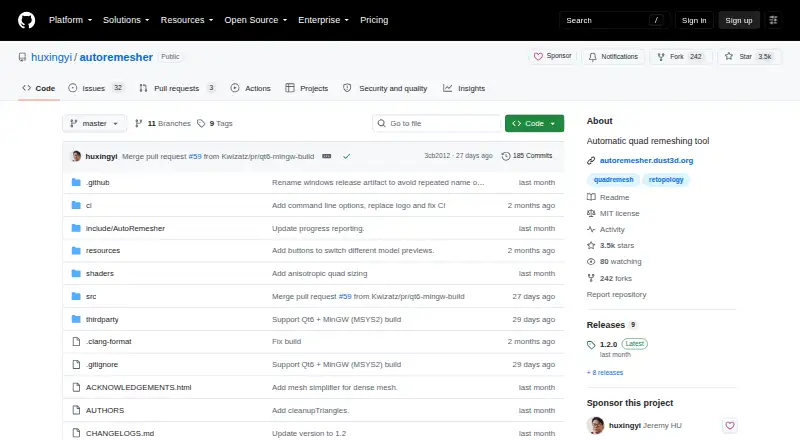
What AutoRemesher is
AutoRemesher converts high-polygon meshes into quad-based topology and includes a command-line mode for headless processing. Its CLI exposes controls for target quad count, edge scaling, sharp edges, smooth normals, adaptivity, and anisotropy. The project provides a ZIP release for Windows, a DMG for macOS, and an AppImage for Linux, and its README includes build instructions for all three systems. Building it requires a C++14 compiler, Qt 5.15.2, and TBB. The project says it is built on Geogram, libigl, isotropicremesher, and other libraries. AutoRemesher is licensed under MIT, and its listed plan costs nothing. The repository documents standalone command-line use and does not list integrations with other applications. On macOS, the README warns that the downloaded app may be blocked because its integrity cannot be verified and describes allowing it in Security & Privacy settings.
Good
- MIT-licensed and free
- Command-line mode for headless processing
- Downloads listed for three operating systems
- Includes controls for topology parameters
Watch out
- Build requires C++14, Qt 5.15.2, and TBB
- No integrations with other applications are listed
- macOS may block the downloaded app
Who it suits
AutoRemesher suits people who need to convert high-polygon meshes to quad topology, including users who want headless command-line processing. It is available for Windows, macOS, and Linux.
Verdict
AutoRemesher offers a free, standalone route to quad-based mesh conversion across Windows, macOS, and Linux. Consider the build prerequisites and macOS warning if you plan to compile or install it.
Plans and prices
From AutoRemesher's own pricing page, checked 4 Oct 2026.
| Plan | Price | What it gives you |
|---|---|---|
| AutoRemesher | Free | MIT-licensed software |
The facts
Each one read from AutoRemesher's own pages, with the date it was checked.
Where it runs
- Build platforms
- The README includes build instructions for Linux, Windows, and macOS.checked 4 Oct 2026
- Linux download
- The README directs Linux users to download and run an AppImage release.checked 4 Oct 2026
- macOS download
- The README directs macOS users to download a DMG release.checked 4 Oct 2026
- Windows download
- The README directs Windows users to download a ZIP release and run autoremesher.exe.checked 4 Oct 2026
What it does
- Build requirements
- The listed development prerequisites include a C++14 compiler, Qt 5.15.2, and TBB.checked 4 Oct 2026
- Controls
- The CLI example exposes target quad count, edge scaling, sharp edge, smooth normal, adaptivity, and anisotropy parameters.checked 4 Oct 2026
- Integration
- The repository documents standalone CLI use and does not list integrations with other applications.checked 4 Oct 2026
- Libraries
- The project says it is built on Geogram, libigl, isotropicremesher, and other libraries.checked 4 Oct 2026
- License
- AutoRemesher is licensed under the MIT License.checked 4 Oct 2026
- Processing
- The project provides a command-line mode for headless processing.checked 4 Oct 2026
- Purpose
- AutoRemesher converts high-polygon meshes into clean quad-based topology.checked 4 Oct 2026
- Security
- The README warns that macOS may block the downloaded app because its integrity cannot be verified and gives steps to allow it in Security & Privacy settings.checked 4 Oct 2026
The full review of AutoRemesher
AutoRemesher is a focused automatic-retopology utility that reduces dense polygon meshes to quad-based topology. It best serves technical artists, developers, and pipeline users who want controllable batch processing without adopting a larger modeling suite. Its strongest case is a free, standalone tool with command-line automation; users needing native integration or a broad sculpting environment should choose something else.
Overview
AutoRemesher concentrates on one job: converting high-polygon geometry into cleaner quad topology. That narrow scope is useful when retopology is a distinct stage in a production process, because the software does not burden the workflow with unrelated modeling features. A headless command-line mode also makes it suitable for repeatable conversions and scripted pipelines. The documented workflow remains standalone, however, so it is not a plug-in replacement for retopology tools embedded in another application.
Key features
Adjustable automatic retopology
The command line accepts a target quad count, edge-scaling controls, sharp-edge handling, smooth-normal treatment, adaptivity, and anisotropy. In practice, these options provide more influence over density, feature preservation, and directional behavior than a one-click remesher. They are most valuable to users comfortable specifying processing parameters or building repeatable presets; casual artists seeking an interactive sculpting workspace may find the CLI-centered approach less natural.
Headless processing
Because processing can run without a graphical session, AutoRemesher can fit automated conversion jobs and server-side or batch workflows. That is a practical advantage for technical teams processing many assets, while individual users who only need occasional manual edits may gain less from it. The project documents command-line use as a standalone operation and does not document integrations with other applications.
Open implementation
The MIT License permits a permissive approach to using and adapting the software. The project is built on Geogram, libigl, isotropicremesher, and other libraries, giving developers a foundation they can inspect or incorporate into their own work. Building from source requires a C++14 compiler, Qt 5.15.2, and TBB, so customization is realistic for developers but not a casual installation path.
Pricing
| Plan | Price | What it includes |
|---|---|---|
| AutoRemesher | free | MIT-licensed software with automatic retopology |
There is no paid tier, trial period, renewal, or seat charge. The free plan is therefore a straightforward fit for individuals, educators, and teams willing to manage a standalone tool. Its trade-off is not a reduced quota but the absence of paid support or a commercial service layer in the published plan.
Platforms
AutoRemesher supports Windows, macOS, and Linux, with self-hosted use also listed. Windows users receive a ZIP release containing autoremesher.exe. macOS users can download a DMG, while Linux users can run an AppImage. Build instructions cover all three operating systems. On macOS, the operating system may block the downloaded application because its integrity cannot be verified; the documented remedy is to allow it through Security & Privacy settings. That extra step matters when planning deployment on Mac systems.
Who it's for
Choose AutoRemesher if you need automatic quad conversion, command-line parameters, and headless execution across the major desktop operating systems. It is particularly well matched to technical artists and developers who can script processing or compile software when necessary. It is less suitable for users who expect an integrated sculpting suite, a plug-in workflow, or a polished set of in-app editing tools.
Pros and cons
Pros
- Completely free and MIT-licensed: there is no subscription, trial expiration, or paid usage tier.
- Useful processing controls: quad targets, edge behavior, normals, adaptivity, and anisotropy let advanced users tune results.
- Headless CLI: repeatable and automated remeshing is possible without a graphical session.
- Three-platform coverage: packaged releases and build guidance span Windows, macOS, and Linux.
Cons
- Standalone only: documented integrations with other applications are absent, which limits in-app workflows.
- Developer-oriented build path: C++14, Qt 5.15.2, and TBB are required for compiling.
- macOS security friction: downloaded builds may need manual approval before they open.
- Narrow scope: it handles retopology rather than broader sculpting or modeling tasks.
Alternatives
Instant Meshes is another free Windows, macOS, and Linux option when you want a similarly cross-platform remeshing utility without a paid plan.
R3DS Wrap is the better choice for students or educational institutions needing a free education license, or for indie users prepared to pay for its 99-priced annual nodelocked subscription on Windows or Linux.
Re:Form suits macOS and web users who prefer a freemium workflow with a free allowance of about 12.5 million triangles, five projects up to 150 MB each, and OBJ import.
ZBrush is the alternative when multi-resolution mesh editing or an iPad-focused sculpting plan matters more than a dedicated standalone remesher.
SculptGL is a free web, Windows, or extension-based sculpting option rather than a direct command-line replacement.
Mixos Mold fits users wanting freemium mold sculpting across mobile, desktop, web, and cloud-connected platforms.
tamga offers a free personal, educational, and non-profit desktop/web plan across several platforms.
Vertexix is worth considering when realtime subdivision limits, UV maps, texture size, and OBJ or PLY export are central requirements.
For broader category browsing, see 3D Sculpting Software.
Verdict
AutoRemesher is a strong pick for developers and technical artists who want free, automatable quad retopology on Windows, macOS, or Linux. Its combination of MIT licensing, headless execution, and meaningful CLI controls is the main reason to choose it. Look elsewhere if your priority is an integrated sculpting application, documented plug-ins, or a more guided graphical workflow.
Alternatives to AutoRemesher
- 1
tamga
Free planiOSWebLinuxmacOS7.9Free plan - 2

ZBrush
Free planiOSAPImacOSWindows7.9Free plan - 3
Autodesk Mudbox
Free planAPILinuxmacOSWindows7.6Free plan - 4

Mixos Mold
Free planAndroidiOSWebLinux7.5From $8.99 a month - 5

Nomad Sculpt
AndroidiOSmacOSWindows7.3 - 6

3DCoat
LinuxmacOSWindows6.7€379 one-time