R3DS Wrap
R3DS Wrap fits an existing base mesh to a 3D scan and includes tools for decimation, mesh filtering, and texture projection.
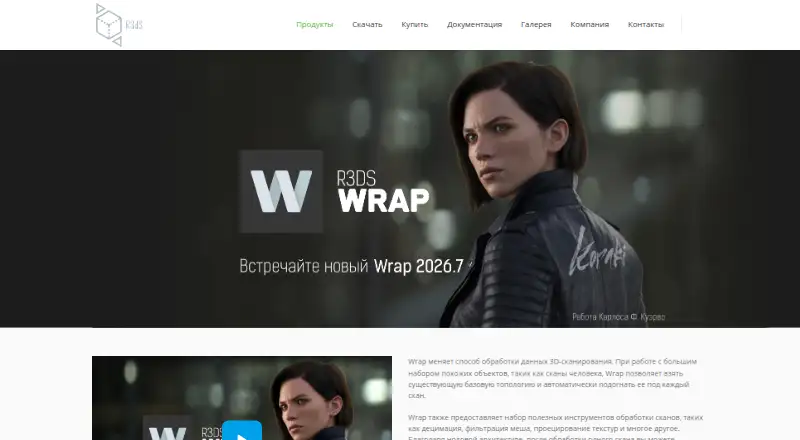
What R3DS Wrap is
R3DS Wrap fits an existing base mesh to a 3D scan and includes tools for decimation, mesh filtering, and texture projection. Its node-graph design lets users build a processing recipe and reuse it across an unlimited number of scans. Listed uses include making digital characters, scan-based blendshapes, autorigging starting points, and virtual fitting rooms. Documentation covers batch processing and a command-line interface for computing project files, with instructions for Windows and Linux. Wrap can import cameras from Agisoft Metashape, Reality Capture, and software that exports FBX, such as Maya or Blender. It runs on Windows and Linux. A 30-day trial is available for evaluation, but the trial license bars commercial, professional, or for-profit use. Student licenses are free for learning, prohibit commercial use, and last one year. Paid options include annual subscriptions and perpetual licenses, with nodelocked and floating choices. The Wrapping node requires manifold, connected geometry; the FAQ recommends base meshes under 100K polygons.
Good
- Reusable processing recipes for unlimited scans
- Includes decimation, filtering, and texture projection
- Supports batch processing and command-line workflows
- Floating licenses allow groups to share seats
Watch out
- The trial prohibits commercial and professional use
- Student licenses are learning-only and last one year
- Wrapping requires manifold, connected geometry
- License cannot run simultaneously on two computers
Who it suits
Wrap suits artists and teams building scan-based characters, blendshapes, rigging starting points, or virtual fitting rooms. Its repeatable node-graph workflow and batch-processing documentation may also suit users processing multiple scans.
Verdict
R3DS Wrap combines scan fitting with tools for repeatable scan-processing workflows. Check the geometry requirements and license terms against your project before choosing a plan.
Plans and prices
From R3DS Wrap's own pricing page, checked 4 Oct 2026.
| Plan | Price | What it gives you |
|---|---|---|
| Student / education | Free | Students, universities, and schools · learning purposes only · Free license |
| Indie annual subscription, nodelocked | $99 a year | Annual revenue under $100K · nodelocked · Annual Subscription License |
| Professional annual subscription, nodelocked | $249 a year | Annual revenue above $100K · nodelocked · Annual Subscription License |
| Professional annual subscription, floating | $375 a year | Annual revenue above $100K · floating · Annual Subscription License |
| Indie perpetual, nodelocked | $570, paid once | Annual revenue under $100K · nodelocked · Perpetual License +1 Year of Free Updates |
| Professional perpetual, nodelocked | $1,070, paid once | Annual revenue above $100K · nodelocked · Perpetual License +1 Year of Free Updates |
| Professional perpetual, floating | $1,470, paid once | Annual revenue above $100K · floating · Perpetual License +1 Year of Free Updates |
The facts
Each one read from R3DS Wrap's own pages, with the date it was checked.
What it does
- Batch processing
- Wrap documentation includes batch processing and a command-line interface for computing project files.checked 4 Oct 2026
- Camera integrations
- Wrap can import cameras from Agisoft Metashape, Reality Capture, and FBX-exporting software such as Maya or Blender.checked 4 Oct 2026
- Education license limits
- Student licenses are for learning only, prohibit commercial use, and remain valid for one year.checked 4 Oct 2026
- License activation
- A license can be installed on two computers owned by the user, but both copies cannot be used simultaneously.checked 4 Oct 2026
- Network licensing
- A license server supports floating licenses so users in a group can share available seats across computers.checked 4 Oct 2026
- Notable geometry limit
- The Wrapping node requires manifold topology and a single connected piece of geometry; the FAQ recommends base meshes under 100K polygons.checked 4 Oct 2026
- Purpose
- Wrap nonrigidly fits an existing base mesh to 3D scans and provides scan-processing tools such as decimation, mesh filtering, and texture projection.checked 4 Oct 2026
- Repeatable workflow
- Its node-graph architecture lets users apply a processing recipe to an unlimited number of other scans.checked 4 Oct 2026
- Support
- The maker directs License Server issues and feature requests to [email protected].checked 4 Oct 2026
- Use cases
- Wrap is used to create digital characters, scan-based blendshapes, autorigging starting points, and virtual fitting rooms.checked 4 Oct 2026
The company
- Headquarters
- Voronezh, Russiachecked 28 Sep 2026
- Maker audience
- R3DS says its products are used by VFX studios and game developers in more than 35 countries.checked 4 Oct 2026
Where it runs
- Platform support
- Wrap's command-line interface has instructions for Windows and Linux.checked 4 Oct 2026
Money
- Trial limits
- The 30-day trial is for evaluation, and commercial, professional, or for-profit use is prohibited under the trial license.checked 4 Oct 2026
The full review of R3DS Wrap
Overview
R3DS Wrap fits an existing base mesh nonrigidly to 3D scans, then supports further scan processing. It is best suited to character and VFX pipelines that repeat this work across scans; it is a specialist production tool, not a general sculpting app.
Its strongest case is a repeatable scan workflow: saved node-graph recipes, batch processing and command-line project computation can reduce repetitive setup. The key constraint is input geometry: the Wrapping node requires manifold topology in one connected piece, and the maker recommends base meshes under 100K polygons.
Key features
Alongside fitting, Wrap provides decimation, mesh filtering and texture projection. Those tools support digital-character creation, scan-based blendshapes, autorigging starting points and virtual fitting rooms. This focus is useful when scans are central to the job, but less relevant if the goal is broad, freeform sculpting.
A node graph lets users apply a processing recipe to an unlimited number of other scans. Batch processing and a command-line interface for computing project files make that repeatability practical for larger workflows; command-line instructions cover both Windows and Linux.
Camera imports from Agisoft Metashape, Reality Capture and FBX-exporting software such as Maya or Blender can help connect Wrap to existing capture pipelines. A license server also supports floating licenses, letting a group share available seats across computers.
The Wrapping node's geometry requirements are a meaningful production constraint: meshes must be manifold and connected, with base meshes preferably below 100K polygons. If a pipeline cannot reliably prepare geometry to those conditions, fitting may require extra mesh preparation or Wrap may not be the right tool.
Pricing
Wrap offers a 30-day evaluation trial, but its license prohibits commercial, professional or other for-profit use during that period. Students, universities and schools can use the free education license for learning only; it prohibits commercial use and expires after one year.
The Indie annual nodelocked subscription costs $99 a year and is for annual revenue under $100K. It is the lowest-cost paid route for an individual or small operation that fits that revenue threshold. The Professional annual nodelocked subscription is $249 a year for annual revenue above $100K. Professional annual floating licensing costs $375 a year and suits teams that need to share seats rather than tie a license to one workstation.
For buyers who prefer a perpetual license, Indie nodelocked costs 570.00 USD once for annual revenue under $100K. Professional nodelocked costs 1070.00 USD once, and Professional floating costs 1470.00 USD once; each perpetual license includes one year of free updates. The cheaper perpetual option is nodelocked, so it does not provide shared-seat flexibility.
A nodelocked license can be installed on two computers owned by the user, but both copies cannot be used simultaneously. Choose floating licensing when multiple users need to share seats across computers. The education license and evaluation trial are not substitutes for commercial plans.
Platforms
Wrap supports Windows and Linux. It does not suit a workflow that requires macOS support.
Who it's for
Wrap is a strong fit for scan-based character artists, VFX studios and game developers who need to fit base meshes to scans repeatedly, process batches or compute project files from the command line. The maker says its products are used by VFX studios and game developers in more than 35 countries, but the tool's practical fit still depends on having suitable input geometry and a compatible operating system.
It is a weaker match for occasional sculpting, projects built around disconnected or non-manifold base meshes, or commercial users seeking a free license. Students can learn with the one-year education license, but it cannot be used for paid work.
Pros and cons
- Pro: The node graph can apply a recipe to an unlimited number of scans, which benefits repeatable production work.
- Pro: Batch processing, command-line project computation and camera imports support integration into established scan pipelines.
- Pro: Floating licensing lets groups share available seats across computers.
- Con: The Wrapping node requires one connected, manifold mesh, and base meshes are recommended to stay below 100K polygons; geometry may need preparation.
- Con: Windows and Linux are the supported platforms, limiting its fit for Mac-only teams.
- Con: Trial and education access prohibit commercial use, so commercial users need a paid plan.
Alternatives
For a broader set of sculpting options, browse 3D Sculpting Software. Consider Mixos Mold if you want an app with a free plan for unlimited mold sculpting, every brush and subdivision level, plus 10 trial AI credits and 100 MB of cloud storage.
tamga may suit desktop, web or mobile-oriented users seeking a free option for personal, educational or non-profit use. Choose Instant Meshes if you want free software for Linux, macOS or Windows instead.
Re:Form offers a free macOS and web option with a stated ceiling of about 12.5 million triangles and five projects up to 150 MB each. For an MIT-licensed free tool that can be self-hosted, consider AutoRemesher.
ZBrush is another option, with a free iPad plan that includes 28 brushes and a subscription plan for iPad. SculptGL is a free alternative for web, Windows or extension use. For a free option with a 500,000 realtime-subdivision ceiling, one UV map, a 1024 maximum texture size and OBJ or PLY export, consider Vertexix.
Verdict
Choose R3DS Wrap if your work depends on fitting and processing scans repeatedly, and your team can meet its geometry requirements on Windows or Linux. Its node-graph and batch workflows are the clearest reasons to pay for it. Look elsewhere if you need general-purpose sculpting, Mac support or commercial access without a paid license.
Alternatives to R3DS Wrap
- 1
tamga
Free planiOSWebLinuxmacOS7.9Free plan - 2
ZBrush
Free planiOSAPImacOSWindows7.9Free plan - 3
Autodesk Mudbox
Free planAPILinuxmacOSWindows7.6Free plan - 4

Mixos Mold
Free planAndroidiOSWebLinux7.5From $8.99 a month - 5

Nomad Sculpt
AndroidiOSmacOSWindows7.3 - 6

3DCoat
LinuxmacOSWindows6.7€379 one-time