
Mixos Mold
Mixos Mold is browser-based 3D sculpting software for shaping organic forms with GPU sculpting and pressure-sensitive brushes.
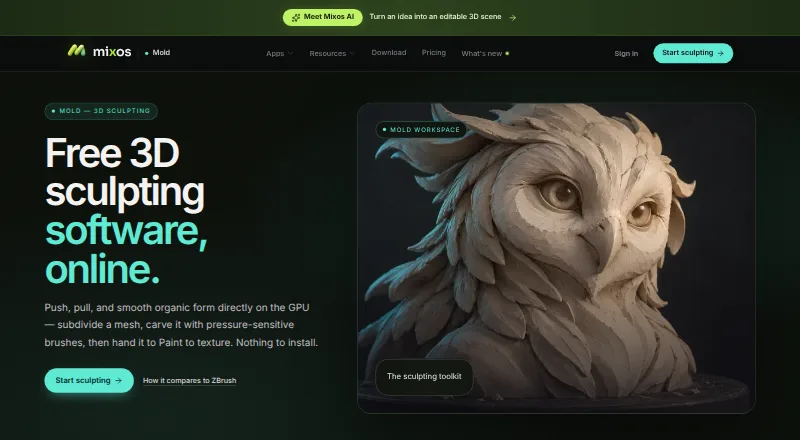
What Mixos Mold is
Mixos Mold is browser-based 3D sculpting software for shaping organic forms with GPU sculpting and pressure-sensitive brushes. Its tools include subdivision, dynamic topology, masking, symmetry, stamp alphas, brush presets and remeshing. A sculpt can be unwrapped and sent to Mixos Paint for layered PBR texturing. Mold imports OBJ, FBX and GLB models; exporting finished meshes as GLB, OBJ or STL requires a paid plan or perpetual license. Sculpting and saving to the library are free, and account-saved projects can be opened on other devices after signing in. It runs without installation in WebGPU-capable browsers, with desktop use listed for Chrome, Edge, Firefox, Brave and Safari 26 or later. It also works on iPad and Android in compatible browsers, and is included in the free Mixos iOS app for iOS 26 or later. The Free plan includes 100 MB of cloud storage and 10 trial AI credits. Pro is $8.99/mo; Max is $17.99/mo; a perpetual license is $99 once. The maker says editing runs locally in the browser, while noting that it has no equivalent security audit or uptime guarantee.
Good
- Sculpting and library saving are free.
- Includes subdivision, dynamic topology and remeshing.
- Can hand sculpts to Mixos Paint for texturing.
- Projects saved to an account open across devices.
- Runs in a browser without installation.
Watch out
- Mesh downloads require a paid plan or license.
- Desktop use requires a WebGPU-capable browser.
- Free cloud storage is 100 MB.
- No equivalent security audit or uptime guarantee.
Who it suits
Mold suits game artists, motion designers, 3D hobbyists, students and studios who want to sculpt in a browser. It can also fit users moving between supported desktop and mobile devices.
Verdict
Mold offers a broad sculpting toolkit in a browser, with free sculpting and saving. Budget for a paid plan or license if you need to export finished meshes.
Plans and prices
From Mixos Mold's own pricing page, checked 29 Sep 2026.
| Plan | Price | What it gives you |
|---|---|---|
| Free | Free | Unlimited Mold sculpting, every brush and subdivision level · 10 trial AI credits · 100 MB cloud storage · mesh export requires a paid plan · $0 forever |
| Pro | $8.99 a month | Mold mesh export as GLB, OBJ & STL · 50 AI credits/month · 25 GB cloud storage · email support · $8.99/mo · billed monthly |
| Max | $17.99 a month | Everything in Pro · 150 AI credits/month · 50 GB cloud storage · priority support · $17.99/mo · billed monthly |
| Perpetual license | $99, paid once | 4K watermark-free export forever · mesh export · 20 GB cloud storage · AI credits sold separately · $99 once |
The facts
Each one read from Mixos Mold's own pages, with the date it was checked.
What it does
- AI privacy
- The maker states that user projects, models, textures, brushes and prompts are not used to train AI models.checked 29 Sep 2026
- Import and export
- The page says users can import OBJ, FBX or GLB models and export finished meshes as GLB, OBJ or STL on a paid plan.checked 29 Sep 2026
- Intended users
- The maker describes Mixos as intended for game artists, motion designers, 3D hobbyists, students and studios.checked 29 Sep 2026
- Mobile support
- Mold runs on iPad and Android devices in a WebGPU-capable browser, and is included in the free Mixos iOS app for iOS 26 or later.checked 29 Sep 2026
- Purpose
- Mold is browser-based 3D sculpting software for shaping organic forms with GPU sculpting and pressure-sensitive brushes.checked 29 Sep 2026
- Sculpting tools
- Its tools include subdivision, dynamic topology, masking, symmetry, stamp alphas, brush presets and remeshing.checked 29 Sep 2026
- Security and data
- The security page says editing runs locally in the browser, projects are stored after account save, and it has no SOC 2, ISO 27001 or equivalent audit or uptime guarantee.checked 29 Sep 2026
- Support
- Support is available by email at [email protected], and in-app feedback includes the app version.checked 29 Sep 2026
- Supported handoff
- Mold sends a sculpt to Paint; the broader Mixos desktop app's Live Link streams materials into Blender, Cinema 4D and Unreal.checked 29 Sep 2026
- Texturing workflow
- Mold can unwrap a sculpt and send it to Mixos Paint for layered PBR texturing.checked 29 Sep 2026
Where it runs
- Browser requirements
- Mold runs in a browser with WebGPU and requires no installation; the page names Chrome, Edge, Firefox or Brave and Safari 26+ for desktop use.checked 29 Sep 2026
- Cross-device projects
- The maker says sculpts save to the user's account and can be opened across devices after sign-in.checked 29 Sep 2026
Money
- Free-plan limit
- Sculpting and saving to the library are free, but downloading a finished mesh requires a paid plan or perpetual license.checked 29 Sep 2026
The company
- Headquarters
- New York, United Stateschecked 28 Sep 2026
- Maker and location
- Founder Matthew Guild says Mixos is a one-person operation based in New York.checked 29 Sep 2026
The full review of Mixos Mold
Overview
Mixos Mold is browser-based software for sculpting organic 3D forms with GPU tools and pressure-sensitive brushes. It suits artists who want to work across devices without installing a sculpting app. Its broad sculpting toolkit is a clear draw, but the free plan cannot export a finished mesh.
Projects saved to an account can be reopened on other devices after sign-in. The maker says editing runs locally in the browser and that projects, models, textures, brushes and prompts are not used to train AI models. Projects are stored after account save, but Mixos has no SOC 2, ISO 27001 or equivalent audit, or uptime guarantee. That distinction matters to studios weighing a browser workflow for production work.
Mixos is a one-person operation based in New York, led by founder Matthew Guild. Its stated audience includes game artists, motion designers, 3D hobbyists, students and studios.
Key features
Sculpting and topology
Mold combines subdivision, dynamic topology, masking, symmetry, stamp alphas, brush presets and remeshing. Automatic retopology, multiresolution sculpting and voxel sculpting broaden the toolkit for different modeling approaches. Free users get unlimited sculpting, every brush and every subdivision level, making the free tier useful for learning and developing forms. The catch is decisive for anyone finishing work outside Mold: mesh export is locked behind a paid option.
Models, texturing and handoff
OBJ, FBX and GLB imports let users bring existing models into the sculpting workflow. Mold can unwrap a sculpt and send it to Mixos Paint for layered PBR texturing, a focused handoff for users who want to continue inside the Mixos ecosystem. The broader Mixos desktop app's Live Link streams materials into Blender, Cinema 4D and Unreal, but that is a separate handoff capability rather than a Mold export format.
Browser and device workflow
Mold runs without installation in WebGPU-capable browsers: Chrome, Edge, Firefox or Brave, and Safari 26+ on desktop. It also runs on iPad and Android devices in a WebGPU-capable browser; the Mixos iOS app includes Mold for iOS 26 or later. This reach favors users moving between devices, though the browser requirement makes WebGPU compatibility essential. Email support is available at [email protected], and in-app feedback includes the app version.
Pricing
Mold is freemium, with no free trial. The free plan costs nothing (billed $0 forever). It includes unlimited Mold sculpting, every brush and subdivision level, 10 trial AI credits and 100 MB cloud storage. It is a capable sculpting tier, but finished-mesh export requires an upgrade.
Pro costs $8.99 a month (billed $8.99/mo; billed monthly). It adds GLB, OBJ and STL mesh export, 50 AI credits/month, 25 GB cloud storage and email support. This is the practical choice for regular users who need to download finished work without a large storage requirement.
Max costs $17.99 a month (billed $17.99/mo; billed monthly). It includes everything in Pro, raises the allowance to 150 AI credits/month and storage to 50 GB, and adds priority support. The higher tier is most relevant to users who need the larger quotas or priority help; it does not change the listed export formats.
The perpetual license costs $99, paid once (billed $99 once). It includes 4K watermark-free export forever, mesh export and 20 GB cloud storage, while AI credits are sold separately. It avoids a monthly subscription for users focused on exported meshes, but offers less storage than Pro and does not include an AI credit allowance.
Platforms
Mold supports web, Windows, macOS, Linux, iOS and Android. Desktop browser use requires WebGPU and one of the named browsers; mobile use also depends on a WebGPU-capable browser, except that Mold is included in the Mixos iOS app for iOS 26 or later.
Who it's for
Mold is best suited to game artists, motion designers, students and hobbyists who want a broad sculpting toolkit in a browser and can accept a paid export route. Its free plan is especially useful for sculpting practice and saving work to a library. Studios should weigh the absence of an equivalent security audit and uptime guarantee before making it a production dependency.
Pros and cons
- Pro: The free tier keeps all brushes, subdivision levels and unlimited sculpting available, so users can develop forms before paying.
- Pro: Import support for OBJ, FBX and GLB, plus a Paint handoff for layered PBR texturing, supports a practical asset workflow.
- Pro: Account-saved projects can be reopened across devices, and the browser-based workflow avoids installation.
- Con: Free users cannot download finished meshes, so the free tier cannot serve as a complete export workflow.
- Con: Browser use depends on WebGPU, with Safari desktop requiring version 26 or later.
- Con: Mixos has no SOC 2, ISO 27001 or equivalent audit or uptime guarantee, a consideration for studios with formal requirements.
Alternatives
- Tamga is another freemium option with a free plan and support for iOS, Linux, macOS, web and Windows.
- 3DCoat may suit users comparing a free plan and trial on Linux, macOS or Windows; its listed 3DCoat 2026 Individual Node-locked plan is €379 a month and includes 12 months of free updates.
- Re:Form is a freemium alternative for Mac and web users who want a free plan and no trial.
- ZBrush may suit Windows and macOS users considering its iPad offering, which has a free plan with 28 brushes and a subscription tier.
- SculptGL is a free option for users who want web, extension or Windows access without a stated paid plan or usage limits.
- Nomad Sculpt is a paid alternative for Android, iOS, macOS and Windows users; it offers a free trial.
- Instant Meshes is a free option for Windows, macOS and Linux users.
- Sculptura is a paid option for iOS and macOS.
See our 3D Sculpting Software category for more options, or browse 3D Rigging Software if rigging is the priority.
Verdict
Choose Mixos Mold if you want a capable, cross-device sculpting workflow and can pay when it is time to export. Its generous free sculpting tier and Mixos Paint handoff are the strongest reasons to start here; look elsewhere if free mesh export or audited enterprise assurances are essential.
Getting started
- Open https://www.mixos.io/mold in a WebGPU capable browser.
- On desktop, use Chrome, Edge, Firefox, Brave or Safari 26 or later.
- On iPad or Android, open Mold in a WebGPU capable browser; the free Mixos iOS app includes Mold for iOS 26 or later.
- Sign in to save projects to your account and access them across devices.
- Sculpt for free, or choose Pro at $8.99/mo, Max at $17.99/mo, or a perpetual license for $99 once to export meshes.
Limits worth knowing
The free plan allows sculpting and saving to the library, but downloading finished meshes requires a paid plan or perpetual license. Free includes 100 MB cloud storage and 10 trial AI credits.
Questions
Is Mixos Mold free?
Yes. The Free plan is $0 forever and includes unlimited sculpting and every brush, along with 10 trial AI credits and 100 MB cloud storage.
How much do the paid options cost?
Pro costs $8.99/mo and Max costs $17.99/mo, both billed monthly. A perpetual license costs $99 once.
Which devices and browsers can run Mold?
Mold runs in WebGPU capable browsers on desktop, iPad and Android. Desktop browsers named are Chrome, Edge, Firefox, Brave and Safari 26 or later; the free Mixos iOS app includes Mold for iOS 26 or later.
Can I export a finished sculpt on the free plan?
No. Mesh downloads require a paid plan or perpetual license; Pro supports GLB, OBJ and STL mesh export.
What model formats can I import?
Mold imports OBJ, FBX and GLB models.
Who makes Mixos?
Mixos is a one person operation based in New York, founded by Matthew Guild.
Alternatives to Mixos Mold
- 1

Houdini
Free planWindowsmacOSLinux7.6From $95 a year - 2
Contour Rig Tools
Free planAPILinuxmacOSWindows7.4From $40 a month - 3

Rigify
Free planOpen sourceAPILinuxmacOSWindows7.2Free plan - 4
Reallusion Character Creator
Windows7.0From $399 a year - 5
Autodesk Maya
macOSLinux6.9 - 6
Live Link Face
Free planAndroidiOS6.6Free plan