
Rigify
Rigify is a free Blender add-on that generates character armatures from a metarig template.
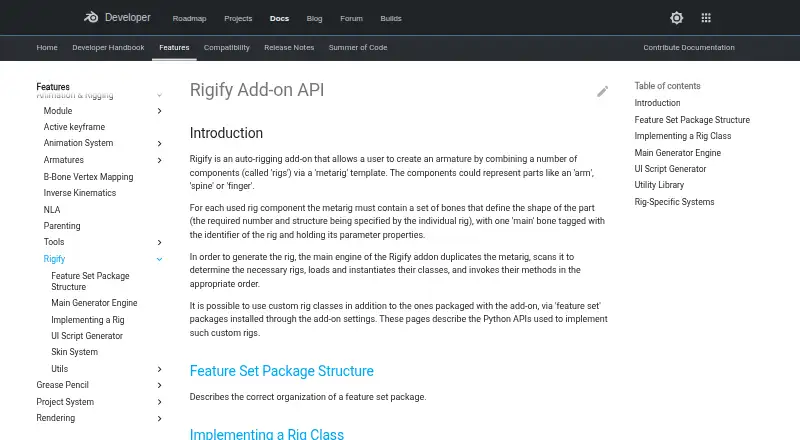
What Rigify is
Rigify is a free Blender add-on that generates character armatures from a metarig template. Users position the template’s bones to fit a character, then generate the rig from Blender’s Armature properties. Available metarigs include basic human and quadruped forms, along with human, cat, wolf, horse, and shark options. Bundled rig types cover spines, limbs, fingers, faces, and skin, while feature set packages can add custom rig classes. During generation, Rigify duplicates the metarig, identifies the needed rigs, creates instances, and runs their generation methods. The generated rig interface can switch visible bone collections, change custom properties, and convert between IK and FK. A user-provided Python text block can apply customizations after generation so they can be repeated when the rig is regenerated. Rigify requires Blender and is available on Linux, macOS, and Windows. It assumes one Blender unit corresponds to one meter. The manual advises keeping the metarig, since removing it or substantially changing the generated rig can interfere with later feature updates or adaptation to Blender changes.
Good
- Free add-on included with Blender
- Metarigs cover human and quadruped characters
- Generated controls include IK/FK conversion
- Supports custom rig classes and repeatable scripts
Watch out
- Requires Blender
- Assumes one Blender unit equals one meter
- Removing the metarig can hinder later updates
Who it suits
Rigify suits Blender users who want to generate character rigs from metarigs and customize the result. Its listed metarigs and rig components cover human, animal, and character anatomy needs.
Verdict
Rigify provides a metarig-based path to generating and customizing character armatures in Blender. Keep the metarig if later updates or adaptation to Blender changes matter.
Plans and prices
From Rigify's own pricing page, checked 15 Oct 2026.
| Plan | Price | What it gives you |
|---|---|---|
| Free | Free | Bundled Blender add-on · no paid tiers stated |
| Rigify | Free | Included as a Blender add-on; requires Blender |
The facts
Each one read from Rigify's own pages, with the date it was checked.
What it does
- Animation controls
- The generated rig UI can switch visible bone collections, change custom properties, and convert between IK and FK.checked 4 Oct 2026
- Bone collections
- Generated rigs can hide and show bone collections through their rig controls.checked 15 Oct 2026
- Built-in metarigs
- The manual lists Basic Human, Basic Quadruped, Human, Cat, Wolf, Horse and Shark metarigs.checked 15 Oct 2026
- Bundling
- Rigify is bundled with Blender rather than distributed as a separate commercial application.checked 15 Oct 2026
- Compatibility limitation
- The manual advises keeping the metarig, because removing it or substantially modifying the generated rig can prevent later feature updates or adaptation to breaking Blender changes.checked 4 Oct 2026
- Customization
- Rigify can run a user-provided Python text block after generation to apply customizations that remain repeatable after regeneration.checked 4 Oct 2026
- Custom rig classes
- Developers can implement custom Rig classes in feature-set packages and register parameters and UI callbacks.checked 15 Oct 2026
- Custom rigs
- Users can add custom rig classes through feature set packages installed in the add-on settings.checked 4 Oct 2026
- Documentation depth
- Official documentation covers user basics, bone-positioning guides, generated features, customization, feature sets and developer APIs.checked 15 Oct 2026
- Face support
- The manual documents a modular face system and a legacy face-rig upgrade operation.checked 15 Oct 2026
- Feature sets
- Third-party feature sets can add new metarigs and rig types and are installed from ZIP files through Rigify settings.checked 15 Oct 2026
- Generated controls
- Generated rigs provide control, mechanism and deformation bones and organize them with ORG, MCH and DEF naming conventions.checked 15 Oct 2026
- Generated UI
- Each generated rig receives a Python script that creates rig-specific panels, operators and custom-property controls.checked 15 Oct 2026
- Generator API
- The Generator class duplicates metarigs, instantiates rigs, creates root controls and executes generation stages.checked 15 Oct 2026
- IK and FK
- The generated rig includes controls for switching between IK and FK control types.checked 15 Oct 2026
- Independent repository popularity
- That archived repository page shows 18 stars and 34 forks.checked 15 Oct 2026
- Independent repository status
- The public cessen/rigify repository is archived and read-only as of April 10, 2020.checked 15 Oct 2026
- Library linking
- Rigify documentation includes a library-linking workflow for generated rigs.checked 15 Oct 2026
- License
- The Blender manual identifies Rigify as GPL, and the Extensions listing specifies GNU GPL version 2.0 or later.checked 15 Oct 2026
- License and project
- Blender is free and open source software under the GNU General Public License and is coordinated by the Blender Foundation.checked 4 Oct 2026
- Limit: complexity
- The same user said Rigify felt overly complex for a simpler clothing-and-character workflow.checked 15 Oct 2026
- Limit: metarig dependency
- The manual warns that deleting the metarig or heavily modifying the generated rig prevents easy adoption of later Rigify features and breaking-change updates.checked 15 Oct 2026
- Limit: scale assumption
- Rigify assumes that one Blender unit represents one meter.checked 15 Oct 2026
- Limit: weighting complexity
- A Blender user reported that automatic weighting spread clothing across many spine, pelvis and thigh bones and required substantial manual correction.checked 15 Oct 2026
The full review of Rigify
Rigify is a Blender add-on that builds character armatures from adjustable metarig templates. It suits Blender users who want a structured starting rig they can adapt or extend with scripts. Its strongest case is repeatable rig generation inside Blender; it is less suited to workflows built around other host applications.
Overview
Rigify turns a positioned metarig into a generated character rig. You match the template bones to a character, then start generation from Blender’s Armature properties. Rather than assemble every rig element from scratch, users can draw on bundled components for spines, limbs, fingers, faces, and skin rigs.
Generation duplicates the metarig, determines which rigs are needed, creates their instances, and runs their generation methods. That process gives technical artists a clear route from template to rig, while the metarig provides the reference for later changes. Rigify assumes one Blender unit equals one meter, so scenes using another scale convention need care.
Key features
Templates and rig components
Predefined metarigs include Basic Human, Basic Quadruped, Human, Cat, Wolf, Horse, and Shark. The range covers several common character forms, but a template is a starting point to position and adapt, not a substitute for matching the skeleton to the character.
Controls and customization
The generated rig UI can show or hide bone collections, adjust custom properties, and switch between IK and FK. Users can also install feature set packages to add custom rig classes. For repeatable post-generation changes, Rigify can run a user-provided Python text block each time a rig is generated. That makes scripted customization practical, though it calls for Python knowledge.
Keeping rigs adaptable
Keep the metarig if future feature updates or adaptation to breaking Blender changes matter. Removing it, or substantially changing the generated rig, can interfere with those updates. This is a meaningful constraint for projects that treat the generated rig as a disposable, independently edited result.
Pricing
Rigify — free. It is included as a Blender add-on and requires Blender. There is no paid Rigify tier or free trial; the free plan suits users already working in Blender who need its metarig-based generation and customization workflow. It does not provide a route for users who need a different host application.
Platforms
Rigify supports Linux, macOS, and Windows through Blender. It is deployed as a host plugin, supports mixed rig targets, and includes scripting support. Blender itself is free and open source under the GNU General Public License, coordinated by the Blender Foundation.
Who it's for
Rigify is a strong fit for Blender character artists and technical artists who want reusable rig components, a selection of character metarigs, and the option to extend generation with Python or feature set packages. It is a weaker fit for users who need a standalone tool, a different host, or a workflow that discards the metarig after generation.
Pros and cons
- Pros: Included with Blender at no additional cost, with metarigs spanning human, quadruped, and named animal forms.
- Pros: IK/FK switching, bone-collection visibility, custom properties, and repeatable Python customization give users control beyond initial generation.
- Cons: Blender is required, so Rigify is not a cross-application rigging option.
- Cons: Removing the metarig or substantially modifying the generated rig can obstruct later updates or compatibility work.
- Cons: The one-unit-equals-one-meter assumption can complicate workflows that use a different scene scale.
Alternatives
3D Rigging Software is the broader category for comparing tools. Choose Mixamo instead if a free web-based option suits your workflow; its free plan requires an Adobe ID and excludes Enterprise or Federated IDs and China country codes. Consider Mesh2Motion if you want a free option for Linux, macOS, Windows, or web, with no subscription and personal or commercial use.
Houdini is another option with a free plan and Linux, macOS, and Windows support; its Houdini Core workstation perpetual plan is priced at $1,995 a month, billed per workstation as node-locked, with five workstation licenses per facility. mGear Framework is a free, open-source alternative under the MIT license for users comparing rigging frameworks.
dpAutoRigSystem is worth considering when Maya is the required host, and is described as an open-source automatic rigging system for Maya. AdvancedSkeleton offers a freemium option; its Freelancer plan costs $750, paid once and includes lifetime updates, unlimited commercial projects for a one-person business, priority email support, and beta access. Contour Rig Tools has a free Animator Mode for animating with Contour rigs and adding bone CVs, plus a paid Rigger Mode option.
Auto-Rig Pro is a paid alternative at $50, paid once, with optional yearly updates at $12.5 and membership that automatically ends after 12 months.
Verdict
Choose Rigify if Blender is your character-animation home and you want a free, adaptable path from metarig to generated armature, especially if you can make use of its rig components and scripting. Look elsewhere if Blender is not your host, or if you need generated rigs to remain independent of their metarigs for future updates.
Alternatives to Rigify
- 1

Houdini
Free planWindowsmacOSLinux7.6From $95 a year - 2

Mixos Mold
Free planAndroidiOSWebLinux7.5From $8.99 a month - 3
Contour Rig Tools
Free planAPILinuxmacOSWindows7.4From $40 a month - 4
Reallusion Character Creator
Windows7.0From $399 a year - 5
Autodesk Maya
macOSLinux6.9 - 6
Live Link Face
Free planAndroidiOS6.6Free plan