Contour Rig Tools
Contour Rig Tools is a spline-based rigging system for Autodesk Maya, intended for animation production and technical directors.
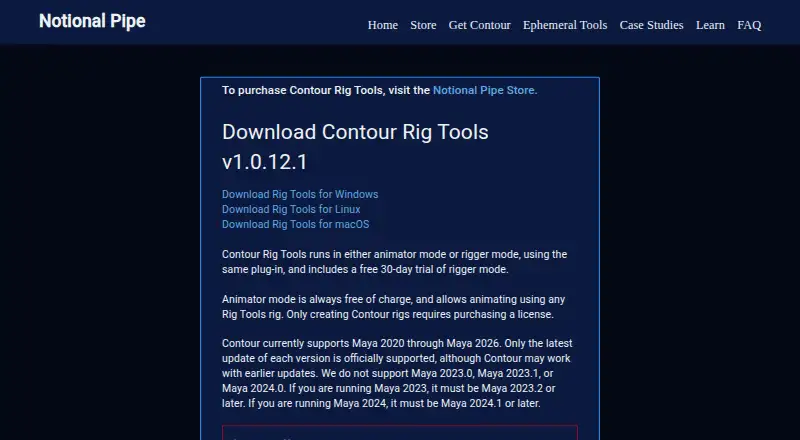
What Contour Rig Tools is
Contour Rig Tools is a spline-based rigging system for Autodesk Maya, intended for animation production and technical directors. Its volume-aware deformation handles bends and twists and is designed to avoid pinching and candy-wrappering. Contour joint chains generate splines that serve as single influences for deformation, which can reduce weight-painting needs. Contour Bones provide length and stretch controls, and their CVs can become spline control points. Built-in IK includes stretch and anti-pop features, while constraints can drive transforms and relationships between Contour chains. A Python API can create, change, and query Contour nodes using strings, pyNodes, or MObjects. The tool can drive conventional Maya joints for game-engine export. Version 1.0.12.1 supports Maya 2020 through Maya 2026, except Maya 2023.0, 2023.1, and 2024.0. Animator Mode is free for animating with Contour rigs and adding bone CVs; creating or modifying rigs requires a paid license.
Good
- Spline deformation supports bends and twists
- Joint-chain splines can reduce weight-painting needs
- Python API can create, modify, and query nodes
- Can drive conventional Maya joints for game-engine export
Watch out
- Maya 2023.0, 2023.1, and 2024.0 are excluded
- Paid license is required to create or modify rigs
- Node-locked activation and periodic checks require internet access
Who it suits
It is intended for Maya riggers and technical directors working on animation production, as well as animators using existing Contour rigs. Check the stated Maya-version exclusions and license requirements against your workflow.
Verdict
Contour Rig Tools brings spline-based deformation, rigging controls, and a Python API to Maya. The free Animator Mode is limited to animating existing rigs and adding bone CVs; rig creation and modification require paid Rigger Mode.
Plans and prices
From Contour Rig Tools's own pricing page, checked 15 Oct 2026.
| Plan | Price | What it gives you |
|---|---|---|
| Animator Mode | Free | Animate Contour rigs · add bone CVs · no rig creation or modification |
| Rigger Mode — twelve months | $40 a month | Create and modify Contour rigs · node-locked or floating licensing · $40.00 / month for twelve months |
| Rigger Mode — six months | $45 a month | Create and modify Contour rigs · node-locked or floating licensing · $45.00 / month for six months |
| Rigger Mode — one month | $50 a month | Create and modify Contour rigs · node-locked or floating licensing · $50.00 / month for one month |
The facts
Each one read from Contour Rig Tools's own pages, with the date it was checked.
What it does
- API depth
- The manual documents a small pre-deprecated API under Contourlib.predeprecatedAPI and warns that incorrect graph connections can cause evaluation errors.checked 15 Oct 2026
- Audience
- The maker describes Contour as a rigging tool for animation production, with workflows intended to reduce character-rigging complexity for technical directors.checked 4 Oct 2026
- Bones
- Contour Bones support built-in length and stretch, and bone CVs can be added as spline control points.checked 4 Oct 2026
- Connectivity
- Node-locked licenses need activation and intermittent internet access, with a stated seven-day offline grace period.checked 15 Oct 2026
- Constraints
- Integrated constraints drive transforms and relationships between Contour chains using the deformation system.checked 15 Oct 2026
- Contour bones
- Contour joint chains combine joints and bones, with built-in bone length and stretch.checked 15 Oct 2026
- Deformation
- Its volume-aware spline deformation supports bends and twists and is designed to avoid pinching and candy-wrappering.checked 4 Oct 2026
- Documentation
- The HTML manual covers installation, licensing, tutorials, deformation, constraints, control rigging, techniques, API functions and caveats.checked 15 Oct 2026
- Floating licensing
- Floating licenses require a separately configured license server and are arranged through Notional Pipe rather than the store.checked 15 Oct 2026
- Game engine workflow
- Contour can drive conventional Maya joints for game engine export.checked 4 Oct 2026
- Game-engine workflow
- Contour can drive conventional Maya joints for workflows that need game-engine export.checked 15 Oct 2026
- IK and aim
- Built-in IK supports stretch and anti-pop behavior, while aim handles support stretch for cartoony rigs.checked 15 Oct 2026
- IK and constraints
- Built-in IK includes stretch and anti-IK-pop features, and the tool includes constraints for driving transforms and relationships between Contour chains.checked 4 Oct 2026
- Independent event news
- Ozone Story Tech listed Notional Pipe as a partner at its SIGGRAPH 2026 booth, where Raf Anzovin was scheduled to demonstrate Ephemeral Rigging.checked 15 Oct 2026
- Independent industry use
- A LinkedIn post by Third Floor rigger Michael de la Rosa describes a fast rigging pipeline for Predator: Killer of Killers using the Contour system developed through Notional Pipe.checked 15 Oct 2026
- Installation
- Windows and macOS offer installer or manual installation, while Linux installation is manual only.checked 15 Oct 2026
- Known caveat
- The maker reports issues affecting Contour rigs when Maya Cached Playback is enabled and points users to manual caveats and workarounds.checked 4 Oct 2026
- License connectivity
- Node-locked licenses require internet access for activation and intermittent access afterward; the stated offline grace period is currently seven days.checked 4 Oct 2026
- License model
- The product uses per-seat animation-only and fully licensed modes; fully licensed mode is subscription-based and may be node-locked or floating.checked 15 Oct 2026
- License requirement
- Paid licenses are only needed to create or modify Contour rigs; animating or rendering with them is free.checked 4 Oct 2026
- Limit: Cached Playback
- The maker documents multiple Cached Playback problems, including crashes and evaluation errors in certain Maya versions, with workarounds or feature disablement required.checked 15 Oct 2026
The company
- Company background
- Raf Anzovin says his career spans more than 25 years and includes work for EA, ReelFX, Arnold and Lego.checked 15 Oct 2026
- Independent company context
- Raf Anzovin’s biography says he currently works at The Third Floor and is a principal of Notional Pipe.checked 15 Oct 2026
Money
- Limit: no other DCC plans
- The maker says it has no concrete plans yet to port Contour to other DCCs or game engines.checked 15 Oct 2026
The full review of Contour Rig Tools
Contour Rig Tools is a spline-based rigging plugin for Autodesk Maya, aimed chiefly at technical directors building character rigs for animation production. It makes the most sense for Maya teams seeking dedicated deformation controls and scripting access; animators can use existing Contour rigs without buying a license to animate or render them.
Its appeal is a focused rig-building workflow, but the Maya-version exclusions and Cached Playback caveat deserve a pipeline check before adoption.
Overview
Contour turns joint chains into splines that act as single deformer influences. That can reduce weight-painting work while giving riggers a spline-centered way to shape character deformation. It is a specialized Maya tool, not a general-purpose rigging application, and its value depends on whether a production wants to build around this workflow.
Contour can also drive conventional Maya joints for game-engine export, which gives teams a path from Contour rigging to standard joints downstream. Paid licenses are required to create or modify Contour rigs; animating or rendering existing rigs is free. That separation can keep licensing needs focused on rig creators rather than every animator.
Key features
Deformation and bone controls
Volume-aware spline deformation supports bends and twists and is designed to avoid pinching and candy-wrappering. That focus is useful for characters whose poses would otherwise demand careful deformation work. Contour Bones provide built-in length and stretch, and bone CVs can be added as spline control points, giving riggers another way to shape the spline.
IK, constraints, and scripting
Built-in IK includes stretch and anti-IK-pop features, while constraints can drive transforms and relationships between Contour chains. These tools put several rig controls inside the same Maya workflow. The Python API can create, modify, and query Contour nodes, accepting strings, pyNodes, and MObjects; that makes it relevant to technical directors who want to script rig operations.
Pricing
Animator Mode is free and allows users to animate with Contour rigs and add bone CVs. It does not include creating or modifying rigs, so it suits animators using rigs prepared by someone with Rigger Mode.
Rigger Mode includes the ability to create and modify Contour rigs, with either a node-locked or floating license. The twelve-month option is $40 a month, billed $40.00 / month for twelve months; the six-month option is $45 a month, billed $45.00 / month for six months; and the one-month option is $50 a month, billed $50.00 / month for one month. The 30-day trial gives riggers a chance to assess the workflow before committing. Node-locked licenses need internet access for activation and intermittent access afterward, with a currently stated seven-day offline grace period.
Platforms
Contour is a Maya host plugin with Windows, Linux, and macOS downloads. Version 1.0.12.1 supports Maya 2020 through Maya 2026, excluding Maya 2023.0, 2023.1, and 2024.0. Teams should match their exact Maya release against those exclusions before standardizing on the tool. The maker also reports issues affecting Contour rigs when Maya Cached Playback is enabled and provides manual caveats and workarounds.
Who it's for
Contour is best suited to technical directors and riggers building character rigs in Maya, particularly when spline deformation, built-in controls, or Python-driven rig operations are priorities. The free Animator Mode also suits teams that want animators to use finished Contour rigs without paying for rig-authoring access. It is a poorer fit for pipelines that cannot accommodate the Maya exclusions or Cached Playback caveat.
Pros and cons
Pros
- Spline chains can reduce weight painting: each generated spline acts as a single deformer influence.
- Focused rig controls: volume-aware deformation, bone length and stretch, IK, and constraints address core character-rigging needs.
- Free animation access: existing rigs can be animated and rendered without a paid license.
- Python API: node creation, modification, and querying support scripted workflows.
Cons
- Rig creation is paywalled: Animator Mode cannot create or modify Contour rigs.
- Maya compatibility has exceptions: Maya 2023.0, 2023.1, and 2024.0 are excluded from the stated support range.
- Cached Playback needs attention: reported issues may require teams to follow caveats and workarounds.
- Node-locked licensing depends on connectivity: activation and intermittent internet access are required, with a seven-day offline grace period.
Alternatives
For a broader category comparison, see 3D Rigging Software.
- Houdini is another freemium option for readers considering a different 3D application; its listed Houdini Core Workstation perpetual plan is billed at $1,995 a month.
- Mixos Mold is a freemium option with a free plan and broad platform support, but its listed focus is sculpting rather than Maya rigging.
- Mesh2Motion is free for personal or commercial use and supports Linux, macOS, web, and Windows.
- MakeHuman is free, with no license fees or paywall.
- mGear Framework is a free, open-source MIT-licensed option for readers who prefer that licensing model.
- Rigify is free as a Blender add-on and requires Blender.
- dpAutoRigSystem is a free, open-source automatic rigging system for Maya.
- InstantRig is free for one user per license and is designed for keyframe animation.
Verdict
Choose Contour Rig Tools if you build character rigs in Maya and want spline-based deformation, integrated rig controls, and a Python API in one focused workflow. Its free Animator Mode is a practical advantage for teams distributing finished rigs, but rig authors need a paid plan and must account for Maya-version exclusions and Cached Playback issues. If those constraints conflict with your pipeline, a free alternative such as dpAutoRigSystem is worth considering instead.
Getting started
- Visit the Contour Rig Tools website.
- Choose Animator Mode or a Rigger Mode term.
- Install the download for Windows, Linux, or macOS.
- Use a supported Maya version, checking the exclusions for Maya 2023.0, 2023.1, and 2024.0.
- Activate a node-locked license online if using that license type.
Limits worth knowing
Animator Mode is free for animation with Contour rigs and adding bone CVs, but creating or modifying rigs requires paid Rigger Mode. Rigger Mode starts at $40.00 per month billed for twelve months; node-locked licenses have a stated seven-day offline grace period.
Questions
What does Contour Rig Tools cost?
Animator Mode is free. Rigger Mode costs $40.00 per month billed for twelve months, $45.00 per month for six months, or $50.00 per month for one month; a 30-day trial is also offered.
What can I do with the free plan?
Animator Mode lets users animate with Contour rigs and add bone CVs. Creating or modifying Contour rigs requires a paid license.
Which Maya versions does it support?
Version 1.0.12.1 supports Maya 2020 through Maya 2026, excluding Maya 2023.0, 2023.1, and 2024.0.
Which operating systems are supported?
The maker provides downloads for Windows, Linux, and macOS, and says supported Maya versions run on those systems.
Does Contour Rig Tools have a Python API?
Yes. The API can create, modify, and query Contour nodes, and accepts strings, pyNodes, and MObjects.
Does a node-locked license work offline?
Node-locked licenses require internet access for activation and intermittent access afterward. The stated offline grace period is currently seven days.
Alternatives to Contour Rig Tools
- 1

Houdini
Free planWindowsmacOSLinux7.6From $95 a year - 2

Mixos Mold
Free planAndroidiOSWebLinux7.5From $8.99 a month - 3

Rigify
Free planOpen sourceAPILinuxmacOSWindows7.2Free plan - 4
Reallusion Character Creator
Windows7.0From $399 a year - 5
Autodesk Maya
macOSLinux6.9 - 6
Live Link Face
Free planAndroidiOS6.6Free plan