tamga
tamga is an app for 3D sculpting, sketching, and stylized rendering, with tools for building, shaping, painting, and presenting models.
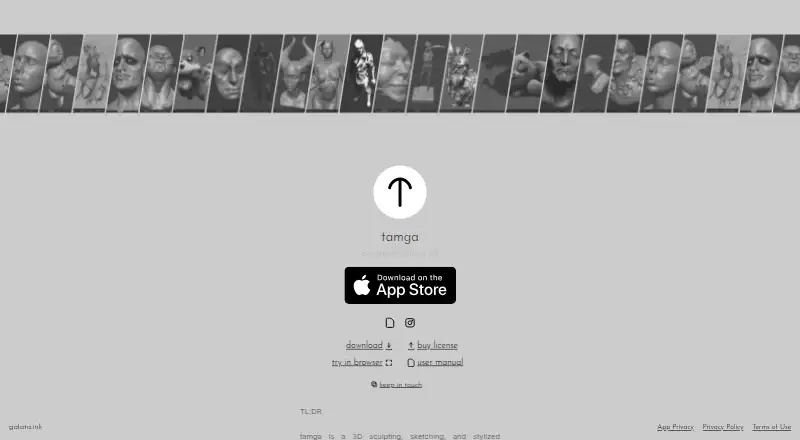
What tamga is
tamga is an app for 3D sculpting, sketching, and stylized rendering, with tools for building, shaping, painting, and presenting models. Sculpting features include brushes, dynamic topology, remeshing, symmetry, and voxel sculpting. Users can combine primitives with boolean operations and pose a model by placing anchors. Painting tools cover albedo, roughness, and metallic channels, and ink strokes can be drawn on 3D surfaces. For rendering, tamga includes a paper mode, environment presets, adjustable lights, and camera color grading and lens effects. It imports and exports OBJ meshes and can save renders as PNG, JPG, or EXR. The maker says the app runs locally and offline, requires no account, and keeps created content on the device. The privacy policy says it does not collect, store, share, or transmit personal data or user information. Desktop and web use for personal, educational, and non-profit work is free; commercial desktop or web use costs 17.99 CAD once. The iPad app costs 12.99 USD once. tamga is available on iOS, Linux, macOS, web, and Windows, but requires WebGPU, which some browsers and operating system versions do not support.
Good
- Runs locally and offline without an account
- Includes sculpting, modeling, painting, and rendering tools
- Exports renders as PNG, JPG, or EXR
- Keeps created content on the device
Watch out
- Requires WebGPU
- Some browsers and operating system versions do not support WebGPU
- Commercial desktop or web use costs 17.99 CAD once
Who it suits
tamga suits hobbyists, artists, concept sculptors, and beginners who want 3D sculpting and rendering tools. Desktop and web use is free for personal, educational, and non-profit work.
Verdict
tamga brings sculpting, painting, and stylized rendering into one locally run app. Check WebGPU compatibility first, and note that commercial desktop or web use requires a paid license.
Plans and prices
From tamga's own pricing page, checked 2 Oct 2026.
| Plan | Price | What it gives you |
|---|---|---|
| Desktop/web personal, educational, and non-profit use | Free | Desktop and web · personal, educational, and non-profit work |
| iPad app | $12.99, paid once | iPadOS 26.0 or later · 20.6 MB · one-time App Store purchase |
| Desktop/web commercial license | C$17.99, paid once | Commercial use of Windows, macOS, Linux and web versions · one-time purchase |
The facts
Each one read from tamga's own pages, with the date it was checked.
What it does
- API and SDKs
- The official product pages expose a browser app, downloadable clients and a user manual, with no public tamga API or SDK described on those pages.checked 15 Oct 2026
- Auto recovery
- An auto-recovery function saves work and restores it after crashes.checked 15 Oct 2026
- Camera controls
- Camera tools include distortion, chromatic aberration, dirt, noise and color-grading adjustments.checked 15 Oct 2026
- Changelog
- The App Store version history records releases adding stability fixes, CSG and lighting improvements, pose and form robustness, a cone primitive, an orientation cube and touch-input controls.checked 15 Oct 2026
- Commercial licensing
- Commercial desktop and web use requires a one-time license, with the receipt serving as proof.checked 15 Oct 2026
- Compatibility limit
- The download page says Tamga requires WebGPU and warns that some browsers and operating system versions do not support it.checked 2 Oct 2026
- Data collection
- The app privacy policy says no personal data is collected, stored, shared or transmitted.checked 15 Oct 2026
- Documentation
- The official manual covers navigation, sculpting, masking, form, pose, paint, lighting, ink, camera, import/export and shortcuts.checked 15 Oct 2026
- File formats
- The app imports and exports OBJ meshes and exports renders as PNG, JPG or EXR.checked 15 Oct 2026
- Form modeling
- Form mode combines primitives with union, subtraction and intersection booleans.checked 15 Oct 2026
- Import and export
- Users can import and export OBJ meshes and export renders as PNG, JPG, or EXR.checked 2 Oct 2026
- Independent feature summary
- 3dnchu lists dynamic topology, vertex painting, rig-free posing, 3D ink, Paper Mode, lighting controls and PNG/JPG/EXR rendering export.checked 15 Oct 2026
- Ink drawing
- Users can draw ink strokes directly on 3D surfaces.checked 15 Oct 2026
- Install limitations
- The maker says macOS and Windows downloads are unsigned and trigger first-run security warnings.checked 15 Oct 2026
- Integrations
- The documented file interchange path is OBJ import/export, rather than named third-party service integrations.checked 15 Oct 2026
- Intended users
- The iPad listing describes it as made for hobbyists, artists, concept sculptors, and beginners.checked 2 Oct 2026
- Licence model
- An independent review states that tamga is proprietary rather than open source, while free for noncommercial users.checked 15 Oct 2026
- Lighting
- Lighting includes environment presets plus user-positioned lights with adjustable intensity and color.checked 15 Oct 2026
- Limit: missing sculpt tools
- 3DArt identified no alpha brushes, VDMs or insert tools.checked 15 Oct 2026
- Limit: object selection
- A Blender Artists user initially found object selection unclear because there was no obvious outliner or list, and the maker pointed to the Scene panel.checked 15 Oct 2026
Where it runs
- App Store complaint: crashes
- Reviewers report crashes when adding shapes, black screens and instability after purchase.checked 15 Oct 2026
- App Store complaint: usability
- One reviewer said orientation and symmetry were difficult to understand compared with Nomad Sculpt.checked 15 Oct 2026
- Limit: Linux compatibility
- Blender Artists users reported Linux Mint WebGPU errors, while the maker said support varies and fixed AppImage behavior in version 1.0.5.checked 15 Oct 2026
The company
- Headquarters
- Vancouver, British Columbia, Canadachecked 28 Sep 2026
The full review of tamga
Overview
Tamga is a 3D sculpting, sketching, and rendering app for artists who want to shape and present models in the same workspace. It is particularly suited to hobbyists, beginners, and concept sculptors. Its broad mix of creative tools and free desktop and web use is appealing, but the WebGPU requirement makes compatibility an important first check.
Alongside sculpting, Tamga brings together modeling, posing, painting, surface drawing, and stylized rendering. That range makes it a useful choice for developing and presenting visual ideas; the lack of multiresolution sculpting is a meaningful drawback for workflows that rely on it.
Key features
Sculpt, model, and pose
Sculpting brushes, dynamic topology, remeshing, symmetry, and voxel sculpting offer several ways to shape a model. Primitive combinations and boolean operations support rough form-building, while pose anchors let users deform a model for posing. Together, these tools suit exploratory concept work. Artists who need multiresolution sculpting should look elsewhere.
Paint and draw on the model
Vertex painting covers albedo, roughness, and metallic channels, and ink strokes can be drawn directly onto 3D surfaces. Texture painting is also supported. This makes Tamga more capable than a sculpting-only tool for adding material variation and hand-drawn detail, though it does not change the stated limitation around multiresolution sculpting.
Render and exchange files
Stylized paper mode, environment presets, adjustable lights, and camera color grading and lens effects provide several ways to shape a rendered image. OBJ import and mesh export support model exchange, and renders can be exported as PNG, JPG, or EXR. OBJ files saved and loaded through Tamga carry Tamga-specific metadata, a consideration when moving meshes between tools.
Offline use and privacy
The maker says Tamga runs locally and offline, requires no account, and keeps created content on the device. Its privacy policy says it does not collect, store, share, or transmit personal data or user information. That is a strong fit for people who prefer an account-free workflow and want their work to remain local.
Pricing
Tamga uses a freemium model, with separate terms for desktop and web use and the iPad app:
- Desktop/web personal, educational, and non-profit use: free. This covers desktop and web for personal, educational, and non-profit work; it is the natural starting point for individuals and eligible projects.
- iPad app: $12.99, paid once. This is a one-time purchase for the iPad app, rather than a subscription.
- Desktop/web commercial license: C$17.99, paid once. Commercial use on desktop or web requires this one-time license.
There is no free trial. The free desktop and web plan is limited by purpose: commercial work requires the paid license. The iPad purchase is a separate plan, so readers should choose based on where they intend to use Tamga.
Platforms
Tamga supports iOS, Linux, macOS, web, and Windows. The download page requires WebGPU and warns that some browsers and operating system versions do not support it, so check compatibility before choosing the web or desktop route. The maker directs bug reports and support requests to [email protected].
Who it's for
Tamga is a good fit for hobbyists, artists, beginners, and concept sculptors who want sculpting, drawing, painting, posing, and stylized rendering in one app. Its free desktop and web option suits personal, educational, and non-profit work, while the local, account-free design will appeal to users who prefer offline tools. It is less suitable for artists who depend on multiresolution sculpting or need to use desktop or web commercially without purchasing a license.
Pros and cons
- Pro: Sculpting, voxel sculpting, painting, surface drawing, posing, and rendering tools support a varied concept-art workflow in one app.
- Pro: Desktop and web use is free for personal, educational, and non-profit work, with no account required and offline operation.
- Pro: Exporting OBJ meshes and PNG, JPG, or EXR renders supports both model exchange and image output.
- Con: No multiresolution sculpting, a clear gap for users whose work depends on that approach.
- Con: WebGPU compatibility varies by browser and operating system version, which can rule out otherwise supported setups.
- Con: Commercial desktop or web use requires a separate one-time license, and OBJ files carry Tamga-specific metadata when saved and loaded.
Alternatives
- Mixos Mold is worth considering if you want unlimited free Mold sculpting and every brush and subdivision level; its free plan also includes 10 trial AI credits and 100 MB of cloud storage.
- R3DS Wrap is a Linux and Windows option for students, universities, and schools seeking a free license for learning purposes only, with a paid indie annual subscription also offered.
- Re:Form may suit macOS and web users who want a free plan with about 12.5 million triangles and five projects of up to 150 MB each.
- AutoRemesher is a free, MIT-licensed choice for users seeking remeshing software across Linux, macOS, Windows, or self-hosted setups.
- ZBrush is an alternative for Windows and macOS users; its iPad free plan includes 28 brushes, with a subscription plan also offered.
- SculptGL is a free alternative for web, Windows, or extension use, with no paid plan or usage limits stated on its maker’s pages.
- MeshMolder is a paid Windows alternative.
- Nomad Sculpt is a paid alternative for Android, iOS, macOS, and Windows, with a free trial.
- Browse the 3D Sculpting Software category for more options.
Verdict
Choose Tamga if you want an account-free, locally run app that combines concept sculpting with painting, surface drawing, posing, and stylized rendering, especially for personal, educational, or non-profit desktop and web work. Its breadth and free entry point are the strongest reasons to pick it. Look elsewhere if WebGPU compatibility is a problem or multiresolution sculpting is essential; commercial desktop and web users should also factor in the paid license.
Getting started
- Visit https://tamga.galata.ink/.
- Choose web, Windows, macOS, Linux, or iOS.
- For desktop or web use, select the free plan for personal, educational, or non-profit work, or the commercial license for commercial use.
- For iPad, purchase the app for 12.99 USD once.
- On web, use a browser and operating system version that support WebGPU.
Limits worth knowing
The free desktop and web plan is limited to personal, educational, and non-profit work. Commercial desktop or web use requires a 17.99 CAD one-time license; the iPad app is a separate 12.99 USD one-time purchase.
Questions
Is Tamga free?
Desktop and web use for personal, educational, and non-profit work costs nothing. There is no free trial.
What does the iPad app cost?
The iPad app costs $12.99, paid once.
How much is commercial desktop or web use?
The commercial desktop/web license costs C$17.99, paid once.
Which platforms does Tamga support?
Tamga supports iOS, Linux, macOS, web, and Windows. Web downloads require WebGPU, which some browsers and operating system versions do not support.
Does Tamga require an account or internet connection?
The maker says it runs locally and offline and requires no account.
Who makes Tamga, and what happens to personal data?
Tamga was created by Ahmet Levent Taşel. Its privacy policy says it does not collect, store, share, or transmit personal data or user information.
Alternatives to tamga
- 1

ZBrush
Free planiOSAPImacOSWindows7.9Free plan - 2
Autodesk Mudbox
Free planAPILinuxmacOSWindows7.6Free plan - 3

Mixos Mold
Free planAndroidiOSWebLinux7.5From $8.99 a month - 4

Nomad Sculpt
AndroidiOSmacOSWindows7.3 - 5

3DCoat
LinuxmacOSWindows6.7€379 one-time - 6

Adobe Substance 3D Modeler
ExtensionWindows6.7