Argente Uninstall Manager
Argente Uninstall Manager is a Windows utility for managing installed applications and removing ones you no longer use.
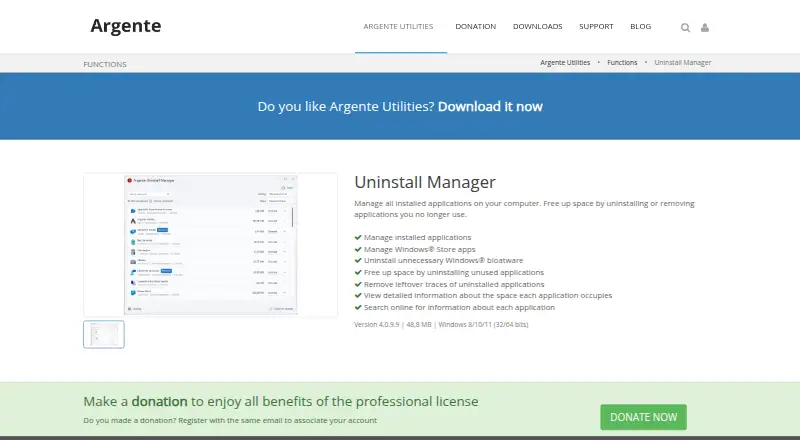
What Argente Uninstall Manager is
Argente Uninstall Manager is a Windows utility for managing installed applications and removing ones you no longer use. It can uninstall Windows Store apps and unnecessary Windows bloatware, then scan for leftover traces from removed applications. For deciding what to remove, it displays how much space each application occupies and can search online for information about an application. The utility also includes junk cleanup, a startup manager, scheduled maintenance, and restore-point tools; driver updates are not included. The product page lists version 4.0.9.8 at 48,8 MB and Windows 8/10/11 support in 32-bit and 64-bit. Its downloads page offers installer and portable options for x64, x86, and Arm64. The maker says the software does not collect or send information about computer or application use, includes no advertising or third-party software, and installs no services or permanent processes. It runs manually or at a scheduled time. Argente offers a free license after account creation, with a Free plan listed as free for one PC forever. Its support site has announcements, FAQs, user guides, technical support, and feedback sections; technical assistance is at the user's own risk.
Good
- Removes leftover traces after application uninstalls.
- Can manage Windows Store apps and uninstall unnecessary bloatware.
- Shows application space use and can search online for details.
- Includes junk cleanup, startup management, and restore-point tools.
- Installer and portable downloads are offered for x64, x86, and Arm64.
Watch out
- Driver updates are not included.
- The Free plan covers one PC.
- Technical assistance is at the user's own risk.
Who it suits
It suits Windows users who want to remove applications, Windows Store apps, or unnecessary bloatware and scan for leftovers. Its application space details and online search can help users review installed software before removing it.
Verdict
Choose Argente Uninstall Manager if you want a free Windows tool for removing programs, bloatware, and leftover traces, with several additional maintenance tools. Look elsewhere if you need driver updates or coverage beyond the Free plan's one PC.
Plans and prices
From Argente Uninstall Manager's own pricing page, checked 15 Oct 2026.
| Plan | Price | What it gives you |
|---|---|---|
| Free | Free | lower donation reminder frequency · free license after account creation · 1 PC forever |
| Basic | €9 a year | no donation reminder · automatic updates · 1 PC 1 year |
| Professional | €18 a year | no donation reminder · all automatic features · 3 PC 1 year |
| Premium | €52 a year | no donation reminder · all automatic features · 10 PC 1 year |
The facts
Each one read from Argente Uninstall Manager's own pages, with the date it was checked.
Where it runs
- Application details
- It shows detailed information about the space each application occupies and can search online for information about each application.checked 9 Oct 2026
- Installed applications
- The product lists and manages applications installed on the computer.checked 15 Oct 2026
What it does
- Background activity
- The maker says the software installs no services or permanent processes and runs manually or at a scheduled time.checked 9 Oct 2026
- Bloatware
- It can uninstall unnecessary Windows bloatware.checked 9 Oct 2026
- Bloatware removal
- It provides an option to uninstall unnecessary Windows bloatware.checked 15 Oct 2026
- Bundled software
- The maker says the software includes no advertising and installs no third-party software.checked 9 Oct 2026
- Bundling
- The vendor says the suite contains no advertising and does not install third-party software.checked 15 Oct 2026
- Data collection
- The vendor states that it does not collect or transmit computer or application-usage information.checked 15 Oct 2026
- Data handling
- The maker says Argente Utilities does not collect or send information about the computer or application use.checked 9 Oct 2026
- Download architectures
- The downloads page lists installer and portable options for x64, x86, and Arm64 for Argente Uninstall Manager.checked 9 Oct 2026
- Earlier release
- The 25 September 2026 release improved uninstall cleanup and fixed a Drive Analyzer short-directory-name error.checked 15 Oct 2026
- Independent download fact
- Uptodown lists version 4.0.7.3, 3,925 downloads, a 62.91 MB EXE and a 2 June 2026 upload date.checked 15 Oct 2026
- Independent feature description
- Gizmodo says the tool runs the standard uninstaller and then scans hidden folders, invalid registry entries and empty directories for leftovers.checked 15 Oct 2026
- Independent license description
- Softpedia labels the current distribution donationware/freemium, while Uptodown labels its listed build free.checked 15 Oct 2026
- Independent system requirement
- Softpedia lists .NET Framework 4.0 Client Profile or later as a requirement.checked 15 Oct 2026
- Installer architectures
- The download page offers x64, x86 and Arm64 installers and portable builds.checked 15 Oct 2026
- Leftover cleanup
- It searches for leftover traces after applications are uninstalled.checked 15 Oct 2026
- Leftover scan
- Yeschecked 23 Sep 2026
- Leftover traces
- It can remove leftover traces of uninstalled applications.checked 9 Oct 2026
- License model
- The maker says creating an account provides a free license and donations can be linked to an account using the same email.checked 9 Oct 2026
- Limit: antivirus warning
- MajorGeeks notes a VirusTotal detection and warns that antivirus software may flag the file as uncommon.checked 15 Oct 2026
- Limit: missing help
- Softpedia reported that the application had no help file.checked 15 Oct 2026
- Limit: no batch uninstall
- Softpedia said it would have preferred the ability to uninstall multiple programs at once.checked 15 Oct 2026
Money
- Free plan
- Yeschecked 23 Sep 2026
The full review of Argente Uninstall Manager
Overview
Argente Uninstall Manager is a Windows application remover with tools for cleaning up leftover traces and handling several basic maintenance jobs. Its value is breadth at no cost for one PC; it is a weaker fit if you need driver updates or support for other platforms.
Key features
It removes installed programs, Windows Store apps and unnecessary Windows bloatware, then scans for traces left behind by uninstalled applications. That makes it more useful than a bare uninstall command when clearing space, while application-size details help pinpoint large programs. Online searches for app information add context before removing software you do not recognize.
Junk cleanup, a startup manager, scheduled maintenance and restore-point tools round out the package. Those extras suit users who want a small set of upkeep functions together; the missing driver updater is a clear boundary for anyone seeking a broader all-in-one maintenance suite.
The maker says the software does not collect or send computer or usage information, installs no services or permanent processes, and contains no advertising or third-party software. It runs manually or on a schedule. Support includes announcements, FAQs, guides, technical help and feedback, but technical assistance is at the user's own risk.
Pricing
Argente Uninstall Manager is freemium. Free costs nothing and covers 1 PC forever, with a lower donation-reminder frequency. Creating an account provides the free license, and donations can be linked to an account using the same email. For an individual PC, that is a useful no-cost starting point, but the one-device cap rules it out for households or multi-PC use.
Basic is custom pricing for 1 PC, Professional is custom pricing for 3 PCs, and Premium is custom pricing for 10 PCs. The larger tiers suit users needing more seats, but there is no published price to compare their cost with the free option. The available plan details do not establish additional feature differences, so the main stated distinction is device count.
Platforms
The product is for Windows. The product page lists Windows 8, 10 and 11 in 32-bit and 64-bit editions; downloads are offered as installer and portable builds for x64, x86 and Arm64. The stated Windows support for the maintenance offering is Windows 10 and 11, so users on Windows 8 should confirm which functions apply to their setup. Version 4.0.9.8 is listed at 48,8 MB.
Who it's for
Choose it if you want to remove programs and bloatware, check for uninstall leftovers, and have junk cleanup and startup controls on one Windows PC. Look elsewhere if you need driver updates, a non-Windows tool, or a free license covering multiple devices.
Pros and cons
- Pro: It handles Windows Store apps, bloatware and leftover traces, covering more cleanup cases than program removal alone.
- Pro: App-size details and online searches help inform removal decisions, especially for unfamiliar software.
- Pro: The free license lasts forever for one PC and includes a lower donation-reminder frequency.
- Con: Free is capped at one PC, while multi-PC plans have custom pricing.
- Con: Driver updates are absent, limiting its usefulness as a complete maintenance package.
- Con: Technical assistance is at the user's own risk, a caveat for people who expect formal support.
Alternatives
For startup-focused choices, compare the Startup Manager Software category. AutoRun Manager is a free, MIT-licensed Windows option centered on startup configuration; Autorun Organizer is free and includes startup entry management, delay controls and VirusTotal scanning; HiBit Startup Manager adds startup monitoring plus Windows services and scheduled-task management. BootRacer is another Windows freemium choice: its Free plan is for non-commercial use, while its Premium plans list $39.95 a month for 1 PC and $59.95 a month for 2 PCs; the 1-PC plan is described as lifetime billing.
For the wider uninstall category, see Software Uninstaller Tools. Microsoft Quick Assist is a free option for a different need: Windows users get the Microsoft Store app, while macOS and web access are for Microsoft Support interactions.
For broader PC optimization, browse PC Optimization Software. Win Startup Manager is a free Windows tool focused on startup entries stored in the Registry and shortcut editing. Autoruns is free to use without an install or device-use limit, though redistribution is not licensed. Corionis Service Manager.NET is free and targets Windows x86/x64, with Windows 7 through Windows Server 2016 tested and .NET Framework 4.7.2 required.
Verdict
Argente Uninstall Manager is a sensible free pick for a Windows user with one PC who wants app removal, leftover scanning and a few maintenance tools in one place. Its main reason to choose it is that combination on a perpetual free license; its main reason to pass is the one-PC ceiling, custom-priced larger plans and lack of driver updates.
Getting started
- Visit https://argenteutilities.com/en/functions/uninstall-manager.
- Choose an installer or portable download for x64, x86, or Arm64.
- Create an account to receive a free license.
- Use the software manually or set it to run at a scheduled time.
Limits worth knowing
The Free plan is listed as free and covers one PC forever, with lower donation reminder frequency. The listed device limit is one device.
Questions
Is there a free plan?
Yes. The Free plan is listed as free for one PC forever.
Which Windows versions does it support?
The product page lists Windows 8/10/11 in 32-bit and 64-bit. Windows support is also listed as Windows 10 and 11.
What download options are available?
The downloads page lists installer and portable options for x64, x86, and Arm64.
Does it include driver updates?
No. Driver updates are listed as not included.
How do users get a free license?
The maker says creating an account provides a free license.
Alternatives to Argente Uninstall Manager
- 1
IObit Uninstaller
Free planWindows7.4Free plan - 2

Wise Program Uninstaller
Free planWindows7.3From $14.95 a year - 3

Geek Uninstaller
Free planWindows7.0Free plan - 4

Uninstalr
Free planWindows7.0$39 one-time - 5

Uninstall Tool
Windows6.8$24.95 one-time - 6

Ashampoo UnInstaller
Windows6.6From $12 a year