Microsoft Quick Assist
Microsoft Quick Assist is a free tool for getting remote help with a computer problem or helping someone else.
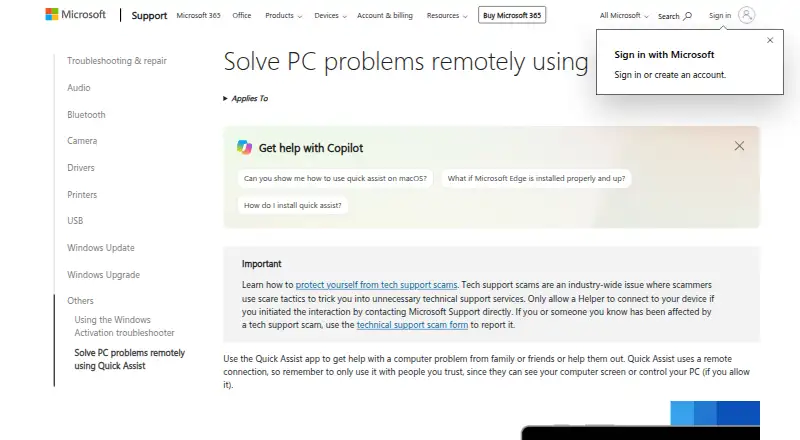
What Microsoft Quick Assist is
Microsoft Quick Assist is a free tool for getting remote help with a computer problem or helping someone else. A helper creates a six-digit code, and the person sharing their device must approve the connection and screen sharing. During the session, the helper can use a laser pointer, annotations, and chat, and may request full control of the PC. The person sharing must approve a control request separately.
The Windows app is installed from Microsoft Store and applies to Windows 10 and Windows 11. Quick Assist for macOS is available only for Microsoft Support interactions. The browser app is limited to interactions with verified Microsoft support agents. Both people need internet access; the helper signs in with a Microsoft account or Microsoft Entra ID, while the person receiving help does not need to authenticate. Quick Assist uses HTTPS over port 443 and TLS 1.2. Microsoft says it logs session times, errors, and features used, cannot view sessions or actions, and does not keep participant data longer than three days. File transfer and mobile apps are not supported.
Good
- Free to use.
- Helper can annotate, point, chat, and request PC control.
- The person sharing a device does not need to authenticate.
- Uses HTTPS over port 443 and TLS 1.2.
- Windows app supports Windows 10 and Windows 11.
Watch out
- Both parties need internet access.
- File transfer is not supported.
- There are no mobile apps.
- macOS and web access are limited to Microsoft Support interactions.
Who it suits
Quick Assist suits people who need an approved helper to assist with a Windows PC, or who want to guide someone else through a computer problem. macOS and web access apply only to Microsoft Support interactions, with web use limited to verified Microsoft support agents.
Verdict
Choose Microsoft Quick Assist for free, attended help with a Windows PC, including sessions with chat, annotations, and an optional control request. Look elsewhere if you need file transfer or mobile apps; macOS and browser access are restricted to Microsoft Support interactions.
Plans and prices
From Microsoft Quick Assist's own pricing page, checked 7 Oct 2026.
| Plan | Price | What it gives you |
|---|---|---|
| Quick Assist | Free | Microsoft Store app for Windows · Quick Assist for macOS and web only for Microsoft Support interactions |
The facts
Each one read from Microsoft Quick Assist's own pages, with the date it was checked.
What it does
- Access mode
- attendedchecked 20 Sep 2026
- Data and privacy
- Microsoft says it logs session start and end times, app errors, and features used; it says it cannot access sessions or view actions or keystrokes, and does not store participant data longer than three days.checked 7 Oct 2026
- File transfer
- Nochecked 20 Sep 2026
- Organizational limits
- Work or school policies may prevent installing Quick Assist from Microsoft Store, and Microsoft advises considering Intune Remote Help for enhanced security and enterprise controls.checked 7 Oct 2026
- Permissions
- The helper can request control, but the person sharing the device must allow the screen-sharing connection and separately allow a control request.checked 7 Oct 2026
- Purpose
- Quick Assist lets someone get help with a computer problem from family or friends, or help them remotely.checked 7 Oct 2026
- Remote session
- A helper generates a six-digit code, and the person receiving help must allow the connection and screen sharing.checked 7 Oct 2026
- Requirements
- Both parties need internet access; the helper must sign in with a Microsoft account or Microsoft Entra ID, while the person sharing their device does not need to authenticate.checked 7 Oct 2026
- Security
- Quick Assist uses HTTPS over port 443 and encrypts traffic with TLS 1.2.checked 7 Oct 2026
- Session tools
- During a session, the helper can use a laser pointer, annotations, and chat, and can request full control of the PC.checked 7 Oct 2026
- Support
- Microsoft directs users with Quick Assist problems, questions, or suggestions to the Feedback Hub app.checked 7 Oct 2026
- WebView2
- Quick Assist requires Microsoft Edge WebView2; it is built into Windows 11 and may be installed automatically on Windows 10.checked 7 Oct 2026
Where it runs
- Browser availability
- The Quick Assist web app is available only for interactions with verified Microsoft support agents.checked 7 Oct 2026
- macOS availability
- Quick Assist for macOS is available for Microsoft Support interactions and is not available outside them.checked 7 Oct 2026
- Mobile apps
- Nochecked 20 Sep 2026
- Supported platforms
- Windows,macOS,webchecked 20 Sep 2026
- Windows availability
- The Quick Assist app is installed from Microsoft Store and applies to Windows 10 and Windows 11.checked 7 Oct 2026
The company
- Founded
- 1975checked 23 Sep 2026
- Headquarters
- Redmond, Washington, USAchecked 23 Sep 2026
Money
- Free plan
- Yeschecked 20 Sep 2026
Getting started
- On Windows 10 or Windows 11, install Quick Assist from Microsoft Store.
- Make sure both people have internet access.
- Have the helper sign in with a Microsoft account or Microsoft Entra ID.
- The helper generates a six-digit code for the person receiving help.
- Approve the connection and screen sharing; separately approve any request for control.
- For macOS or web access, use Quick Assist only in an eligible Microsoft Support interaction.
Limits worth knowing
The free plan provides Quick Assist, with macOS and web access limited to Microsoft Support interactions; web use is only for verified Microsoft support agents. File transfer and mobile apps are unavailable.
Questions
How much does Microsoft Quick Assist cost?
It is free.
Which platforms can use Quick Assist?
The Windows app is for Windows 10 and Windows 11. Quick Assist for macOS and the web is available only for Microsoft Support interactions; web use is limited to verified Microsoft support agents.
Does the person receiving help need a Microsoft account?
No. The helper must sign in with a Microsoft account or Microsoft Entra ID, but the person sharing their device does not need to authenticate.
Can the helper control the PC?
The helper can request full control. The person sharing the device must approve that request separately from the screen-sharing connection.
Does Quick Assist support file transfer or mobile apps?
No. File transfer and mobile apps are not supported.
What does Microsoft say it logs?
Microsoft says it logs session start and end times, app errors, and features used. It says it cannot access sessions or view actions or keystrokes, and does not store participant data longer than three days.
Alternatives to Microsoft Quick Assist
- 1

BitNinja
Free planAndroidiOSWebAPI9.0From $6 a month - 2
Certo AntiSpy
Free planAndroidiOSmacOSWindows8.9From $39.99 a year - 3

Comodo Internet Security
AndroidiOSExtensionWindows8.7 - 4
ClamAV
Free planOpen sourceAPILinuxmacOSSelf-hosted8.3Free plan - 5

Spybot – Search & Destroy
Free planWindows7.4Free plan - 6

ESET Mobile Security for Android
Free planAndroid7.3Free plan