
Geek Uninstaller
Geek Uninstaller is a Windows utility for removing unwanted software.
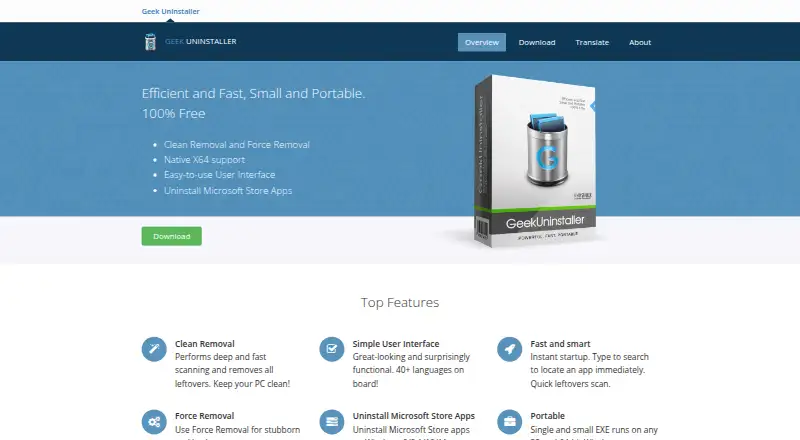
What Geek Uninstaller is
Geek Uninstaller is a Windows utility for removing unwanted software. After a standard uninstall, it scans for leftover files and registry items; Force Removal is intended for programs that cannot be removed normally. It can also uninstall Microsoft Store apps on Windows 8, 8.1, 10, and 11. The free edition is a portable EXE for 32-bit and 64-bit Windows, supports Windows 7 through 11, and requires administrator permissions. Its interface is translated into more than 40 languages. The free plan is for personal use and includes no support. The free edition does not provide batch uninstall or installation monitoring. The paid offerings are presented under different names and terms: Geek Uninstaller PRO is listed at $24.95 per month with a lifetime license, while Uninstall Tool Standard License is $24.95 per once and its Portable License is $39.95 per once. Uninstall Tool, developed by CrystalIDEA Software based on Thomas Koen’s code, adds features including installation monitoring, startup-program management, batch removal, and technical support. It can be tried free for 30 days.
Good
- Portable free EXE runs on 32-bit and 64-bit Windows.
- Scans for leftover files and registry items.
- Force Removal targets programs that cannot uninstall normally.
- Can remove Microsoft Store apps on Windows 8 through 11.
- Interface is translated into more than 40 languages.
Watch out
- Free plan is for personal use only.
- Free plan includes no support.
- Free edition lacks batch uninstall and installation monitoring.
- Administrator permissions are required.
Who it suits
Geek Uninstaller suits Windows users who want a portable removal utility with leftover scanning or a force-removal option. Those needing batch removal or installation monitoring can consider the separately listed Uninstall Tool offerings.
Verdict
Geek Uninstaller’s free edition focuses on portable software removal and cleanup after uninstalling. Batch removal and installation monitoring are listed among the paid Uninstall Tool additions.
Plans and prices
From Geek Uninstaller's own pricing page, checked 28 Sep 2026.
| Plan | Price | What it gives you |
|---|---|---|
| Geek Uninstaller Free | Free | Personal use only · No support · ZIP 3.04 MB or 7Z 2.11 MB |
| Geek Uninstaller PRO | $24.95 a month | Real-time installation monitor · Start-up programs management · Batch removal · Thorough and complete removal · Technical support · Portable license available · life-time license; from $24.95 |
| Uninstall Tool Standard License | $24.95, paid once | Per-PC license · Volume discounts available · Lifetime technical support · one-time payment |
| Uninstall Tool Portable License | $39.95, paid once | Single user · Multiple PCs · USB portable mode · Lifetime technical support · one-time payment |
The facts
Each one read from Geek Uninstaller's own pages, with the date it was checked.
What it does
- Batch uninstall
- Nochecked 23 Sep 2026
- Clean removal
- It performs deep scanning after standard uninstall and removes leftover files and registry items.checked 28 Sep 2026
- Compatibility
- The free edition supports 32-bit and 64-bit Windows 11, 10, 7, 8 and 8.1 and requires administrator permissions.checked 28 Sep 2026
- Forced uninstall
- Yeschecked 23 Sep 2026
- Force removal
- Force Removal is intended for stubborn or broken programs that cannot be removed normally.checked 28 Sep 2026
- Install monitoring
- Nochecked 23 Sep 2026
- Languages
- The interface is translated into more than 40 languages.checked 28 Sep 2026
- Leftover scan
- Yeschecked 23 Sep 2026
- License limits
- The EULA says a single-user license may be installed on one computer unless the purchased license expressly provides otherwise.checked 28 Sep 2026
- License validation
- Activated Uninstall Tool copies connect at startup to CrystalIDEA's license-verification service and transmit an encrypted license key, hardware identifier, software version and operating-system version.checked 28 Sep 2026
- Portability
- The free edition is a single small EXE that runs on 32-bit and 64-bit Windows.checked 28 Sep 2026
- Portable version
- Yeschecked 23 Sep 2026
- Privacy analytics
- CrystalIDEA says its website uses self-hosted Plausible Analytics with no cookies, no personal-data collection and aggregate-only statistics.checked 28 Sep 2026
- Pro features
- Uninstall Tool adds real-time installation monitoring, startup-program management, batch removal, thorough removal and technical support.checked 28 Sep 2026
- Pro relationship
- Geek Uninstaller Pro is called Uninstall Tool and is developed by CrystalIDEA Software based on Thomas Koen's code.checked 28 Sep 2026
- Purpose
- Geek Uninstaller is a fast utility for removing unwanted software from Windows.checked 28 Sep 2026
- Support
- Uninstall Tool support includes documentation, FAQs, release notes, GitHub issue tracking and email contact.checked 28 Sep 2026
The company
- Founded
- 2012checked 19 Oct 2026
Money
- Free plan
- Yeschecked 23 Sep 2026
- Trial
- Uninstall Tool can be tried free for 30 days.checked 28 Sep 2026
Where it runs
- Microsoft Store apps
- It can uninstall Microsoft Store apps on Windows 8, 8.1, 10 and 11.checked 28 Sep 2026
The full review of Geek Uninstaller
Geek Uninstaller is a Windows utility for removing unwanted programs, best suited to people who want a portable tool for individual cleanup jobs. Its free edition combines leftover scanning with a way to remove stubborn apps, while the paid Uninstall Tool adds broader management features.
Overview
The free edition runs as a small EXE on 32-bit and 64-bit Windows, so it suits users who prefer not to install a dedicated uninstaller. After a standard removal, it scans for leftover files and registry items; Force Removal is intended for programs that cannot be uninstalled normally. It can also remove Microsoft Store apps on Windows 8, 8.1, 10 and 11.
That focused toolkit makes Geek Uninstaller useful for occasional maintenance and failed uninstall attempts. It is less suitable for regular cleanup across many apps: the free edition has no batch removal or installation monitoring, and is limited to personal use without support.
Key features
Leftover scanning and Force Removal
The post-uninstall scan checks for files and registry items left behind by a program's normal uninstaller, which can make one-at-a-time cleanup more complete. Force Removal gives users another option when a program is broken or its ordinary uninstall path fails. Neither feature replaces the efficiency of batch removal, which belongs to the paid Uninstall Tool.
Portable and multilingual
The free edition is a single small executable that runs on 32-bit and 64-bit Windows and is offered in ZIP and 7Z downloads. Its interface supports more than 40 languages. It requires administrator permissions, so portability does not mean it can run without elevated access.
Pricing
Geek Uninstaller Free costs nothing and is for personal use only. It includes the core removal utility, but has no support, batch removal, or real-time installation monitoring.
Geek Uninstaller PRO is $24.95 a month (billed life-time license). It adds real-time installation monitoring, startup-program management, batch removal, thorough and complete removal, technical support, and a portable license option. The price label pairs a monthly amount with a lifetime-license term, so buyers should confirm the license terms before purchase.
Uninstall Tool Standard License costs $24.95, paid once, billed as a one-time payment. It is licensed per PC, offers volume discounts, and includes lifetime technical support. The Portable License costs $39.95, paid once, also as a one-time payment; it covers one user on multiple PCs, supports USB portable mode, and includes lifetime technical support. Uninstall Tool can be tried free for 30 days.
Uninstall Tool is developed by CrystalIDEA Software based on Thomas Koen's code. Its activated copies connect at startup to CrystalIDEA's license-verification service, sending an encrypted license key, hardware identifier, software version, and operating-system version. The EULA limits a single-user license to one computer unless the purchased license expressly says otherwise.
Platforms
Geek Uninstaller supports Windows 11, 10, 7, 8 and 8.1 in both 32-bit and 64-bit editions. Microsoft Store app removal is supported on Windows 8, 8.1, 10 and 11. It is not a cross-platform option.
Who it's for
Choose the free edition for personal, occasional Windows cleanup when portability, leftover scanning, and a fallback for stubborn programs matter more than batch workflows or support. Uninstall Tool is a better fit for people who remove software regularly and want installation monitoring, startup management, batch removal, or technical support. Its per-PC Standard License suits a single machine, while the Portable License is designed for one user working across multiple PCs.
Pros and cons
- Pro: The portable free edition avoids a conventional installation and runs on both 32-bit and 64-bit Windows.
- Pro: Leftover scanning and Force Removal address incomplete or failed individual uninstallations.
- Pro: Microsoft Store app removal and support for more than 40 interface languages broaden its usefulness on Windows.
- Con: The free edition is personal-use only and comes without support.
- Con: No batch removal or installation monitoring in the free edition makes repeated cleanup less efficient.
- Con: The Standard License is per PC; use across multiple computers requires the pricier Portable License.
Alternatives
Software Uninstaller Tools is a useful starting point for comparing tools in this category.
IObit Uninstaller is worth considering if you want a free Windows option with batch uninstall, Windows app removal, drag-and-drop uninstall, and automatic leftover cleanup.
Bulk Crap Uninstaller is a free alternative for private or commercial use under Apache 2.0; its v6 supports Windows 10 or newer.
Jharu is a free alternative for readers considering a tool that runs on macOS as well as Windows.
Soft Organizer offers free personal and educational use, with Pro licenses listed for two or five PCs; consider it if those license options better fit your household or school use.
Uninstalr is another Windows freemium option for readers comparing paid uninstall tools.
Wise Program Uninstaller has a free edition for uninstalling apps, removing stubborn or unlisted apps, removing browser extensions, and analyzing software health; its free plan also includes premium technical support.
AppCleaner is the relevant alternative if you need a free app uninstaller for macOS rather than Windows.
HiBit Uninstaller is another free Windows option to compare.
Verdict
Geek Uninstaller is a good fit for personal users who want portable Windows cleanup, leftover checks, and a way to handle stubborn individual programs without paying. Look elsewhere if batch removal, installation monitoring, or free-edition support matters; the paid Uninstall Tool adds those capabilities, but comes with a distinct license and startup verification requirements.
Getting started
- Open the Geek Uninstaller website
- Download the portable free EXE or choose an Uninstall Tool license
- Run it on a supported Windows computer with administrator permissions
- Select software or a Microsoft Store app to remove
- Use the leftover scan after standard uninstall, or choose Force Removal
Limits worth knowing
The Free plan costs nothing, is for personal use and includes no support. It does not provide batch uninstall or installation monitoring; those are listed among Uninstall Tool additions.
Questions
What does the free plan cost?
Geek Uninstaller Free is listed as free for personal use.
Which platforms are supported?
The free edition supports 32-bit and 64-bit Windows 11, 10, 7, 8 and 8.1, and requires administrator permissions.
What does Force Removal do?
Force Removal is intended for stubborn or broken programs that cannot be removed normally.
Are paid versions available?
Uninstall Tool Standard License is listed at $24.95, paid once, Portable License at $39.95, paid once, and Geek Uninstaller PRO at $24.95 a month with a lifetime license.
Is there a trial?
Uninstall Tool can be tried free for 30 days.
Does the free edition monitor installations or uninstall in batches?
No. The free edition does not include installation monitoring or batch uninstall.
Alternatives to Geek Uninstaller
- 1
IObit Uninstaller
Free planWindows8.2Free plan - 2

Wise Program Uninstaller
Free planWindows8.0From $14.95 a year - 3
Argente Uninstall Manager
Free planWindows7.6From €9 a year - 4

Uninstall Tool
Windows7.5$24.95 one-time - 5

Uninstalr
Free planWindows7.5$39 one-time - 6
Revo Uninstaller
Windows7.4