
Jharu
Jharu is a free desktop disk cleaner and storage analyzer for software developers and machine learning engineers, available on macOS and Windows.
What Jharu is
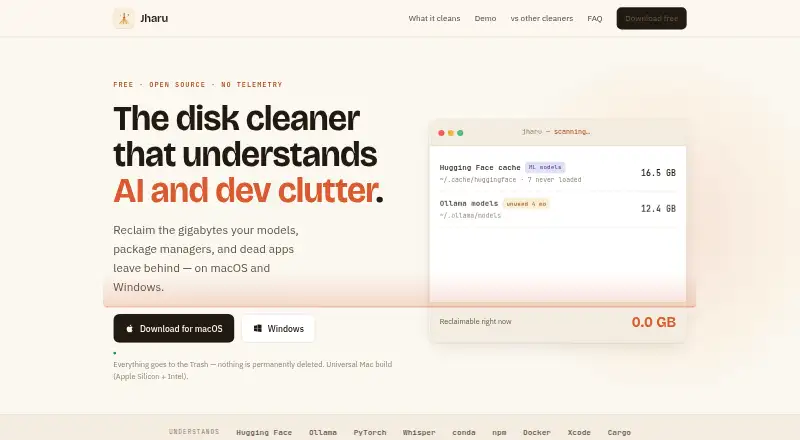
Jharu is a free desktop disk cleaner and storage analyzer for software developers and machine learning engineers, available on macOS and Windows. It scans more than 25 known developer and machine learning cache locations, showing per-item safety ratings and staleness detection. Its model view covers individual models from Hugging Face, Ollama, Whisper, PyTorch, and Keras, distinguishing models that were loaded from those downloaded but never opened. The Deep clean view displays disk contents as a treemap or list and classifies folders by type. Jharu also finds virtualenv and conda environments, sizes their packages, and shows duplication between environments. Its uninstaller removes apps and leftover support files, caches, and preferences; on Windows, it runs each program’s own uninstaller. Cleanup moves items to Trash or Recycle Bin with a safety rating and confirmation, while operating system locations are protected. The maker describes Jharu as open source under Apache 2.0 with no telemetry. macOS users need Full Disk Access for complete scan coverage.
Good
- Scans more than 25 cache locations.
- Shows model download and load status.
- Cleanup sends items to Trash or Recycle Bin.
- Open source under Apache 2.0; no telemetry.
Watch out
- Full Disk Access is needed for complete macOS scans.
- First launch may show a security warning on macOS and Windows.
- Windows app removal runs each program’s own uninstaller.
Who it suits
Jharu suits developers and machine learning engineers who want to inspect caches, model files, and Python environments. Users should note its platform requirements and first-launch warnings.
Verdict
Jharu focuses on developer and machine learning storage, with safety ratings and protected system locations. Its macOS access requirement and unsigned-app warning are worth noting before installation.
Plans and prices
From Jharu's own pricing page, checked 4 Oct 2026.
| Plan | Price | What it gives you |
|---|---|---|
| Jharu | Free | No subscription · no paid tier · no ads · no telemetry · Free forever |
The facts
Each one read from Jharu's own pages, with the date it was checked.
Where it runs
- App removal
- Its uninstaller removes apps and sweeps leftover support files, caches and preferences; on Windows it runs each program’s own uninstaller.checked 4 Oct 2026
- Platform requirement
- The maker says macOS users need to grant Full Disk Access for complete scan coverage.checked 4 Oct 2026
- Platforms
- Prebuilt installers are available for macOS (Apple Silicon and Intel) and 64-bit Windows.checked 4 Oct 2026
What it does
- Current signing status
- The maker says the app is not yet signed with a paid developer certificate, so macOS and Windows may show a first-launch security warning.checked 4 Oct 2026
- Developer caches
- It scans more than 25 known developer and machine learning cache locations, with per-item safety ratings and staleness detection.checked 4 Oct 2026
- Disk map
- Its Deep clean view analyzes the disk as a treemap or list and classifies folders by type.checked 4 Oct 2026
- Model caches
- It lists individual models from Hugging Face, Ollama, Whisper, PyTorch and Keras, and distinguishes models that were loaded from those downloaded but never opened.checked 4 Oct 2026
- Privacy
- The maker describes Jharu as having no telemetry; it is open source under the Apache 2.0 license.checked 4 Oct 2026
- Protected locations
- Operating system locations are protected from cleaning, and unreadable locations are reported rather than hidden.checked 4 Oct 2026
- Purpose
- Jharu is a desktop disk cleaner and storage analyzer built for software developers and machine learning engineers.checked 4 Oct 2026
- Python environments
- It finds virtualenv and conda environments, sizes their packages and shows duplication across environments.checked 4 Oct 2026
- Safe cleanup
- Clean actions move data to the Trash or Recycle Bin, with a safety rating and confirmation explaining the consequences.checked 4 Oct 2026
- Support
- The maker directs users to GitHub issues and pull requests for support and contributions.checked 4 Oct 2026
- Updates
- Jharu checks GitHub releases for updates and installs signed, verified updates in-app.checked 4 Oct 2026
The company
- Headquarters
- Salt Lake City, Utah, United Stateschecked 28 Sep 2026
- Maker
- Matily identifies itself as a non-profit software studio established in 2026 in Salt Lake City; its creator and maintainer is Ripon Chandra Malo.checked 4 Oct 2026
The full review of Jharu
Jharu is a desktop disk cleaner and storage analyzer for software developers and machine-learning engineers. It is best suited to people who need to inspect model, development and Python-environment storage before deciding what to remove. Its cache-specific detail and cautious cleanup controls make it a focused free option, though macOS permissions and first-launch security warnings add setup friction.
Overview
Rather than treating storage as a single list of large files, Jharu identifies caches and environments tied to development and machine learning. That focus can make it easier to find stale or duplicated material without guessing which folders belong to which tools. It is less compelling for someone who wants only a simple, general-purpose cleanup utility.
Key features
Developer and model storage
Jharu scans more than 25 known developer and machine-learning cache locations, showing per-item safety ratings and staleness detection. For models from Hugging Face, Ollama, Whisper, PyTorch and Keras, it distinguishes items that have been loaded from those downloaded but never opened. That distinction gives users a more useful basis for cleanup than file size alone, although the final decision about what to remove still rests with the user.
Disk map and Python environments
The Deep clean view presents disk contents as a treemap or list and groups folders by type. Its Python environment scan finds virtualenv and conda environments, sizes packages and highlights duplication between environments. These tools are most useful when storage has accumulated across multiple projects; they offer less reason to switch from a basic disk view if development caches are not a significant part of the problem.
Removal and safeguards
Jharu’s app uninstaller removes applications and sweeps leftover support files, caches and preferences. On Windows it runs each program’s own uninstaller, so the cleanup process depends on that program’s removal mechanism before Jharu handles leftovers. Cleanup moves data to the Trash or Recycle Bin, and each action includes a safety rating and an explanation of its consequences. Operating-system locations are protected, while unreadable locations are reported rather than silently omitted.
Privacy and updates
The maker describes Jharu as having no telemetry, and the app is open source under the Apache 2.0 license. It checks GitHub releases and installs signed, verified updates in-app. Support and contributions go through GitHub issues and pull requests.
Pricing
Jharu is free forever at no cost, with no subscription, paid tier or ads. There is no trial to consider and no paid plan that adds features or removes a free-plan cap. That makes it straightforward for developers who want these targeted cleanup tools without a recurring cost, though users seeking a commercial support channel should note that support is directed to GitHub.
Platforms
Jharu runs on macOS and Windows. On macOS, complete scan coverage requires granting Full Disk Access. The maker also says the app does not yet have a paid developer certificate, so macOS and Windows may show a security warning on first launch. Those are material setup considerations for users who prefer software with established signing credentials or do not want to grant broad disk access.
Who it's for
Jharu is a strong fit for developers and machine-learning practitioners who accumulate model caches, build artifacts or multiple Python environments and want to review them before cleanup. Its safety ratings, protected system locations and Trash or Recycle Bin workflow suit cautious users. For someone mainly removing ordinary Windows applications, a Windows-focused uninstaller may be a better match; macOS users who do not need developer-cache analysis may prefer a simpler app-removal tool.
Pros and cons
- Pros: Model-level detail across five named ecosystems helps distinguish used models from downloads never opened.
- Pros: More than 25 known cache locations, environment duplication checks and categorized disk views target common sources of development storage growth.
- Pros: Trash-based cleanup, safety explanations and protected system locations reduce the risk of an irreversible or poorly understood removal.
- Pros: Free forever, open source under Apache 2.0 and described by its maker as having no telemetry.
- Cons: Full Disk Access is required for complete scans on macOS, adding a permissions decision before the app can deliver its full coverage.
- Cons: The unsigned-app warning on macOS and Windows may deter users who want a paid developer certificate at first launch.
- Cons: Its strongest analysis is aimed at developer and machine-learning storage, so it is a less targeted choice for routine cleanup alone.
Alternatives
For a broader comparison, see Software Uninstaller Tools.
- IObit Uninstaller is a Windows alternative with a free version that includes batch uninstall, drag-and-drop uninstall and automatic leftover cleanup; choose it when Windows app removal is the priority rather than model-cache analysis.
- Bulk Crap Uninstaller is a free Windows desktop option for private and commercial use under Apache 2.0, with version 6 supporting Windows 10 or newer. It is a reasonable pick for Windows users who want an explicitly licensed free uninstaller.
- Geek Uninstaller offers a free Windows edition for personal use, with no support, as well as a PRO edition. Choose it if a Windows-only uninstaller better matches your needs.
- Soft Organizer has free personal and educational use, with Pro home-license options. It may suit Windows users seeking a dedicated uninstaller with home licensing.
- Uninstalr is a Windows freemium alternative with a Pro option sold as a one-time payment for one computer. Consider it if a paid Windows uninstaller is preferable.
- Wise Program Uninstaller has a free Windows version that can remove stubborn or unlisted apps, browser extensions and assess software health. It is a better fit when those removal tasks matter more than developer-cache inspection.
- AppCleaner is a free macOS app uninstaller. Pick it if removing Mac apps is the main task and Jharu’s developer and machine-learning storage analysis is unnecessary.
- HiBit Uninstaller is a free Windows alternative.
Verdict
Choose Jharu if development or machine-learning storage is taking up space and you want to inspect caches, models and Python environments before cleanup. Its focused analysis, cautious removal flow and free, open-source model are the main reasons to choose it. Look elsewhere if you need only a straightforward app uninstaller, or if macOS Full Disk Access and the first-launch signing warning are deal-breakers.
Alternatives to Jharu
- 1
IObit Uninstaller
Free planWindows8.2Free plan - 2

Wise Program Uninstaller
Free planWindows8.1From $14.95 a year - 3
Argente Uninstall Manager
Free planWindows7.9From €9 a year - 4

Geek Uninstaller
Free planWindows7.6Free plan - 5

Uninstalr
Free planWindows7.4$39 one-time - 6
Revo Uninstaller
Windows7.3